当前位置:网站首页>crontab的定时操作
crontab的定时操作
2022-07-31 05:16:00 【xp_fangfei】
crontab 介绍
Linux crontab 是用来定期执行程序的命令。
当安装完成操作系统之后,默认便会启动此任务调度命令。
crond 命令每分钟会定期检查是否有要执行的工作,如果有要执行的工作便会自动执行该工作。
注意:新创建的 cron 任务,不会马上执行,至少要过 2 分钟后才可以,当然你可以重启 cron 来马上执行。
而 linux 任务调度的工作主要分为以下两类:
- 系统执行的工作:系统周期性所要执行的工作,如备份系统数据、清理缓存
- 个人执行的工作:某个用户定期要做的工作,例如每隔 10 分钟检查邮件服务器是否有新信,这些工作可由每个用户自行设置
crontab 格式说明
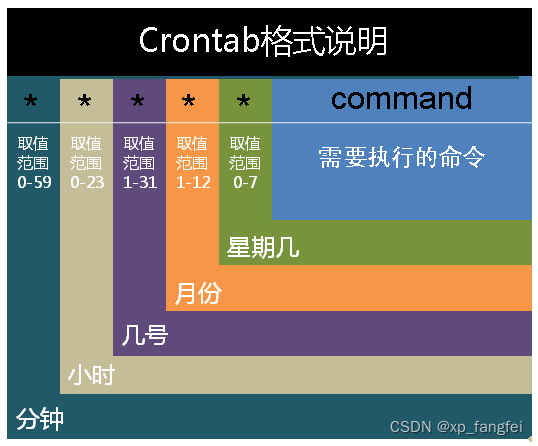
在以上各个字段中,还可以使用以下特殊字符:
- "* "代表所有的取值范围内的数字,如月份字段为*,则表示1到12个月;
- "/"代表每一定时间间隔的意思,如分钟字段为*/10,表示每10分钟执行1次。
- "-"代表从某个区间范围,是闭区间。如“2-5”表示“2,3,4,5”,小时字段中0-23/2表示在0~23点范围内每2个小时执行一次。
- ","分散的数字(不一定连续),如1,2,3,4,7,9。
注:由于各个地方每周第一天不一样,因此Sunday=0(第一天)或Sunday=7(最后1天)。
crontab 语法
crontab [ -u user ] file
或
crontab [ -u user ] {
     -l | -r | -e }
参数说明:
-u user 是指设定指定 user 的时程表,这个前提是你必须要有其权限(比如说是 root)才能够指定他人的时程表。如果不使用 -u user 的话,就是表示设定自己的时程表。
-e : 执行文字编辑器来设定时程表,内定的文字编辑器是 VI,如果你想用别的文字编辑器,则请先设定 VISUAL 环境变数来指定使用那个文字编辑器(比如说 setenv VISUAL joe)
-r : 删除目前的时程表
-l : 列出目前的时程表
实例1
//每一分钟执行一次 /bin/ls:
* * * * * /bin/ls

//在 12 月内, 每天的早上 6 点到 12 点,每隔 3 个小时 0 分钟执行一次 /usr/bin/backup:
0 6-12/3 * 12 * /usr/bin/backup

//周一到周五每天下午 5:00 寄一封信给 [email protected]:
0 17 * * 1-5 mail -s "hi" [email protected].name < /tmp/maildata
实际配置
以自己电脑为例:
crontab -e
结果:
# Edit this file to introduce tasks to be run by cron.
#
# Each task to run has to be defined through a single line
# indicating with different fields when the task will be run
# and what command to run for the task
#
# To define the time you can provide concrete values for
# minute (m), hour (h), day of month (dom), month (mon),
# and day of week (dow) or use '*' in these fields (for 'any').
#
# Notice that tasks will be started based on the cron's system
# daemon's notion of time and timezones.
#
# Output of the crontab jobs (including errors) is sent through
# email to the user the crontab file belongs to (unless redirected).
#
# For example, you can run a backup of all your user accounts
# at 5 a.m every week with:
# 0 5 * * 1 tar -zcf /var/backups/home.tgz /home/
#
# For more information see the manual pages of crontab(5) and cron(8)
#
# m h dom mon dow command
在文件最后写入自己想要执行的操作
54 21 * * * rm -r /home/ubuntu/log #每天晚上九点54删除日志
注意:第一次进行编辑的时候会选一下编辑器,根据自己的情况选择即可
实例2
1.删除文件命令:
find 对应目录 -mtime +天数 -name "文件名" -exec rm -rf {
    } \;
实例命令:
find /export/Logs/ -mtime +2 -name "*.log" -exec rm -rf {
    } \;
#将/export/Logs/目录下所有2天前带".log"的文件全部删除。
find /export/log/ -mtime +2 -name "*.20*.log" -exec rm -rf {
    } \;
#将/export/Logs/目录下所有2天前带*.20*.log的文件全部删除。
具体参数说明如下:
- find:linux的查找命令,用户查找指定条件的文件;
- /export/Logs/:想要进行清理的任意目录;
- -mtime:标准语句写法;
- +2:查找2天前的文件,这里用数字代表天数;
- “.log"、".20*.log”:希望查找的数据类型,".log"表示查找扩展名为log的所有文件,""表示查找所有文件,以此类推,灵活使用
- -exec:固定写法;
- rm -rf:强制删除文件,包括目录;
- {} \ ; :固定写法,一对大括号+空格+\ ;
边栏推荐
- quick-3.5 无法正常显示有混合纹理的csb文件
- SQLite 查询表中每天插入的数量
- jenkins +miniprogram-ci upload WeChat applet with one click
- For penetration testing methods where the output point is a timestamp (take Oracle database as an example)
- podspec自动化升级脚本
- 计算图像数据集均值和方差
- Gradle sync failed: Uninitialized object exists on backward branch 142
- How MySQL - depots table?A look at will understand
- 360 加固 file path not exists.
- 我的训练函数模板(动态修改学习率、参数初始化、优化器选择)
猜你喜欢





随机推荐
cocoscreator 显示刘海内容
Sqlite column A data is copied to column B
js中的this指向与原型对象
使用 OpenCV 提取图像的 HOG、SURF 及 LBP 特征 (含代码)
Android software security and reverse analysis reading notes
js中的对象与函数的理解
The feign call fails, JSON parse error Illegal character ((CTRL-CHAR, code 31)) only regular white space (r
ERROR Error: No module factory availabl at Object.PROJECT_CONFIG_JSON_NOT_VALID_OR_NOT_EXIST ‘Error
自定dialog 布局没有居中解决方案
360 加固 file path not exists.
Flutter mixed development module dependencies
VS通过ODBC连接MYSQL(二)
js中的break与continue退出
Pytorch常用函数
flutter 混合开发 module 依赖
Sqlite A列数据复制到B列
Numpy常用函数
计算图像数据集均值和方差
用pytorch里的children方法自定义网络
变分自编码器VAE实现MNIST数据集生成by Pytorch