当前位置:网站首页>DOM操作---放大镜案例
DOM操作---放大镜案例
2022-08-02 03:22:00 【cjx177187】
在box盒子中设置图片为背景,在盒子中设置一个move小盒子;给move盒子绑定移动事件,使其随着鼠标运动;设置一个盒子max与move盒子成比例放大作为放大后显示的窗口,在max盒子中添加一个图片,给图片设置成与box盒子背景图成比例放大的宽高;将图片在max盒子中超出部分隐藏;每次移动mova盒子时,修改max盒子中的img的top和left使其与move盒子移动成倍的距离
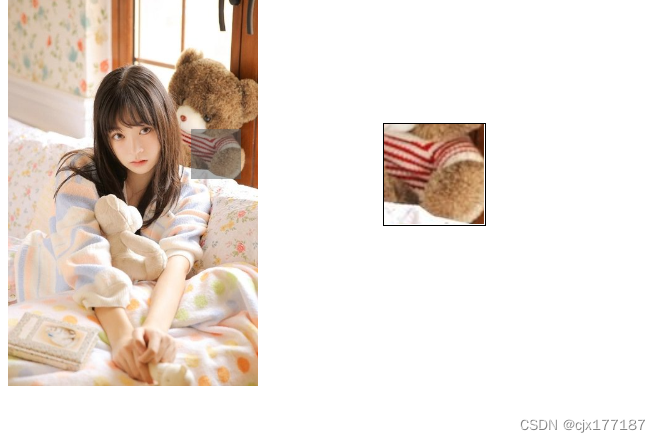
注意:
- 每个盒子成比例缩放,
- 每个盒子都要固定定位,不然top和left不能生效。
- 再放大显示时,窗口时动不了的,这时就只能移动图片,使其往move盒子移动的反方向运动。
<style>
.a{
display: flex;
justify-content: flex-start;
}
.box{
width: 200px;
height: 310px;
background-image: url("https://p0.ssl.qhimgs1.com/sdr/400__/t01043eec7c54708f40.jpg");
background-size: 100%;
position: relative;
}
.move{
width: 40px;
height: 40px;
background-color:rgb(89, 93, 93,0.5);
position: absolute;
display: none;
}
.show{
width: 120px;
height: 120px;
position:relative;
display: none;
overflow: hidden;
margin: 100px;
border: 1px solid black;
}
img{
width: 400px;
height: 620px;
position: absolute;
}
</style>
<div class="a">
<div class="box">
<div class="move"></div>
</div>
<div class="max">
<div class="show">
<img src="https://p0.ssl.qhimgs1.com/sdr/400__/t01043eec7c54708f40.jpg" alt="">
</div>
</div>
</div>
<script>
var box=document.querySelector(".box")
var move=document.querySelector(".move")
var show=document.querySelector(".show")
var img=document.querySelector("img")
box.addEventListener("mouseover",function(el){
move.style.display="block"
show.style.display="block"
})
box.addEventListener("mouseout",function(){
show.style.display="none"
move.style.display="none"
})
box.addEventListener("mousemove",function(el){
//在小图片上使move小盒子随鼠标移动
move.style.top=el.clientY-20+"px"
move.style.left=el.clientX-20+"px"
//窗口动不了,将图片移动
img.style.top=-(el.clientY-20)*2+"px"
img.style.left=-(el.clientX-20)*2+"px"
})
</script>
边栏推荐
猜你喜欢
yolov5调用ip摄像头时出现的问题

Redis simple study notes
oracle内连接和外连接
每天填坑,精卫填坑第二集,TX1 配置从固态启动,安装Pytorch

【深度学习】从LeNet-5识别手写数字入门深度学习

DSPE-PEG-Silane,DSPE-PEG-SIL,磷脂-聚乙二醇-硅烷修饰活性基团

ThunderBirde无法登录问题、pycharm调试一直收集数据、RuntimeError: CUDA error: device-side assert triggered等疑难杂症解决

新工程加载YOLOV6的预训练权重问题

@Autowired与@Resource区别

PCL—点云数据分割
随机推荐
Chemical reagent Phospholipid-polyethylene glycol-hydroxyl, DSPE-PEG-OH, DSPE-PEG-Hydroxyl, MW: 5000
Basic usage of Monaco Editor
Phospholipid-polyethylene glycol-hydrazide, DSPE-PEG-Hydrazide, DSPE-PEG-HZ, MW: 5000
The @autowired distinguished from @ the Resource
一个结构体 = 另一个结构体(同类型结构体之间可直接赋值操作)
UserWarning:火炬。meshgrid:在以后的版本中,它将被要求通过索引ing argu
DSPE-PEG-PDP, DSPE-PEG-OPSS, phospholipid-polyethylene glycol-mercaptopyridine supply, MW: 5000
MySQL中JOIN的用法
getattr() function analysis
「PHP基础知识」PHP中对象的使用
我的两周年创作纪念日
SSM整合
通过PS 2021 将网页图标抠下来
MySQL分页查询的5种方法
[Mianjing] Mihayou data development on one side and two sides
Deveco studio Hongmeng app access network detailed process (js)
MySQL删除表数据 MySQL清空表命令 3种方法
分布式领域最重要的一篇论文,到底讲了什么?
磷脂-聚乙二醇-叠氮,DSPE-PEG-Azide,DSPE-PEG-N3,MW:5000
AttributeError: Can't get attribute 'SPPF' on