当前位置:网站首页>TD conducts functional simulation with Modelsim
TD conducts functional simulation with Modelsim
2022-07-02 09:38:00 【Quikk】
TD union Modelsim Functional simulation
1 introduction
Recently, I have been in contact with and used domestic Anlu technology company FPGA Carry out relevant development ,TD(Tang Dynasty) As an Anlu FPGA Development tools and Quartus The use is roughly the same , But there are still some differences .
2 Basic configuration process
It is recommended to practice with the official user manual as a reference , First of all, it needs to be done TD Internal operation of software .
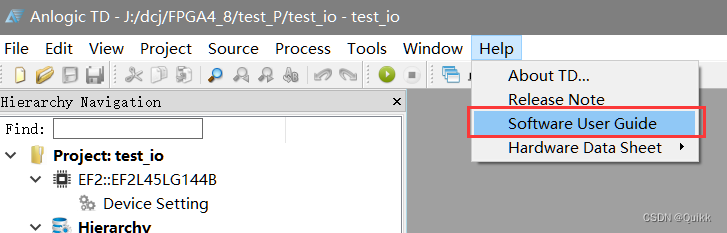
2.1 TD Software setting operation
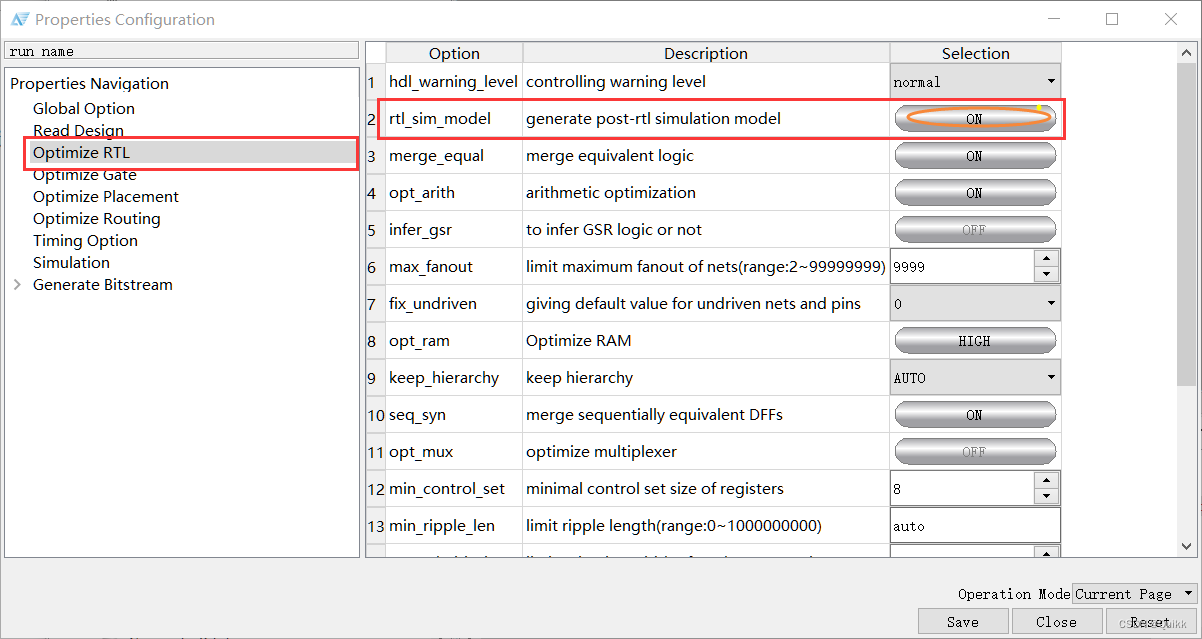
1. Process ⇒ \Rightarrow ⇒ Properties ⇒ \Rightarrow ⇒ Optimize RTL :
rtl_sim_model :ON
2. Process ⇒ \Rightarrow ⇒ Properties ⇒ \Rightarrow ⇒ Optimize Gate :
gate_sim_model :ON

3. Process ⇒ \Rightarrow ⇒ Properties ⇒ \Rightarrow ⇒ Optimize Routing :
phy_sim_model :ON

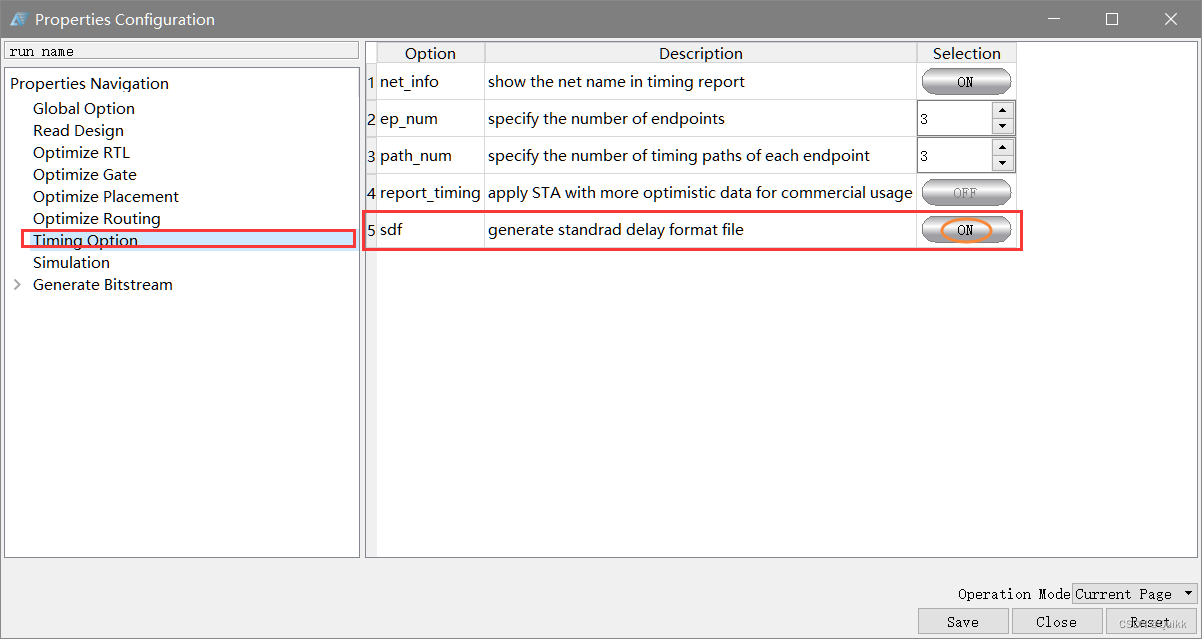
4. Process ⇒ \Rightarrow ⇒ Properties ⇒ \Rightarrow ⇒ Timing Option :
sdf :ON
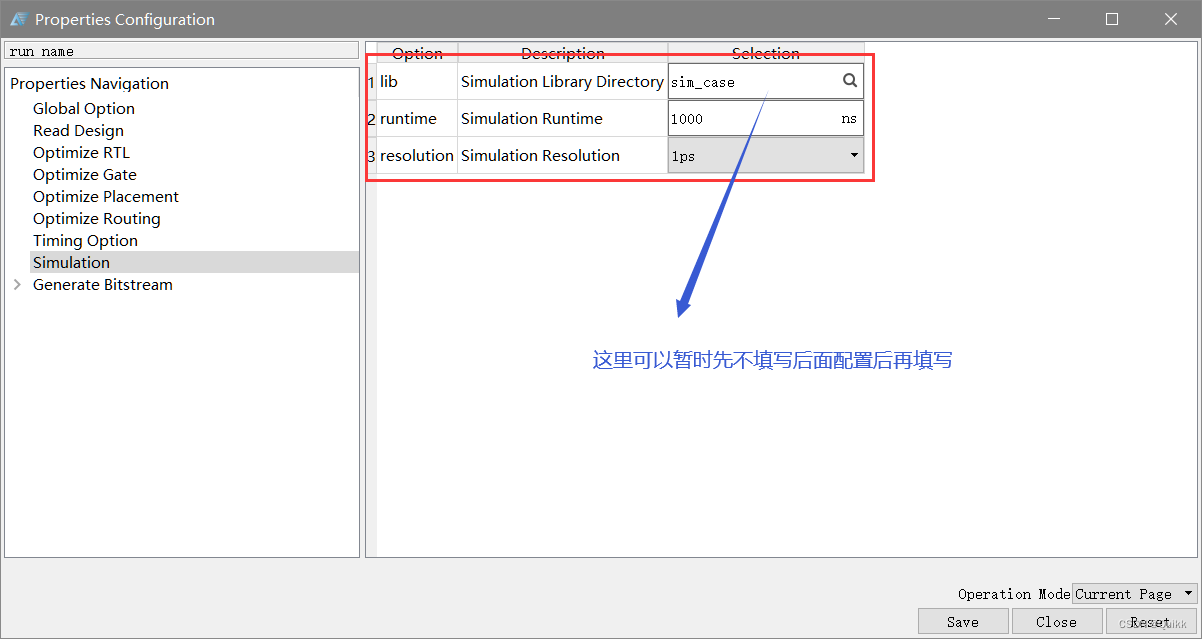
5. Set relevant simulation parameters
6. function Simulation

7. Select the relevant test file (testbench file )
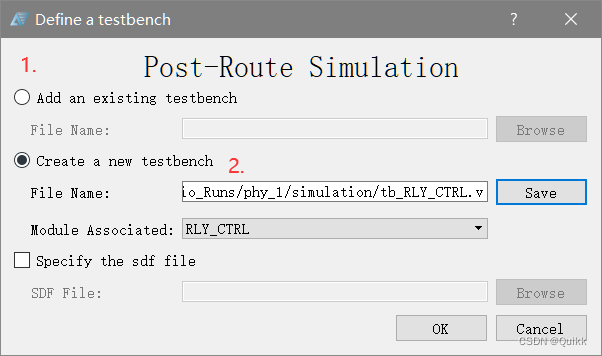
There are two ways , The first is to add existing tb File to test ; The second is to create a new test file .
8. After completing the above steps, two files will be generated :①testbench file ② Script files do file .
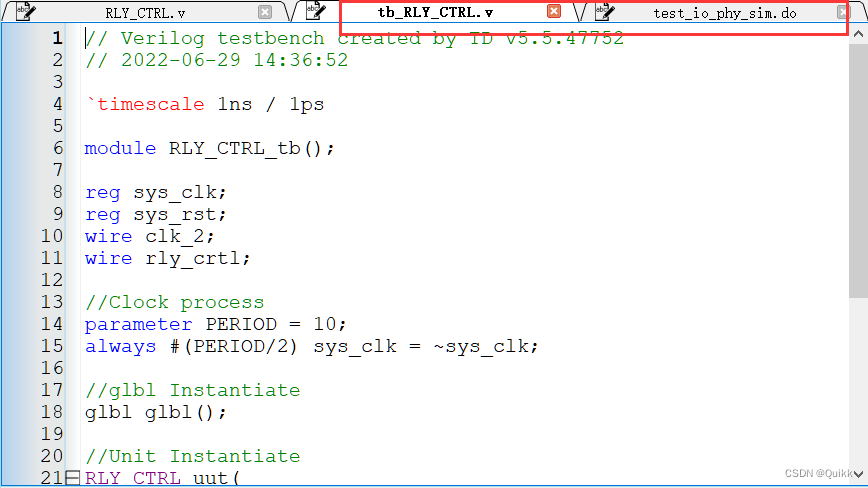
After these steps ,TD The setting of the software has been completed , Now we need to finish Modelsim Software settings .
2.2 Modelsim Software settings
First of all to enter TD The installation directory , There is a folder under the change directory as sim_release The file of , Under the folder are some simulation files of corresponding chips , Because the chip used here is EF2L45LG144B. So just copy EF2 Related files in the folder .( Here, you must pay attention to selecting the copied folder according to the chip type )
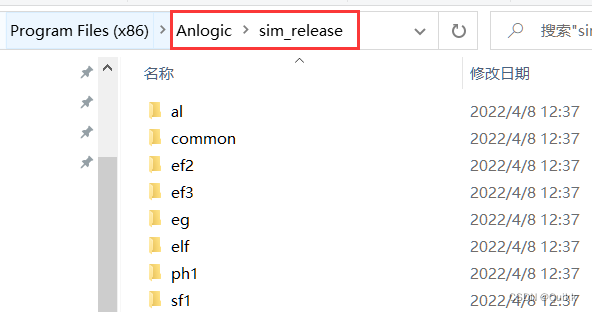
stay Modelsim Create a new folder under the installation root directory (Anlogic), Just copy the EF2 Copy the folder into the new Anlogic >> src In the folder . here src A large number of simulation files of the chip are stored in the folder .

- open Modelsim,File ⇒ \Rightarrow ⇒ Change Directory ⇒ \Rightarrow ⇒ Modify the current directory to the newly created Modelsim In the root directory Anlogic Folder .

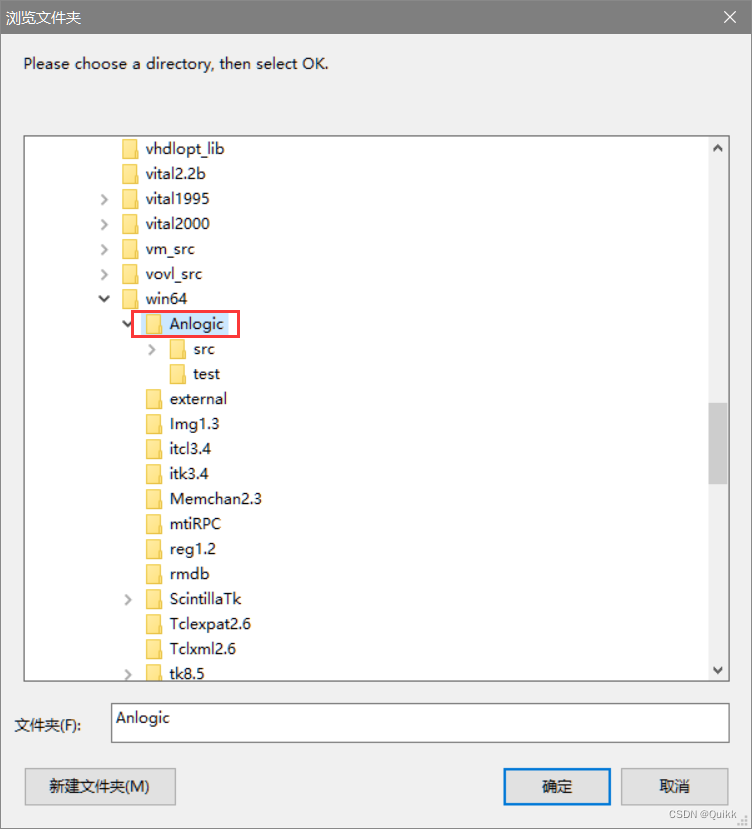
File ⇒ \Rightarrow ⇒ New ⇒ \Rightarrow ⇒ Library ⇒ \Rightarrow ⇒ New road safety simulation library . The library name is set to EF2_ver.
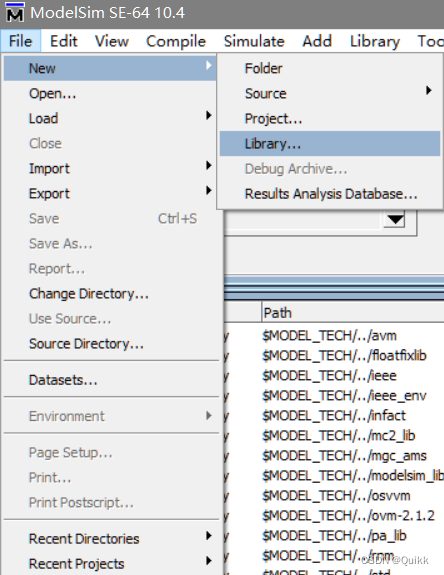
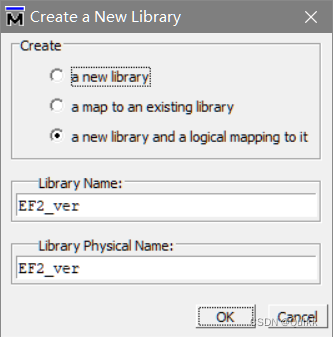
5.Compile ⇒ \Rightarrow ⇒ Compile ⇒ \Rightarrow ⇒ Compile new library
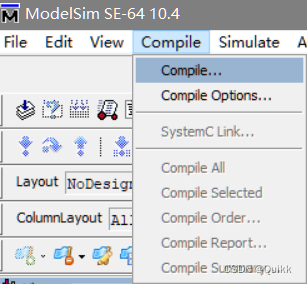

6. go back to TD Software , Set up Lib, Re engage Simulation.

take TD Under the project directory tb Documents and original Verilog Copy the file to modelsim root directory Anlogic New folder under folder , As an engineering document .

8. stay Modelsim Create a new project file in


9. Add test files for the project
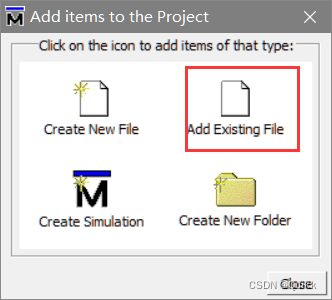
10. Add the file and compile , Be sure to correct tb The amplitude and modification of the initial value in the file . I.e. modification initial The definition part of the statement .
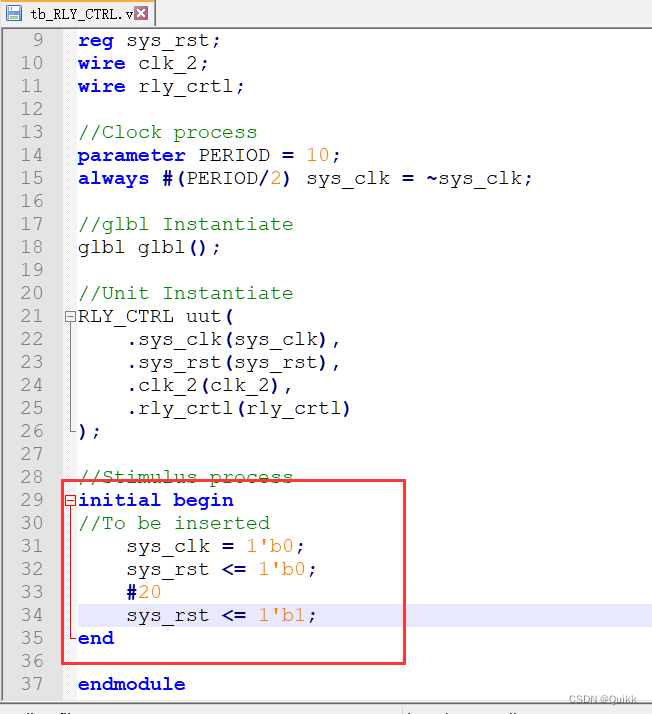

11. Start the simulation , Set up the simulation file , Add simulation library

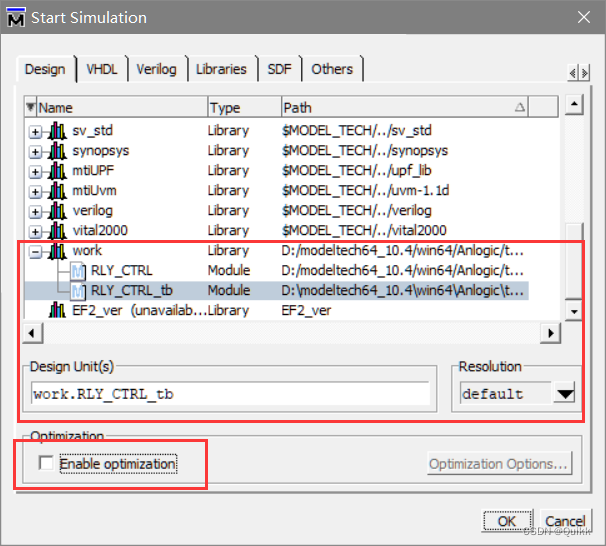
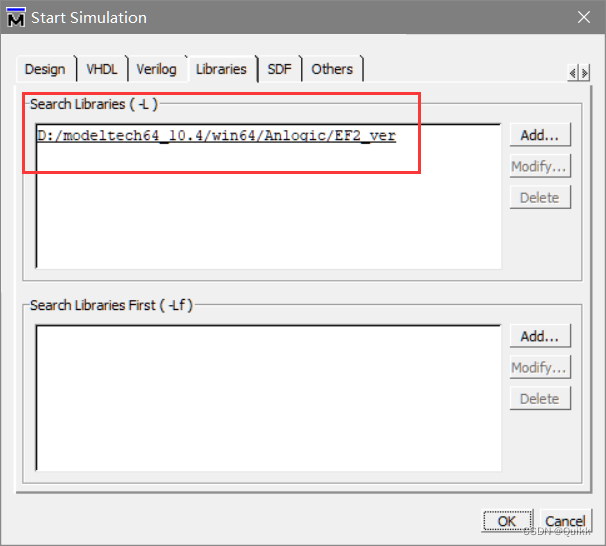
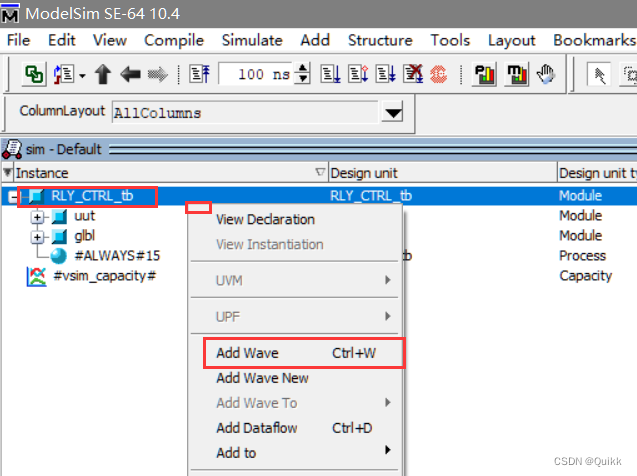
12. Simulation results

边栏推荐
- Mysql 多列IN操作
- FragmentTabHost实现房贷计算器界面
- Micro service practice | introduction and practice of zuul, a micro service gateway
- Read Day6 30 minutes before going to bed every day_ Day6_ Date_ Calendar_ LocalDate_ TimeStamp_ LocalTime
- Mysql默认事务隔离级别及行锁
- Who is better for Beijing software development? How to find someone to develop system software
- kinect dk 获取CV::Mat格式的彩色RGB图像(openpose中使用)
- How to choose between efficiency and correctness of these three implementation methods of distributed locks?
- Amq6126 problem solving ideas
- A detailed explanation takes you to reproduce the statistical learning method again -- Chapter 2, perceptron model
猜你喜欢

ZK configuration center -- configuration and use of config Toolkit

Chrome浏览器插件-Fatkun安装和介绍

How to use PHP spoole to implement millisecond scheduled tasks

A detailed explanation takes you to reproduce the statistical learning method again -- Chapter 2, perceptron model

企业级SaaS CRM实现

MySQL事务

Chrome video download Plug-in – video downloader for Chrome

每天睡前30分钟阅读Day6_Day6_Date_Calendar_LocalDate_TimeStamp_LocalTime
TD联合Modelsim进行功能仿真
YOLO物体识别,生成数据用到的工具
随机推荐
Typeerror: X () got multiple values for argument 'y‘
Read Day5 30 minutes before going to bed every day_ All key values in the map, how to obtain all value values
Micro service practice | introduction and practice of zuul, a micro service gateway
MySQL error: unblock with mysqladmin flush hosts
Long summary (code with comments) number structure (C language) -- Chapter 4, string (Part 1)
What are the differences between TP5 and laravel
FragmentTabHost实现房贷计算器界面
Learn combinelatest through a practical example
VIM操作命令大全
Microservice practice | declarative service invocation openfeign practice
[go practical basis] how to customize and use a middleware in gin
每天睡前30分钟阅读Day6_Day6_Date_Calendar_LocalDate_TimeStamp_LocalTime
Operation and application of stack and queue
企业级SaaS CRM实现
Methods of classfile
College Students' CET-4 and CET-6 composition template (self created version, successfully crossed CET-6)
Chrome video download Plug-in – video downloader for Chrome
Hystrix implements request consolidation
一次聊天勾起的回忆
微服务实战|负载均衡组件及源码分析