当前位置:网站首页>How to use pyqt5 to make a sensitive word detection tool
How to use pyqt5 to make a sensitive word detection tool
2022-07-02 09:26:00 【Yisu cloud】
How to use PyQT5 Make a sensitive word detection tool
Xiaobian will share with you how to use PyQT5 Make a sensitive word detection tool , I hope you will gain something after reading this article , Let's discuss it together !
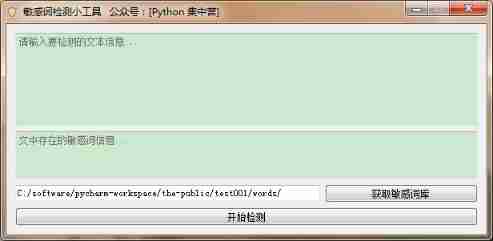
Design thinking : Filter according to sensitive thesaurus files , Check whether the entered text contains sensitive words . So as to filter out relevant sensitive words .
Import application related modules .
import os
import logging
import sys
Import UI Interface related modules .
from PyQt5.QtWidgets import QApplication,QWidget,QVBoxLayout,QTextEdit,QGridLayout,QLineEdit,QPushButton,QFileDialog
from PyQt5.QtGui import QIcon

import resource
This one's inside resource modular , It's using python Generated .py Resource files in the form of . Importing this file directly into the module can prevent the problem that the resource file cannot be packaged when packaging . Show me some of the resource.py Code block of the file .
from PyQt5 import QtCore

qt_resource_data = b"\
\x00\x00\x2b\x03\
\x00\
\x01\x6a\xb6\x78\x9c\xed\x5d\x0b\x40\x54\xc5\xfa\x1f\x5c\x95\xf5\
\x11\x58\xdd\xb2\x52\xc1\x7c\x84\xa9\xa9\xa5\x29\xec\x6a\x58\x9a\
\xf6\xbc\x69\xb7\x6b\x5d\x2b\xb1\xb2\xb4\x7c\x01\x65\xa1\xc0\xee\
\xaa\x25\x18\xa4\x66\x6a\xf6\x34\x7a\x78\xcd\x5b\xa6\x66\xb9\x66\
\x25\xff\x44\x01\x33\x5f\xf8\xcc\x47\xf8\x7e\xc1\xee\x22\xa0\x28\
\xb0\xf3\xff\xcd\x39\x67\xe1\xec\x39\x67\x97\x05\x76\x17\xb0\xf3\
\xd3\x8f\xd9\x39\x67\xce\xcc\x37\xdf\x37\xdf\xbc\xce\x9c\x19\x42\
\x02\x48\x73\xd2\xab\x57\x2b\xb8\x8d\xc9\xb8\xa6\x84\x2c\x25\x84\
\xb4\x6f\xcf\xfb\xcf\x34\x22\x24\x28\x90\x90\x56\xad\x78\x7f\x97\
Next is UI Part of the interface , This time directly use UI The slot function of the main thread of the interface is used to complete the processing of business logic , No separate QThread Sub threads of .
    def init_ui(self):
        ''' Initialize log manager '''
        self.logger = logging.getLogger(" Sensitive word detection tool ")
        self.logger.setLevel(logging.DEBUG)

        self.setFixedWidth(600)
        self.setWindowIcon(QIcon(':sens.ico'))
        self.setWindowTitle(' Sensitive word detection gadget     official account :[Python  concentration camp ]')

        vbox = QVBoxLayout()

        self.text_ = QTextEdit()
        self.text_.setPlaceholderText(' Please enter the text information to be detected ...')
        self.text_.setMaximumHeight(120)

        self.text_lis = QTextEdit()
        self.text_lis.setPlaceholderText(' The sensitive word information in the text ...')
        self.text_lis.setReadOnly(True)
        self.text_lis.setMaximumHeight(60)

        grid = QGridLayout()
        self.dir_sens = QLineEdit()
        self.dir_sens.setPlaceholderText(' Sensitive thesaurus path ')
        self.dir_sens.setReadOnly(True)

        self.dir_btn = QPushButton()
        self.dir_btn.setText(' Get sensitive Thesaurus ')
        self.dir_btn.clicked.connect(self.dir_btn_click)

        grid.addWidget(self.dir_sens, 0, 0, 1, 2)
        grid.addWidget(self.dir_btn, 0, 2, 1, 1)

        self.lis_btn = QPushButton()
        self.lis_btn.setText(' Start detection ')
        self.lis_btn.clicked.connect(self.search_sens)

        vbox.addWidget(self.text_)
        vbox.addWidget(self.text_lis)
        vbox.addLayout(grid)
        vbox.addWidget(self.lis_btn)

        self.setLayout(vbox)
The rest are the four slot function parts , The main implementation is to load all sensitive words in the sensitive word file . Finally, compare the sensitive words with the input file .
    def dir_btn_click(self):
        '''
         Select the folder
        :return:
        '''
        directory = QFileDialog.getExistingDirectory(self, " Select a folder ", self.cwd)
        self.dir_sens.setText(directory + '/')

    def get_sens_files(self):
        '''
         Get sensitive word file
        :return:
        '''
        file_paths = []
        self.logger.info(" Start batch file path processing ")
        list = os.listdir(self.dir_sens.text())
        for i in range(0, len(list)):
            path = os.path.join(self.dir_sens.text(), list[i])
            if os.path.isfile(path):
                file_paths.append(path)
        self.logger.info(" Complete batch file path processing ")
        return file_paths

    def load_sens(self):
        '''
         Load sensitive words
        :return:
        '''
        paths = self.get_sens_files()
        sens = []
        self.logger.info(" Start loading sensitive words ")
        for path in paths:
            self.logger.info(" The currently loaded file path is :" + path)
            with open(path, "rb") as file:
                data = file.readlines()
                datac = []
                for string in data:
                    try:
                        datac.append(string.decode('utf8').replace('\n', '').replace('\r', ''))
                    except:
                        self.logger.error(" file :[" + path + "] Decoding exception ")
                sens = sens + datac
            sens = sens + datac
        self.logger.info(" Finish loading sensitive words ")
        return sens

    def search_sens(self):
        '''
         Search for sensitive words
        :return:
        '''
        text_lis = ""
        sens = self.load_sens()
        text = self.text_.toPlainText()
        for se in sens:
            if se in text and se not in text_lis:
                text_lis = text_lis + se
        self.logger.info(" Contains sensitive words :" + text_lis)
        self.text_lis.setText(text_lis)
Last , Use it directly main() Function to start the entire application .
if __name__ == '__main__':
    app = QApplication(sys.argv)
    main = SensListen()
    main.show()
    sys.exit(app.exec_())
The above is the complete implementation process , Small partners who need to copy all the code directly into their own development tools to start main() Function is OK !
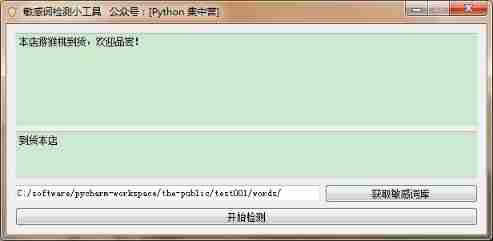
Input sensitive words and detect them directly on the interface , The detected sensitive words will be displayed in the following text box .
After reading this article , Believe that you are “ How to use PyQT5 Make a sensitive word detection tool ” With a certain understanding , If you want to know more about it , Welcome to the Yisu cloud industry information channel , Thank you for reading !
边栏推荐
- 破茧|一文说透什么是真正的云原生
- Dix ans d'expérience dans le développement de programmeurs vous disent quelles compétences de base vous manquez encore?
- Watermelon book -- Chapter 5 neural network
- [go practical basis] how can gin get the request parameters of get and post
- Redis zadd导致的一次线上问题排查和处理
- Jingdong senior engineer has developed for ten years and compiled "core technology of 100 million traffic website architecture"
- win10使用docker拉取redis镜像报错read-only file system: unknown
- Chrome视频下载插件–Video Downloader for Chrome
- Matplotlib剑客行——布局指南与多图实现(更新)
- 远程连接IBM MQ报错AMQ4036解决方法
猜你喜欢

自定义Redis连接池

Knowledge points are very detailed (code is annotated) number structure (C language) -- Chapter 3, stack and queue

Shengshihaotong and Guoao (Shenzhen) new energy Co., Ltd. build the charging pile industry chain
"Redis source code series" learning and thinking about source code reading
Microservice practice | teach you to develop load balancing components hand in hand

一篇详解带你再次重现《统计学习方法》——第二章、感知机模型

There is a problem with MySQL installation (the service already exists)

Chrome user script manager tempermonkey monkey
![[go practical basis] how to customize and use a middleware in gin](/img/fb/c0a4453b5d3fda845c207c0cb928ae.png)
[go practical basis] how to customize and use a middleware in gin
微服务实战|微服务网关Zuul入门与实战
随机推荐
微服务实战|手把手教你开发负载均衡组件
双非本科生进大厂,而我还在底层默默地爬树(上)
Taking the upgrade of ByteDance internal data catalog architecture as an example, talk about the performance optimization of business system
知识点很细(代码有注释)数构(C语言)——第三章、栈和队列
Flink-使用流批一体API统计单词数量
[staff] time sign and note duration (full note | half note | quarter note | eighth note | sixteenth note | thirty second note)
C4D quick start tutorial - C4d mapping
[go practical basis] gin efficient artifact, how to bind parameters to structures
Matplotlib swordsman line - first acquaintance with Matplotlib
Microservice practice | load balancing component and source code analysis
京东高级工程师开发十年,编写出:“亿级流量网站架构核心技术”
Insight into cloud native | microservices and microservice architecture
Actual combat of microservices | discovery and invocation of original ecosystem implementation services
微服务实战|熔断器Hystrix初体验
The channel cannot be viewed when the queue manager is running
【Go实战基础】gin 如何获取 GET 和 POST 的请求参数
Microservice practice | teach you to develop load balancing components hand in hand
查看was发布的应用程序的端口
告别996,IDEA中必装插件有哪些?
Oracle modify database character set