当前位置:网站首页>DOM operation -- operation node
DOM operation -- operation node
2022-07-26 05:26:00 【H5_ ljy】
List of articles
1. Chuangjie dom Elements
Use document.createElement() Method to create an element node
2. Add a node
1.appendChild (); Append the contents of the current element ( Related to the operation process )
2.insertBefore(); Append the element before the old element .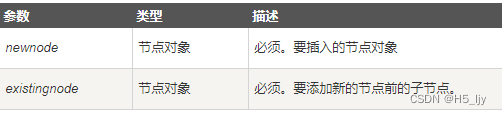
<body>
    <div id="div1">
        <div id="div2"></div>
    </div>
    <script>
        var div1 = document.getElementById('div1')
        var span = document.createElement('span')
        var div2 = document.getElementById('div2')
        div1.insertBefore(span,div2)
    </script>
</body>

Use insertBefore() Method to change the order of nodes
<body>
<ul id="myList"><li>1</li><li>2</li><li>3</li><li>4</li></ul>
<p id="demo"> Click this button to change the order of the list items </p>
<button onclick="fn()"> Am I </button>
<script>
function fn(){
    var list=document.getElementById("myList");
    var node=list.getElementsByTagName("li");
    list.insertBefore(node[3],node[0]);
}
</script>
</body>

3.inserAfter(); Append the element to the old element , The official did not provide this method ;
We encapsulate one by ourselves .
<body>
    <div id="div1">
        <div id="div2"></div>
    </div>
    <script>
        Object.prototype.insertAfter = function (newnode, existingnode) {
            if (this.lastChild == existingnode) {
                this.appendChild(newnode);
            } else {
                this.insertBefore(newnode, existingnode.nextSilbing);
            }
        }
        var span = document.createElement('span')
        var div1 = document.getElementById('div1')
        var div2 = document.getElementById('div2')
        div1.insertAfter(span, div2)

3. Delete node
1. removeChild() Delete child elements
				var box=document.querySelector("#box")
				box.parentElement.removeChild(box)
2. remove() Delete yourself
                var box=document.getElementById("box");
                box.remove();
4. Replication node ( Clone node )
The format is as follows :
Nodes to replicate .cloneNode(); // There are no parameters and parameters in brackets false, The effect is the same .
Nodes to replicate .cloneNode(true);
With or without parameters in parentheses , The effect is different . Explain the following :
With no arguments / With parameters false: Just copy the node itself , Do not copy child nodes .
With parameters true: Copy the node itself , Also copy all of its children .
5. Set the properties of a node
1. Get the attribute value of the node
The way 1:
Element nodes . attribute ;
Element nodes [‘ Property name ’];
The way 2:
Element nodes .getAttribute(“ The attribute name ”);
<body>
<img src="../imgs/touxiang.webp.jpg" alt=" Image load failed " title="touxiang" id="img1" class="img_1">
<script>
let img=document.querySelector('.img_1')
console.log(img.src,img['src'])
console.log(img.alt,img['alt'])
console.log(img.title,img['title'])
console.log(img.id,img['id'])
console.log(img.className,img['className'])
console.log(img.getAttribute('src'))
</script>
</body>

2、 Set the attribute value of the node
The way 1:
Element nodes . attribute =‘ Modified value ’;
Element nodes [‘ Property name ’]=‘ Modified value ’;
The way 2:
Element nodes .setAttribute( Property name , New attribute value );
<body>
<img src="../imgs/touxiang.webp.jpg" alt=" Image load failed " title="touxiang" id="img1" class="img_1">
<script>
let img=document.querySelector('.img_1')
img.title='mao'
img.className='img_2'              // modify class Name use className
img.setAttribute('id','img2')
console.log(img.title)
console.log(img.className)
console.log(img.id)
</script>
</body>

class Methods of adding and deleting multiple class names :
Mode one :
Element nodes .className=‘ Class name 1 Class name 2’
Element nodes [‘className’]=‘ Class name 1 Class name 2’
Element nodes .className= Element nodes .className+‘ Space class name 2’
Mode two :
Element nodes .classList.add(“ Class name to add ”)
<body>
<img src="../imgs/touxiang.webp.jpg" alt=" Image load failed " title="touxiang" id="img1" class="img_1">
<script>
let img=document.querySelector('.img_1')
img.className='img_1 img_2'
img.className=img.className+' img_3'
img.classList.add("img_4")
img.classList.add("img_4")  // Repeat without adding
</script>
</body>

6. Modify the text content of the node
Method 1 :
Element nodes .innerHTML=“<strong> Content <strong>” It will be bold
innerHTML Recognize labels
Method 2 :
Element nodes .innerText=“<strong> Content <strong>” Display the inside quotation marks as a string
innerText You can only parse text and remove spaces and newlines
Summary : Both methods will replace the original content with sub tags , If you don't want to replace the original content, you can :
Element nodes .innerHTML+=“<strong> Content <strong>”
Element nodes .innerText+=“<strong> Content <strong>”
<body>
<div><span>ljy</span></div>
<script>
var div=document.querySelector('div')
div.innerHTML='<strong> Content <strong>'
div.innerText+='<strong> Content <strong>'
</script>
</body>

7. Modify node CSS attribute
Method 1 :
Elements .style. Style name = Style value
Be careful : adopt style Property setting and reading are inline styles , Unable to read styles in style sheet
If CSS The style name of contains -,
This name is used in JS It is illegal in, for example background-color
This style name needs to be changed to hump naming method ,
Get rid of -, And then - The last letter is capitalized
<style>
    div{
        width: 200px;
        height: 200px;
        background-color: aqua;
    }
</style>
<body>
<div><span>ljy</span></div>
<script>
var div=document.querySelector('div')
console.log(div.style.width,div.style.backgroundColor) // Print empty , Cannot get the style in the style sheet
console.log(div)

Method 2 :
adopt js Read css attribute ( Inline style )
Gets the current display style of the element :
grammar : Elements .currentStyle. Style name
It can be used to read the style that the current element is displaying
If the current element is not set to this style , Then get its default value
currentStyle Only IE Browser support , Other browsers don't support
Available in other browsers
getComputedStyle() This method gets the current style of the element
The method is window Methods , You can use it directly
Two parameters are required
first : The element to get the style
the second : You can pass a pseudo element , It's usually spread null
This method will return an object , Object encapsulates the style corresponding to the current element
Through the object . Style name to read the style
If the obtained style is not set , You will get the real value , Not the default
such as : No settings width, It won't get auto, It's a length
However, this method does not support IE8 And the following browsers
<style>
    div{
        width: 200px;
        height: 200px;
        background-color: aqua;
    }

</style>
<body>
<div><span>ljy</span></div>
<script>
var div=document.querySelector('div')
let divStyle=getComputedStyle(div)
console.log(divStyle.width,divStyle.height,divStyle.backgroundColor)
</script>
</body>

边栏推荐
猜你喜欢

开发项目事半功倍,一款开源的stm32驱动库大集合

攻防世界--easy_web
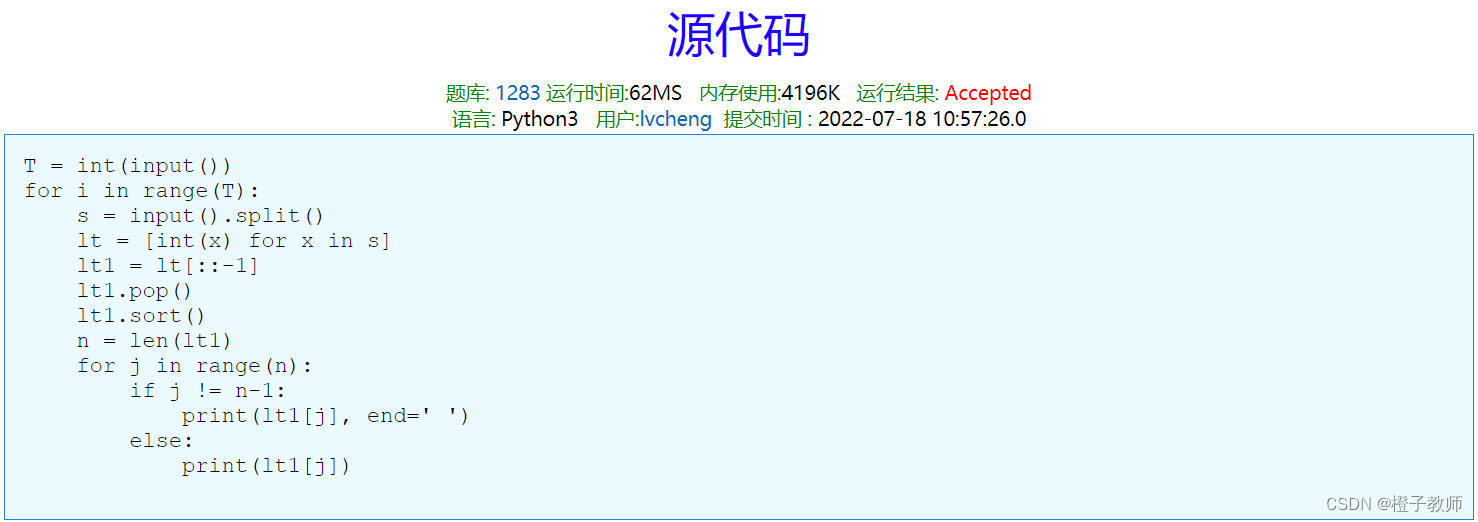
TZC 1283: simple sorting - function method

517. Super washing machine

Knowledge points of Polymer Physics

Application of remote sensing, GIS and GPS technology in hydrology, meteorology, disasters, ecology, environment and health

FPGA question brushing sequence detection

OD-Paper【2】:Fast R-CNN

Improve reduce parallelism in shuffle operation

TZC 1283: simple sort - select sort
随机推荐
Use flutter to adjust a color filter for the picture of my little sister
MongoDB 常用命令
使用Ansible中的playbook
CLM land surface process model
电机控制专栏文章汇总
ABAP grammar learning (ALV)
Attack and defense world flatscience
Mongondb API usage
STL common template library
MySQL master-slave synchronization and master-slave synchronization delay solution
SIP账号注册的SIP软电话的使用和常见问题
Recommended reading: how can testers get familiar with new businesses quickly?
芯片的翻新和造假,人被坑麻了
TZC 1283: simple sort - Comparative sort
YOLOV3预备工作
C语言-指针进阶
SQL injection
Use playbook in ansible
517. 超级洗衣机
Shell process control (emphasis), if judgment, case statement, let usage, for ((initial value; loop control condition; variable change)) and for variable in value 1 value 2 value 3..., while loop