当前位置:网站首页>Introduction to R language
Introduction to R language
2022-07-01 08:33:00 【桜キャンドルル】
Catalog
2. Use seq(from,to,by) Generating vectors
3.rep(x,...) Generate repetition vectors that meet the conditions
4. Generation of logical vectors
One 、 Scalar
stay R Assignment in language adopts <- perhaps =
| a<-4 | Numeric type scalar |
| b<-"hello" | String type scalar |
| c<-"t" | Character type scalar |
| f<-TRUE | Boolean scalar |
Test data type
| is.numeric(a) | Judge a Is it a numeric object |
| is.character(a) | Judge a Is it a character object |
Cast
| s<-as.character(a) | take a Convert to string type and assign to s,a The type of itself remains unchanged |
| a<-as.character(a) | take a Convert to string type and assign to a,a Its own type becomes a character variable |
Two 、 vector
Vectors use <-c To assign a value , among , The separator for each element of the vector is “,”
| num<-c(9,2,-3,5,6,7,8,9) | Numerical vectors |
| ord<-c("a","wdw","23") | Character vector |
| logv1<-c(T,T,T,TF,F,F) | Logical vector |
| logv2<-c(True,TRUE,FALSE) | Logical vector |
1. Generate regular vectors
Use it directly a:b In the form of , Generated from a To b Sequence of numbers , If a>b One by one +1, Otherwise, one by one -1
From our code below, we can see that our colon has a higher priority than × and - high

2. Use seq(from,to,by) Generating vectors
The first parameter is the starting value , The second parameter is the termination value , The third number is the step size

Of course, we can also directly set the length of the entire vector to generate our vector

3.rep(x,...) Generate repetition vectors that meet the conditions
rep(1,times=10)
x <- c(1,2,3,4)
rep(x,times=3)
rep(x,length.out=10)
rep(x,each=2)
rep(x,times=c(1,2,2,3))
rep("abc",5)
y <- c("a","b","c")
rep(y,2)
rep(y,length.out=10)
rep(y,times=c(1,2,3))
4. Generation of logical vectors
z <- c(8,3,5,7,6,2,8,9)
n <- z > 5
# Judge z Are all elements in greater than 5
all(z>5)
# Judge z Is there any element greater than 5
any(z>5)
# We can see from the following results , our R The following table of language arrays is from 1 At the beginning
z[2]
z[1:4]
z[c(2,5,7)]
#-3 Indicates that the third element is not taken
z[-3]
# The second element and the fourth element do not take
z[c(-2,-4)]
# The same effect as the previous code , Both the second element and the fourth element do not take
z[-c(2,4)]

3、 ... and 、 matrix
① A matrix is a two-dimensional array
② The elements in the matrix must be of the same type
③ Generating a matrix requires a function matrix() Realization
mymatrix <- matrix(vector,nrow = number_of_rows,
ncol = number_of_columns,
byrow = logical_value,dimnames = list(char_vector_rownames, char_vector_colnames))
From the following run results , We'll find out about us R The matrix in the language is placed in the form of columns by default .
A <- matrix(1:20,nrow=5) 
Of course, our matrix can also be generated by the following method
values <- c(1,2,3,4)
# Create row index vector
rnames <- c("r1","r2")
# Create column index vector
cnames <- c("c1","c2")
# Specify our matrix , Take our values respectively , The number of rows is passed in ,
#byrow The default is FALSE, It means to place by column
# If TRUE It is placed according to rows
#dimnames You can specify the names of our columns and rows
C <- matrix(values,nrow=2,byrow=T,
            dimnames=list(rnames,cnames))
C 
# If we were to byrow The parameter of is adjusted to F Will become the following form
D <- matrix(values,nrow=2,byrow=F,
            dimnames=list(rnames,cnames))
D
The first line of code is to find the data in the first row and the second column
The second line of code is to find all the data in the first line
The third line of code is to find the data in the second column
C[1,2]
C[1,]
C[,2] 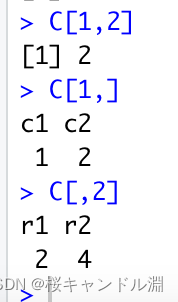
# Find us A Second line in , The values corresponding to the focus of the second and fourth columns
A[2,c(2,4)]
# Find us A The values corresponding to the focus of the first and third rows and the third and fourth columns
A[c(1,3),c(3,4)]
# see A Dimension of
dim(A)
# see A The number of rows
nrow(A)
# see A Columns of
ncol(A)
# see C The index of the matrix , Return the row index first , Then return the column index
dimnames(C)
# see A The index of the matrix , Return the row index first , Then return the column index
dimnames(A)
# Set up A Row and column index
dimnames(A) <- list(c("one","two","three","four","five"),
                    c("I","II","III","IV"))
dimnames(A)
A

Straightening of matrix
# Take us c Cast type to vector , And then assign it to our horz, That is to straighten our matrix
# As can be seen from the following running results , The way we straighten is by column
horz <- as.vector(C)
horz
C 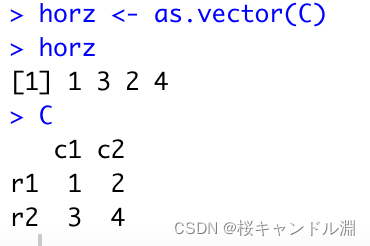
# Generate E matrix , The number of rows is 2
E <- matrix(c("a","b","c","d","e","f","g","h"),nrow=2)
E
# Generate G matrix , The number of columns is 2
G <- matrix(c("i","j","k","l","m","n","o","p"),nrow=2)
G
# Vertical splicing
rbind(E,G)
# Transverse splicing
cbind(E,G)
# Generate H matrix
H <- matrix(1:6,nrow=2)
H
# Generate J matrix
J <- matrix(5:8,ncol=2)
J
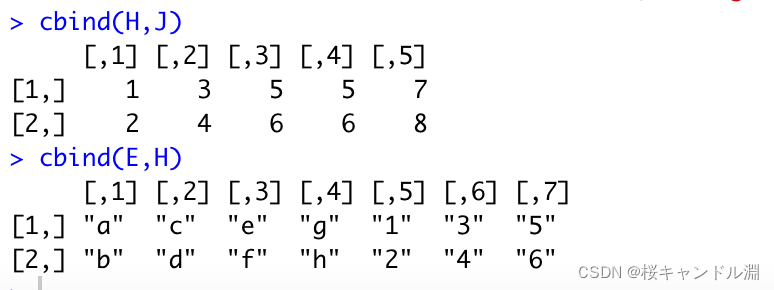
# Here we can find , If we have different columns , We can't splice vertically
rbind(H,J)
# Here we have the same number of lines , So it can be spliced horizontally
cbind(H,J)
#
cbind(E,H)

Four 、 Array
① Arrays are similar to matrices , But the dimension must be greater than 2
② The elements in the array must be of the same type
③ The way to select the uniform velocity in the array is the same as that in the matrix
④ Arrays can be passed through functions array establish
General form
myarray <- array(vector, dimensions, dimnames)
dim1 <- c("A1","A2")
dim2 <- c("B1","B2","B3")
dim3 <- c("C1","C2","C3","C4")
dim1
dim2
dim3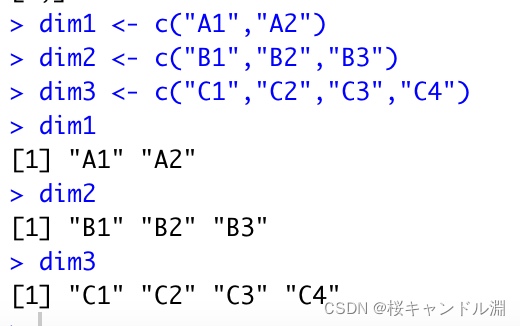
# Will we from 1-24 The data is divided into four matrices with two rows and three columns , The indexes are dim1,dim2,dim3
exarray <- array(1:24, c(2,3,4),
                 dimnames=list(dim1,dim2,dim3))
exarray
# Here we take out the data of the first row and the second column in the third matrix
exarray[1,2,3]
5、 ... and 、 Data frame
A data frame is a class matrix composed of different types of data columns , It can be understood as a loose data set
Create instructions mydata<-data.frame(col1,col2,col3,……)
ID <- c(1,2,3,4)
age <- c(25,34,28,52)
status <- c("Poor","Improved","Excellent","Poor")
diabetes <- c("Type1","Type2","Type1","Type1")
patientdata <- data.frame(ID,age,diabetes,status)
patientdata
# Extract our patientdata The first and second columns in
patientdata[1:2]
# Of course, we can also specify the index name to be searched as a specific object
patientdata[c("diabetes","status")]
# Direct access to patientdata Medium age The elements of the column
patientdata$age
# Modify the data of a column
patientdata$age[2] <- 33
patientdata$diabetes[3] <- "Type2"
Now our data table has been modified to look like the following

6、 ... and 、 factor
factor : Categorical variables and ordered variables are in R It's called a factor
Categorical variables : Also known as nominal variable , The value of a variable has no size relationship , There is no sequence relationship , Just like type I and type II of cases in the above table
Ordered variable : There is a certain order relationship between the values of variables , But there is no quantitative relationship , As in the code above status Evaluation in (poor,Improved,excellent)
function :factor(), Store category values as an integer vector , The value range of an integer is [1,k],k Is the number of horizontal values .
#diabetes What is stored here is the type of our case , The default is no order
diabetes <- factor(diabetes)
#status What is stored here is the therapeutic effect , And it's sequential , But the default sort is in character order
status <- factor(status, ordered=T)
status
# Of our function level The order of can also be specified by us
status <- factor(status, ordered=T,
                 levels=c("Poor","Improved","Excellent"))
diabetes
status 
7、 ... and 、 list
Lists can be viewed as objects (R Any data structure in ) Ordered set of
Create a list
mylist <- list(object1, object2,......)
Create a list , And name each object in the list
mylist <- list(name1=object1, name2=object2,......)
g <- "my list"
h <- c(25,26,18,39)
j <- matrix(1:10,nrow=5)
k <- c("one", "two", "three")
mylist <- list(title=g, ages=h, j, k)
mylist
Get the second element in the list
mylist[[2]]
# In the following code , We created a list
# The first element is ID
# The second element is the name
# The third element is a matrix , And the matrix is twoorthree lines , And the incoming data is arranged in rows , Not by column first
# And specify the list names of the index of our dimension as semester name and subject name respectively
stu <- list(ID="12345678",name="Ün",
            grade=matrix(c(99,96,88,92,93,87),nrow=2,byrow=T,
                         dimnames=list(c(" The first semester "," The second semester "),
                                       c(" Mathematical analysis "," Advanced algebra "," probability theory "))))
stu
# View... In the list ID Elements
stu$ID
# View the name element in the list
stu$name
# Look at the second element in our list , Here the subscript of the list is from 1 At the beginning , Not from 0 At the beginning , That is our name
stu[[2]]
# Check out our score elements
stu$grade
# ditto
stu[[3]]
# Look at the elements in the second row and the third column of our grade elements
stu[[3]][2,3]
# View the data of the first row and the first column in the grade element
stu$grade[1,1]
# Replace our name element with Li Si
stu$name <- " Li Si "
# Change the data of the position of the first row and the second column of the grade element to 78
stu$grade[1,2] <- 78
stu

边栏推荐
- Leetcode t40: combined sum II
- 长安链同步节点配置与启动
- slice扩容机制分析
- 2022 Chinese cook (technician) simulation test and Chinese cook (technician) practice test video
- How can beginners correctly understand Google's official suggested architectural principles (questions?)
- Count number of rows per group and add result to original data frame
- 【js逆向】md5加密参数破解
- Field agricultural irrigation system
- MATLAB小技巧(23)矩阵分析--模拟退火
- Pipeline detection of UAV Based on gazebo
猜你喜欢


![[JS reverse] MD5 encryption parameter cracking](/img/06/0610045d287f646479d6eb5021a067.png)


随机推荐
TypeError: __init__() got an unexpected keyword argument ‘autocompletion‘
01 numpy introduction
Luogu p3799 demon dream stick
P4 安装bmv2 详细教程
[深度剖析C语言] —— 数据在内存中的存储
leetcode T31:下一排列
初学者如何正确理解google官方建议架构原则(疑问?)
使用 setoolkit 伪造站点窃取用户信息
量化交易之读书篇 - 《征服市场的人》读书笔记
Analysis of slice capacity expansion mechanism
[Yu Yue education] Shandong Vocational College talking about railway reference materials
The difference between interceptors and filters
Huawei machine test questions column subscription Guide
使用threejs简单Web3D效果
0 basic introduction to single chip microcomputer: how to use digital multimeter and precautions
Mavros sends a custom topic message to Px4
MAVROS发送自定义话题消息给PX4
Qt的模型与视图
Leetcode T40: 组合总和II
XX攻击——反射型 XSS 攻击劫持用户浏览器