当前位置:网站首页>Use of OpenCL thread algebra library viennacl
Use of OpenCL thread algebra library viennacl
2022-06-30 05:31:00 【Crazy banana Nicky】
ViennaCL
Introduce
http://viennacl.sourceforge.net/
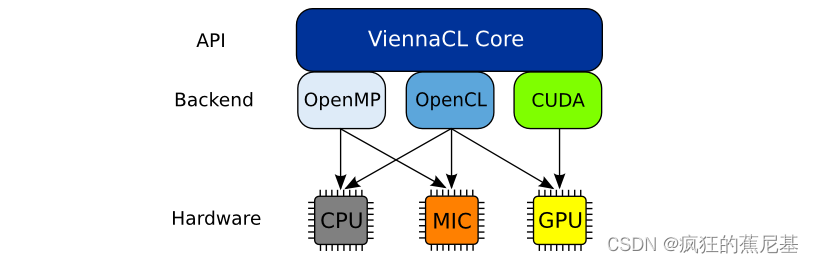
ViennaCL is a free open-source linear algebra library for computations on many-core architectures (GPUs, MIC) and multi-core CPUs. The library is written in C++ and supports CUDA, OpenCL, and OpenMP (including switches at runtime).
ViennaCL Is a free open source linear algebra library , For multi-core architecture (gpu, MIC) And multicore cpu The calculation of . The library uses c++ Compiling , Support CUDA、OpenCL and OpenMP( Including the switch during operation ).
newest 1.7 Highlights of the version .X The release series is :
- Fast sparse matrix-matrix multiplications, outperforming CUBLAS and MKL.
- Fast sparse matrix - Matrix multiplication , be better than CUBLAS and MKL.
- Fine-grained parallel algebraic multigrid preconditioners for CPUs, Xeon Phis, and GPUs.
- Fine grained parallel algebraic multigrid preprocessor cpu, Xeon phi Coprocessors and gpu.
- Fine-grained parallel incomplete LU factorization preconditioners for CPUs, Xeon Phis, and GPUs.
- Fine grained parallelism is not complete LU Disassembly preprocessor , be used for cpu, Xeon phi Coprocessors and gpu.
download
http://viennacl.sourceforge.net/viennacl-download.html
Download connection as above , Please use the corresponding version if you need it .ViennaCL-1.7.1.tar.gz
compile
- Unzip the downloaded source code
unzip ViennaCL-1.7.1.zip
The following directory will be generated , Get into build
[email protected]:ViennaCL-1.7.1$ ls
build      CL     CMakeLists.txt  examples  libviennacl  README  viennacl
changelog  cmake  doc             external  LICENSE      tests
perform cmake-gui ../ And then click Configure.
At this time, it will automatically be in usr Look for OpenCL Compile the header and library files required by the environment (libOpenCL.so). If not, please install the corresponding graphics card driver SDK, If it is an embedded board , Please select cross compile , Then specify but for the desired opencl Header and library files .
Make the header file path and library file path , Click on Generate. Generate Makefile, And then execute make
Or reference build/README.txt
Wait for the compilation to succeed , Move to the corresponding platform .
Use
We see :
In the compiled code examples There will be many executable examples under , For user's use .
benckmarks
#./dense_blas-bench-opencl
----------------------------------------------
               Device Info
----------------------------------------------

Vendor:              Vivante Corporation
Type:                GPU
Available:           1
Max Compute Units:   1
Max Work Group Size: 1024
Global Mem Size:     268435456
Local Mem Size:      32768
Local Mem Type:      2
Host Unified Memory: 1

Benchmark : BLAS
----------------
sCOPY : 2 GB/s
sAXPY : 2 GB/s
sDOT : 4 GB/s
sGEMV-N : 1.97 GB/s
sGEMV-T : 1.48 GB/s
sGEMM-NN : 0.246 GFLOPs/s
sGEMM-NT : 0.246 GFLOPs/s
sGEMM-TN : 0.246 GFLOPs/s
sGEMM-TT : 0.246 GFLOPs/s
----
Benchmark : BLAS
----------------
sCOPY : 0.195 GB/s
sAXPY : 0.196 GB/s
sDOT : 0.171 GB/s
sGEMV-N : 0.0303 GB/s
sGEMV-T : 0.0517 GB/s
sGEMM-NN : 0.00863 GFLOPs/s
sGEMM-NT : 0.234 GFLOPs/s
sGEMM-TN : 0.00868 GFLOPs/s
sGEMM-TT : 0.00863 GFLOPs/s
----
dCOPY : 0.381 GB/s
dAXPY : 0.377 GB/s
dDOT : 0.327 GB/s
dGEMV-N : 0.0596 GB/s
dGEMV-T : 0.101 GB/s
dGEMM-NN : 0.00797 GFLOPs/s
dGEMM-NT : 0.00774 GFLOPs/s
dGEMM-TN : 0.00821 GFLOPs/s
dGEMM-TT : 0.00797 GFLOPs/s
#./opencl-bench-opencl
----------------------------------------------
               Device Info
----------------------------------------------
Name:                Vivante OpenCL Device VIP8000-OI.8102.0000
Vendor:              Vivante Corporation
Type:                GPU
Available:           1
Ma[ 5243.331300] VIP8000 SetPower 0
x Compute Units:		 1
Max Work Group Size: 1024
Global Mem Size:     268435456
Local Mem Size:      32768
Local Mem Type:      2
Host Unified Memory: 1


----------------------------------------------
----------------------------------------------
## Benchmark :: OpenCL performance
----------------------------------------------

   -------------------------------
   # benchmarking single-precision
   -------------------------------
Time for building scalar kernels: 4e-06
Time for building vector kernels: 1.446
Time for building matrix kernels: 2.98157
Time for building compressed_matrix kernels: 1.88953
Time for 100000 entry accesses on host: 0.004118
Time per entry: 4.118e-08
Result of operation on host: 104839
Time for 100000 entry accesses via OpenCL: 35.0961
Time per entry: 0.000350961
Result of operation via OpenCL: 104839
bandwidth-reduction
#./bandwidth-reduction
-- Generating matrix --
 * Unknowns: 262144
 * Initial bandwidth: 8192
 * Randomly reordered bandwidth: 262051
-- Cuthill-McKee algorithm --
 * Reordered bandwidth: 6207
-- Advanced Cuthill-McKee algorithm --
 * Reordered bandwidth: 6207
-- Gibbs-Poole-Stockmeyer algorithm --
 * Reordered bandwidth: 6207
!!!! TUTORIAL COMPLETED SUCCESSFULLY !!!!
fft
Computing FFT Matrix
m: [4,8]((0,0,1,1,2,2,3,3),(0,1,1,2,2,3,3,4),(1,1,2,2,3,3,4,4),(1,2,2,3,3,4,4,5))
o: [4,8]((0,0,0,0,0,0,0,0),(0,0,0,0,0,0,0,0),(0,0,0,0,0,0,0,0),(0,0,0,0,0,0,0,0))
Done
m: [4,8]((0,0,1,1,2,2,3,3),(0,1,1,2,2,3,3,4),(1,1,2,2,3,3,4,4),(1,2,2,3,3,4,4,5))
o: [4,8]((32,40,-16,0,-8,-8,-9.53674e-07,-16),(-8,0,0,0,0,0,0,0),(0,-8,0,0,0,0,0,0),(-4.76837e-07,-8,0,0,0,0,0,0))
Transpose
m: [4,8]((0,0,1,1,2,2,3,3),(0,1,1,2,2,3,3,4),(1,1,2,2,3,3,4,4),(1,2,2,3,3,4,4,5))
o: [4,8]((0,0,0,1,1,1,1,2),(1,1,1,2,2,2,2,3),(2,2,2,3,3,3,3,4),(3,3,3,4,4,4,4,5))
---------------------
Computing FFT bluestein
input_vec: [16](0,0,1,0,2,0,3,0,4,0,5,0,6,0,7,0)
Done
input_vec: [16](0,0,1,0,2,0,3,0,4,0,5,0,6,0,7,0)
output_vec: [16](28,2.38419e-07,-4,9.65685,-4,4,-4,1.65685,-4,-3.2981e-07,-4,-1.65685,-4,-4,-4,-9.65685)
---------------------
Computing FFT
input_vec: [16](0,0,1,0,2,0,3,0,4,0,5,0,6,0,7,0)
Done
input_vec: [16](0,0,1,0,2,0,3,0,4,0,5,0,6,0,7,0)
output_vec: [16](28,0,-4,9.65685,-4,4,-4,1.65685,-4,0,-4,-1.65685,-4,-4,-4,-9.65685)
---------------------
Computing inverse FFT...
input_vec: [16](0,0,1,0,2,0,3,0,4,0,5,0,6,0,7,0)
output_vec: [16](0,0,1,4.56956e-08,2,-2.78181e-08,3,-1.64905e-07,4,0,5,-7.35137e-08,6,2.78181e-08,7,1.92723e-07)
---------------------
Computing real to complex...
input_vec: [16](0,0,1,0,2,0,3,0,4,0,5,0,6,0,7,0)
output_vec: [16](0,0,0,0,1,0,0,0,2,0,0,0,3,0,0,0)
---------------------
Computing complex to real...
input_vec: [16](0,0,1,0,2,0,3,0,4,0,5,0,6,0,7,0)
output_vec: [16](0,1,2,3,4,5,6,7,2,0,0,0,3,0,0,0)
---------------------
Computing multiply complex
input_vec: [16](0,0,1,0,2,0,3,0,4,0,5,0,6,0,7,0)
input2_vec: [16](0,0,1,0,2,0,3,0,4,0,5,0,6,0,7,0)
Done
output_vec: [16](0,0,1,0,4,0,9,0,16,0,25,0,36,0,49,0)
---------------------
!!!! TUTORIAL COMPLETED SUCCESSFULLY !!!!
There are also many examples that can be compiled , You can explore .
边栏推荐
- 2021-10-31
- Question mark (?) in Cron expression Use of
- Fifty years ago, the go code first submitted by the inventor of Hello world was as long as this
- Operation of JSON file
- Xi'an Jiaotong 21st autumn "computerized accounting" online homework answer sheet (I) [standard answer]
- PWN Introduction (2) stack overflow Foundation
- Revit二次開發---未打開項目使用面板功能
- Wechat applet training 2
- RedisTemplate 常用方法汇总
- mmcv常用API介绍
猜你喜欢

Unity project hosting platform plasticscm (learn to use 2)

Unity ugui text value suspended enlarged display add text background

Database SQL language 04 subquery and grouping function

东塔攻防世界—xss绕过安全狗

使用码云PublicHoliday项目判断某天是否为工作日

9. naive Bayes

声网,站在物联网的“土壤”里

Redistemplate common method summary
![[note] usage model tree of the unity resource tree structure virtualizingtreeview](/img/3e/fe5610c797a14554ad735172c3ab54.jpg)
[note] usage model tree of the unity resource tree structure virtualizingtreeview

Super comprehensive summary | related improvement codes of orb-slam2 / orb-slam3!
随机推荐
Pyinstaller flash back
炒股用指南针开户交易安全吗?
14x1.5cm竖向标签有点难,VFP调用BarTender来打印
Xctf--Web--Challenge--area Wp
Intellj idea generates jar packages for projects containing external lib to other projects. The method refers to the jar package written by itself
2021-10-31
Uboot reads the DDR memory size by sending 'R' characters through the terminal
The file has been downloaded incorrectly!
Unity limited time use limited trial time and use times
Bessel curve with n control points
You don't know how to deduce the location where HashSet stores elements?
E: Topic focus
Revit secondary development - use panel function without opening the project
mmdet之Loss模块详解
Is it safe to open an account and trade with a compass?
Detailed explanation of the loss module of mmdet
OpenCL线程代数库ViennaCL的使用
RedisTemplate 常用方法汇总
Configuration and use of controllers and routes in nestjs
Unity 3D model operation and UI conflict Scrollview