当前位置:网站首页>redis集群搭建-使用docker快速搭建一个测试redis集群
redis集群搭建-使用docker快速搭建一个测试redis集群
2022-07-27 12:53:00 【秃了也弱了。】
使用脚本快速搭建六个redis实例
1.拉取docker镜像
docker pull redis:5.0.7
2.快速搭建六个redis实例
for port in $(seq 7001 7006); \
do \
	mkdir -p /mydata/redis/node-${port}/conf
	touch /mydata/redis/node-${port}/conf/redis.conf
	cat << EOF >/mydata/redis/node-${port}/conf/redis.conf
	port ${port}
	cluster-enabled yes
	cluster-config-file nodes.conf
	cluster-node-timeout 5000
	# 当前节点的ip
	cluster-announce-ip 192.168.56.10
	cluster-announce-port ${port}
	# 集群间信息交互的端口
	cluster-announce-bus-port 1${port}
	appendonly yes
	EOF

	docker run -p ${port}:${port} -p 1${port}:1${port} --name redis-${port} \
	-v /mydata/redis/node-${port}/data:/data \
	-v /mydata/redis/node-${port}/conf/redis.conf:/etc/redis/redis.conf \
	-d redis:5.0.7 redis-server /etc/redis/redis.conf; \
done
3.其他命令
docker stop $(docker ps -a |grep redis-700 | awk '{ print $1}')
docker start $(docker ps -a |grep redis-700 | awk '{ print $1}')
docker rm $(docker ps -a |grep redis-700 | awk '{ print $1}')

搭建redis集群
1.随便进入一台redis实例
docker exec -it redis-7001 bash

2.创建redis集群
redis-cli --cluster create 192.168.56.10:7001 192.168.56.10:7002 192.168.56.10:7003 192.168.56.10:7004 192.168.56.10:7005 192.168.56.10:7006 --cluster-replicas 1
–cluster-replicas 1的意思就是设置主节点有一个从节点。

我们可以看到,7001、7002、7003是主节点,7006是7002的从,7005是7001的从,7004是7003的从。
此时,redis集群搭建完成
测试使用redis集群
1.随便连接某个redis结点
docker exec -it redis-7002 /bin/bash
redis-cli -c -h 192.168.56.10 -p 7002
2.获取集群信息
cluster info
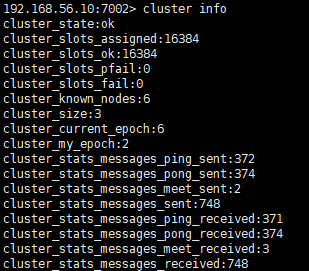
3.获取集群结点信息
cluster nodes

4.set/get测试数据
我们发现,会正常进行重定向
5.此时我们停止一个主节点
此时再查看节点信息,会发现7005号redis代替了7001,成为了主节点
6.此时再将7001启动
我们发现,7001自动成为7005的从节点了
边栏推荐
- Classification and application of slip rings
- Jianzhi offer 07 rebuild binary tree -- construct binary tree from middle order and post order traversal sequence
- 【基础知识】~ 集成电路设计流程,以及各阶段所使用的EDA工具
- Fifth, download the PC terminal of personality and solve the problem of being unable to open it
- 双料第一!
- Cute image classification -- a general explanation of the article "what are the common flops in CNN model?"
- Data enhancement in image processing
- new的多种使用方法
- QT clipboard qclipboard copy paste custom data
- [basic knowledge] ~ IC design process and EDA tools used in each stage
猜你喜欢

Verilog的系统任务----$fopen、$fclose和$fdisplay, $fwrite,$fstrobe,$fmonitor

小程序毕设作品之微信校园洗衣小程序毕业设计成品(8)毕业设计论文模板

SNMP (Simple Network Management Protocol)

How can electric complete set enterprises do well in cost and profit management with the help of ERP system?

Set up SSH key based authentication using putty

Dat.gui control custom placement and dragging

Additional: [urlencoder.encode (string to be encoded, "encoding method");] (what is it?; why do we use this to encode when we set values in cookies?) (to be improved...)

小程序毕设作品之微信校园洗衣小程序毕业设计成品(1)开发概要

opencv图像的缩放平移及旋转
Figure 8 shows you how to configure SNMP
随机推荐
[basic knowledge] ~ IC design process and EDA tools used in each stage
Unapp prevents continuous click errors
What are the precautions for using carbon brushes
uniapp防止连续点击出错
Selenium eight elements positioning and relative locator
Egg swagger doc graphic verification code solution
期货公司开户后续会有哪些服务?
使用碳刷的注意事项有哪些
SNMP (Simple Network Management Protocol)
特征工程中的缩放和编码的方法总结
Futures Commission Standard and margin ratio
产品经理经验谈100篇(十一)-策略产品经理:模型与方法论
图像特征及提取
OPPO 自研大规模知识图谱及其在数智工程中的应用
软考 系统架构设计师 简明教程 | 系统设计
字节跳动 AI Lab 总监李航:语言模型的过去、现在和未来
LeetCode报错及其解决方案
【基础知识】~ 集成电路设计流程,以及各阶段所使用的EDA工具
leetcode——83,24; Machine learning - neural networks
网络异常流量分析系统设计