当前位置:网站首页>LVGL使用心得
LVGL使用心得
2022-07-03 03:09:00 【Dorthyn】
要写的东西太多,一时间竟不知从何说起。正值端午放假,先安康吧,大致记录一下关键点
目的
给海思芯片的板子加一个菜单界面。
历程
- framebufferr
尝试了官方手册推荐的什么osd不太会搞,偶然间发现了framebuffer很好用,就用这个来做菜单了。很好奇业内(嵌入式)都是怎么搞UI的,问了那么多没人能答出来,竟然会觉得这个问题很新鲜,哎自己搞吧。 - lvgl
找嵌入式相关的视频来看,发现韦东山老师讲得不错,b站有上传。于是用framebuffer打点加字库的方式做了初级菜单,用双链表+json存储菜单,做了好久,太丑了看不下去了,于是开始找可替代的。浏览b站发现squareline的ui设计软件,最终发现了lvgl并看到有人在海思上成功应用,就它了! - 工程组织
在这之前其实有一个遗留问题一直没有解决:海思的sdk到底应该怎么用?怎么基于海思的sdk开发自己的应用?这么大一个工程,用编辑器纯手写?都21世纪了,应该不会有这么low的吧?新上手的东西讲究快,所以开始跑程序都直接在sample下的demo里编辑,直接make就好,不用考虑那么多乱七八糟的。这也就导致了程序全靠make的时候报错提示然后改正,没有深入了解交叉编译的gdb怎么操作。在vscode中可以依靠插件结合通用makefile调试,海思的sdk这条路显然不通。问题就此搁置。 - 破局
squareline推荐用模拟器运行ui,按照他们官方的说法,模拟器跑通了,其他平台移植也很快。导出c/c++工程只支持eclipse,然后就不得不下载eclipse模拟运行。第一次接触c/c++的eclipse,此前(读大学期间)用eclipse编译过java,安卓的程序,多年未见,还是离不开啊~windows上跑gcc程序离不开mingw,现在有升级版mingw64。 - mingw64绊倒石
官网提供的安装包有问题,只能手动安装。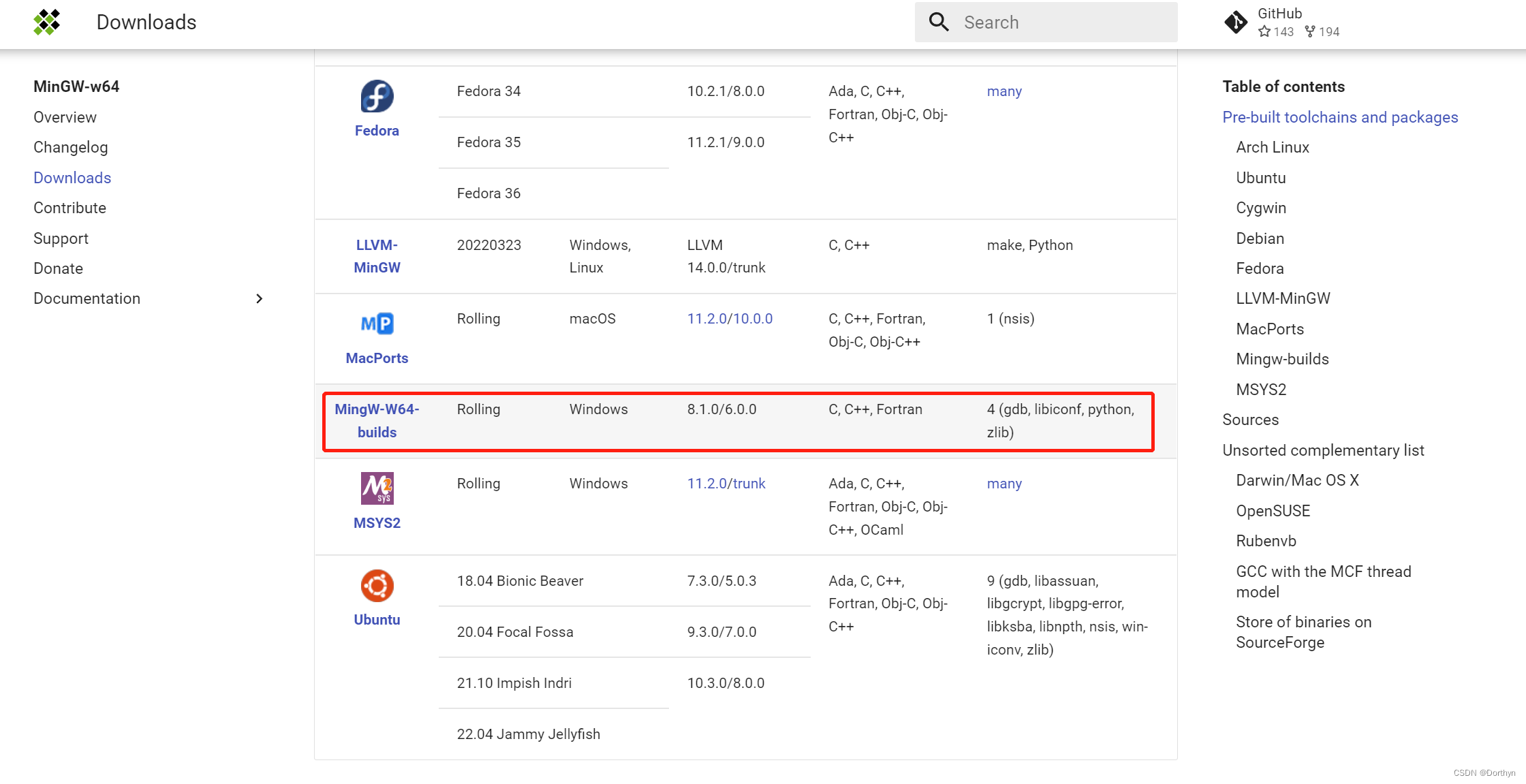

折腾了很久终于还是没搞定,切Linux吧,受不了了! - Ubuntu下的eclipse和squareline工程
下面这段出自squareline导出工程
Eclipse project for SquareLine Studio and LVGL
This project can be used to build and run C/C++ UI code exported from SquareLine Studio.
Get started
- Install a compiler and related tools if you don’t have them yet:
- On Windows MinGW can be a good choice
- On Linux type in the Terminal:
sudo apt-get install gcc g++ gdb build-essential
- Install SDL (required to simulate a display)
- On Windows see for example this guide
- On Linux
sudo apt-get install libsdl2-dev
- Download and Install Eclipse CDT from http://www.eclipse.org/cdt/
Add the UI files
In SquareLine Studio click Export->Export Files and select the ui folder of this project
Open and build the project
- Start Eclipse
- Select the parent folder of the exported project as “Workspace”
- Select
File->Import->General->Exisiting project into Workspaceclick “Next” and browse the project - Build the project with
Project->Build - Run the project with
Run->Run.
遇到的问题就是提示没有装png库,直接sudo下载一个开发版-dev就好:
sudo apt install libpng-dev
之后按照上面的步骤就能看到demo的界面了。
7. 移植
在决定尝试lvgl之后,就找相关资料如何使得海思芯片能跑这个程序。
海思Hi3519移植freetype zlib libpng16 libharfbuzz 添加字幕
我发现Linux的好多开源库好像都有一样的配置过程,先config,再mak && make install,目前还没有搞清楚为什么~
第一次移植有多蠢吗?因为想把结果直接搬到海思芯片上,所以把上面用到的这些库用交叉编译器重新编译了之后就把整个包拷过去了,不识别的库就先放到/usr/lib/下,结果嘛,跑是跑起来了,但是报错什么权限拒绝,目前没有想明白是什么原因。
- eclipse中c++开发中添加包含路径和库路径的操作
- 【嵌入式】—交叉编译 移植 ALSA1.2.2
在eclipse下移植squareline的时候用得到。。当初想把include目录替换成交叉编译包下的目录~ - lvgl framebuffer移植实践参考
- 不通的芯片有不同的移植方法,不是简单改一下编译器就可以了,具体可以参考官方github的使用说明。
- lvgl在linux平台上的移植,以及自己的一些应用程序尝试
上面这个链接帮助不小,但是lvgl库结构调整了,可以参考一下怎么配参数的(比如demos的位置发生了变化) - 官方移植,按照readme操作就好了.
- 自己将lvgl改framebuffer
结合上面这个链接的readme,改
#define USE_FBDEV 1
#define USE_EVDEV 1
- eclipse配置c/c++开发环境
- 官网下载c/c++版本的eclipse
- 下载好之后help/check for updates/cdt
- 项目的properties里配置builder选cdt
- makefile工程不能配(没有这个选项)
- 如果是交叉编译,那么编译器和路径可以参考如下配置:
/opt/hisi-linux/x86-arm/aarch64-himix100-linux/
aarch64-himix100-linux-
- lvgl移植—Linux fbdev&evdev(基于LVGL v7)
- LVGL linux arm平台上的详细移植过程(上)
- LVGL linux arm平台上的详细移植过程(下)
- lvgl移植—Linux fbdev&evdev(基于LVGL v7)
- LVGL8.1 Hi3536C平台使用
- [海思]–Hi3516aMpp开发环境配置
- 海思MPP移植到eclipse下实现在eclipse下用海思交叉编译器实现编译
- eclipse 灵活使用makefile来编译C/C++
- 学习笔记linux(三)Linux下IDE的配置
听说missing semester还不错,要去看下 - 通用Makefile的编写和在项目工程中使用Makefile,大项目组织
First run the ./configure to generate the Makefile. After that, if you have CDT installed,just choose the option “File->New->Makefile Project With Existing Code” and point to the directory where the Makefile is stored.
靠上面这种方法可以加载海思sample,比较好用
Linux + Eclipse 配置交叉编译环境
10. makefile可以条件编译头文件
感觉海思将这个makefile玩得溜的,linux,liteos,multi-core,single…分别用不同的头文件,c文件引用的头文件都不是当前目录下的,ide找都找不到,编译的时候才通过make的智能编译[email protected] $^去找。也不知道这样用makefile和eclipse应用sdk到底对不对-_-||
边栏推荐
- Vs Code configure virtual environment
- MySQL practice 45 lecture [row lock]
- I2C 子系统(三):I2C Driver
- What does it mean when lambda is not entered?
- Agile certification (professional scrum Master) simulation exercise-2
- 你真的懂继电器吗?
- VS 2019配置tensorRT
- Segmentation fault occurs during VFORK execution
- MySql实战45讲【索引】
- I2C 子系統(四):I2C debug
猜你喜欢

VS 2019 配置tensorRT生成engine

一文带你了解 ZigBee
Three.js本地环境搭建

MySql實戰45講【SQL查詢和更新執行流程】

I2C subsystem (I): I2C spec
Deep reinforcement learning for intelligent transportation systems: a survey paper reading notes

Spark on yarn资源优化思路笔记

用docker 連接mysql的過程
![[error record] the parameter 'can't have a value of' null 'because of its type, but the im](/img/1c/46d951e2d0193999f35f14d18a2de0.jpg)
[error record] the parameter 'can't have a value of' null 'because of its type, but the im
I2C 子系统(二):I3C spec
随机推荐
C language beginner level - pointer explanation - paoding jieniu chapter
[C语言]给账号密码进行MD5加密
3D drawing example
左连接,内连接
Super easy to use logzero
[combinatorics] Application of exponential generating function (multiple set arrangement problem | different balls in different boxes | derivation of exponential generating function of odd / even sequ
【PyG】理解MessagePassing过程,GCN demo详解
MySQL Real combat 45 [SQL query and Update Execution Process]
Three. JS local environment setup
文件重命名
函数栈帧的创建与销毁
力扣------网格中的最小路径代价
I2C subsystem (I): I2C spec
com.fasterxml.jackson.databind.exc.InvalidFormatException问题
MySql实战45讲【全局锁和表锁】
Are there any recommended term life insurance products? I want to buy a term life insurance.
The XML file generated by labelimg is converted to VOC format
敏捷认证(Professional Scrum Master)模拟练习题
你真的懂继电器吗?
Getting started | jetpack hilt dependency injection framework