当前位置:网站首页>I2C 子系統(四):I2C debug
I2C 子系統(四):I2C debug
2022-07-03 02:49:00 【嵌入式Linux系統開發】
I2C 常見有兩種錯誤:I2C ACK error、I2C timeout
1、I2C ACK error
在應該收到 ACK 信號的時候沒有收到 ACK 信號,i2c controller 就會產生一個 ACK error 的中斷,告訴 i2c driver 發生了 ACK error。通常情况是 slave 本身的問題。

1、檢查 device 是否存在,i2c bus number 和 device address 是否正確。示例如下:i2c number 為 6,addr 為 0x28:
[31.092951][xxx]i2c i2c-6:addr:0x28,ACK error
2、檢查 device 是否已經上電使能,以及正確的 init
3、檢查 i2c speed 是否適配,speed 大於 device 支持的 max speed 也會造成 ACK Error。降低速度,如果仍然可以工作的話就說明是 clk 相關問題。
4、檢查 i2c device 信號電平是否與 AP 匹配。
5、GPIO check 以下幾個部分
- GPIO 電流驅動能力
- GPIO 工作模式是否是 I2C 模式
- GPIO 是否有內部上拉電阻
- GPIO 默認電平狀態
從 i2c spec 看,如下情况 NACK 是正常的。
I2C 讀
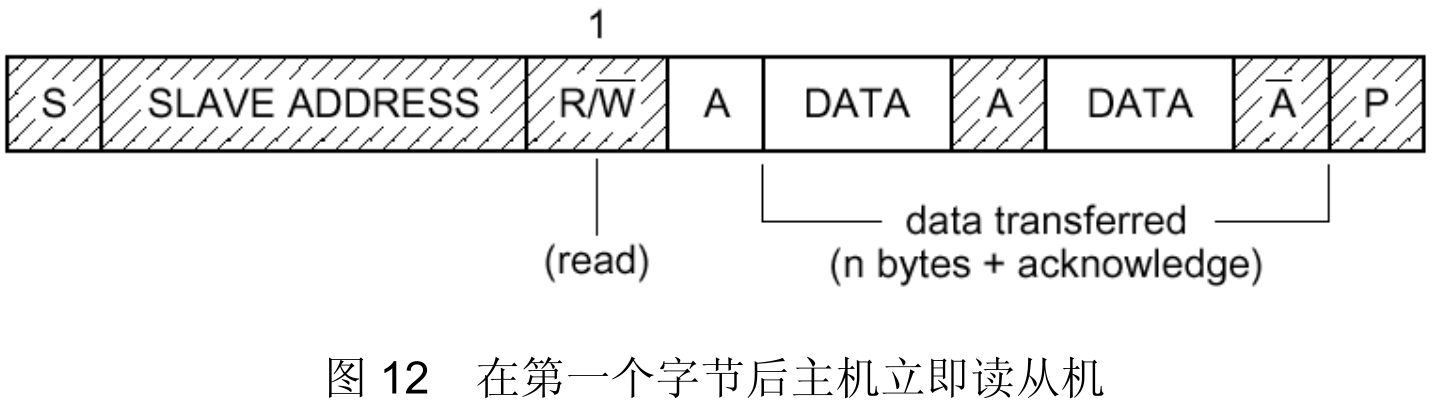
主機從從機接收數據時,最後一個 Byte 數據時,主機不回應該從機,即 NACK.
2、I2C timeout
當 I2C 傳輸發生 timeout 時,一般 kernel log 會有類似如下打印:
[48.197718][xxx]i2c i2c-1: addr:0xa,transfer timeout
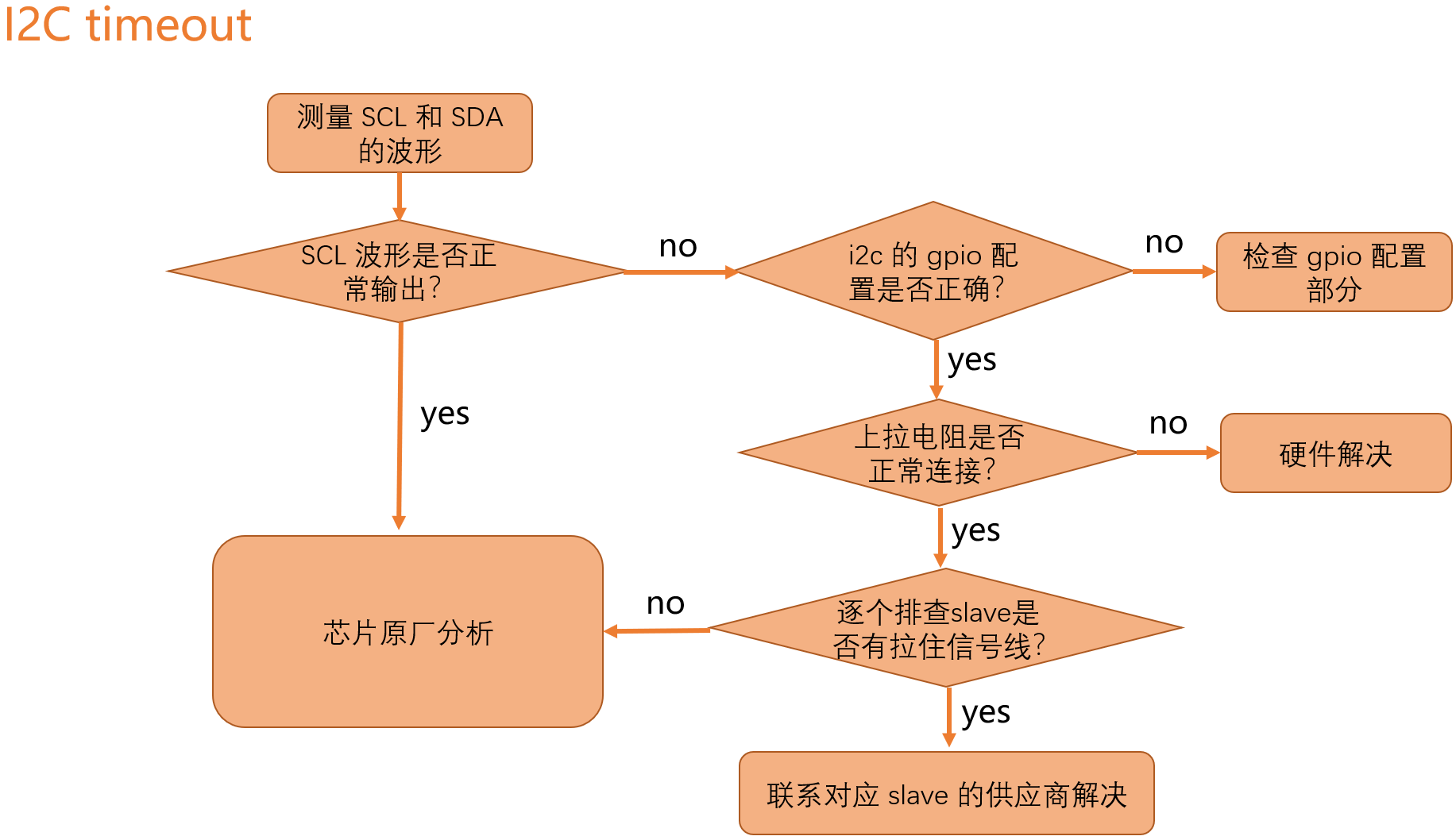
1、GPIO check 以下幾個部分
- GPIO 電流驅動能力
- GPIO 工作模式是否是 I2C 模式
- GPIO 是否有內部上拉電阻
- GPIO 默認電平狀態
2、排查 slave 順序
- log 中第一個發生 timeout 的 slave
- 有 power 控制和 reset 控制的 slave
- other slave
複現問題後,可以手動將相應外設去掉,確認是哪個外設將 i2c bus 拉住,再與供應商溝通,debug 一下該 IC 狀態,理清拉住 i2c bus 原因。
3、i2c-tools
i2c-tools 也可以,大家可以百度,很多教程。
4、常見問題
1、同一條 i2c bus 上所有的外設的 i2c addr 要不同
1)相同 address 注册時沖突
[2.059184][xxx]i2c i2c-1:Failed to register i2c client 24c02 at 0x51(-16)
[2.059189][xxx]i2c i2c-1:Can't create device at 0x51
對應的錯誤碼是 -16
/kernel-5.10/include/uapi/asm-generic/errno-base.h

#define EPERM 1 /* Operation not permitted */
#define ENOENT 2 /* No such file or directory */
#define ESRCH 3 /* No such process */
#define EINTR 4 /* Interrupted system call */
#define EIO 5 /* I/O error */
#define ENXIO 6 /* No such device or address */
#define E2BIG 7 /* Argument list too long */
#define ENOEXEC 8 /* Exec format error */
#define EBADF 9 /* Bad file number */
#define ECHILD 10 /* No child processes */
#define EAGAIN 11 /* Try again */
#define ENOMEM 12 /* Out of memory */
#define EACCES 13 /* Permission denied */
#define EFAULT 14 /* Bad address */
#define ENOTBLK 15 /* Block device required */
#define EBUSY 16 /* Device or resource busy */
......
可以執行 ls /sys/bus/i2c/devices 查看對應的 i2c-1 下是否已經有注册相同的 address 的外設
出現重複的原因:
- dts 中定義的 i2c device 節點,有些 driver 中使用傳統的 i2c_register_board_info 函數來注册 i2c device.
- dts 中重複定義.
返回 -11,—EAGAIN。代錶總線正忙,或無法申請到總線鎖。如果總線正忙,請 retry 等待,或查看是哪個 device 一直在發送。如果無法申請到總線鎖,請查看是否在中斷函數或原子上下文調用了 i2c_transfer。
2)隱藏的 i2c address,即外設存在多個 i2c addr 或外設 HW bug,導致 i2c 通訊异常。
示例:eeprom 在 i2c-1 上注册了 0x50 地址,而 type c 雖然注册到 0x60 地址,但對 0x50 也能產生響應,type c 拉低了 SDA ,從而 timeout 。
debug 方法:
- 軟件上確認數據及對應的 driver 是否正確。
- 硬件上逐一去掉外設,確認是哪個外設導致。
2、示波器 ACK 的地方有毛刺
slave 在第 9 個 clk 產生 ACK 應答後,換成 mater 端來控制時產生的毛刺。此毛刺不會影響 I2C 總線讀寫時序,無需處理。
即 slave 和 master 控制總線切換間隔,沒有人控制總線,帶來的毛刺。
3、在外接上拉電阻的情况下,有 enable 內部下拉電阻,導致總線上有半高電平。
4、總線上電平拉不到地。
- master 端發送數據時電平拉不到地,可以增大驅動電流或者上拉電阻。
- slave 端拉不到地,可以諮詢供應商看是否能增大 slave 端驅動電流或者上拉電阻。
5、RK 平臺 I2C debug
來源於 firefly
https://wiki.t-firefly.com/zh_CN/Firefly-RK3399/driver_i2c.html
1、I2C 通信失敗,出現 log: “timeout, ipd: 0x00, state: 1”
請檢查硬件上拉是否給電。
2、調用 i2c_transfer 返回值為 -6?
返回值為 -6 錶示為 NACK 錯誤,即對方設備無應答響應,這種情况一般為外設的問題,常見的有以下幾種情况:
- I2C 地址錯誤,解决方法是測量 I2C 波形,確認是否 I2C 設備地址錯誤;
- I2C slave 設備不處於正常工作狀態,比如未給電,錯誤的上電時序等;
- 時序不符合 I2C slave 設備所要求也會產生 Nack 信號。
3、當外設對於讀時序要求中間是 stop 信號不是 repeat start 信號的時候,該如何處理?
這時需要調用兩次 i2c_transfer, I2C read 拆分成兩次,修改如下:
static int i2c_read_bytes(struct i2c_client *client, u8 cmd, u8 *data, u8 data_len) {

    struct i2c_msg msgs[2];
	int ret;
	u8 *buffer;
	buffer = kzalloc(data_len, GFP_KERNEL);
	if (!buffer)
		return -ENOMEM;;
	msgs[0].addr = client->addr;
	msgs[0].flags = client->flags;
	msgs[0].len = 1;
	msgs[0].buf = &cmd;
	ret = i2c_transfer(client->adapter, msgs, 1);
	if (ret < 0) {

		dev_err(&client->adapter->dev, "i2c read failed\n");
        kfree(buffer);
			return ret;
    }
    msgs[1].addr = client->addr;
    msgs[1].flags = client->flags | I2C_M_RD;
    msgs[1].len = data_len;
    msgs[1].buf = buffer;
    ret = i2c_transfer(client->adapter, &msgs[1], 1);
    if (ret < 0)
		dev_err(&client->adapter->dev, "i2c read failed\n");
    else
        memcpy(data, buffer, data_len);
    kfree(buffer);
    return ret;
}
相信以上的 I2C debug 方法已經能為大家解决大部分問題,如果還是沒解决,一般是芯片原廠底層 code bug,可以找芯片原廠支持。
边栏推荐
- sql server数据库添加 mdf数据库文件,遇到的报错
- Gbase 8C system table PG_ cast
- tensor中的append应该如何实现
- Tensorflow to pytorch notes; tf. gather_ Nd (x, y) to pytorch
- Source code analysis | resource loading resources
- Mathematical statistics -- Sampling and sampling distribution
- C语言中左值和右值的区别
- Hcip137-147 title + analysis
- As a leader, how to control the code version and demand development when the epidemic comes| Community essay solicitation
- Gbase 8C trigger (I)
猜你喜欢

random shuffle注意
vfork执行时出现Segmentation fault
Pytest (6) -fixture (Firmware)
Add some hard dishes to the interview: how to improve throughput and timeliness in delayed task scenarios!

用docker 連接mysql的過程
Deep learning: multi-layer perceptron and XOR problem (pytoch Implementation)

Check log4j problems using stain analysis

HW-初始准备
[advanced ROS] Lesson 6 recording and playback in ROS (rosbag)

Super easy to use logzero
![[advanced ROS] Lesson 6 recording and playback in ROS (rosbag)](/img/84/abde1c0d5441eb8dec2bacb60d19e9)
随机推荐
Gbase 8C function / stored procedure parameters (II)
[flutter] example of asynchronous programming code between future and futurebuilder (futurebuilder constructor setting | handling flutter Chinese garbled | complete code example)
Basic operation of binary tree (C language version)
[principles of multithreading and high concurrency: 1_cpu multi-level cache model]
Gbase 8C system table PG_ amproc
MUX VLAN Foundation
Gbase 8C system table PG_ attribute
HW-初始准备
HTB-Devel
How to implement append in tensor
[fluent] futurebuilder asynchronous programming (futurebuilder construction method | asyncsnapshot asynchronous calculation)
random shuffle注意
【翻译】具有集中控制平面的现代应用负载平衡
Cancer biopsy instruments and kits - market status and future development trends
Practice of traffic recording and playback in vivo
Why choose a frame? What frame to choose
Summary of interview project technology stack
Thunderbolt Chrome extension caused the data returned by the server JS parsing page data exception
C语言中左值和右值的区别
Kubernetes family container housekeeper pod online Q & A?