当前位置:网站首页>Selection of Hongmeng page menu
Selection of Hongmeng page menu
2022-06-25 07:24:00 【respectable-face】

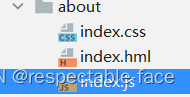
Main screen shots

All non displayed codes can be found in the previous documents

search.css Code
.search-container {
    padding: 10px 15px;
}

.search-input {
    height: 40px;
    width: 100%;
    justify-content: center;
    align-items: center;
    border-radius: 6px;
    border: 0.5px solid #ee742f;
}

.search-input-image {
    width: 20px;
    height: 20px;
}

.search-input-text {
    font-size: 12px;
    font-weight: 100;
}

.index-inner-bg {
    background-color: #fff;
}

.cate-inner-bg {
    background-color: #f2f2f2;
    border-width: 0;
}

.index-outer-bg {
    background-color: #f2f2f2;
}

.cate-outer-bg {
    background-color: #fff;
}
search.hml Code
<div class="search-container {
   {from==='cate' ?'cate-outer-bg':'index-outer-bg'}}">
    <div class="search-input {
   {from==='cate' ?'cate-inner-bg':'index-inner-bg'}}">
        <image src="/common/images/search.png"></image>
        <text> Search for </text>
    </div>
</div>
search.js Code
export default{
    props:['from']
}
cookbook-category.json Code , The other two blogs have
{
  "data": {
    "category": {
      " hot ": [" drink ", " light ", " Summer recipes ", " Serve a meal ", " Noodle & Pastries ", " porridge ", " dinner ", " soup ", " noodles ", " Tangyuan(glutinous rice ball) ", " Oven ", " Chinese food ", " Western food ", " breakfast ", " The cake ", " Northeast food ", " cold ", " soup ", " Pudding ", " Sushi ", " Cakes and Pastries ", " Sugar water ", " Hunan cuisine ", " The dessert "],
      " Dishes ": [" Home Dishes ", " vegetable dish ", " Cold Dishes ", " Serve a meal ", " interview ", " snack ", " porridge ", " soup "],
      " Cuisine ": [" Sichuan cuisine ", " Northeast food ", " Cantonese cuisine ", " Hunan cuisine ", " Western food ", " Shandong cuisine ", " Korean cuisine ", " Japanese cuisine "],
      " features ": [" pickled cabbage ", " ice cream ", " traditional Chinese rice-pudding ", " salad ", " Deep-Fried Dough Sticks ", " Soya-bean milk ", " snacks ", " Pudding "],
      " Bake ": [" The cake ", " pizza ", " bread ", " The moon cake ", " toast ", " cookies ", " Cup cake ", " Egg Tart "],
      " Staple food ": [" Sushi ", " cake ", " Fried rice ", " Steamed bread ", " dumplings ", " Stir-Fried Noodles with Vegetables "],
      " appliances ": [" Oven ", " Wok ", " The microwave oven "],
      " The way of cooking ": [" Bake ", " Mix ", " Hot pot ", " steamed ", " cook ", " Brine "],
      " taste ": [" light ", " Curry ", " Spicy ", " spicy ", " cook ", " Brine "],
      " occasion ": [" breakfast ", " dinner ", " Chinese food ", " Afternoon tea ", " Night snack ", " Cook a night meal ", " Spring menu "],
      " festival ": [" Spring Festival ", " New Year ", " Mid-Autumn Festival ", " New year's Day "]
    },
    "material": {
      " meat ": [" pork ", " Spareribs ", " pig 's trotters ", " beef "],
      " egg / milk ": [" egg ", " Duck's egg ", " Quail egg ", " Salted Duck Egg ", " Preserved egg "],
      " fish ": [" octopus ", " The carp ", " Crucian carp "],
      " The aquatic ": [" shrimp ", " Small shrimp ", " lobster ", " Shrimp "],
      " vegetables ": [" Chinese cabbage ", " rapeseed ", " celery ", " spinach ", " Chrysanthemum coronarium "],
      " peas and beans ": [" Mungbean sprout ", " Yellow bean sprouts ", " soybean "],
      " Fruits ": [" Apple ", " Banana "],
      " Grains and other grains ": [" Mustard flour ", " malt ", " millet "],
      " Medicine and food ": [" Bird's nest ", " Ginseng "]
    }
  }
}
index.css Code
.container {
    flex-direction: column;
    justify-content: center;
    align-items: center;
    width: 100%;
    height: 100%;
}

.title {
    font-size: 40px;
    color: #000000;
    opacity: 0.9;
}

@media screen and (device-type: tablet) and (orientation: landscape) {
    .title {
        font-size: 100px;
    }
}

@media screen and (device-type: wearable) {
    .title {
        font-size: 28px;
        color: #FFFFFF;
    }
}

@media screen and (device-type: tv) {
    .container {
        background-image: url("/common/images/Wallpaper.png");
        background-size: cover;
        background-repeat: no-repeat;
        background-position: center;
    }

    .title {
        font-size: 100px;
        color: #FFFFFF;
    }
}

@media screen and (device-type: phone) and (orientation: landscape) {
    .title {
        font-size: 60px;
    }
}
index.hml Code
<element name='comp' src='../../components/tabbar/tabbar.hml'></element>
<div class="container">
  <!--  <text class="title">
        About us
    </text>-->
    <div>
    <web src="https://map.baidu.com/search/%E5%A4%A9%E5%AE%89%E9%97%A8/@12957695.78455178,4825339.25645,17.33z?querytype=s&da_src=shareurl&wd=%E5%A4%A9%E5%AE%89%E9%97%A8&c=153&src=0&wd2=%E5%8C%97%E4%BA%AC%E5%B8%82%E4%B8%9C%E5%9F%8E%E5%8C%BA&pn=0&sug=1&l=12&b=(12469977.85,4064032.61;12568281.85,4112864.61)&from=webmap&biz_forward=%7B%22scaler%22:2,%22styles%22:%22pl%22%7D&sug_forward=65e1ee886c885190f60e77ff&device_ratio=2"></web>
    </div>
    <comp index="2"></comp>
</div>
index.js Code
export default {
    data: {
        title: ""
    },
    onInit() {
        this.title = this.$t('strings.world');
    }
}

menu.css Code
.menu-container {
    flex: 1;
    border-top: 0.5px solid #CCC;
}

.menu-tab {
    width: 100px;
    background-color: #f3f3f3;
    flex-direction: column;
}

.menu-tab-item {
    height: 34px;
    justify-content: center;
    align-items: center;
    width: 100px;
}

.menu-tab-item-text {
    font-size: 12px;
    font-weight: 100;
    height: 100%;
/*    align-content: stretch;*/
}

.menu-tab-item-normal {
    background-color: #f3f3f3;
}

.menu-tab-item-text-normal {
/*    font-size: 12px;*/
/*    font-weight: 100;*/
/*    height: 100%;*/
/*    align-content: stretch;*/
    color: #000;
    border-bottom: 0;
}

.menu-tab-item-active {
    background-color: #FFF;
}

.menu-tab-item-text-active {
    font-size: 12px;
    font-weight: 100;
    height: 100%;
/*    align-content: stretch;*/
/*    color: #ee742f;*/
/*    border-bottom: 2px solid #ee742f;*/
}

.menu-list {
    flex: 1;
    flex-wrap: wrap;
}

.menu-list-item {
    width: 33.333333%;
    height: 40px;
    justify-content: center;
    align-items: center;
}

.menu-list-item-text {
    font-size: 12px;
    font-weight: bold;
}
menu.hml Code
<div class="menu-container">
    <div class="menu-tab">
        <div class="menu-tab-item {
   { $item === currentTab ?'active' :'normal' }}"
               for="{
   {tabs}}"
             @click="handleTabClick($item)"
                >
            <text>
                {
   {$item}}
             </text>
         </div>


    </div>
    <div class="menu-list">
        <div class="menu-list-item" for="{
   {lists}}">
            <text>
                <span>{
   { $item }}</span>
            </text>
        </div>
    </div>
</div>
menu.js Code
export default{
    props: ['menuData','firstItem'],
    data(){
        return{
            currentTab: this.firstItem
        }
    },
    computed:{
        tabs(){
            return Object.keys(this.menuData)
        },
        lists(){
            return this.menuData[this.currentTab]
        }
    },
    handleTabClick(currentTab){
        this.currentTab=currentTab
    },
    onReady(){
        this.$watch('firstItem',(newValue)=>{
            this.currentTab=newValue
        })
    }
}
index.hml Code
<element name='comp' src='../../components/tabbar/tabbar.hml'></element>
<element src='../../components/child/child.hml'></element>
<element src='../index/menu/menu.hml' name="cb-menu"></element>
<element name="cb-search" src="../../common/components/components/search/search.hml"></element>
<div class="cate-container">
    <div class="cate-header">
        <div class="cate-header-nav">
        <div class="cate-header-nav-item" @click="handleSliderClick('category')">
            <text>
                 classification
            </text>
        </div>
        <div class="cate-header-nav-item" @click="handleSliderClick('material')">
            <text>
                 The ingredients
            </text>
        </div>
        <div if="{
   {type==='category'}}" class="cate-header-nav-slider">
            <text>
                 classification
            </text>
        </div>
            <div else class="cate-header-nav-slider move">
                <text>
                     The ingredients
                </text>
            </div>
    </div>
</div>
    <div>
        <cb-search> from="cate"</cb-search>
    </div>
    <div>
        <cb-menu menu-data="{
   {filteredMenuData}}"first-item="{
   {type==='category' ? ' hot ':' meat '}}"></cb-menu>
    </div>

    <div>
     <comp index="0"></comp>
    </div>
</div>


<!--<div>
    <text>
         Information page
    </text>
    <text>{
   {num}}</text>

    <child @change-father-num="changeNum">
        <text> Parent component slot Content </text>
        <text slot="other"></text>
    </child>
    <comp index="0"></comp>
</div>-->
index.css Code
.cate-container {
    flex-direction: column;
}

.cate-header {
    width: 100%;
    height: 44px;
    background-color: #ee742f;
    justify-content: center;
    align-items: center;
}

.cate-header-nav {
    width: 140px;
    height: 30px;
    border-radius: 30px;
    border: 0.5px solid #FFF;
    position: relative;
    z-index: 1;
}

.cate-header-nav-item {
    flex: 1;
    justify-content: center;
    align-items: center;
    height: 30px;
}

.item-text {
    font-size: 12px;
    color: #FFF;
}

.cate-header-nav-slider {
    position: absolute;
    left: 0;
    border-radius: 30px;
    width: 70px;
    height: 30px;
    background-color: #FFF;
    z-index: 0;
    justify-content: center;
    align-items: center;
    transition: left 200ms ease-in;
}

.slider-text {
    font-size: 12px;
    color: #ee742f;
}

.move {
    left: 70px;
}
index.js Code
// @ts-nocheck
import menuData from '../../common/data/cookbook-category.json'
export default {
    data: {
       type:'category',
        menuData:[]
    },
    handleSliderClick(type){
        this.type=type
    },
    computed:{
        filteredMenuData(){
            return this.menuData[this.type]
        }

    },
    onInit(){
        this.menuData=menuData.data
    }
}

index.css Code
/*@import "../../../common/scss/title.scss";*/

.container {
    flex-direction: column;
    justify-content: center;
    align-items: center;
    width: 100%;
    height: 100%;
}

.title {
    font-size: 40px;
    color: #000000;
    opacity: 0.9;
}

@media screen and (device-type: tablet) and (orientation: landscape) {
    .title {
        font-size: 100px;
    }
}

@media screen and (device-type: wearable) {
    .title {
        font-size: 28px;
        color: #FFFFFF;
    }
}

@media screen and (device-type: tv) {
    .container {
        background-image: url("/common/images/Wallpaper.png");
        background-size: cover;
        background-repeat: no-repeat;
        background-position: center;
    }

    .title {
        font-size: 100px;
        color: #FFFFFF;
    }
}

@media screen and (device-type: phone) and (orientation: landscape) {
    .title {
        font-size: 60px;
    }
}


.more-container {
    flex-direction: column;
}

/*.cb-title {*/
/*    @extent %cb-title;*/
/*}*/

.cb-title {
    width: 100%;
    height: 44px;
    background-color: #ee742f;
    justify-content: center;
    align-items: center;
}

.cb-title-text {
    font-size: 16px;
    font-weight: normal;
    color: #FFF;
}

.camera-container {
    width: 100%;
    height: 270px;
    flex-direction: column;
    align-content: center;
    justify-content: center;
}

.camera {
    width: 100%;
    height: 240px;;
}

.btn-takePhoto {
    width: 90%;
    height: 30px;
    align-self: center;
}

.switch-container {
    padding-left: 20px;
}

.switch-container-text {
    font-size: 12px;
}

.image_camera {
    margin-top: 10px;
    width: 100%;
    object-fit: contain;
    height: 400px;
}
index.hml Code
<element name='comp' src='../../components/tabbar/tabbar.hml'></element>

<!--<div class="container">
    <text class="title">
        Personal center
    </text>
    <comp index="3"></comp>
</div>-->
<div class="more-container">
    <div div="cb-title">
        <text> Personal center </text>
    </div>
    <div class="camera-container">
        <camera class="camera" ref="camera"></camera>
        <div>
            <text>

            </text>
        </div>
        <button @click="handleClick" class="btn-takePhoto">
             Taking pictures
        </button>
    </div>
    <div class="switch-container">
        <text>
             Whether to slide switch
        </text>
        <switch checked="{
   {checked}}" @chenge="handleChange"></switch>
    </div>
    <comp index="3"></comp>
</div>
index.js Code
/*export default {

    data: {
        title: ""
    },
    onInit() {
        this.title = this.$t('strings.world');
    }
}*/
export default{
    data:{
        photoUri:'',
        checked:true
    },

    handleClick(){
        this.$refs.camera.takePhoto({
            success(uri){
                this.photoUri=uri
            },
            fail(error){

            }
        })
    },
    handleChange(obj){

    }
}
index.css Code
.cb-container {
    flex-direction: column;
}

.cb-title {
    width: 100%;
    height: 44px;
    justify-content: center;
    align-items: center;
    background-color: #00ff00;
}

text {
    color: white;
    font-size: 16px;
    font-weight: normal;
}

.cb-body {
    flex: 1;
}

.cb-body-item {
    flex-direction: column;
}
index.hml Code
<element name='cb-hotcake' src='./hotcake/hotcake'></element>
<element name='cb-swiper' src='./swiper/swiper.hml'></element>
<element name='cb-top' src='./top/top.hml'></element>
<element name='comp' src='../../components/tabbar/tabbar.hml'></element>
<element name="cb-search" src="../../common/components/components/search/search.hml"></element>
<div class="cb-container" ><!--scrollable="{
   {pageScrollable}}"-->
    <div class="cb-title">
    <text>
        Food collection
    </text>
    </div>
    <div class="cb-body">
        <list>
            <list-item class="cb-body-item">
               <!-- <cb-hotcake></cb-hotcake>-->
                <cb-swiper list="{
   {list}}"></cb-swiper>

             <!--   <cb-hotcake></cb-hotcake>-->
            </list-item>
        </list>
    </div>

    <div class="cb-body">
        <list>
            <list-item class="cb-body-item">
            <!-- <cb-hotcake></cb-hotcake>-->
                <cb-search from="index"></cb-search>

            <!--   <cb-hotcake></cb-hotcake>-->
            </list-item>
        </list>
    </div>


    <div class="cb-body">
        <list>
            <list-item class="cb-body-item">
                <cb-hotcake></cb-hotcake>


            <!--   <cb-hotcake></cb-hotcake>-->
            </list-item>
        </list>
    </div>


    <div class="cb-body">
        <list>
            <list-item class="cb-body-item">
                <cb-top list="{
   {list}}"></cb-top>


            </list-item>
        </list>
        <comp index="1"></comp>
    </div>

</div>
index.js Code
// @ts-nocheck

import list from '../../common/data/cookbook-list.json'
import fetch from '@system.fetch';
export default {
    data: {
        list:[]
       // title: ""
    },

    onInit() {
        this.list=list.data;
       // this.title = this.$t('strings.world');
       /* currentSelected:0,
        pageScrollable:true*/
        fetch.fetch({
        url:'http://securit.qfjava.cn/hm/cookbook-list.json',
            responseType:'json',
            success:res=>{
                const result=JSON.parse(res.data)
                this.list=result.data
            }
    })
    }
}

config.json Change and add some code
This part is related to js Add this part of the code at the same level

"reqPermissions": [
      {
        "name": "ohos.permission.GET_NETWORK_INFO"
      },
      {
        "name": "ohos.permission.SET_NETWORK_INFO"
      },
      {
        "name": "ohos.permission.INTERNET"
      },
      {
        "name": "ohos.permission.CAMERA"
      }

    ]
Change this part of the code to the screenshot shown 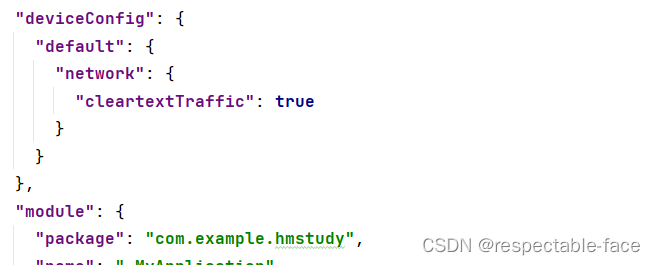
 "deviceConfig": {
    "default": {
      "network": {
        "cleartextTraffic": true
      }
    }
},边栏推荐
- Can we use function pointers in go- Can we have function pointers in Go?
- Rotation vector (rotation matrix) and Euler angle
- 3632. Binary sum
- Wow, it's so rich.
- The upper and lower lines of the shell are merged into one line
- Lotus windowsost manually triggers space-time proof calculation
- Orcad Schematic常用功能
- 太美的承诺因为太年轻
- lotus v1.16.0-rc2 Calibration-net
- Event registration Apache pulsar x kubesphere online meetup hot registration
猜你喜欢

Weimeisi new energy rushes to the scientific innovation board: the annual revenue is 1.7 billion, and the book value of accounts receivable is nearly 400million

【pytest】修改allure报告中的logo及参数化

How is the network connected?

活动报名|Apache Pulsar x KubeSphere 在线 Meetup 火热报名中
弱大数定理的意义与证明

TEMPEST HDMI泄漏接收 1
正版photoshop2022购买体验经历分享

Loopholes in the missed scanning system of Lvmeng and its repair scheme
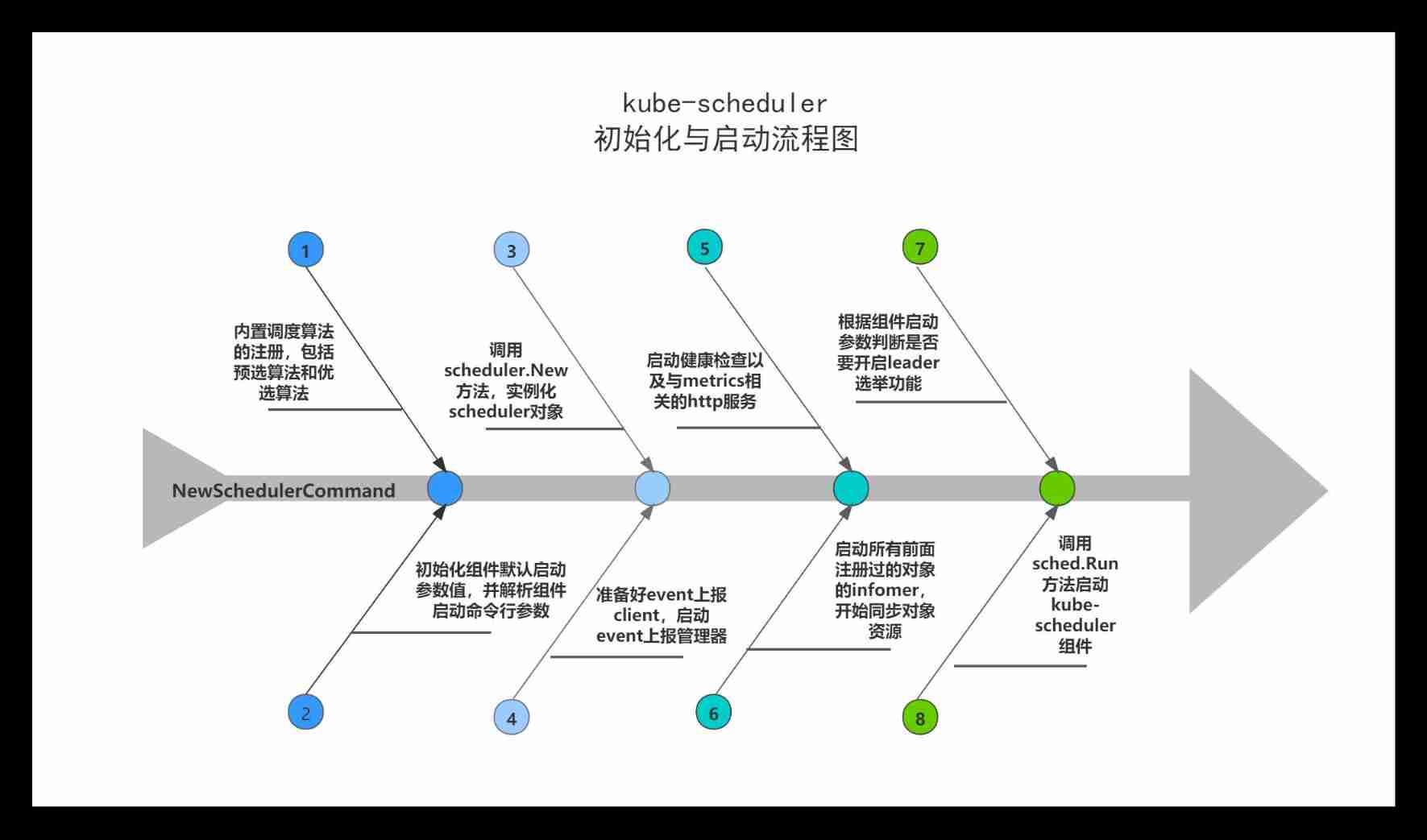
Kube scheduler source code analysis (1) - initialization and startup analysis

Debug through yalc before releasing NPM package
随机推荐
Make fertilizer Safi from crop residues locally to increase yield by 30% and improve soil
Event registration | Apache pulsar x kubesphere online meetup is coming
LTpowerCAD II和LTpowerPlanner III
ES can finally find brother Wukong!
Escape analysis of 982 golang
高考志愿填报,为啥专业最后考虑?
[XXL job] the pond is green and the wind is warm. I remember that Yu Zhen first met
TEMPEST HDMI泄漏接收 1
Chang Wei (variables and constants) is easy to understand
Icon already includes gloss effects
Modify the default log level
Kube scheduler source code analysis (1) - initialization and startup analysis
【UVM入门 ===> Episode_9 】~ 寄存器模型、寄存器模型的集成、寄存器模型的常规方法、寄存器模型的应用场景
Event registration Apache pulsar x kubesphere online meetup hot registration
[Introduction aux uvm== > Episode 9] ~ modèle de registre, intégration du modèle de registre, méthode conventionnelle du modèle de registre, scénario d'application du modèle de registre
lotus windowPoSt 手动触发时空证明计算
Reading sensor data with GPIO analog SPI interface
Wow, it's so rich.
Efficient exploration | an application practice of ES geographical location query
New research shows that human ability to make decisions and process information does not decline until the age of 60