当前位置:网站首页>ASP. Net core Middleware
ASP. Net core Middleware
2022-06-30 15:41:00 【zhoubangbang1】
Middleware is a kind of software assembled into the application pipeline to handle requests and responses . Each component :
1. Choose whether to pass the request to the next component in the pipeline .
2. Work can be performed before and after the next component in the pipeline .
The request delegate is used to generate the request pipeline . Request delegates to process each HTTP request .
Use Run 、Map and Use Extend the method to configure the request delegate . A separate request delegate can be specified as an anonymous method in parallel ( It's called middleware ), Or define it in a reusable class . These reusable classes and parallel anonymous methods are called middleware , Also called middleware component . Each middleware component in the request pipeline is responsible for calling the next component in the pipeline , Or short-circuit the pipe . When the middleware is short circuited , It is called “ Terminal Middleware ” , Because it prevents the middleware from further processing requests .
Using middleware #
ASP.NET Core Middleware model is that we can develop our own middleware quickly , Complete the extension of the application , Let's start with a simple example of middleware development .
Run:
effect : first Run Delegate terminated pipeline .
public class Startup
{
    public void Configure(IApplicationBuilder app)
    {
        app.Run(async context =>
        {
            await context.Response.WriteAsync("Hello, World!");
        });
    }
}
Running results :

Such results do not seem to clearly show Run The role of , Next, let's introduce a simple example :
public void Configure(IApplicationBuilder app, IHostingEnvironment env)
{

                app.Run(async context =>
                {
                    await context.Response.WriteAsync("Hello, .Net");
                });
                app.Run(async context =>
                {
                    await context.Response.WriteAsync("Hello, Python!");
                });


}
Running results :

From these two simple pieces of code, we can see , Use Run Method to run a delegate , It is a simple middleware , It intercepts all requests , Return a piece of text in response . also Run The Commission terminated the operation of the pipeline , It is also called terminal middleware .
Use
Use Links multiple request delegates together .next Parameter represents the next delegate in the pipeline . Can be called by not calling next The parameter short-circuited the pipe . Operations can usually be performed before or after the next delegate , This is shown in the following example :
public void Configure(IApplicationBuilder app, IHostingEnvironment env)
{

	app.Use(async (context, next) =>
	{
		// Do work that doesn't write to the Response.
		await context.Response.WriteAsync("before Use1 \r\n");
		//await next.Invoke();
		await context.Response.WriteAsync("After Use1 \r\n");
		// Do logging or other work that doesn't write to the Response.
	});

	app.Run(async context =>
	{
		await context.Response.WriteAsync("Hello from 2nd delegate.\r\n");
	});

}
Code execution result :

Did you think the result would be like this ? Would you say Run Is the termination Middleware , Why is the corresponding content not displayed ? Let's think about it ....
I believe everyone should have guessed , We were introducing it before Use When I said
Use Links multiple request delegates together .next Parameter represents the next delegate in the pipeline . Can be called by not calling next The parameter short-circuited the pipe .
Let's look at the next example :
 public void Configure(IApplicationBuilder app, IHostingEnvironment env)
{


	app.Use(async (context, next) =>
	{
		// Do work that doesn't write to the Response.
		await context.Response.WriteAsync("before Use1 \r\n");
		await next.Invoke();

	});
	app.Run(async context =>
	{
		await context.Response.WriteAsync("Hello from 2nd delegate.\r\n");
	});

}
Let's guess what it will be ? I believe everyone can get , You won't paste the results , You can experiment it yourself
Middleware sequence
ASP.NET Core The request pipeline contains a series of request delegates , In turn, calls . The following diagram illustrates this concept . Execute along the black arrow .

towards Startup.Configure Method the order in which middleware components are added defines the order in which these components are called for requests , And the reverse order of responses . This sequence is important for security 、 Performance and functionality are critical .
Next let's look at the example :
 public void Configure(IApplicationBuilder app, IHostingEnvironment env)
{


	app.Use(async (context, next) =>
	{
		// Do work that doesn't write to the Response.
		await context.Response.WriteAsync("before Use1 \r\n");
		await next.Invoke();
		await context.Response.WriteAsync("After Use1 \r\n");

	});
	app.Run(async context =>
	{
		await context.Response.WriteAsync("Hello from 2nd delegate.\r\n");
	});

}
Running results :

The execution sequence of middleware may not be well understood through the above experiments , Let's take another example :
public void Configure(IApplicationBuilder app, IHostingEnvironment env)
{

   app.Use(async (context, next) =>
	{
		// Do work that doesn't write to the Response.
		await context.Response.WriteAsync("before Use \r\n");
		await next.Invoke();
		await context.Response.WriteAsync("After Use \r\n");
		// Do logging or other work that doesn't write to the Response.
	});
	app.Use(async (context, next) =>
	{
		// Do work that doesn't write to the Response.
		await context.Response.WriteAsync("before Use1 \r\n");
		await next.Invoke();
		await context.Response.WriteAsync("After Use1 \r\n");

	});
	app.Run(async context =>
	{
		await context.Response.WriteAsync("Hello from 2nd delegate.\r\n");
	});

}
Running results :
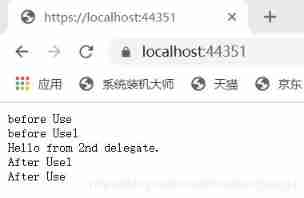
Through the experimental comparison of the two , We can find out , The running sequence of middleware is clockwise , Middleware ,next The previous one is executed from top to bottom according to the sorting order of middleware , stay next The subsequent code is executed in the reverse order of the middleware .
Customize ASP.NET Core middleware
Middleware is usually encapsulated in a class , And use extended methods to expose .

Middleware delegates are moved to classes :
stay Middlewares Created in RequestMiddlewareExtensions class :
public class RequestTestMiddleware
{
	private readonly RequestDelegate _next;
	public RequestTestMiddleware(RequestDelegate next)
	{
		_next = next;
	}
	public async Task InvokeAsync(HttpContext context)
	{

		await context.Response.WriteAsync("start RequestTestMiddleware  \r\n");

		await _next(context);
		await context.Response.WriteAsync("end  RequestTestMiddleware \r\n");
	}
}
Insert the middleware as follows :
 public void Configure(IApplicationBuilder app, IHostingEnvironment env)
{
	// app.UseRequestCulture();
	app.UseMiddleware<RequestTestMiddleware>();
	app.Use(async (context, next) =>
	{
		// Do work that doesn't write to the Response.
		await context.Response.WriteAsync("before Use \r\n");
		await next.Invoke();
		await context.Response.WriteAsync("After Use \r\n");
		// Do logging or other work that doesn't write to the Response.
	});

	app.Use(async (context, next) =>
	{
		// Do work that doesn't write to the Response.
		await context.Response.WriteAsync("before Use1 \r\n");
		await next.Invoke();
		await context.Response.WriteAsync("After Use1 \r\n");
		// Do logging or other work that doesn't write to the Response.
	});

	app.Run(async context =>
	{
		await context.Response.WriteAsync("Hello from 2nd delegate.\r\n");
	});

}
Execution results :
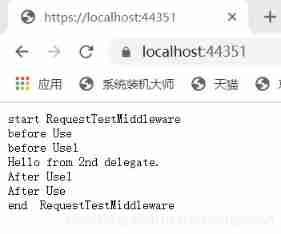
Expose middleware through extension methods :
Write extension methods RequestMiddlewareExtensions
public static  class RequestMiddlewareExtensions
{
	public static IApplicationBuilder UseRequestCulture(
		this IApplicationBuilder builder)
	{
		return builder.UseMiddleware<RequestTestMiddleware>();
	}
}
stay Startup Class to create a request processing pipeline for the application :
 public void Configure(IApplicationBuilder app, IHostingEnvironment env)
{
	app.UseRequestCulture();
	//app.UseMiddleware<RequestTestMiddleware>();
	app.Use(async (context, next) =>
	{
		// Do work that doesn't write to the Response.
		await context.Response.WriteAsync("before Use \r\n");
		await next.Invoke();
		await context.Response.WriteAsync("After Use \r\n");
		// Do logging or other work that doesn't write to the Response.
	});

	app.Use(async (context, next) =>
	{
		// Do work that doesn't write to the Response.
		await context.Response.WriteAsync("before Use1 \r\n");
		await next.Invoke();
		await context.Response.WriteAsync("After Use1 \r\n");
		// Do logging or other work that doesn't write to the Response.
	});

	app.Run(async context =>
	{
		await context.Response.WriteAsync("Hello from 2nd delegate.\r\n");
	});

}
The implementation result is the same as above .
This is my wechat public number , I hope to grow up with you , I will keep it updated once a day or so .

边栏推荐
- 1030 travel plan (30 points)
- Don't fight for big companies
- Infrastructure is code. What are you talking about?
- Oracle中的With As 子查询
- 001 data type [basic]
- Container common commands
- A. Theatre Square(codefore)
- 爬虫(1) - 爬虫基础入门理论篇
- 比亚迪越来越像华为?
- Flask-SQLAlchemy----sqlalchemy. exc.InvalidRequestError: SQL expression, column, or mapped e---ORM(9)
猜你喜欢

Oculus quest2 | unity configures the oculus quest2 development environment and packages an application for real machine testing

C language foundation - pointer array - initialization method & constant pointer array, pointer constant array
The principle of fluent 2 rendering and how to realize video rendering

RTC monthly tabloid programming challenge ended successfully in June; Review of the first anniversary of sound network's listing

Google Play 索引表

How should we understand the variability of architecture design?

深入理解.Net中的线程同步之构造模式(二)内核模式1.内核模式构造物Event事件

Go-Micro安装

Xiao Sha's pain (thinking problem)

The sound network has fully opened the real-time transmission network sd-rtn, which has been free of network wide accidents for seven years - this is FPA!
随机推荐
Pointer understanding
4.6 floating point number
国债逆回购在哪个平台上买比较安全?
Message queue ten questions
Guada digital analog
from Crypto. Cipher import AES could not find the solution record with module error
Teach you a learning method to quickly master knowledge
map reduce案例超详细讲解
Infrastructure is code. What are you talking about?
剑指 Offer II 080. 含有 k 个元素的组合 回溯
深入理解.Net中的线程同步之构造模式(二)内核模式1.内核模式构造物Event事件
ADB devices cannot detect the problem of Xiaomi note 3
Google Play 索引表
B. Moamen and k-subarrays (codeforce+ binary search)
Scattered knowledge of C language (unfinished)
iMeta | 叶茂/时玉等综述环境微生物组中胞内与胞外基因的动态穿梭与生态功能...
Openresty built in variable
Data governance Market: Yixin Huachen faces left, Huaao data faces right
Chapter III installation and use of jupyter
How to do a good job in high concurrency system design? I have summarized three points