当前位置:网站首页>Getting started with D3D calculation shaders
Getting started with D3D calculation shaders
2022-07-26 00:37:00 【Freak587】
1. Understanding of computational shaders :
The computational shader is the same as his name , Is the shader for calculation . But its use is not limited to graphic operations , It can also perform general operations . The computing power of computing shaders is very strong , This makes in gpu After general operation, it is transmitted back to cpu, Direct than cpu It takes less time to calculate in .
The calculation shader does not belong to the rendering pipeline , But you can read at any stage .

2. Thread groups and threads
Compute shader utilization gpu Parallel processors to enable multithreaded Computing , So as to achieve high-performance computing . A thread group contains multiple threads , It is better to have multiple processors deal with two or more thread groups at the same time , It will not cause computing congestion when there are thread groups waiting for resources .
Each thread group has shared memory for threads to access , But thread groups cannot access each other .
One warp Corresponding 32 Threads ,ATI Corresponding to wavement Corresponding 64 Threads .
m_pd3dImmediateContext->Dispatch(32, 32, 1);// Express xyz The thread group of the three dimensions is 32/32/1
Suppose the mesh shown above is a texture , Then its thread is 2x2x1, The thread group is 3x2x1, So this bitmap is 6x4x1 The pixel size of .
3.HLSL Code understanding
Texture2D g_TexA : register(t0);
Texture2D g_TexB : register(t1);

RWTexture2D<float4> g_Output : register(u0);

[numthreads(16, 16, 1)]
void CS( uint3 DTid : SV_DispatchThreadID )
{
    g_Output[DTid.xy] = g_TexA[DTid.xy] * g_TexB[DTid.xy];
}
Texture2D Indicates a texture , It contains RGBA, Coordinate information, etc , Equivalent to Texture2D<unorm float4> , This is because Texture2D Data format is omitted .
RWTexture2D<float4> Can read but write , Data types cannot be omitted like that .u0 Indicates unordered access to 0 A register .
[numthreads(16, 16, 1)] Set the thread of a thread group to 16x16x1 Number of .
SV_DispatchThreadID The thread is in 3D Location of grid (xyz).
g_TexA[DTid.xy] * g_TexB[DTid.xy] Take from xy Multiply the texture data components of the position .
4.C++ Code
Main process :
Initialization part :
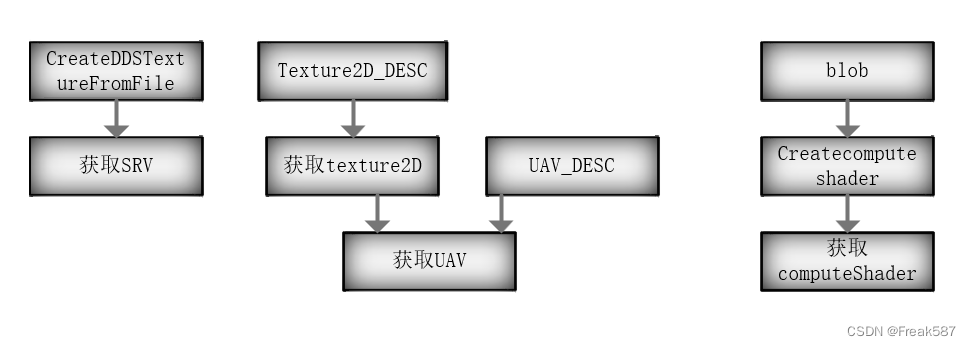
UAV unorderAccessView Disorderly read and write textures
SRV ShaderResourceView Read the texture
| The theme | explain |
|---|---|
The constant buffer contains shader constant data . The advantage is that data persists , And can be determined by any GPU Shader access , Until you need to change the data . | |
Vertex buffer saves the data of vertex list . The data of each vertex may contain positions 、 Color 、 Normal vector 、 Texture coordinates, etc . The index buffer indexes integers ( Offset ) Save to vertex buffer , And used to define and render objects that form part of a complete vertex list . | |
Shader resource views typically surround textures in a way that allows shaders to access them . Unordered access views provide similar functionality , But it supports reading and writing to textures in any order ( Or other resources ). | |
Sampling is the process of reading input values in textures or other resources . “ Sampler ” Is any object read from a resource . | |
Render target enables the scene to be rendered to the temporary intermediate buffer , Instead of rendering to the background buffer to be rendered to the screen . Use this feature , Renderable complex scenes can be used as reflection textures or for other purposes in the graphics pipeline , It can also be used to add other pixel shader effects to the scene before rendering . | |
The depth template view provides formats and buffers for storing depth and template information . The depth buffer is used to eliminate when it is occluded by a closer object , Draw pixels invisible to the viewer . The template buffer can be used to eliminate all drawings outside the defined shape . | |
Flow output view supports vertex 、 Vertex information attached to segmentation and geometry shaders is streamed back to the application for further use . for example , Objects that have been distorted by these shaders can be written back to the application , So as to provide more accurate input for physical engine or other engines . But in practice , The flow output view is a feature not often used in graphics pipelines . | |
Use raster to order views , Some depth buffer restrictions can be eliminated , In particular, multiple textures containing transparency are applied to the same pixel . |
Reference resources : View - UWP applications | Microsoft Docs
The pipeline part :

The first four stages belong to the calculation shader stage . final api Is to output the synthesized texture to a file .
Code :
 HR(CreateDDSTextureFromFile(m_pd3dDevice.Get(), L"..\\Texture\\flare.dds",
        nullptr, m_pTextureInputA.GetAddressOf()));
    HR(CreateDDSTextureFromFile(m_pd3dDevice.Get(), L"..\\Texture\\flarealpha.dds",
        nullptr, m_pTextureInputB.GetAddressOf()));

    //  Create for UAV The texture of , Must be in uncompressed format
    D3D11_TEXTURE2D_DESC texDesc;
    texDesc.Width = 512;
    texDesc.Height = 512;
    texDesc.MipLevels = 1;
    texDesc.ArraySize = 1;
    texDesc.Format = DXGI_FORMAT_R32G32B32A32_FLOAT;
    texDesc.SampleDesc.Count = 1;
    texDesc.SampleDesc.Quality = 0;
    texDesc.Usage = D3D11_USAGE_DEFAULT;
    texDesc.BindFlags = D3D11_BIND_SHADER_RESOURCE |
        D3D11_BIND_UNORDERED_ACCESS;
    texDesc.CPUAccessFlags = 0;
    texDesc.MiscFlags = 0;

    HR(m_pd3dDevice->CreateTexture2D(&texDesc, nullptr, m_pTextureOutputA.GetAddressOf()));

    texDesc.Format = DXGI_FORMAT_R8G8B8A8_UNORM;
    HR(m_pd3dDevice->CreateTexture2D(&texDesc, nullptr, m_pTextureOutputB.GetAddressOf()));

    //  Create an unordered access view
    D3D11_UNORDERED_ACCESS_VIEW_DESC uavDesc;
    uavDesc.Format = DXGI_FORMAT_R32G32B32A32_FLOAT;
    uavDesc.ViewDimension = D3D11_UAV_DIMENSION_TEXTURE2D;
    uavDesc.Texture2D.MipSlice = 0;
    HR(m_pd3dDevice->CreateUnorderedAccessView(m_pTextureOutputA.Get(), &uavDesc,
        m_pTextureOutputA_UAV.GetAddressOf()));

    uavDesc.Format = DXGI_FORMAT_R8G8B8A8_UNORM;
    HR(m_pd3dDevice->CreateUnorderedAccessView(m_pTextureOutputB.Get(), &uavDesc,
        m_pTextureOutputB_UAV.GetAddressOf()));

    //  Create the compute shader
    ComPtr<ID3DBlob> blob;
    HR(CreateShaderFromFile(L"HLSL\\TextureMul_R32G32B32A32_CS.cso",
        L"HLSL\\TextureMul_R32G32B32A32_CS.hlsl", "CS", "cs_5_0", blob.GetAddressOf()));
    HR(m_pd3dDevice->CreateComputeShader(blob->GetBufferPointer(), blob->GetBufferSize(), nullptr, m_pTextureMul_R32G32B32A32_CS.GetAddressOf()));

    HR(CreateShaderFromFile(L"HLSL\\TextureMul_R8G8B8A8_CS.cso",
        L"HLSL\\TextureMul_R8G8B8A8_CS.hlsl", "CS", "cs_5_0", blob.GetAddressOf()));
    HR(m_pd3dDevice->CreateComputeShader(blob->GetBufferPointer(), blob->GetBufferSize(), nullptr, m_pTextureMul_R8G8B8A8_CS.GetAddressOf()));
    assert(m_pd3dImmediateContext);

//#if defined(DEBUG) | defined(_DEBUG)
//	ComPtr<IDXGraphicsAnalysis> graphicsAnalysis;
//	HR(DXGIGetDebugInterface1(0, __uuidof(graphicsAnalysis.Get()), reinterpret_cast<void**>(graphicsAnalysis.GetAddressOf())));
//	graphicsAnalysis->BeginCapture();
//#endif

    m_pd3dImmediateContext->CSSetShaderResources(0, 1, m_pTextureInputA.GetAddressOf());
    m_pd3dImmediateContext->CSSetShaderResources(1, 1, m_pTextureInputB.GetAddressOf());

    // DXGI Format: DXGI_FORMAT_R32G32B32A32_FLOAT
    // Pixel Format: A32B32G32R32
    m_pd3dImmediateContext->CSSetShader(m_pTextureMul_R32G32B32A32_CS.Get(), nullptr, 0);
    m_pd3dImmediateContext->CSSetUnorderedAccessViews(0, 1, m_pTextureOutputA_UAV.GetAddressOf(), nullptr);
    m_pd3dImmediateContext->Dispatch(32, 32, 1);

    // DXGI Format: DXGI_FORMAT_R8G8B8A8_SNORM
    // Pixel Format: A8B8G8R8
    m_pd3dImmediateContext->CSSetShader(m_pTextureMul_R8G8B8A8_CS.Get(), nullptr, 0);
    m_pd3dImmediateContext->CSSetUnorderedAccessViews(0, 1, m_pTextureOutputB_UAV.GetAddressOf(), nullptr);
    m_pd3dImmediateContext->Dispatch(32, 32, 1);


//#if defined(DEBUG) | defined(_DEBUG)
//	graphicsAnalysis->EndCapture();
//#endif

    HR(SaveDDSTextureToFile(m_pd3dImmediateContext.Get(), m_pTextureOutputA.Get(), L"..\\Texture\\flareoutputA.dds"));
    HR(SaveDDSTextureToFile(m_pd3dImmediateContext.Get(), m_pTextureOutputB.Get(), L"..\\Texture\\flareoutputB.dds"));

    MessageBox(nullptr, L" Please open the Texture Folder observation output file flareoutputA.dds and flareoutputB.dds", L" End of run ", MB_OK);
6. data format
C++ Corresponding HLSL in RWTexture2D<T> Data format
| DXGI_FORMAT | HLSL type |
|---|---|
| DXGI_FORMAT_R32_FLOAT | float |
| DXGI_FORMAT_R32G32_FLOAT | float2 |
| DXGI_FORMAT_R32G32B32A32_FLOAT | float4 |
| DXGI_FORMAT_R32_UINT | uint |
| DXGI_FORMAT_R32G32_UINT | uint2 |
| DXGI_FORMAT_R32G32B32A32_UINT | uint4 |
| DXGI_FORMAT_R32_SINT | int |
| DXGI_FORMAT_R32G32_SINT | int2 |
| DXGI_FORMAT_R32G32B32A32_SINT | int4 |
| DXGI_FORMAT_R16G16B16A16_FLOAT | float4 |
| DXGI_FORMAT_R8G8B8A8_UNORM | unorm float4 |
| DXGI_FORMAT_R8G8B8A8_SNORM | snorm float4 |
Reference article :DirectX11 With Windows SDK--26 Compute Shader : introduction - X_Jun - Blog Garden (cnblogs.com)
边栏推荐
- [untitled] how to realize pluggable configuration?
- Nodejs learning
- Binary representation -- power of 2
- 【Redis】① Redis 的介绍、Redis 的安装
- Prefix XOR sum, XOR difference array
- Research on text classification of e-commerce comments based on mffmb
- 寻找命令find和locate
- Nodejs starts mqtt service with an error schemaerror: expected 'schema' to be an object or Boolean problem solving
- Redis(八) - Redis企业实战之优惠券秒杀
- What is Web3 game?
猜你喜欢

Private cloud disk setup

你还在掐表算时间复杂度?

数据流通交易场景下数据质量综合管理体系与技术框架研究

How to use 120 lines of code to realize an interactive and complete drag and drop upload component?

How to open the Internet and ask friends to play together?

The way to understand JS: six common inheritance methods of JS

Pikachu靶机通关和源码分析

Sorting out the encapsulation classes of control elements in appium

Modeling and simulation analysis of online medical crowdfunding communication based on SEIR model

攻防世界web题-favorit_number
随机推荐
Verilog grammar basics HDL bits training 05
快速入门顺序表链表
找出单身狗(力扣260)
8个小妙招-数据库性能优化,yyds~
8个小妙招调整数据库性能优化,yyds
分布式事务和Seata的AT模式原理
【无标题】如何实现可插拔配置?
Day06 MySql知识点总结
向左旋转k个字符串(细节)
【oops-framework】界面管理
你还在掐表算时间复杂度?
Study on gene targeting preparation of tissue plasminogen activator loaded on albumin nano ultrasonic microbubbles
融合聚类信息的技术主题图可视化方法研究
Redis killed twelve questions. How many questions can you carry?
Four characteristics and isolation level of MySQL transactions
MySQL - master-slave replication
Hefei approved in advance
[redis] ② redis general command; Why is redis so fast?; Redis data type
mysql事务的引入
The way to understand JS: six common inheritance methods of JS