当前位置:网站首页>pdf. JS introduction
pdf. JS introduction
2022-07-26 01:45:00 【Brick dog - Xiaoqiang】
Project background
Load and display... In the web page PDF Documents are the most common business requirements . Most browsers now come with pdf Preview function , But for every browser pdf Loaders are different , Toolbars cannot be customized , To unify different browsers pdf Consistency of Preview , And add some custom functions , We use pdf.js To achieve pdf Preview of .
pdf.js It's a very good pdf Parsing tool , In fact, our Firefox browser kernel comes with pdf The preview parser is pdf.js This parser , We put pdf Open in Firefox and press F12 You can see the content of the source code .

The following is the final effect of the project , Only the print button is left in the toolbar on the right , And trigger the events required by the project when printing , Prevent copying and downloading pdf.

pdf.js Use
Official website address :http://mozilla.github.io/pdf.js, Download the stable version

Project structure

Project use
Deploy the project to nginx perhaps IIS, Access... Directly in the browser viewer.html You can preview our pdf, How to use it is as follows ,file For what we want to preview pdf File address .
127.0.0.1/pdfjs-2.14.305-dist/web/viewer.html?file=/pdfjs-2.14.305-dist/web/compressed.tracemonkey-pldi-09.pdf
Project customization
We need to remove many unnecessary buttons from the toolbar on the right , And edit the button event , We can use PDFViewerApplication Object .
window.onload = function () {
    PDFViewerApplication.appConfig.toolbar.presentationModeButton.classList.add("hidden");
    PDFViewerApplication.appConfig.toolbar.openFile.classList.add("hidden");
    PDFViewerApplication.appConfig.toolbar.download.classList.add("hidden");
    PDFViewerApplication.appConfig.toolbar.viewBookmark.classList.add("hidden");
}
function onbeforeprint() {
    var url = GetQuery1("file");
    var urlParams = parseUrlParams(url);

    $.ajax({
        type: "get",
        url: "/PrintCount?sCardNos=" + urlParams.sCardNos,
        success: function (data) { }
    });
}
window.addEventListener("beforeprint", onbeforeprint);
Project deployment
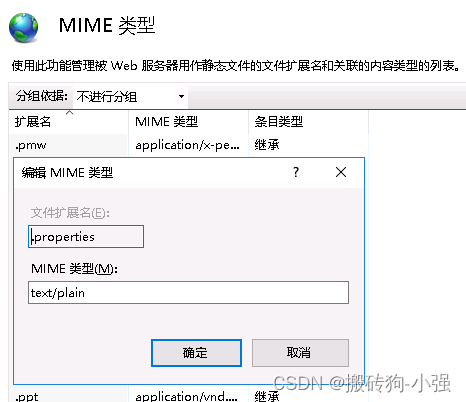
IIS Deployment needs to be increased MIME type .properties text/plain
other
Prohibit automatic printing during preview , stay viewer.js Method _updateFromSandbox Comment out the following code .

边栏推荐
- “蔚来杯“2022牛客暑期多校训练营2 D.[Link with Game Glitch] 二分答案+SPFA判环
- 言语理解中心理解总结
- Recommend a super good UI automation tool: uiautomator2!
- 6 + 1 skills of Software Test Engineer
- Kubernetes pod start process
- 华为无线设备WDS配置命令
- What should I do when my blog is attacked by hackers?
- 推荐⼀款超好⽤的UI⾃动化⼯具: UiAutomator2!
- "Weilai Cup" 2022 Niuke summer multi school training camp 2 g.[link with monotonic subsequence] block structure
- 大佬们, flinksql datahub源表,源表有字段 timestamp 16位, 写入Ora
猜你喜欢

pt-onnx-ncnn转换的问题记录(接yolov5训练)

【Verilog数字系统设计(夏宇闻)4-----Verilog语法的基本概念2】

What is a test case? How to design?

AutoCAD -- Method of calculating area

Analysis of zeromq

Handler message mechanism - FWK layer

Silicon Valley classroom - official account cloud on demand Silicon Valley classroom microservice project practical notes

NFT market also began to diversify

推荐系统-协同过滤在Spark中的实现

PTGui Pro12垂直线纠正
随机推荐
元素和小于等于阈值的正方形的最大边长(来源:力扣(LeetCode))
我mysql to mysql数据表同步,代码上只有写在第一个顺序上的生效 其余的不生效,这个可能是
Detailed explanation of redis data structure, combined with books
ABC find 4-cycle (pigeon nest theorem)
Kubernetes pod start process
大咖观点+500强案例,软件团队应该这样提升研发效能
Mysql_ Note2
Y77. Chapter IV Prometheus' monitoring system and practice -- Prometheus' service discovery mechanism (VIII)
How to modify Oracle functions?
What is cross site scripting (XSS)?
推荐系统-协同过滤在Spark中的实现
Test questions and answers of the latest Beijing Construction eight (materialman) mock examination in 2022
flink sql 如何配置打印insert实参日志呢
Format JS code and debug JS code
Analysis of zeromq
图像批处理高斯滤波降噪+峰值信噪比计算
leetcode/只出现一次的数字
【深入浅出玩转FPGA学习11----Testbench书写技巧2】
2022 love analysis ― bank digitalization practice report
CPU的三种模式