当前位置:网站首页>sudo rosdep init Error ROS安装问题解决方案
sudo rosdep init Error ROS安装问题解决方案
2022-07-25 14:19:00 【这世界比瞳孔还漆黑】
问题简述
操作系统:Ubuntu18.04
ROS版本:melodic
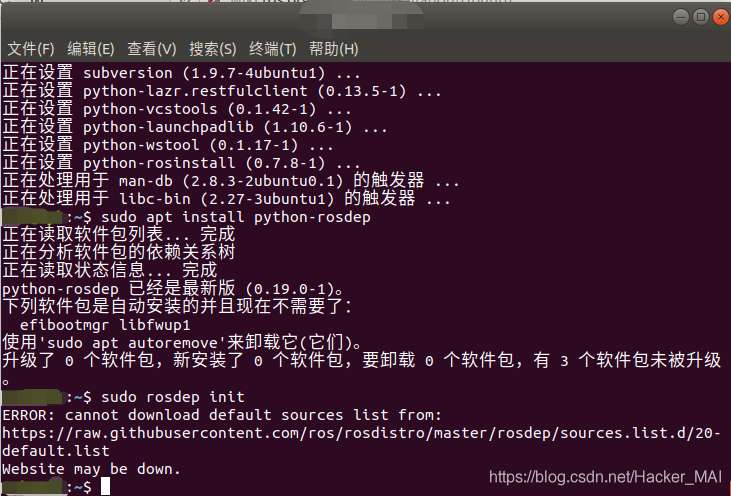
笔者在很长一段时间里,由于自身电脑问题,只能通过VMWare软件安装Ubuntu操作系统的虚拟机进行ROS相关的学习与应用,并偶然并多次的发现安装完系统后,进行ROS安装过程中,跟着官方安装教程执行到下面贴出的命令行时,出现了如下图所示的错误提示:
sudo rosdep init
ERROR: cannot download default sources list from:
https://raw.githubusercontent.com/ros/rosdistro/master/rosdep/sources.list.d/20-default.list
Website may be down.
于是试着通过浏览器访问error中提及的网址:浏览器启动——!!!
发现网址都无法打开,于是尝试以下代码,ping一下这个网址
ping raw.githubusercontent.com
却发现其实通过终端ping的方式,我们是可以访问上述网页地址的
那么究竟error中返回的地址到底有什么内容呢,于是从一台安装好ROS的电脑上,我们访问了这个error中提及的网址,从下图可以看出这个网址页面的一些信息。
于是在安装好ROS的电脑上翻看了相关文件,发现在/etc/ros/rosdep/sources.list.d文件目录下有一个名称为20-default.list文件,打开显示如下,通过对比发现,该文档的内容与error返回网址的内容一致,于是笔者猜测sudo rosdep init为链接上述网址,下载相关文件(20-default.list)到上述目录中,并且通过rosdep update访问该文件中的相关地址,下载相关文件。

解决方案
解决方案0x01
如果你正遇到这个问题,那么第一个解决方案就是,更换网络,你可以尝试使用你的手机热点,然后继续尝试以下指令,如果你成功了,那么你可以结束本文章的阅读,当然欢迎你继续阅读。
sudo rosdep init
rosdep update
解决方案0x02
该解决方案是针对由于以下两个无法正常访问,但可以ping通,于是修改hosts文件,加入以下两个网址的IP地址实现访问。
sudo gedit /etc/hosts

199.232.28.133 raw.githubusercontent.com
151.101.228.133 raw.github.com
修改完成后,在终端执行
sudo rosdep init
rosdep update
解决方案0x03
如果使用解决方案0x01仍然无法解决你的问题,那么你可以尝试以下步骤,此解决方案的原理是基于手动完成sudo rosdep init的步骤,然后再通过rosdep update完成整个方案的实施。
步骤一:首先打开一个终端,执行以下指令创建root并切换至root用户
sudo passwd    //接着提示输入UNIX密码,输入你的用户密码即可
sudo su //或者su root 然后输入密码切换至root用户
sudo mkdir -p /etc/ros/rosdep/sources.list.d
cd /etc/ros/rosdep/sources.list.d
sudo gedit 20-default.list
步骤二:将以下内容复制进20-default.list文件中
# os-specific listings first
yaml https://raw.githubusercontent.com/ros/rosdistro/master/rosdep/osx-homebrew.yaml osx

# generic
yaml https://raw.githubusercontent.com/ros/rosdistro/master/rosdep/base.yaml
yaml https://raw.githubusercontent.com/ros/rosdistro/master/rosdep/python.yaml
yaml https://raw.githubusercontent.com/ros/rosdistro/master/rosdep/ruby.yaml
gbpdistro https://raw.githubusercontent.com/ros/rosdistro/master/releases/fuerte.yaml fuerte

# newer distributions (Groovy, Hydro, ...) must not be listed anymore, they are being fetched from the rosdistro index.yaml instead
步骤三:执行以下指令
exit //退出root用户
rosdep update
如果你成功了,那么你可以结束本文章的阅读,当然欢迎你继续阅读。
但也许你会遇到如下图所示的问题,发现20-default.list中的地址都无法连接,此时你可以将20-default.list中的内容替换如下,即将raw.githubusercontent.com替换为raw.github.com后保存文件,在终端中执行
rosdep update
如果你成功了,那么你可以结束本文章的阅读,当然欢迎你继续阅读
# os-specific listings first
yaml https://raw.github.com/ros/rosdistro/master/rosdep/osx-homebrew.yaml osx

# generic
yaml https://raw.github.com/ros/rosdistro/master/rosdep/base.yaml
yaml https://raw.github.com/ros/rosdistro/master/rosdep/python.yaml
yaml https://raw.github.com/ros/rosdistro/master/rosdep/ruby.yaml
gbpdistro https://raw.github.com/ros/rosdistro/master/releases/fuerte.yaml fuerte

# newer distributions (Groovy, Hydro, ...) must not be listed anymore, they are being fetched from the rosdistro index.yaml instead
步骤四:番外篇
也许执行完上述步骤,你在终端中收到的信息,仍然是连接被拒绝,或者时间超出导致中断,此时你可以执行以下指令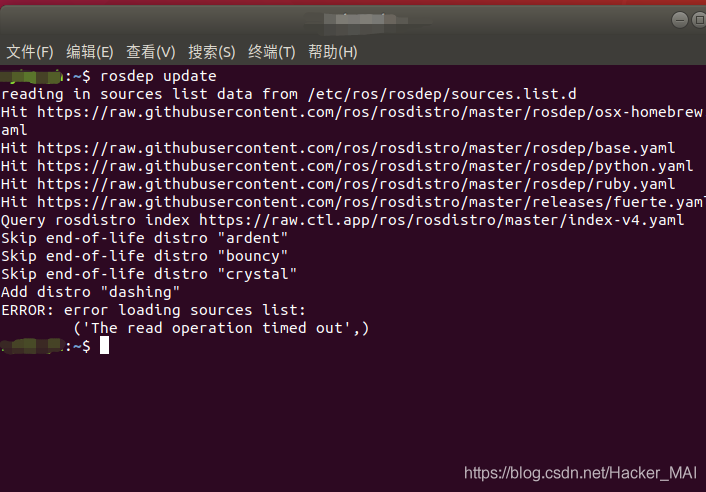
sudo su
sudo gedit /etc/hosts
在hosts中添加以下内容并保存,在执行完后继续rosdep update
199.232.28.133 raw.githubusercontent.com
151.101.228.133 raw.github.com
解决方案 0x04-终极篇
如果上述步骤仍然不能解决你的问题,那么可以进行这最后的步骤。
执行以下指令,
sudo rosdep init
系统提示已经存在20-default.list(于解决方案0x02创建),那么下面就将该文件删除
sudo su
cd /etc/ros/rosdep/sources.list.d
sudo rm 20-default.list
exit
移除文件后打开新的终端
sudo rosdep init
rosdep update
虚拟机网络问题
笔者在使用虚拟机安装ubuntu操作系统安装ros过程中遭遇了上述问题,完成上述各步骤后忍让出现time out的报错现象,即便是手机热点也无法解决问题,于是思考是不是虚拟机的网络配置问题。首先打开虚拟机的设置,我们可以看到虚拟机默认的网络适配器是NET模式:用于共享主机的IP地址;
步骤一:将网络适配器切换为桥接模式
如果通过上面设置面板直接设置为桥接模式后启动虚拟机,会发现虚拟机没有网络了。原因是因为虚拟机的桥接网络设置默认是自动的,但是这个自动并不智能,那么如何去更改这个设置呢,点击上方菜单栏的编辑,选择虚拟网络编辑器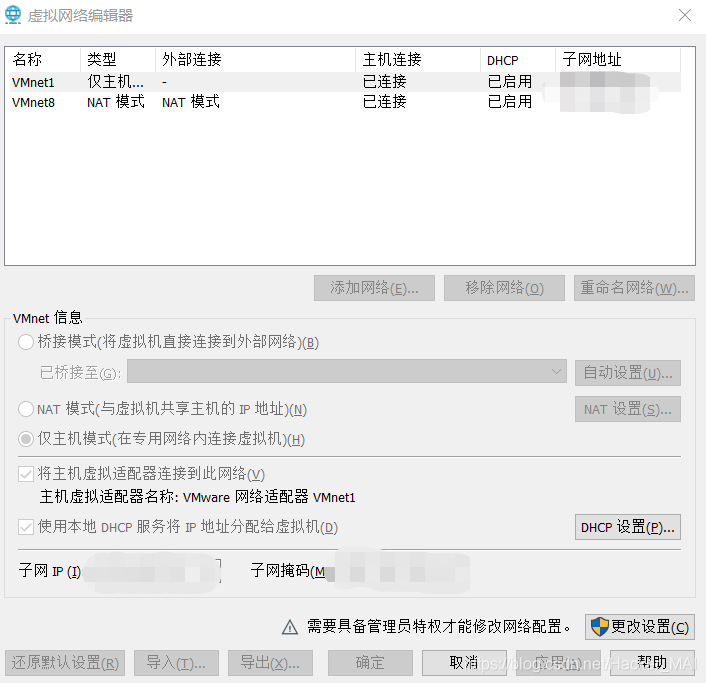
从图片上我们看不到桥接网络,点击更改设置,然后面板消失,然后在点击菜单栏的编辑,选择虚拟网络编辑器,此时可以看到桥接模式,并将下方已桥接至的自动更改为电脑网卡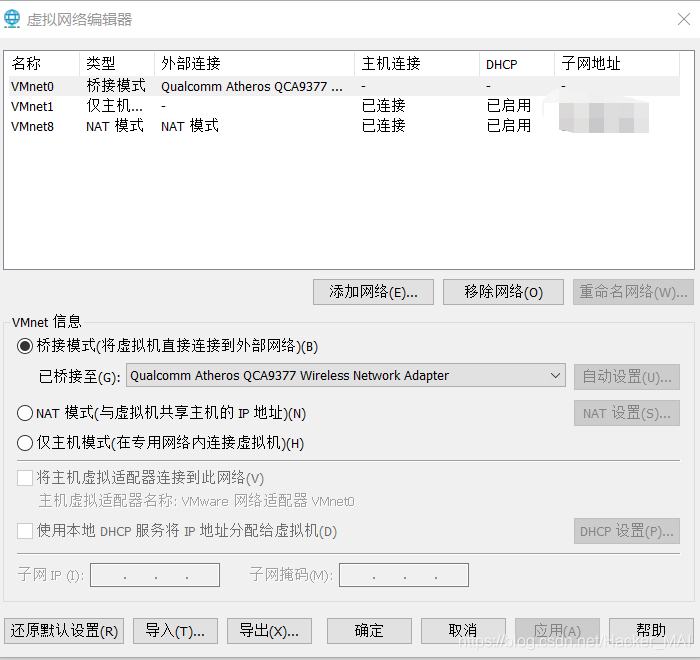
至此,虚拟机网络由NET模式转至桥接模式,此时在进行rosdep update即可解决time out问题。
写在最后
上述的解决方案目前已经经过几次验证可行,如果通过此方案,解决了你遇到的问题,方便的话,请在留言处盖章(留言),方便后面发现这篇文章的人能够相信本文的真实性与可行性。愿各位在学习与科研的道路上,一帆风顺!
边栏推荐
- [cartographer_ros] VIII: Official demo parameter configuration and effect
- 基于PaddleOCR开发uni-app离线身份证识别插件
- 数字孪生 - 认知篇
- That day, I installed a database for my sister... Just help her sort out another shortcut
- CSV文本文件导入excel的四种方法
- Business analysis report and data visualization report of CDA level1 knowledge point summary
- The practice of depth estimation self-monitoring model monodepth2 in its own data set -- single card / multi card training, reasoning, onnx transformation and quantitative index evaluation
- IDEA设置提交SVN时忽略文件配置
- Can the variable name be in Chinese? Directly fooled people
- OKA通证权益解析,参与Okaleido生态建设的不二之选
猜你喜欢
![[directory blasting tool] information collection stage: robots.txt, Yujian, dirsearch, dirb, gobuster](/img/72/d3e46a820796a48b458cd2d0a18f8f.png)
[directory blasting tool] information collection stage: robots.txt, Yujian, dirsearch, dirb, gobuster

It is predicted that 2021 will accelerate the achievement of super automation beyond RPA

IDEA报错 Failed to determine a suitable driver class

The main function of component procurement system, digital procurement helps component enterprises develop rapidly

Realize a family security and environmental monitoring system (I)

What you must know about data engineering in mlops

Doris学习笔记之与其他系统集成

Realize a family security and environmental monitoring system (II)
数字孪生 - 认知篇

机械制造业数字化新“引擎”供应链协同管理系统助力企业精细化管理迈上新台阶
随机推荐
Doris learning notes integration with other systems
opencv视频跟踪「建议收藏」
Leetcode 205. isomorphic string (2022.07.24)
Okaleido生态核心权益OKA,尽在聚变Mining模式
thymeleaf设置disabled
依迅总经理孙峰:公司已完成股改,准备IPO
What you must know about data engineering in mlops
The practice of depth estimation self-monitoring model monodepth2 in its own data set -- single card / multi card training, reasoning, onnx transformation and quantitative index evaluation
Save the image with gaussdb (for redis), and the recommended business can easily reduce the cost by 60%
A small part is exposed on one or both sides of the swiper
Tm1638 LED digital display module Arduino drive code
Why do China Construction and China Railway need this certificate? What is the reason?
网络安全应急响应技术实战指南(奇安信)
Data analysis interview records 1-5
轻松入门自然语言处理系列 12 隐马尔可夫模型
word设置粘贴仅保留文本
阿里云安装MYSQL5.7
From fish eye to look around to multi task King bombing -- a review of Valeo's classic articles on visual depth estimation (from fisheyedistancenet to omnidet) (Part I)
DVWA practice - brute force cracking
安防市场进入万亿时代,安防B2B网上商城平台精准对接深化企业发展路径