当前位置:网站首页>JSP action -- usebean action
JSP action -- usebean action
2022-07-26 08:00:00 【Super Qi】
jsp action
useBean action
a. effect
Instantiate or find within the specified domain JavaBean object : If it exists, it will be returned directly JavaBean References to objects . If it does not exist, instantiate one JavaBean Object and store it in the specified domain scope with the specified name . Used to connect to servlet and html file
b. Grammar format
<jsp:useBean
       id="beanName"
       class="package.class"
       scope="page|request|application|seesion"
       type="class_or_interface_name"
       beanName="ser_filename"
             ></jsp:useBean>


example :
<%@ page contentType="text/html;charset=UTF-8" language="java" %>
<html>
<head>
    <title>useBean label </title>
</head>
<body>
1.<jsp:useBean id="clock" type="java.io.Serializable" beanName="java.util.Date"></jsp:useBean>
2.<jsp:useBean id="clock" class="java.util.Date"></jsp:useBean>
 The current time is :<%=clock %>
</body>
</html>
c. scop Range properties


2、getProperty action
a. effect
call get Method , Read the attribute value and Convert to string Post output
b. Grammar format
<jsp:getProperty name="bName" property="pName"></jsp:getProperty>
name Property specifies JavaBean Object name , That is to say JavaBean Of id value
property Attribute specifies JavaBean The property name of the object
If JavaBean The value of an attribute of the object is null, Then read the attribute value It's a “null” String
3、setProperty action
a. effect
adopt setProperty Action settings JavaBean Property value of object
b. Grammar format
1. <jsp:setPropetty name="bName" property="pName" value="{String|<%= expression %>}"></jsp:setPropetty>
	// Use value Value represents a string or expression
2. <jsp:setProperty name="bName" property="pName" param="paraName( Form element name )"></jsp:setProperty>
	// The value of the form element used is JavaBean Attribute assignment
3. <jsp:setProperty name="bName" property="*"></jsp:setProperty>
	// wildcard (*), Assign a value to an attribute using the value of a form element with the same name

c. The application of three grammatical formats
1. <jsp:setPropetty name="bName" property="pName" value="{String|<%= expression %>}"></jsp:setPropetty>
/**Book**/
package myClass;

public class Book {

    private String bn;
    public Book() {

        super();
    }
    public String getBn() {

        return bn;
    }
    public void setBn(String bn) {

        this.bn = bn;
    }
}

/**book.jsp**/
<%@ page contentType="text/html;charset=UTF-8" language="java" %>
<html>
<head>
    <title>Title</title>
<%--    <jsp:useBean id="book" class="myClass.Book" scope="request"></jsp:useBean>--%>
</head>
<body>
<jsp:useBean id="BeanID" class="myClass.Book" scope="page"></jsp:useBean>
<jsp:setProperty name="BeanID" property="bn" value=" Programming "></jsp:setProperty>
<jsp:getProperty name="BeanID" property="bn"/>
</body>
</html>
2. <jsp:setProperty name="bName" property="pName" param="paraName( Form element name )"></jsp:setProperty>
/**book.html**/
<!DOCTYPE html>
<html lang="en">
<head>
<meta charset="UTF-8">
<title>setProperty</title>
</head>
<body>
<form action="dispBook.jsp">
<ul>
<li>ISBN :<input type="text" name="bn"></li>
<li> book name :<input type="text" name="book"></li>
<li> do person :<input type="text" name="auth"></li>
<li> Sold or not :<input type="radio" name="sta" value="true"> yes
<input type="radio" name="sta" value="false"> no
</li>
<li>
<input type="submit" value=" Submit ">
<input type="reset" value=" Cancel ">
</li>
</ul>
</form>
</body>
</html>
/**dispBook.jsp**/
<%@ page contentType="text/html;charset=UTF-8" language="java" %>
<html>
<head>
<title>setProperty</title>
</head>
<body>
<%-- utilize useBean Action instantiation object book--%>
<jsp:useBean id="book" class="myClass.BooksOne" scope="application"></jsp:useBean>
<%-- Use setProperty Actions use form element parameters book Attribute assignment --%>
<jsp:setProperty name="book" property="isbn" param="bn"></jsp:setProperty>
<jsp:setProperty name="book" property="bookName" param="book"></jsp:setProperty>
<jsp:setProperty name="book" property="bookAuthor" param="auth"></jsp:setProperty>
<jsp:setProperty name="book" property="salaStatus" param="sta"></jsp:setProperty>
<%-- Use geyProperty Action get object book The attribute value --%>
International Standard Book Number :<jsp:getProperty name="book" property="isbn"/><br>
Title :<jsp:getProperty name="book" property="bookName"/><br>
author :<jsp:getProperty name="book" property="bookAuthor"/><br>
Sales status :<jsp:getProperty name="book" property="salaStatus"/>
</body>
</html>
/**BooksOne**/
package myClass;
public class BooksOne {
private String isbn;
private String bookName;
private String bookAuthor;
private String salaStatus;
public BooksOne() {
super();
}
public String getIsbn() {
return isbn;
}
public void setIsbn(String isbn) {
this.isbn = isbn;
}
public String getBookName() {
return bookName;
}
public void setBookName(String bookName) {
this.bookName = bookName;
}
public String getBookAuthor() {
return bookAuthor;
}
public void setBookAuthor(String bookAuthor) {
this.bookAuthor = bookAuthor;
}
public String getSalaStatus() {
return salaStatus;
}
public void setSalaStatus(String salaStatus) {
this.salaStatus = salaStatus;
}
}
3. <jsp:setProperty name="bName" property="*"></jsp:setProperty> // I don't think it's useful
/**book2.html**/
<!DOCTYPE html>
<html lang="en">
<head>
<meta charset="UTF-8">
<title>Title</title>
</head>
<body>
<form action="dispBook.jsp">
<ul>
<li>ISBN :<input type="text" name="bn"></li>
<li> book name :<input type="text" name="book"></li>
<li> do person :<input type="text" name="auth"></li>
<li> Sold or not :<input type="radio" name="sta" value="true"> yes
<input type="radio" name="sta" value="false"> no
</li>
<li>
<input type="submit" value=" Submit ">
<input type="reset" value=" Cancel ">
</li>
</ul>
</form>
</body>
</html>
/**dispBook2.jsp**/
<%@ page contentType="text/html;charset=UTF-8" language="java" %>
<html>
<head>
<title>Title</title>
</head>
<body>
<%-- utilize useBean Action instantiation object book--%>
<jsp:useBean id="book" class="myClass.BooksOne" scope="application"></jsp:useBean>
<%-- The form element is automatically given the same name book Attribute assignment --%>
<jsp:setProperty name="book" property="*"></jsp:setProperty>
<%-- Use geyProperty Action get object book The attribute value --%>
International Standard Book Number :<jsp:getProperty name="book" property="isbn"/><br>
Title :<jsp:getProperty name="book" property="bookName"/><br>
author :<jsp:getProperty name="book" property="bookAuthor"/><br>
Sales status :<jsp:getProperty name="book" property="salaStatus"/>
</body>
</html>
d. Homework
Create a class , And encapsulate the title and number of the book . Create another jsp page , Instantiate this class , And assign values to the title and number of the book respectively , Then get the corresponding values of the book name and book number and display them .
/**mybook.java**/
package myClass;

public class myBook {

    private String bn; // Book number
    private String bookName; // Title

    public myBook() {

        super();
    }

    public String getBn() {

        return bn;
    }

    public void setBn(String bn) {

        this.bn = bn;
    }

    public String getBookName() {

        return bookName;
    }

    public void setBookName(String bookName) {

        this.bookName = bookName;
    }
}
/**mybook.jsp**/
<%@ page contentType="text/html;charset=UTF-8" language="java" %>
<html>
<head>
    <title>Title</title>
</head>
<body>
<jsp:useBean id="mybook" class="myClass.myBook" scope="application"></jsp:useBean>
<%--<jsp:setProperty name="mybook" property="bn" value="2243"></jsp:setProperty>--%>
<%--<jsp:setProperty name="mybook" property="bookName" value="C Language "></jsp:setProperty>--%>

<%-- Book number :<jsp:getProperty name="mybook" property="bn"--%>
<%--<br>--%>
<%-- Title :<jsp:getProperty name="mybook" property="bookName"/>--%>
<%
    mybook.setBn("2243");
    mybook.setBookName("C Language ");
%>
<%
    out.println(" Book number :"+mybook.getBn()+"<br>"+" Title :"+mybook.getBookName());
%>
</body>
</html>
边栏推荐
- Jmeter性能测试之命令行执行和生成测试报告
- "Door lock" ignites a heated discussion on the safety of living alone. The new poster picture is suffocating
- Meta universe infrastructure: analysis of the advantages of Web 3.0 chain33
- Traversal mode of list, set, map, queue, deque, stack
- Kdd2022 | uncover the mystery of Kwai short video recommendation re ranking, and recommend the new SOTA
- 一文掌握mysql数据库审计特点、实现方案及审计插件部署教程
- Enterprise private network construction and operation and maintenance
- Program environment and pretreatment
- 分布式相关面试题总结
- Establishment and use of openstack cloud platform
猜你喜欢

Use js to count the number of occurrences of each string in the string array, and format it into an object array.

Table fix specific rows
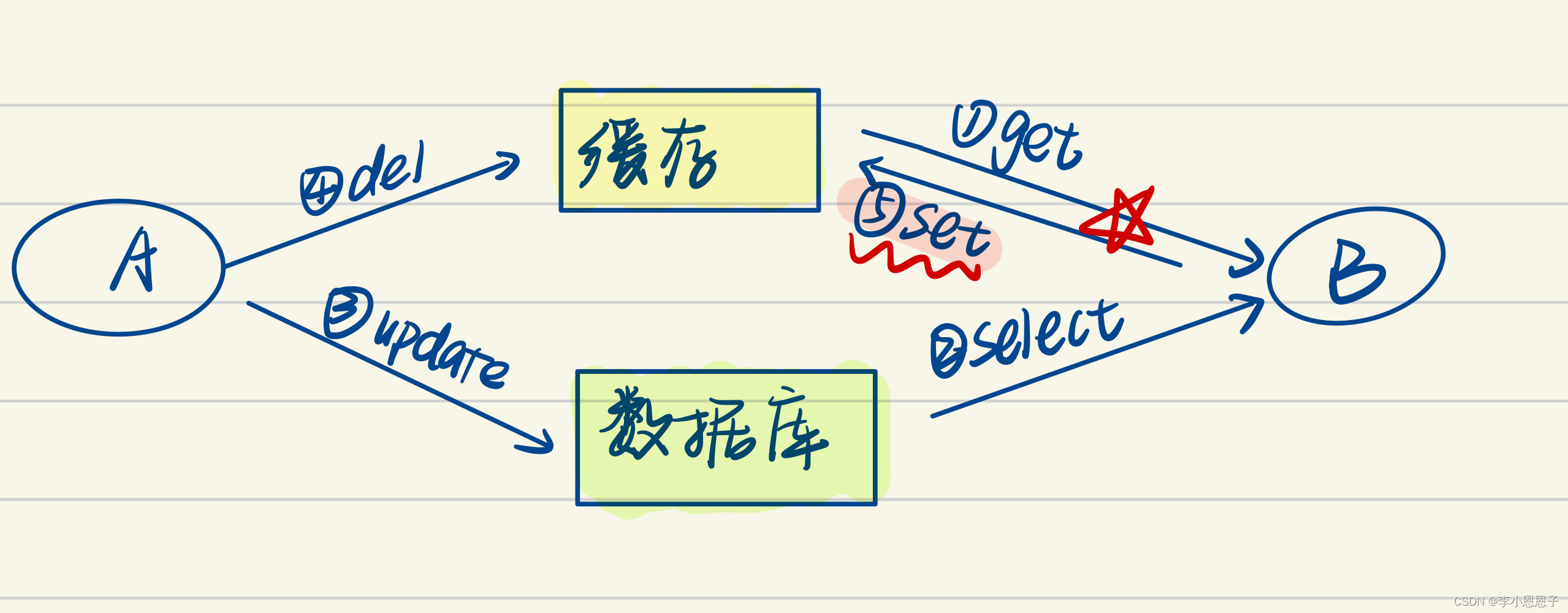
How to ensure the double write consistency between cache and database?

Jmeter性能测试之命令行执行和生成测试报告

爬虫->TpImgspider

The bigger the project is, the bigger it is. This is how I split it

一文掌握mysql数据库审计特点、实现方案及审计插件部署教程

MySQL implementation plan

2w字详解数据湖:概念、特征、架构与案例

线程崩了,为什么不会导致 JVM 崩溃呢?如果是主线程呢?
随机推荐
动态性能视图概述
Como automatic test system: build process record
From boosting to lamdamart
The difference between abstract classes and interfaces
What is message subscription and publishing?
Keras learning part: obtaining the output results of neural network middle layer
要不你给我说说什么是长轮询吧?
Selenium: detailed explanation of browser crawler use (I)
Utils connection pool
The idea of stack simulating queue
通用 DAO 接口设计
Traversal mode of list, set, map, queue, deque, stack
Speech at 2021 global machine learning conference
Using producer consumer model and dpkt to process pcap files
Rewriting and overloading
Summary of API method
Sort: merge sort and quick sort
Program environment and pretreatment
万字长文 | 深入理解 OpenFeign 的架构原理
Excel file parsing