当前位置:网站首页>CADD course learning (3) -- target drug interaction
CADD course learning (3) -- target drug interaction
2022-07-01 23:11:00 【Stunned flounder (】
CADD Course study (3)-- Target drug interactions
PyMol Software tutorial
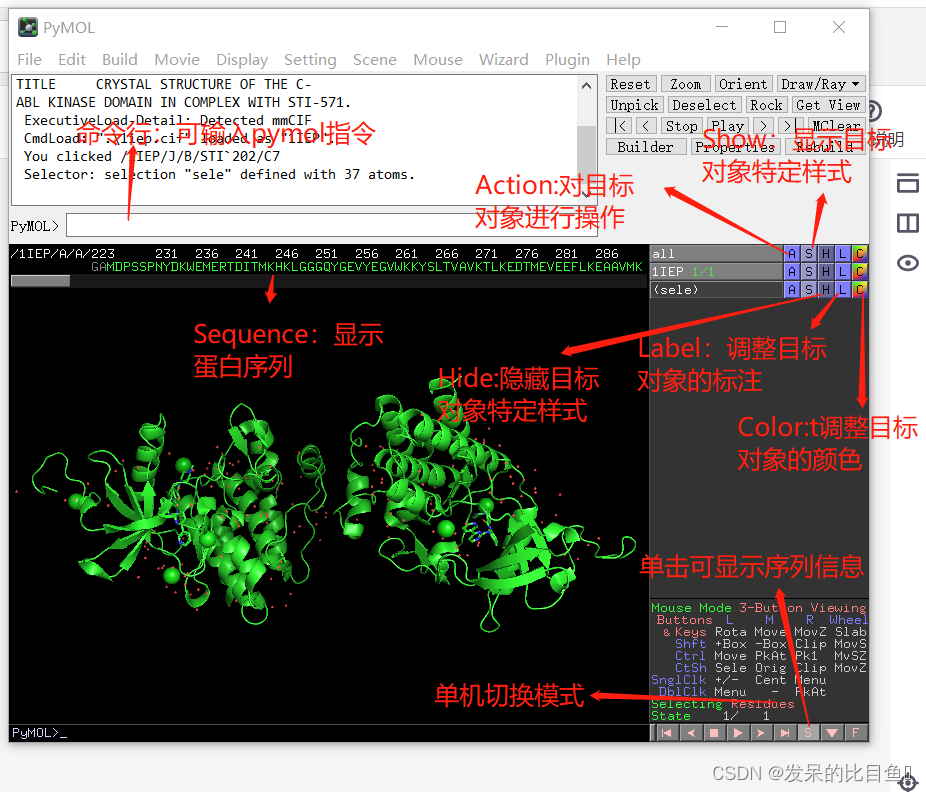
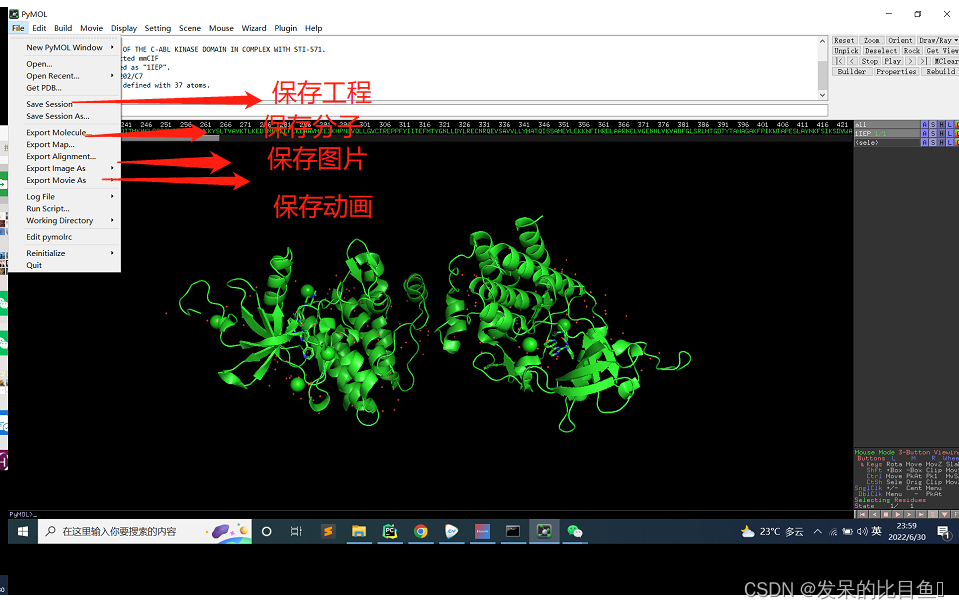

Basic operation
Rotate the image arbitrarily : Aim at any part of the image, click the left mouse button, and then move the mouse
Zoom in / Zoom out the image : Aim at any part of the image, click the right mouse button, and then move the mouse ( Up is shrinking , Down is zoom )
Move the image : Aim at any part of the image and click the middle mouse button or scroll wheel , Then move the mouse command line to enter :fetch 1lEP
from PDB Download crystal structure from database website 1lEP, stay pymol open
- Step1: Change interface color (Display One Background-White)
- Step2: Deletion protein B chain , Enter at the command line ‘remove chainB’, press return
- Step3: Remove ions and water molecules (14.75 and 129 Water molecules interact with ligands , So keep ): Select chloride ion and corresponding water molecule in the column of sequence information , Action object sele
(Action-remove atoms)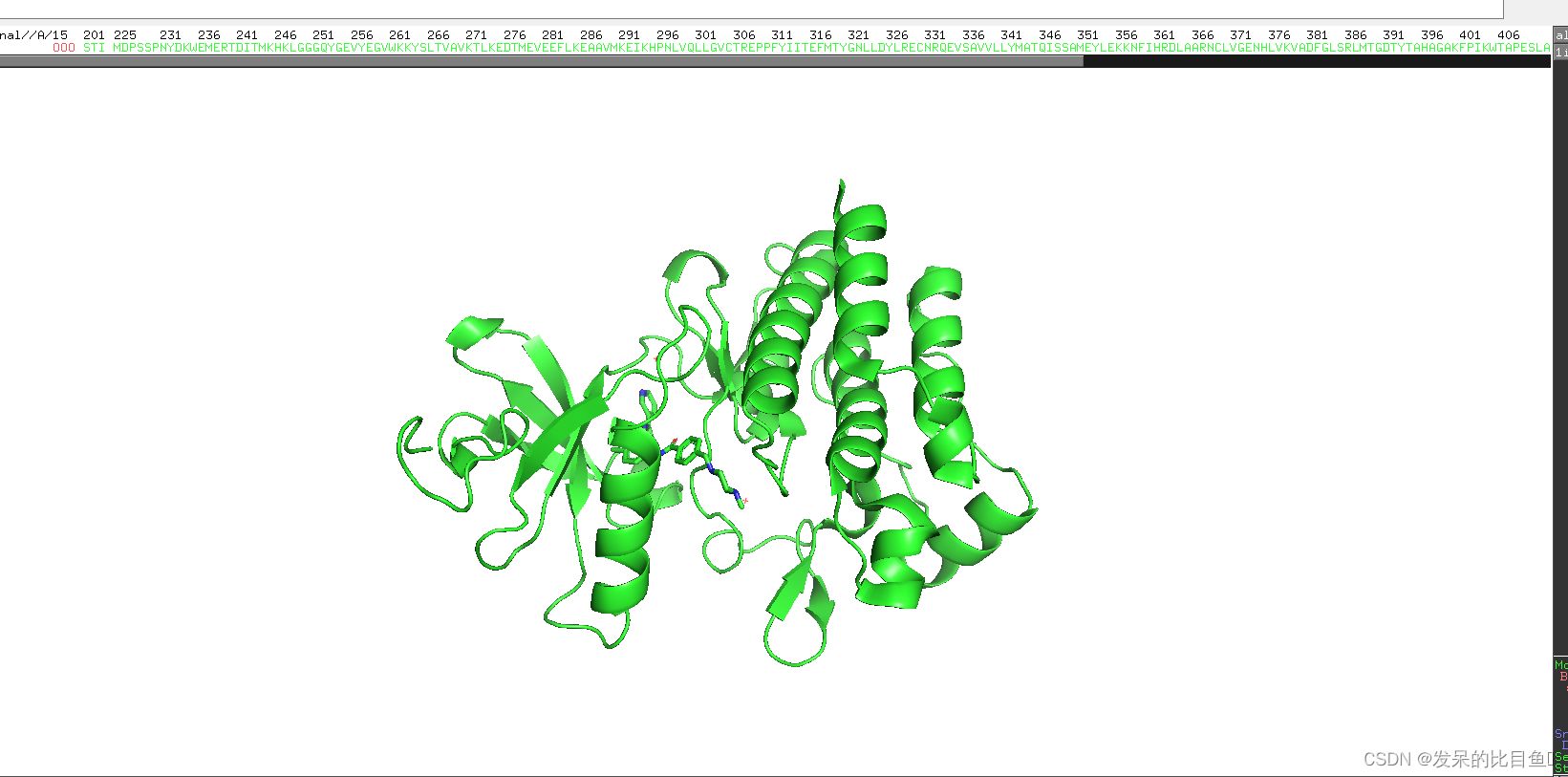
Step4: Show cartoon shapes (Action-present-ligand sites-cartoon)
Step5: Copy to obj01(Action-copy to object-new
Step6: Action object 1iep, Now it only shows cartoons (Hide-sticks&Hide-lines)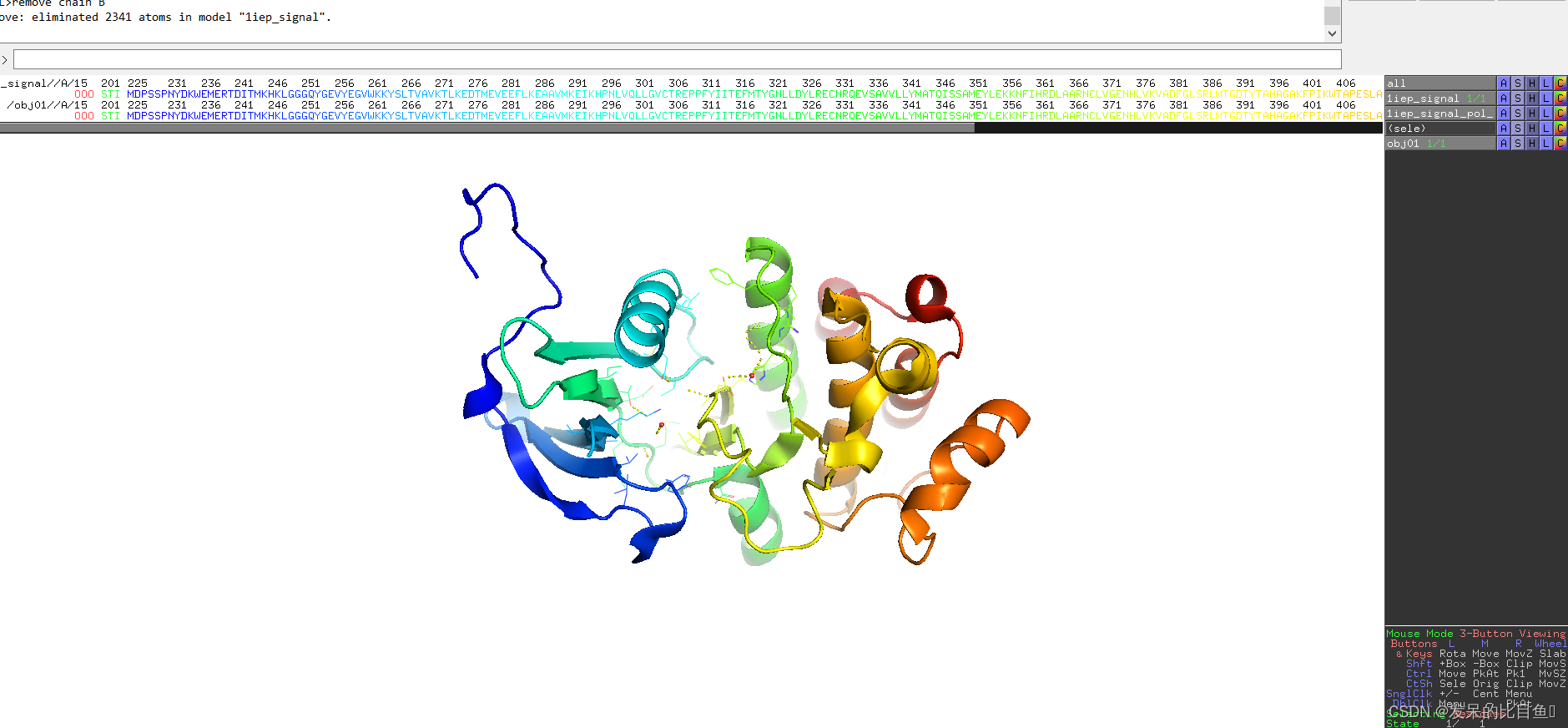
Step7: Action object obj01, Now it only shows ligands and amino acids (Hide-cartoon)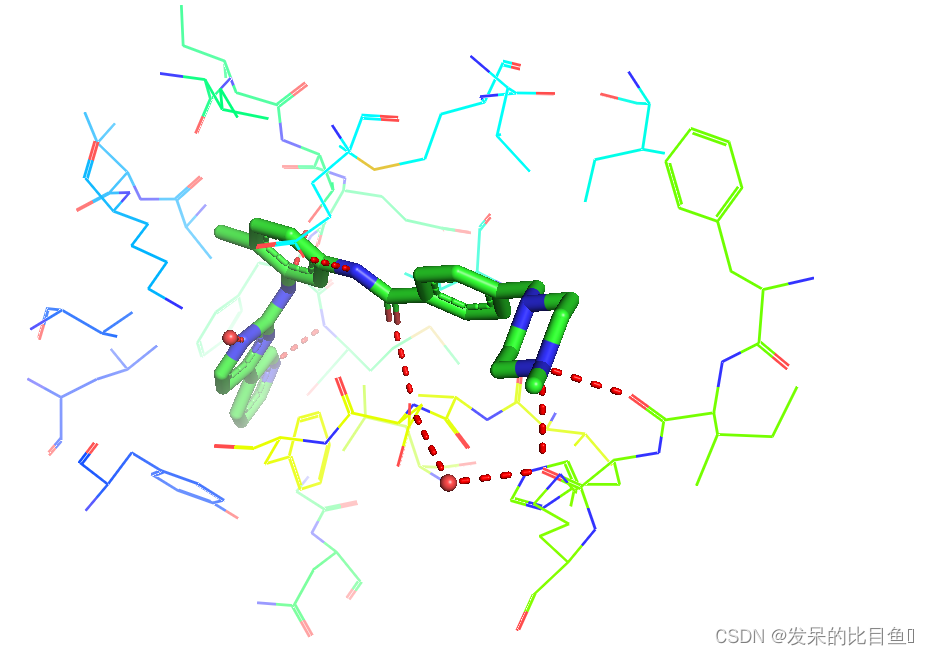
Step8: Click the object with the mouse 1iep, Don't show cartoon temporarily ; Right click on the operation interface , Select... From the pop-up box center(vis), Make objects obj01 centered
Step9: Action object 1iep_pol_conts. Change the color of hydrogen bond (Color-reds-red)
The green stick shows imatinib , Surrounded by interacting amino acids , The red ball is a water molecule , To better see the interactions , Need further operation
Step10: Select the amino acids with hydrogen bonds around the ligand , Displayed as a stick (Show-sticks;Label-residues)
Step11: Action object obj01, Hide the rest of the amino acids (Hide-Lines)
The display size of water molecules can be set :
(Setting-Edit All, Call up the setting box , take nb_spheres_size The size of is changed to 0.4, press return ) Select the amino acids around the ligand , Unified display color , operation sele object :
(Color-by element Choose the fifth color here )

As you can see from the picture :
- The nitrogen atom on the pyridine ring of the compound is related to M318 The ammonia formed hydrogen bonds , The nitrogen atom on the piperazine ring of the compound is related to I360 and H361 Form hydrogen bond , The two imino nitrogen atoms of the compound are also related to E286 and T315 Form hydrogen bond
- K271,E286,H361 and D381 It also interacts with compounds indirectly through water bridges
How to get a beautiful combination pattern diagram ?
3. There is no main chain or side chain involved in the interaction in the hidden amino acid : Selected amino acids , Action object sele(Hide-main chain or side chain;Hide-label)
4. Action object liep, Change the cartoon style (Color-blues-lightblue)
5. Adjust the angle of the mouse , Enable clear display of target drug interactions 
setting-cartoon-smooth-loops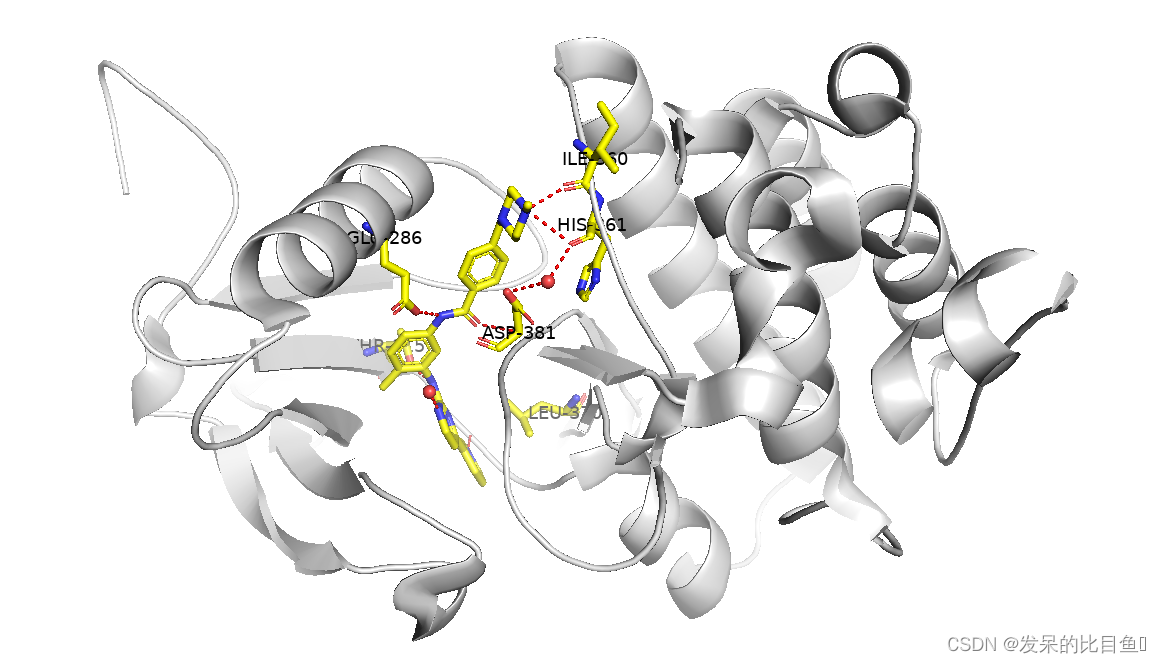
We adjusted the angle to clearly observe the target drug interaction , How to export pictures ?
- Set parameters ray_shadows by 0 (Setting-Edit All, Call up the setting box , take ray_shadows The size of is changed to 0, press return )
- Life today line input :ray 1600,1200
- Then you can export the pictures (File-Save lmage As-PNG; The amino acid number can be found in photoshop add to )

边栏推荐
- CADD课程学习(3)-- 靶点药物相互作用
- 证券开户选哪个证券公司比较好,哪个更安全
- 91. (cesium chapter) cesium rocket launch simulation
- Explain the use of locksupport in detail
- [daily training] 326 Power of 3
- The last packet sent successfully to the server was 0 milliseconds ago. The driver has not received
- Turn -- use setjmp and longjmp in C language to realize exception capture and collaboration
- 2022年起重机司机(限桥式起重机)考试试题及模拟考试
- 众昂矿业:发展以氟化工为主的特色化工产业具有先天优势
- 会声会影2022智能、快速、简单的视频剪辑软件
猜你喜欢
![Jielizhi, production line assembly link [chapter]](/img/5f/9ea7fd3b93df1fd3ecbfc1b669c831.png)
Jielizhi, production line assembly link [chapter]
思科--高可用和高可靠网络考试
Turn -- the underlying debugging principle of GDB is so simple

Quantifiers of regular series

Cisco test -- the concept and configuration test of routing
思科--WAN 的概念考试外部工具

Hide the creation and use of users
Cisco -- highly available and reliable network examination

常见的二十种软件测试方法详解(史上最全)

Cisco exam -- redundant network
随机推荐
Some thoughts on game performance optimization
Stimulate new kinetic energy and promote digital economy in multiple places
Redis~02 缓存:更新数据时如何保证MySQL和Redis中的数据一致性?
Understanding threads
Force buckle 710 Random numbers in the blacklist
dat.GUI
Where can the courses purchased by CSDN be accessed
[daily training] 326 Power of 3
微信个人小商店一键开通助手小程序开发
Business visualization - make your flowchart'run'up
【嵌入式系统课设】单个按键控制LED灯
ESP自动下载电路设计
[image segmentation] 2021 segformer neurips
Unable to climb hill sort, directly insert sort
RPA: Bank digitalization, business process automation "a small step", and loan review efficiency "a big step"
Rank ranking with MySQL 5.7
2022年起重机司机(限桥式起重机)考试试题及模拟考试
使用3DMax制作一个象棋棋子
Genicam gentl standard ver1.5 (4) Chapter 5 acquisition engine
Cisco exam -- redundant network