当前位置:网站首页>Display product details [project mall]
Display product details [project mall]
2022-06-11 23:26:00 【Sun star moon cloud】
Show product details 【 project Shopping Mall 】
Show product details
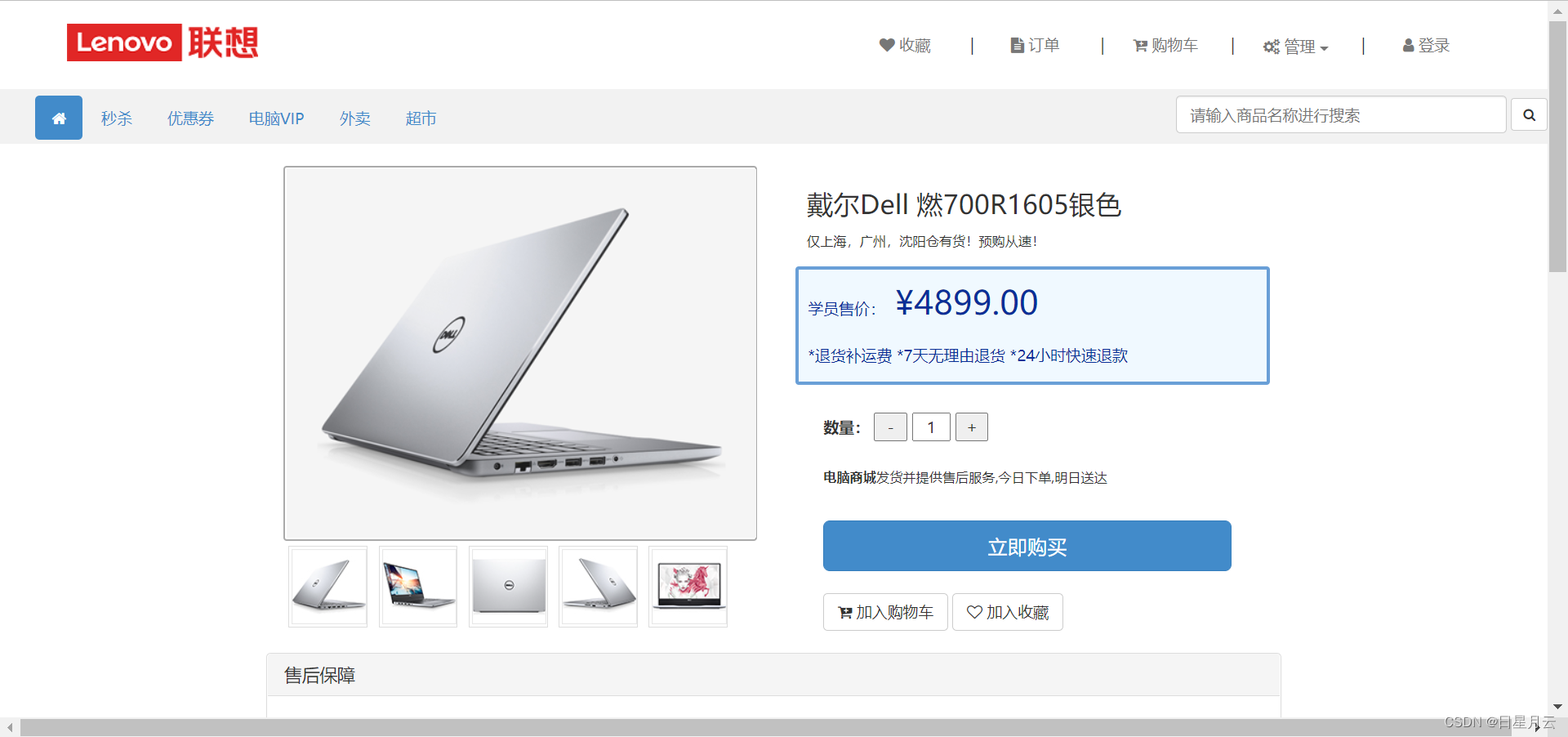
1. Item display item details persistence layer
1.1 Of planning query SQL sentence
According to the id Display item details SQL sentence
SELECT * FROM t_product WHERE id=?
1.2 Implement interfaces and abstract methods
stay ProductMapper Add abstract methods to the interface .
/*  According to the goods id Check product details */
    Product findById(Integer id);
1.3 To configure SQL mapping
1. stay ProductMapper.xml Configuration in file findById(Integer id) Mapping of methods .
  	<!--  According to the goods id Check product details :Product findById(Integer id) -->
    <select id="findById" resultMap="ProductEntityMap">
        SELECT * FROM t_product WHERE id=#{id}
    </select>
ProductMapper–findById
test
ProductMapperTests
package com.up.stores.mapper;

import com.up.stores.entity.Product;
import org.junit.Test;
import org.junit.runner.RunWith;
import org.springframework.beans.factory.annotation.Autowired;
import org.springframework.boot.test.context.SpringBootTest;
import org.springframework.test.context.junit4.SpringRunner;

import java.util.List;

@RunWith(SpringRunner.class)
@SpringBootTest
public class ProductMapperTests {

    @Autowired
    private ProductMapper productMapper;

    @Test
    public void findHotList() {

        List<Product> list = productMapper.findHotList();
        System.out.println("count=" + list.size());
        for (Product item : list) {

            System.out.println(item);
        }
    }

    @Test
    public void findById() {

        Integer id = 10000017;
        Product result = productMapper.findById(id);
        System.out.println(result);
    }
}
ProductMapperTests
2. Product display product details business layer
2.1 Planning exception
If the item data does not exist , A throw ProductNotFoundException, You need to create an exception .
package com.cy.store.service.ex;

/**  Exception that commodity data does not exist  */
public class ProductNotFoundException extends ServiceException {

    public ProductNotFoundException() {

    }

    public ProductNotFoundException(String message) {

        super(message);
    }

    public ProductNotFoundException(String message, Throwable cause) {

        super(message, cause);
    }

    public ProductNotFoundException(Throwable cause) {

        super(cause);
    }

    public ProductNotFoundException(String message, Throwable cause, boolean enableSuppression, boolean writableStackTrace) {

        super(message, cause, enableSuppression, writableStackTrace);
    }
}
ProductNotFoundException
2.2 Implement interfaces and abstract methods
At the business level IProductService Add to interface findById(Integer id) Abstract method .
	/* According to the goods id Check product details */
    Product findById(Integer id);
2.3 Implement abstract methods
1. stay ProductServiceImpl Class , Implement... In the interface findByd(Integer id) Abstract method .
	@Override
    public Product findById(Integer id) {

        //  According to the parameters id Call private methods to execute queries , Get product data
        Product product = productMapper.findById(id);
        //  Judge whether the query result is null
        if (product == null) {

            //  yes : Throw out ProductNotFoundException
            throw new ProductNotFoundException(" The item data you are trying to access does not exist ");
        }
        //  Set some properties in the query results to null
        product.setPriority(null);
        product.setCreatedUser(null);
        product.setCreatedTime(null);
        product.setModifiedUser(null);
        product.setModifiedTime(null);
        //  Return query results
        return product;
    }
ProductService–findById
test
package com.cy.store.service;

import com.cy.store.entity.Product;
import com.cy.store.service.ex.ServiceException;

import org.junit.jupiter.api.Test;
import org.springframework.beans.factory.annotation.Autowired;
import org.springframework.boot.test.context.SpringBootTest;


import java.util.List;

@SpringBootTest
public class ProductServiceTests {

    @Autowired
    private IProductService productService;

    @Test
    public void findHotList() {

        try {

            List<Product> list = productService.findHotList();
            System.out.println("count=" + list.size());
            for (Product item : list) {

                System.out.println(item);
            }
        } catch (ServiceException e) {

            System.out.println(e.getClass().getSimpleName());
            System.out.println(e.getMessage());
        }
    }

    @Test
    public void findById() {

        try {

            Integer id = 10000042;
            Product result = productService.findById(id);
            System.out.println(result);
        } catch (ServiceException e) {

            System.out.println(e.getClass().getSimpleName());
            System.out.println(e.getMessage());
        }
    }
}
**ProductServiceTests **
3. Item display item detail controller
3.1 Handling exceptions
stay BaseController Class ProductNotFoundException
		else if (e instanceof ProductNotFoundException) {

            result.setState(4006);
            result.setMessage(" Exception that commodity data does not exist ");
        }
BaseController–ProductNotFoundException
3.2 Design request
 Request path :/products/{
    id}/details
 Request parameters :@PathVariable("id") Integer id
 Request type :GET
 In response to the results :JsonResult<Product>
3.3 Processing requests
1. stay ProductController Class to handle the request getById() Method
 	@GetMapping("{id}/details")
    public JsonResult<Product> getById(@PathVariable("id") Integer id) {

        //  Call the business object to get data
        Product data = productService.findById(id);
        //  Return success and data
        return new JsonResult<Product>(OK, data);
    }
ProductController–getById
test
2. Complete or start the project , Direct access to test .
4 Product details page – Front page
1. Check on product.html page body Whether the last in the label is introduced jquery-getUrlParam.js file , If it is introduced, there is no need to repeat the introduction .
<script type="text/javascript" src="../js/jquery-getUrlParam.js"></script>
2. stay product.html On the page body The last inside the label , Add a code to get the details of the current product .
		<script type="text/javascript">
			let id = $.getUrlParam("id");
			console.log("id=" + id);
			$(document).ready(function() {

				$.ajax({

					url: "/products/" + id + "/details",
					type: "GET",
					dataType: "JSON",
					success: function(json) {

						if (json.state == 200) {

							console.log("title=" + json.data.title);
							$("#product-title").html(json.data.title);
							$("#product-sell-point").html(json.data.sellPoint);
							$("#product-price").html(json.data.price);

							for (let i = 1; i <= 5; i++) {

								$("#product-image-" + i + "-big").attr("src", ".." + json.data.image + i + "_big.png");
								$("#product-image-" + i).attr("src", ".." + json.data.image + i + ".jpg");
							}
						} else if (json.state == 4006) {
     //  Exception that commodity data does not exist
							location.href = "index.html";
						} else {

							alert(" Failed to get product information !" + json.message);
						}
					}
				});
			});


			$("#btn-add-to-cart").click(function(){

				$.ajax({

					url: "/carts/add_to_cart",
					type: "POST",
					data: {

						"pid": id,
						"amount":$("#num").val()
					},
					dataType: "JSON",
					success: function(json) {

						if (json.state == 200) {

							alert(" Successfully joined the shopping cart !");

						} else {

							alert(" Failed to add shopping cart !");
						}
					},
					error: function(xhr) {

						alert(" Unknown exception occurred when adding shopping cart " + xhr.message);
					}
				});
			});

		</script>
product.html
test
Start the project for testing after completion .
README– Show product details
边栏推荐
- 栈(C语言)
- 一文读懂Logstash原理
- Figure overview of neural network
- Analysis on the market prospect of smart home based on ZigBee protocol wireless module
- Google搜索為什麼不能無限分頁?
- [day15 literature extensive reading] numerical magnetic effects temporary memories but not time encoding
- Games-101 Yan Lingqi 5-6 lecture on raster processing (notes sorting)
- Wireless communication comparison of si4463, si4438 and Si4432 schemes of wireless data transmission module
- How to completely modify the user name in win10 system and win11 system
- [day6-7 intensive literature reading] a unifying Bayesian framework accounting for spatiotemporal interactions with a
猜你喜欢

MySQL 8.0 decompressed version installation tutorial

Read the logstash principle
Data visualization platform based on template configuration

The second bullet of in-depth dialogue with the container service ack distribution: how to build a hybrid cloud unified network plane with the help of hybridnet

Summary of personal wrong questions (the wrong questions have not been solved and are used for help)
Method for debugging wireless data packet capturing of Internet of things zigbee3.0 protocol e18-2g4u04b module
Are you still struggling with the gold content of PMP

2022高压电工考试题模拟考试题库及在线模拟考试

2022年安全员-A证考题模拟考试平台操作

Inventory | more than 20 typical security incidents occurred in February, with a loss of nearly $400million
随机推荐
HMS core shows the latest open capabilities in mwc2022, helping developers build high-quality applications
A new product with advanced product power, the new third generation Roewe rx5 blind subscription is opened
Deconstruction of volatile | community essay solicitation
Solve the problem of slow downloading plug-ins for idea
Implementation scheme of iteration and combination pattern for general tree structure
帝国理工等最新《胶囊网络综述》论文,29页pdf阐述胶囊的概念、方法与应用
[day4 literature intensive reading] space – time interdependence: evidence against Asymmetric mapping between time and space
The second bullet of in-depth dialogue with the container service ack distribution: how to build a hybrid cloud unified network plane with the help of hybridnet
Jetpack架构组件学习(3)——Activity Results API使用
2022年低压电工上岗证题目及在线模拟考试
【Day4 文献精读】Space–time interdependence: Evidence against asymmetric mapping between time and space
[day15 literature extensive reading] numerical magnetic effects temporary memories but not time encoding
2022年安全员-A证考题模拟考试平台操作
Solr之基礎講解入門
Recruitment of audio and video quality test and Development Engineer
SDNU_ ACM_ ICPC_ 2022_ Weekly_ Practice_ 1st (supplementary question)
【Day6-7 文献精读】A unifying Bayesian framework accounting for spatiotemporal interferences with a ...
【Day3 文献精读】Asymmetrical time and space interference in Tau and Kappa effects
Stack (C language)
【delphi】判断文件的编码方式(ANSI、Unicode、UTF8、UnicodeBIG)