当前位置:网站首页>JS introduction < 1 >
JS introduction < 1 >
2022-07-02 03:00:00 【Cloud shadow y】
Catalog
1. Put other data types , Convert to String
2. Convert other data types to Number
3. Convert other data types to Boolean
Where to write
- Write to onclick,href Properties of the
- Write to <script></script> in
- Write to external js In file , And then through
<script></script>Tag in <title></title> Part of the introduction .( recommend )
<title>
		<script type="text/javascript" src="js/script.js"></script>
		<script type="text/javascript">
			alert(" I'm internal JS Code ");
		</script>

</title>
<body>

<button onclick="alert('1  Authored to label onclick Properties of the , When we click the button ,JS Code will execute ');"> Click on me </button>

<!-- Hyperlinks don't jump -->
<a href="javascript:alert(' Write in the hyperlink href Properties of the , So when you click a hyperlink , Will execute JS Code ');"> You order me too </a>

<!-- There is no response after clicking the hyperlink -->
<a href="javascript:;"> You order me too </a>
</body>
Basic grammar
- notes Multiline comment :/**/ Single-line comments ://
- JS Strictly case sensitive in
- JS Each statement in is marked with a semicolon (;) ending
- JS Multiple spaces and line breaks are ignored in , So we can use spaces and newlines to format the code .
Literal & Variable
- Literal ( Constant ): They're all immutable values , such as :12344.( Literal quantity can be used directly , But it's not convenient )
- Variable : Variable can be used to store literal amount , And the value of the variable can be changed arbitrarily .( Can be called repeatedly , Easy to change )
<script type="text/javascript">
			//1、 Declare variables
			// stay js Use in var Keyword to declare a variable
			var a;
			//2、 Assign values to variables
			a = 123;
			a = 456;
			// Declaration and assignment are performed at the same time
			var b = 789;
			var c = 0;
			console.log(a);
		</script>
identifier
stay js All of which can be named by ourselves can be called identifiers . for example : Variable name 、 Function name 、 Attribute names are identifiers
When naming an identifier, you need to follow the following rules :
- Identifiers can contain letters 、 Numbers 、_、$
- Identifier cannot begin with a number
- Identifier cannot be ES Keywords or reserved words in
- Generally, the hump naming method is used for identifier ( Initial lowercase , Capitalize the beginning of each word , The rest of the letters are lowercase Such as :helloWorld)
JS The underlying identifier is actually stored in Unicode code (UTF-8), So in theory , all UTF-8 Can be used as identifiers .
data type
| Variable | explain | Example |
|---|---|---|
| String | character string ( A string of text ): The value of the string must be in quotation marks ( It can be done either alone or in pairs , Must be in pairs ) Expand . | let myVariable = ' Li lei '; |
| Number | Numbers : No quotation marks . | let myVariable = 10; |
| Boolean | Boolean value ( really / false ): true/false yes JS Special keywords in , No quotation marks . | let myVariable = true; |
| Array | Array : Structure for storing multiple values in a single reference . | let myVariable = [1, ' Li lei ', ' Han Meimei ', 10];Element reference method : myVariable[0], myVariable[1] …… |
| Object | object :JavaScript It's all about objects , Everything can be stored in variables . Keep this in mind . | let myVariable = document.querySelector('h1');And all the examples above are objects . |
among String、Number、Boolean、Null、Undefined It's a basic data type , and object It belongs to the reference data type .
typeof Operator can check the type of a variable
typeof "John"                 //  return  string
typeof 3.14                   //  return  number
typeof NaN                    //  return  number
typeof false                  //  return  boolean
typeof [1,2,3,4]              //  return  object
1. String character string
stay JS Quotation marks are required in the string ( Double or single quotes ) Cover up
Quotes cannot be nested , You can't put double quotation marks inside double quotation marks , Single quotation marks cannot be placed inside
\ As escape character , When representing some special symbols, you can use \ Transference .
- \" Express "
- \' Express '
- \n Means line break
- \t tabs
- \\ Express \
2. Number type
Number Types include integers and floating point numbers ( decimal )
JS The maximum number of digits that can be represented in (Number.MAX_VALUE by 1.7976931348623157e+308)
Greater than 0 The minimum value of Number.MIN_VALUE by 5e-324
If you use Number The number represented exceeds the maximum value , It will return a Infinity( infinite )
NaN It's a literal quantity ,NaN It's a special number , Express Not A Number
Use typeof Check NaN And will return to number
stay JS The operation of integer in can guarantee the accuracy . If you use JS Do floating point operations , It's possible to get an imprecise result , So never use JS Carry out the operation with high accuracy requirements .
3. Boolean Boolean value
There are only two Boolean values , Mainly used to make logical judgments
Use typeof When checking a Boolean value , Returns the boolean
4.Null type
Null( Null value ) There is only one value of type , Namely null
null This value is specially used to represent an empty object
Use typeof Check one null When the value of , Returns the object
5. Undefined Undefined type
Undefined ( Undefined ) There is only one value of type , Namely undefined
When you declare a variable , But when you don't assign values to variables , Its value is undefined
Use typeof Check undefined when , Returns the undefined
Cast
Cast refers to casting one data type to another .
Type conversion mainly refers to , Put other data types , Convert to String、Number、Boolean.
1. Put other data types , Convert to String
Mode one : Call the... Of the converted data type toString() Method
This method does not affect the original variable , It will return the conversion result to
But notice ;null and undefined These two values have no toString() Method , If called, an error will be reported
var o = new Object();
o.toString(); //  return  [object Object]
Mode two : call String() function , The transformed data is passed to the function as parameters
Use String() When a function does a cast , about Number and Boolean It's actually called toString() Method .
But for null and undefined, Will not call . It will be null Convert directly to "null", take undefined Convert directly to "undefined" .
<script>
var x = 123;
document.getElementById("demo").innerHTML =
    String(x) + "<br>" +
    String(123) + "<br>" +
    String(100 + 23);
</script>
2. Convert other data types to Number
Mode one : Use Number() function
character string —> Numbers
① If it's a string of pure numbers , Convert it directly to numbers
② If there is something non numeric in the string , Convert to NaN
③ If the string is empty or a string full of spaces , Convert to 0
Boolean —> Numbers
true Turn into 1
false Turn into 0
Null—> Numbers Turn into 0
undefined—> Numbers NaN
Mode two :
parseInt(string, radix) Parses a string and returns a decimal integer with the specified cardinality , radix yes 2-36 Integer between , Represents the cardinality of the parsed string .
parseFloat() Function resolves a parameter ( Convert to string if necessary ) And returns a floating-point number .
For non String Use parseInt() or parseFloat(), It will first convert it to String, And then operate .
parseInt() Can be a string of valid integer content out , And then convert to Number
function circumference(r) {
  return parseFloat(r) * 2.0 * Math.PI;
}

console.log(circumference(4.567));
// expected output: 28.695307297889173

function roughScale(x, base) {
  const parsed = parseInt(x, base);
  if (isNaN(parsed)) { return 0; }
  return parsed * 100;
}

console.log(roughScale(' 0xF', 16));
// expected output: 1500
3. Convert other data types to Boolean
Use Boolean() function
- Numbers —> Boolean
except 0 and NaN, The rest are true - character string —> Boolean
Except for empty strings , The rest are true - null and undefined Will be converted into false
- The object will also be converted to true
Other numbers in base
- 16 Decimal digit , You need to 0x start
- 8 Decimal digit , You need to 0 start
- 2 Decimal digit , You need to 0b start , But not all browsers support . Such as : image "070" This string , Some browsers will look like 8 Hexadecimal parsing , Some will take 10 Hexadecimal parsing .
Can be in parseInt() Pass a second parameter in , To specify the base of the number
	<script type="text/javascript">

			a = "070";
			// Can be in parseInt() Pass a second parameter in , To specify the base of the number
			a = parseInt(a,10);
			console.log(a);
	</script>
Operator
Operators are also called operators .
Operators allow you to operate on one or more values , And get the result
such as :typeof It's the operator , You can get the type of a value , It returns the type of the value as a string number string boolean undefined object
Arithmetic operator
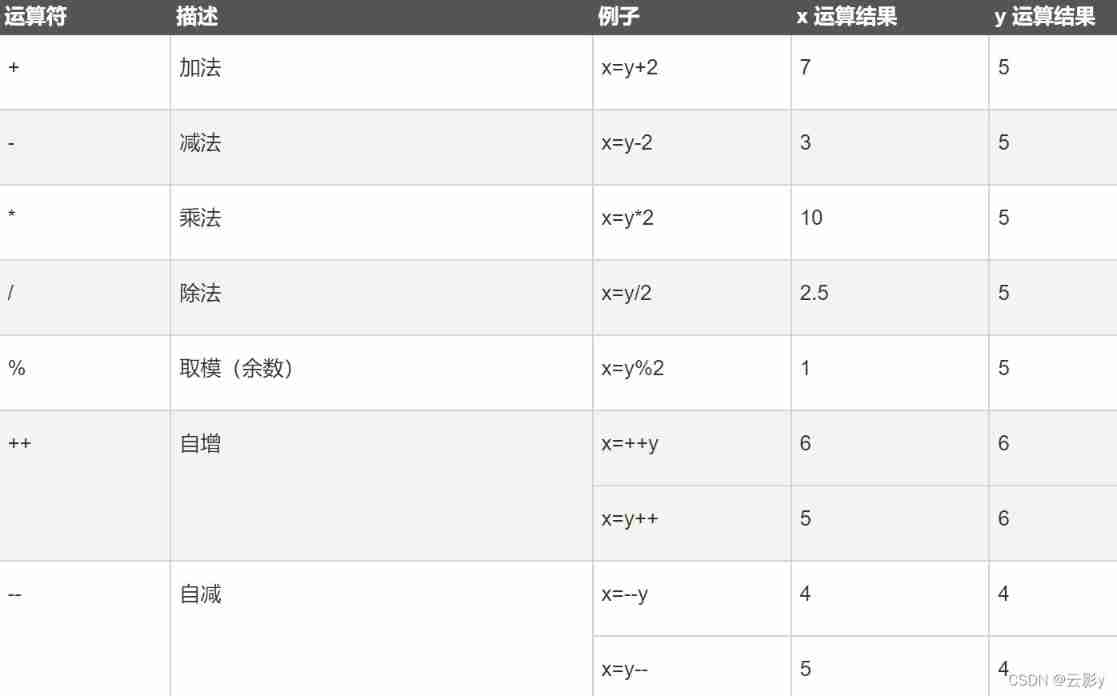
When right and wrong Number When the value of type is evaluated , These values will be converted into Number And then calculate
Any value sum NaN All the operations have to be done NaN
+:
- You can add two values , And return the result
- If you add two strings , You can do string matching , Put two strings together , And back to
- Add any value and string , Will be converted to a string first , Then do string splicing with the string .
- We can take advantage of this feature , Let's say that an arbitrary data type is converted to String.== We only need any data type + One ""( Empty string ), You can convert it to String.== This is an implicit transformation , A browser automatically completes , In fact, it also calls String() function .
Unary operator
Unary operator , You only need one operand
+Plus sign , It won't have any impact on the numbers-Minus sign , Negative signs can be used to negate numbers
<script type="text/javascript">

			var a = 1 + "2" + 3;	//123
			var b = 1 + +"2" + 3;	//6

			console.log("a="+a);
			console.log("b="-b);//-6
		</script>
Logical operators
| Operator | describe | Example |
|---|---|---|
| && | and | (x < 10 && y > 1) by true |
| || | or | (x==5 || y==5) by false |
| ! | not | !(x==y) by true |
Comparison operator
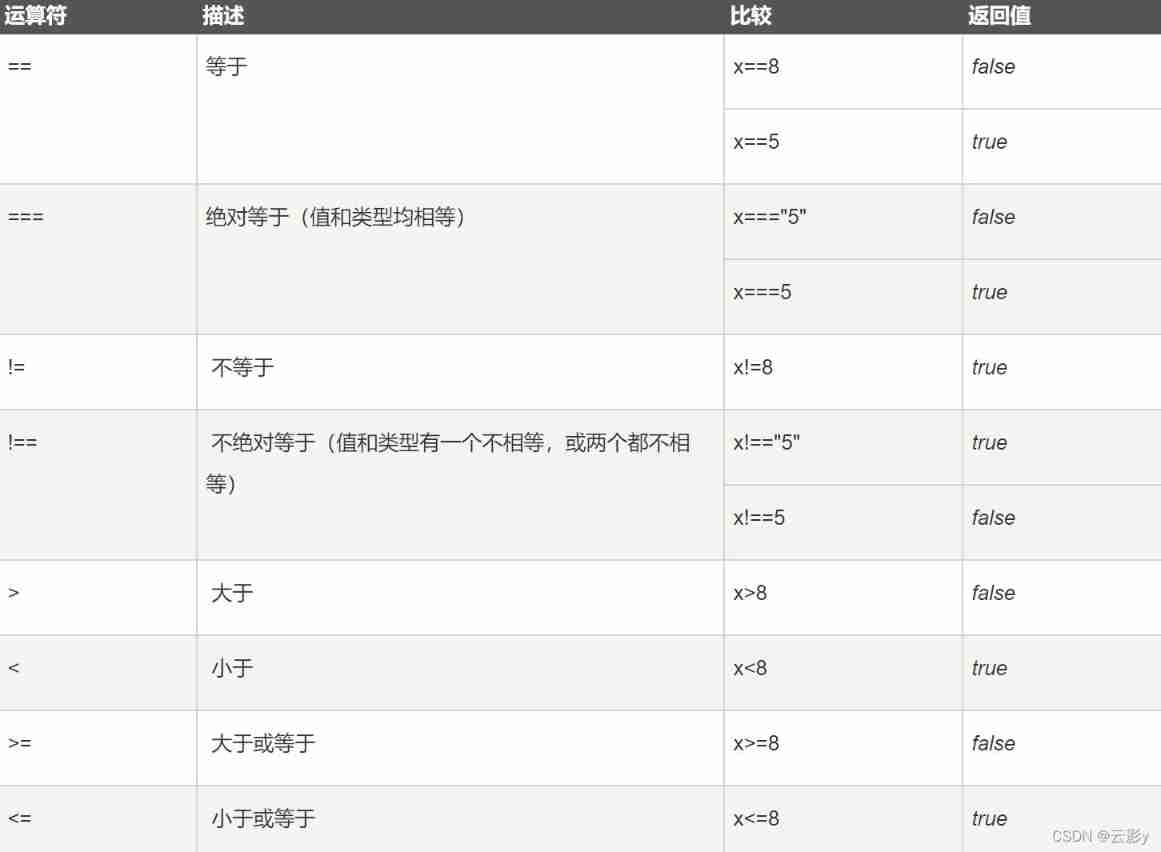
Non numerical cases
- When comparing non numerical values , It will be converted into numbers , Then compare
- If the values on both sides of the symbol are strings , It will not be converted to a number for comparison , The characters in the string are compared separately Unicode code . When comparing character encodings , It's a comparison one by one ; If two people are the same , Compare the next , So use it to sort English .
Be careful : When comparing the numbers of two strings , We must transform . Congruent and incomplete operators do not convert data types to produce results .
- undefined Derived from null, So these two values are equal (==) When judging , Returns the true
- NaN Not equal to any value , Including itself
- How to judge whether a value is NaN? Can pass
isNaN() functionTo determine whether a value is NaN, If the value is NaN Then return to true, Otherwise return to false
<script type="text/javascript">

			console.log(null==0);//false
			/*
			 * undefined Derived from null
			 *  So when these two values are equal , Returns the true
			 */
			console.log(undefined==null);//true
			/*
			 * NaN Not equal to any value , Including itself
			 */
			console.log(NaN==NaN);//false
			// Judge b Is the value of NaN
			/*
			 *  Can pass isNaN() Function to determine whether a value is NaN
			 *  If the value is NaN Then return to true, Otherwise return to false
			 */
			var b = NaN;
			console.log(isNaN(b));//true

</script>
Assignment operator 
Conditional operator
Conditional operators are also called ternary operators
grammar : Conditional expression ? sentence 1: sentence 2;
Conditional expression pairs 1, Wrong rule 2. If the evaluation result of the conditional expression is Non Boolean , Will be converted to a Boolean value , And then calculate .
, Operator
Use , You can split multiple statements , You can generally use... When declaring multiple variables
Operator priority
| priority | Operator type | associativity | Operator |
|---|---|---|---|
| 19 | grouping | n/a( Unrelated ) | ( … ) |
| 18 | Member visit | From left to right | … . … |
| Member access to be calculated | From left to right | … [ … ] | |
| new( With parameter list ) | n/a | new … ( … ) | |
| Function call | From left to right | … ( … ) | |
| Optional chain (Optional chaining) | From left to right | ?. | |
| 17 | new( No parameter list ) | From right to left | new … |
| 16 | Post increment | n/a | … ++ |
| Post decrement | … -- | ||
| 15 | Logic is not (!) | From right to left | ! … |
| Bitwise non (~) | ~ … | ||
| Unary addition (+) | + … | ||
| One dollar subtraction (-) | - … | ||
| Pre increment | ++ … | ||
| Pre decrement | -- … | ||
| typeof | typeof … | ||
| void | void … | ||
| delete | delete … | ||
| await | await … | ||
| 14 | power (**) | From right to left | … ** … |
| 13 | Multiplication (*) | From left to right | … * … |
| division (/) | … / … | ||
| Remainder (%) | … % … | ||
| 12 | Add (+) | From left to right | … + … |
| Subtraction (-) | … - … | ||
| 11 | Move left according to position (<<) | From left to right | … << … |
| Right shift to position (>>) | … >> … | ||
| unsigned right shift (>>>) | … >>> … | ||
| 10 | Less than (<) | From left to right | … < … |
| Less than or equal to (<=) | … <= … | ||
| Greater than (>) | … > … | ||
| Greater than or equal to (>=) | … >= … | ||
| in | … in … | ||
| instanceof | … instanceof … | ||
| 9 | equal (==) | From left to right | … == … |
| It's not equal (!=) | … != … | ||
| Agreement / Strictly equal (===) | … === … | ||
| atypism / Strictly unequal (!==) | … !== … | ||
| 8 | Bitwise AND (&) | From left to right | … & … |
| 7 | Bitwise XOR (^) | From left to right | … ^ … |
| 6 | Press bit or (|) | From left to right | … | … |
| 5 | Logic and (&&) | From left to right | … && … |
| 4 | Logic or (||) | From left to right | … || … |
| Null merge (??) | From left to right | … ?? … | |
| 3 | Conditions ( Three yuan ) Operator | From right to left | … ? … : … |
| 2 | assignment | From right to left | … = … |
… += … | |||
… -= … | |||
… **= … | |||
… *= … | |||
… /= … | |||
… %= … | |||
… <<= … | |||
… >>= … | |||
… >>>= … | |||
… &= … | |||
… ^= … | |||
… |= … | |||
… &&= … | |||
… ||= … | |||
… ??= … | |||
| 1 | comma / Sequence | From left to right | … , … |
The higher in the table, the higher the priority , The higher the priority, the higher the priority
If the priority is the same , The formula is calculated from left to right
Use Unicode code
1. Use escape character input in string Unicode code
grammar :\u Four bit code
    <script type="text/javascript">
            console.log("\u2620");
    </script>
2. Use... In web pages Unicode code
grammar :&# code ;( The coding here needs to be 10 Base number )
<h1 style="font-size: 100px;">☠</h1>边栏推荐
- [staff] diacritical mark (ascending sign | descending sign B | double ascending sign x | double descending sign BB)
- New programmer magazine | Li Penghui talks about open source cloud native message flow system
- 高并发场景下缓存处理方案
- Principle of computer composition - interview questions for postgraduate entrance examination (review outline, key points and reference)
- Cache processing scheme in high concurrency scenario
- How to turn off the LED light of Rog motherboard
- Face++ realizes face detection in the way of flow
- Deployment practice and problem solving of dash application development environment based on jupyter Lab
- MongoDB非关系型数据库
- Formatting logic of SAP ui5 currency amount display
猜你喜欢
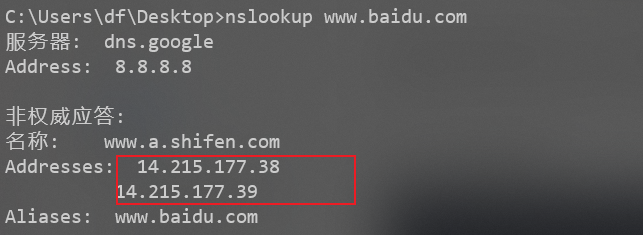
Batch detect whether there is CDN in URL - high accuracy
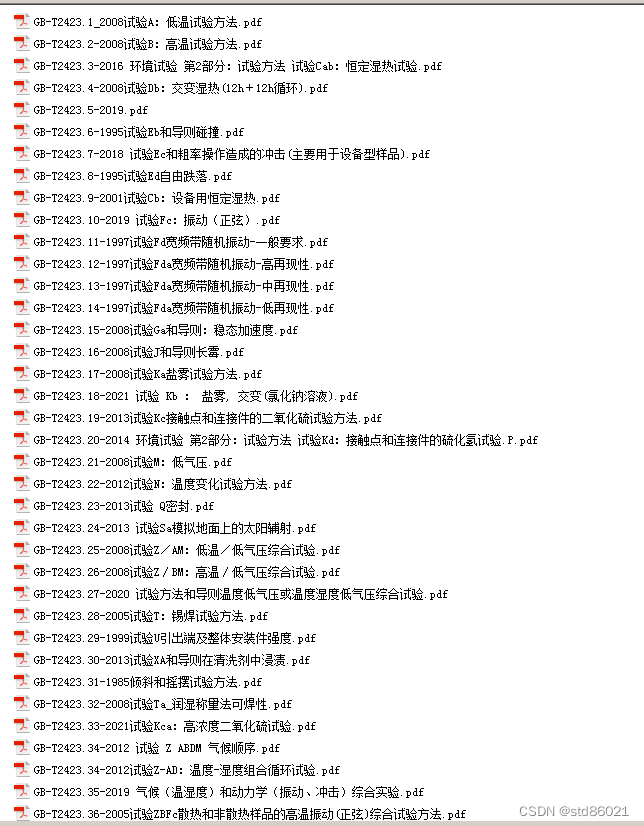
GB/T-2423.xx 环境试验文件,整理包括了最新的文件里面

The capacity is upgraded again, and the new 256gb large capacity specification of Lexar rexa 2000x memory card is added
![[staff] restore mark (Introduction to the use of restore mark | example analysis of Metaphone mark and restore mark)](/img/21/7bbf276b01f5a1056a22f5afc0af26.jpg)
[staff] restore mark (Introduction to the use of restore mark | example analysis of Metaphone mark and restore mark)
![[question 008: what is UV in unity?]](/img/f7/5ee0b18d1fe21ff3b98518c46d9520.jpg)
[question 008: what is UV in unity?]
![[Chongqing Guangdong education] Sichuan University concise university chemistry · material structure part introductory reference materials](/img/ae/7edbdf55795400166650c795c8bd58.jpg)
[Chongqing Guangdong education] Sichuan University concise university chemistry · material structure part introductory reference materials
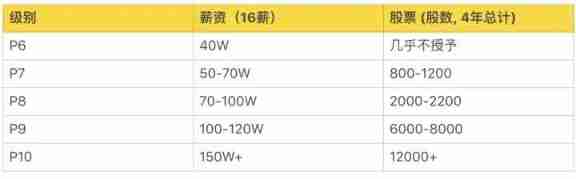
A list of job levels and salaries in common Internet companies. Those who have conditions must enter big factories. The salary is really high
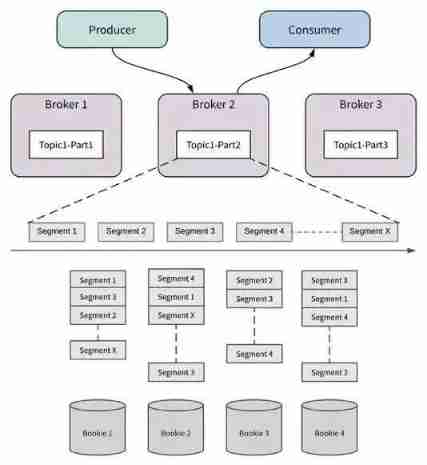
New programmer magazine | Li Penghui talks about open source cloud native message flow system

Pat a-1165 block reversing (25 points)
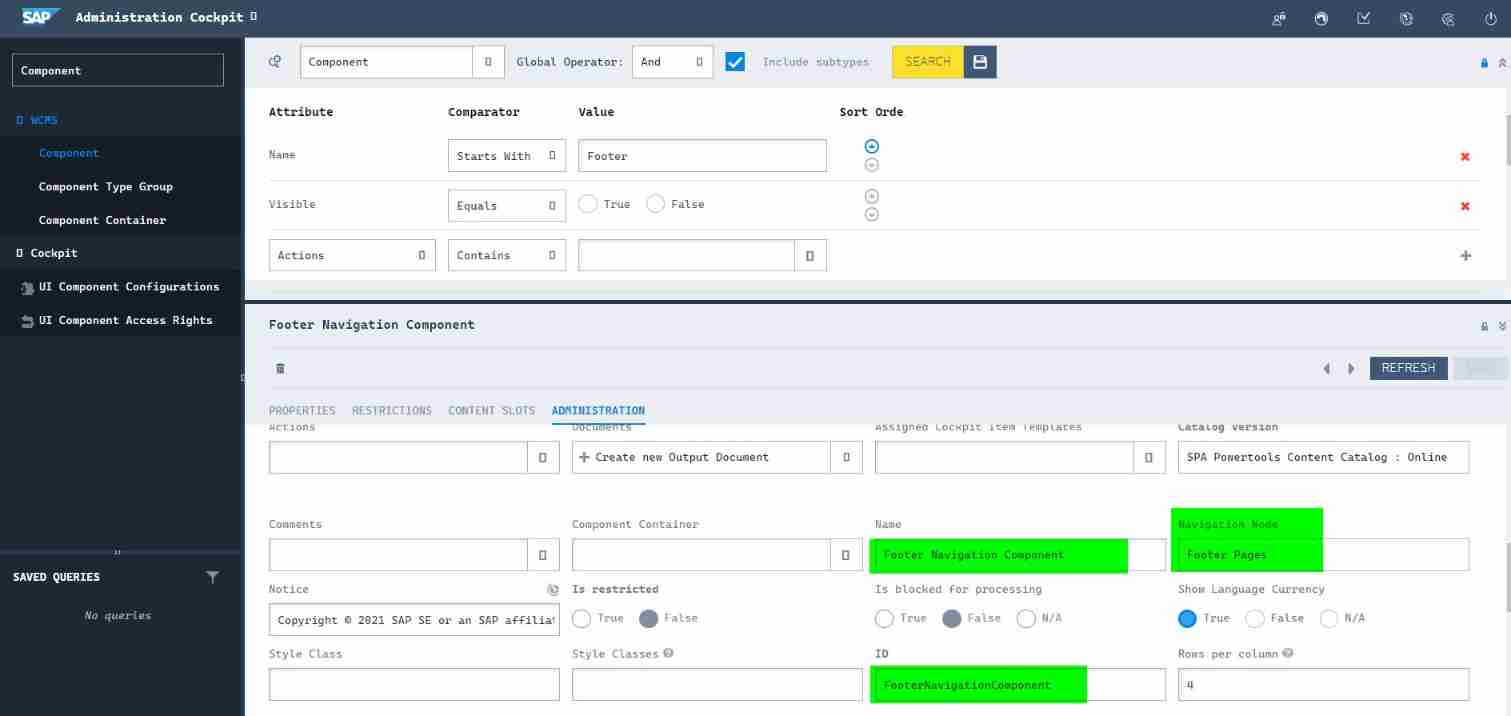
Design details of SAP e-commerce cloud footernavigationcomponent
随机推荐
The number one malware in January 2022: lokibot returned to the list, and emotet returned to the top
JVM interview
Divorce for 3 years to discover the undivided joint property, or
Connected block template and variants (4 questions in total)
Start a business
[liuyubobobo play with leetcode algorithm interview] [00] Course Overview
Mongodb non relational database
Which brand of running headphones is good? How many professional running headphones are recommended
连通块模板及变式(共4题)
Design details of SAP e-commerce cloud footernavigationcomponent
Addition without addition, subtraction, multiplication and division (simple difficulty)
Rotating frame target detection mmrotate v0.3.1 learning model
結婚後
Xiaomi, a young engineer, was just going to make soy sauce
[learn C and fly] day 5 chapter 2 program in C language (Exercise 2)
浅谈线程池相关配置
结婚后
About DNS
GB/T-2423. XX environmental test documents, including the latest documents
2022-2028 global soft capsule manufacturing machine industry research and trend analysis report