当前位置:网站首页>Use usedeferredvalue for asynchronous rendering
Use usedeferredvalue for asynchronous rendering
2022-07-02 02:41:00 【Code Taoist】

Recently, I am developing a complex application , I found my React The mental model is wrong . This is a simplified version of it :
const AppWithSynchronousRendering = () => {
  const [counter, setCounter] = useState(0);
  return (
    <div className="App" style={AppStyle}>
      <ExpensiveRenderComponent counter={counter} />
      <BasicComponent counter={counter} />
      <button onClick={() => setCounter(counter + 1)}>Increment</button>
    </div>
  );
}
It is generally accepted that , As long as the components prop change , It will immediately re render . So I hope to be here once counter change ,<ExpensiveRenderComponent/> and <BasicComponent/> It will re render , Show their respective contents . Whereas <ExpensiveRenderComponent/> Before displaying its contents, you need to do some processing that will affect the performance , I hope <BasicComponent/> First render . But it's not : The two components are updated at the same time . let me put it another way ,<BasicComponent/> wait for <ExpensiveRenderComponent/> appear .
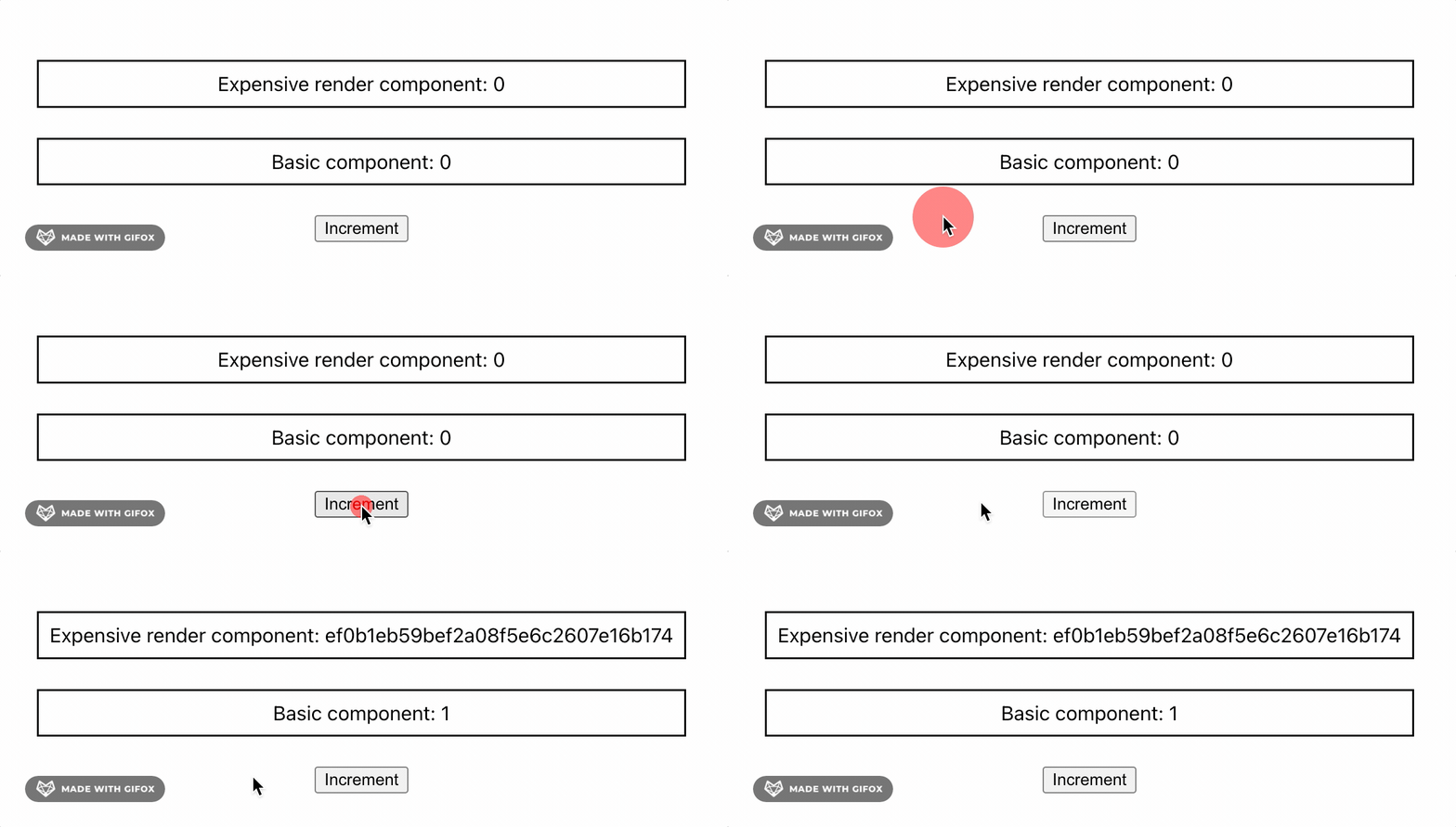
I spent quite a long time on this problem , Finally, I found out my React What is missing from the mental model . ad locum , We need to know more about React How rendering works .
React Rendering is synchronous
Whenever the state of a component changes ,React Will trigger the re rendering of the latter and all its sub components . There are three steps in this process :
- React First Calculation New caused by state change fictitious DOM. fictitious DOM Basically user interface Javascript Express , Equivalent to actual DOM. The only difference here is not to show virtual DOM, Therefore, the operation is faster .
- When calculating the new virtual DOM after ,React Will compare it with reality DOM Compare and update the actual changes . This process is called reconciliation.
- As a last step ,React Apply the changes to the actual DOM. This is called commit Stage .

Calculate new virtual DOM It means running the code of each component rendered due to state changes . therefore , The duration of this step is at least As long as it takes to calculate the most complex components .
In our example , Due to the same state change ,<ExpensiveRenderComponent/> and <BasicComponent/> To render .<ExpensiveRenderComponent/> Some expensive calculations need to be performed , therefore React You must wait for it to complete before updating the actual DOM. in the meantime ,UI Become unresponsive .
So rendering is Sync Of . This behavior is also for Uniformity And designed .React Always re render components because the same state is updated at the same time . stay file This is well explained in :
This is meaningful in most cases . inconsistent UI Can cause confusion , And may mislead users .
One solution is to optimize the components that take the longest rendering time . But what if it's impossible ? This is it. React 18 Where it comes in handy !
React 18 Concurrent characteristics
React 18 On 2022 year 3 Published in , And introduced a powerful concurrent rendering function . Before , Rendering is synchronous , As our example shows : Each rendering component triggered by a state change must wait for all other components to be ready to update . Use React 18, Each state change can be given a different priority , You can even assign different priorities to each component rendering , As we will see . In short ,React 18 To enable the Asynchronous rendering .
Let's see how the new hook useDeferredValue Apply to our previous problem :
const AppWithAsynchronousRendering = () => {
  const [counter, setCounter] = useState(0);
  const deferredCounter = useDeferredValue(counter);

  return (
    <div className="App" style={AppStyle}>
      <ExpensiveRenderComponent counter={deferredCounter} />
      <BasicComponent counter={counter} />
      <button onClick={() => setCounter(counter + 1)}>Increment</button>
    </div>
  );
}
ad locum ,useDeferredValue Created counter Delayed version of , It allows decoupling <ExpensiveRenderComponent/> and <BasicComponent/> Rendering of :
<BasicComponent/>You can use the new immediatelycounter.- meanwhile ,
deferredCounterKeep the oldcountervalue , until React Finish using the newcounterValue completes without blocking the main thread<ExpensiveRenderComponent/>The calculation of . After completion ,<ExpensiveRenderComponent/>It will be updated immediately , And the application is completely up-to-date .
Let's take a look at this hook The role of :

Because applications respond faster , The user experience has been greatly improved ! however , You'll notice UI Consistency has been sacrificed , because <ExpensiveRenderComponent/> The old... Will be displayed in a short time counter value . The solution to this problem is in UI It's not the latest time to notify users . It can be like introducing prop isStale It's as simple as :
const AppWithAsynchronousRendering = () => {
  const [counter, setCounter] = useState(0);
  const deferredCounter = useDeferredValue(counter);

  return (
    <div className="App" style={AppStyle}>
      <ExpensiveRenderComponent
        counter={deferredCounter}
        {/* You can return a loading state based on this prop */}
        isStale={deferredCounter !== counter}
      />
      <BasicComponent counter={counter} />
      <button onClick={() => setCounter(counter + 1)}>Increment</button>
    </div>
  );
}
Now? , By means of isStale by true Return to the loading state when UI It's easy to be consistent :
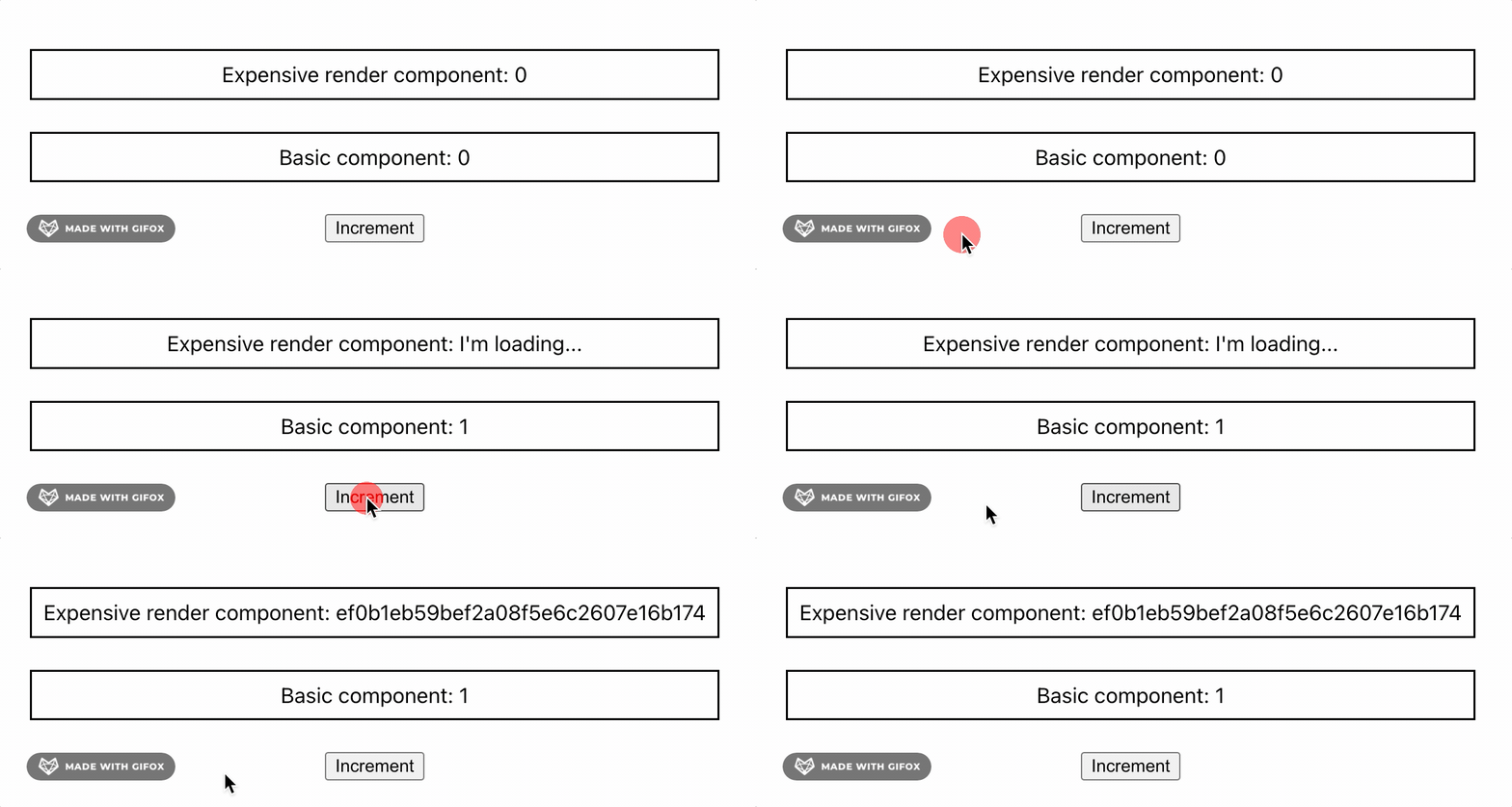
summary
- Have consistent React Mental models are not only the key to understanding and applying weird behaviors , It is also the key to effectively enhance it .
- React Rendering is synchronized and forced UI Uniformity . If some components need time to render ,UI It could become unresponsive .
- React 18 The concurrency feature supports asynchronous rendering .
useDeferredValueYou can delay the rendering of expensive components , And make UI More responsive . But if not handled properly , May sacrifice UI Uniformity . - React 18 There are many other concurrent rendering functions in :
useTransition、Suspenseetc. .
Reference resources
边栏推荐
- Questions d'entrevue
- What is the function of the headphone driver
- 【liuyubobobo-玩转Leetcode算法面试】【00】课程概述
- [staff] the direction of the symbol stem and the connecting line (the symbol stem faces | the symbol stem below the third line faces upward | the symbol stem above the third line faces downward | the
- If you want to rewind the video picture, what simple methods can you use?
- Which brand of sports headset is better? Bluetooth headset suitable for sports
- Sword finger offer 42 Maximum sum of continuous subarrays
- Systemserver service and servicemanager service analysis
- [learn C and fly] 1day Chapter 2 (exercise 2.2 find the temperature of Fahrenheit corresponding to 100 ° f)
- QT implementation interface jump
猜你喜欢

Sword finger offer 62 The last remaining number in the circle

CSDN article underlined, font color changed, picture centered, 1 second to understand

LeetCode刷题(十)——顺序刷题46至50

【带你学c带你飞】2day 第8章 指针(练习8.1 密码开锁)

How to create an instance of the control defined in SAP ui5 XML view at runtime?
Connected block template and variants (4 questions in total)
Leetcode question brushing (10) - sequential question brushing 46 to 50
连通块模板及变式(共4题)
![[staff] pitch representation (bass clef | C1 36 note pitch representation | C2 48 note pitch representation | C3 60 note pitch representation)](/img/98/956d8abbccceb1aae47e25825bc63d.jpg)
[staff] pitch representation (bass clef | C1 36 note pitch representation | C2 48 note pitch representation | C3 60 note pitch representation)
![[learn C and fly] 3day Chapter 2 program in C language (exercise 2.3 calculate piecewise functions)](/img/8e/a86a9724251718d98ce172a6a96e53.png)
[learn C and fly] 3day Chapter 2 program in C language (exercise 2.3 calculate piecewise functions)
随机推荐
大厂裁员潮不断,双非本科出身的我却逆风翻盘挺进阿里
Calculation (computer) code of suffix expression
[opencv] - comprehensive examples of five image filters
2022 safety officer-c certificate examination questions and mock examination
Duplicate keys detected: ‘0‘. This may cause an update error. found in
A quick understanding of digital electricity
CSDN article underlined, font color changed, picture centered, 1 second to understand
Sword finger offer 31 Stack push in and pop-up sequence
query词权重, 搜索词权重计算
使用 useDeferredValue 进行异步渲染
【读书笔记】程序员修炼手册—实战式学习最有效(项目驱动)
Remote connection to MySQL under windows and Linux system
Is bone conduction earphone better than traditional earphones? The sound production principle of bone conduction earphones is popular science
【带你学c带你飞】2day 第8章 指针(练习8.1 密码开锁)
Questions d'entrevue
Query word weight, search word weight calculation
Which kind of sports headphones is easier to use? The most recommended sports headphones
QT implementation interface jump
Types of exhibition items available in the multimedia interactive exhibition hall
How to hide the scroll bar of scroll view in uniapp