当前位置:网站首页>『Skywalking』. Net core fast access distributed link tracking platform
『Skywalking』. Net core fast access distributed link tracking platform
2022-07-25 22:02:00 【Lao Chen chat architecture】
Pay attention to me and don't get lost in learning back-end architecture
If it helps you , welcome Point a praise To encourage
If you need it next time , Sure Collection get up , Avoid missing next time
Share good news
『ScheduleMaster』 Get started quickly with a highly available open source distributed task scheduling platform

After reading this article, you can gain
- .NET Core Access Skywalking
- understand Skywalking The overall architecture design
- understand Skywalking What about the technical indicators of
- All pits during production deployment are skipped
List of articles
One 、 summary
1 Concept ——SkyWalking What is it? ?
Application performance monitor tool for distributed systems, especially designed for microservices, cloud native and container-based (Kubernetes) architectures.
Application performance monitoring tools for distributed systems , Dedicated to micro Services 、 Cloud native architecture and container based (Docker、K8s、Mesos) Architecture and Design .
Provide distributed tracking 、 Service grid telemetry analysis 、 Measurement aggregation and visualization integration solution .
2 Core functions

- Multiple monitoring means . You can use language probes and service mesh Getting monitoring is data
- Multiple language auto probes . Include Java,.NET Core and Node.JS
- Lightweight and efficient . No big data platform , And a lot of server resources
- modularization .UI、 Storage 、 There are various mechanisms for cluster management
- Support alarm
- Excellent visualization solution
3 System architecture

Consider making the description simpler , We give up Metric Index correlation , And focus on Tracing Link related functions .
- Upper part
Agent: Responsible for... From the application , Collect link information , Send to SkyWalking OAP The server . At present, we support SkyWalking、Zikpin、Jaeger And so on Tracing Data and information . And what we're using now is ,SkyWalking Agent collect SkyWalking Tracing data , Pass it to the server . - Lower part
SkyWalking OAP: Responsible for receiving Agent Sent Tracing Data and information , And then analyze it (Analysis Core) , To external storage ( Storage ), Finally, provide the query ( Query ) function . - Right section
Storage:Tracing data storage . At present, we support ES、MySQL、Sharding Sphere、TiDB、H2 Multiple memories . And what we're using now is ES , The main consideration is SkyWalking The development team's own production environment uses ES Mainly . - Left part
SkyWalking UI: Responsible for providing the console , Look at the links and so on .
Two 、 Tool installation
- Skywalking Download installation reference for : Click here to jump
3、 ... and 、.NET Project access
1. NuGet Package reference
- It needs to pass in every service NuGet quote
SkyAPM.Agent.AspNetCore, If it is .net core3.1 You need to choose1.3.0edition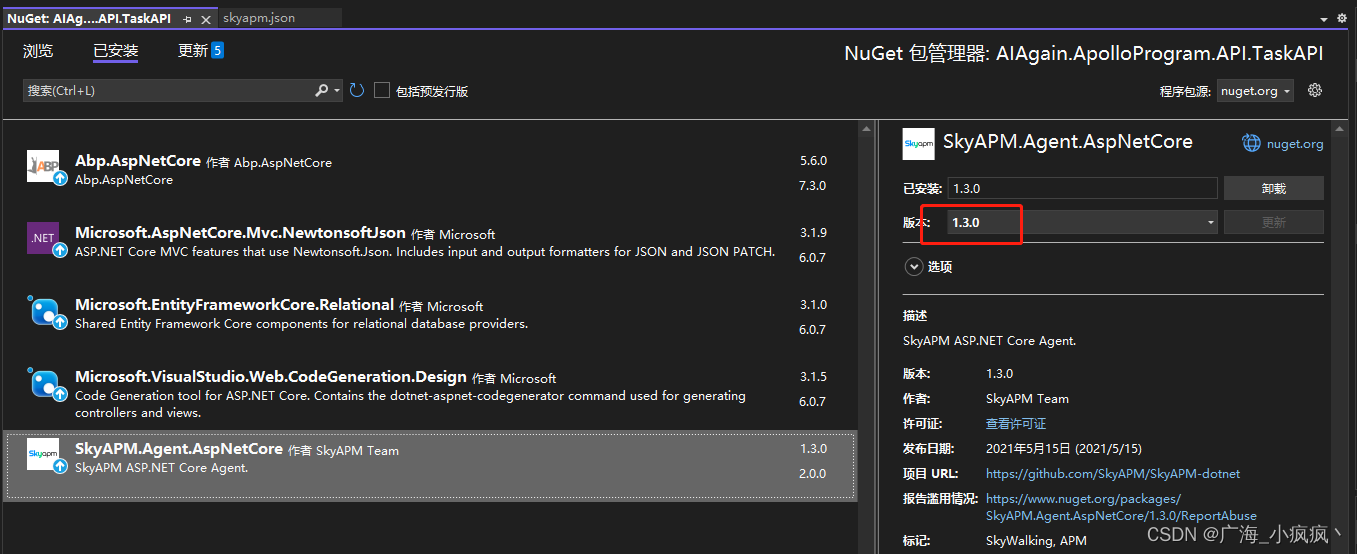
2. Add configuration file skyapm.json

{

  "SkyWalking": {

    "ServiceName": "demo-application",
    "Namespace": "",
    "HeaderVersions": [
      "sw8"  //6.x The following version is sw6
    ],
    "Sampling": {

      "SamplePer3Secs": -1,
      "Percentage": -1.0
    },
    "Logging": {

      "Level": "Information", // Fill in the blanks
      "FilePath": "logs\\skyapm-{Date}.log"// Fill in the blanks
    },
    "Transport": {

      "Interval": 3000,
      "ProtocolVersion": "v8", //6.x The following version is v6
      "QueueSize": 30000,
      "BatchSize": 3000,
      "gRPC": {

        "Servers": "localhost:11800", //ip:port
        "Timeout": 10000,
        "ConnectTimeout": 10000,
        "ReportTimeout": 600000
      }
    }
  }
}
- Be careful :
- gRPC Of Servers You need to specify the SkyWalking The server address of , The default port is 11800
v8Refers to the version number , The new version isv8
3. Configure environment variables
- Directly change the startup file
"ASPNETCORE_HOSTINGSTARTUPASSEMBLIES": "SkyAPM.Agent.AspNetCore"

- Or at startup Program.cs->Main() Set the environment variable at the beginning of the method
Environment.SetEnvironmentVariable("ASPNETCORE_HOSTINGSTARTUPASSEMBLIES", "SkyAPM.Agent.AspNetCore");

4. skyapm.json File output
- take skyapm.json File properties ” Copy to output directory “ It is amended as follows ” If newer, copy ”

Four 、 Operation monitoring
- Now you can use , open skywalking Address , See the effect
- here , We can see .NET Core The service of the application is
demo-application
1 General service ——General-Service
General service (General-Service): Represents a series or set of workloads that provide the same behavior for requests . In the use of Agent or SDK When , You can define the name of the service .

2 Main monitoring indicators
- Click on
demo-applicationThis service name , You can see the 【 Overall monitoring information 】

ApdexScore: Performance index ,Apdex(Application Performance Index) It is an international standard ,Apdex It is the quantitative value of users' satisfaction with application performance . It provides a unified way to measure and report user experience , Take the end-user experience and application performance as a complete indicator for unified measurement , The highest is 1 The lowest is 0;ResponseTime: response time , That is, within the selected time , Average response time for all requests served (ms);ServiceLoad-Throughput: Service load - throughput , That is, within the selected time , The number of requests that the service responds to per minute (cpm)SuccessRate: Company -(SLA)service level agreement, Service level agreement ,SW Specifically refers to the percentage of successful requests that are responded to every minute .Slow Endpoint in Current Service: Current serviceslowEndpoint , The service indicator dashboard will list the endpoints with the largest response time of the current service Top10, If the response time of an endpoint is too high , We need to pay more attention to its indicators ( Click to copy the endpoint name ).Endpoint Load in Current Service: Current service load ( throughput ) High endpoint , From this, we can infer the load between instances . If the throughput of an instance is found to be low , You need to query instance indicators ( For example, query whether the instance has occurred GC, Or CPU Utilization is too high )
3 Service instance ——Service Instance
Service instance (Service Instance): Each of the above set of workloads is called an instance . It's like Kubernetes Medium pods equally , An instance of an operating system is not necessarily a service . But when you're using Agent When , A service instance is actually a real process on the operating system- Click on [Instance] tab , You can find the service 【 The instance list 】

4 Endpoint ——Endpoint
Endpoint (Endpoint): For the request path received by a specific service , Such as HTTP Of URI Path and gRPC The class name of the service + Method signature . here , We can see .Net Core An endpoint of the application , by API Interface /demo/echoClick on [Endpoint] tab , You can view the 【 Endpoint list 】

5 Topology ——Topology
- Click on [Topology] tab , You can view the 【 Topology 】

6 link ——Trace
- Click on [Trace] tab , You can view the 【 link 】.

7 journal ——Log
- Click on [Log] tab , You can view the 【 journal 】.

5、 ... and 、 Production environment deployment
If the start-up of the third point is adopted Program.cs->Main() Set the environment variable at the beginning of the method
Then the following operations can be omitted
1. Linux Deploy
- Command line startup mode , increase systemd environment variable , The grammar is
Environment=ASPNETCORE_HOSTINGSTARTUPASSEMBLIES=SkyAPM.Agent.AspNetCore
2. Windows IIS Mode deployment
The project is compiled and published to IIS,SkyWalking It doesn't work , We need to be in IIS Set the environment variable in , There are two ways to set environment variables
- Method 1 : There will be web.config, We need to be in web.config Add environment variables to

<?xml version="1.0" encoding="utf-8"?>
<configuration>
  <location path="." inheritInChildApplications="false">
    <system.webServer>
      <handlers>
        <add name="aspNetCore" path="*" verb="*" modules="AspNetCoreModule" resourceType="Unspecified" />
      </handlers>
      <aspNetCore processPath="dotnet" arguments=".\MI.Web.dll" stdoutLogEnabled="false" stdoutLogFile=".\logs\stdout">
                <environmentVariables>
                    <environmentVariable name="ASPNETCORE_HOSTINGSTARTUPASSEMBLIES" value="SkyAPM.Agent.AspNetCore" />
                    <environmentVariable name="SKYWALKING__SERVICENAME" value="xx.Service" />
                </environmentVariables>
            </aspNetCore>
    </system.webServer>
  </location>
</configuration>
- Method 2 : adopt IIS To configure
- Select the corresponding item , Click configuration editor


边栏推荐
猜你喜欢

【饭谈】那些看似为公司着想,实际却让人无法理解的事(二:面试时的软素质“眼缘”)
![[hand tear STL] BitSet (bitmap), bloom filter](/img/bc/a6e3c2ccce478460a2742852eee9cf.png)
[hand tear STL] BitSet (bitmap), bloom filter
![[leetcode ladder] linked list · 876 find the middle node of the linked list](/img/72/d3e46a820796a48b458cd2d0a18f8f.png)
[leetcode ladder] linked list · 876 find the middle node of the linked list

在进行自动化测试,遇到验证码的问题,怎么办?

别投了,软件测试岗位饱和了...

2022 the latest software tests eight part essay. Whether you can offer depends on how you recite it

2年功能测试,却感觉自己什么都不会,2022我该何去何从?
![[redis underlying parsing] string type](/img/a6/47083b033125195ebaf80090919fe2.png)
[redis underlying parsing] string type

3. Editors (vim)

Shopify sellers: share some tips for social media marketing!
随机推荐
Create files, file permissions, ownership, and sticky bits
c sqlite ... ...
The dragon lizard exhibition area plays a new trick this time. Let's see whose DNA moved?
【饭谈】Web3.0到来后,测试人员该何去何从?(十条预言和建议)
jsp九大内置对象
Summary of function test points of wechat sending circle of friends on mobile terminal
ZigBee development board (nxpzigbee Development)
【leetcode天梯】链表 · 021 合并两个有序链表
磁盘空间的三种分配方式
The testing work is not valued. Have you changed your position?
如何快速搭建图片服务器[通俗易懂]
What are the application characteristics of NTU general database gbase Bi?
Special class design
[dinner talk] those things that seem to be for the sake of the company but are actually incomprehensible (2: soft quality "eye edge" during interview)
新版Maixhub部署(V831与K210)
Unity performance optimization direction
C语言:随机生成数+冒泡排序
突破性思维在测试工作中的应用
Bitcoin.com:usdd represents a truly decentralized stable currency
jenkins+SVN配置