当前位置:网站首页>Camera Hal OEM模块 ---- cmr_snapshot.c
Camera Hal OEM模块 ---- cmr_snapshot.c
2022-08-02 10:39:00 【Caroline_cheng】
cmr_snapshot.c 是处理接收到的拍照帧数据的。内容不算特别多,并且有规律可循。
老规矩,先来看下重要的结构体(这些结构体做了删减,只保留了关键成员)
常用结构体
snp_thread_context :包含了各个thread的handle对象
struct snp_thread_context {

    cmr_handle main_thr_handle;
    cmr_handle post_proc_thr_handle;
    cmr_handle notify_thr_handle;
    cmr_handle proc_cb_thr_handle;
    cmr_handle secondary_thr_handle;
    cmr_handle cvt_thr_handle;
    cmr_handle write_exif_thr_handle;
    cmr_handle proc_redisplay_handle;
    cmr_handle proc_thumb_handle;
    sem_t writte_exif_access_sm;
};
snapshot_param :主要是包含了一个后面会经常用到 struct snp_proc_param post_proc_setting;
struct snapshot_param {

	struct snp_proc_param post_proc_setting;
}
//snp_proc_param 的定义在 cmr_common.h 中
struct snp_proc_param {

    cmr_uint rot_angle;
    cmr_uint channel_zoom_mode;
    struct img_size dealign_actual_snp_size;
    struct img_size cap_org_size; // as prev_cxt->cap_org_size
    struct img_size actual_snp_size;
    struct img_size snp_size;
    struct img_size max_size;
    struct img_data_end data_endian;
    cmr_uint is_need_scaling;
    struct img_rect scaler_src_rect[CMR_CAPTURE_MEM_SUM];
    struct img_frm chn_out_frm[CMR_CAPTURE_MEM_SUM];
    struct cmr_cap_mem mem[CMR_CAPTURE_MEM_SUM];
    struct img_size thumb_size;
};
snp_channel_param :包含 chn_frm、scale、convert_thumb、rot、jpeg_in、ipm、thumb_in、exif_in等数组数据
struct snp_channel_param {

    cmr_u32 is_scaling;
    cmr_u32 is_rot;
    struct img_frm chn_frm[CMR_CAPTURE_MEM_SUM];
    struct img_frm hdr_src_frm[CMR_CAPTURE_MEM_SUM];
    struct snp_scale_param scale[CMR_CAPTURE_MEM_SUM];
    struct snp_scale_param convert_thumb[CMR_CAPTURE_MEM_SUM];
    struct snp_rot_param rot[CMR_CAPTURE_MEM_SUM];
    /*jpeg encode param*/
    cmr_u32 thumb_stream_size[CMR_CAPTURE_MEM_SUM];
    struct snp_jpeg_param jpeg_in[CMR_CAPTURE_MEM_SUM];
    struct snp_ipm_param ipm[CMR_CAPTURE_MEM_SUM];
    struct snp_jpeg_param thumb_in[CMR_CAPTURE_MEM_SUM];
    struct snp_exif_param exif_in[CMR_CAPTURE_MEM_SUM];
    struct snp_exif_out_param exif_out[CMR_CAPTURE_MEM_SUM];
    /*jpeg decode param*/
    struct snp_jpeg_param jpeg_dec_in[CMR_CAPTURE_MEM_SUM];
    /*isp proc*/
    struct raw_proc_param isp_proc_in[CMR_CAPTURE_MEM_SUM];
    struct process_status isp_process[CMR_CAPTURE_MEM_SUM];
};
snp_context :是cmr_snapshot的结构体综合,前面两个结构体都作为成员包含在此结构体中。我们只列出snp_context 的几个关键成员
struct snp_context {

    cmr_handle oem_handle;
    cmr_uint is_inited;
    cmr_uint camera_id;
    snapshot_cb_of_state oem_cb;
	struct snp_thread_context thread_cxt;
	struct snapshot_param req_param;
	struct snp_channel_param chn_param;
}
关键的结构体就是这些了。下面我们看下函数头,我们会看到他的函数头非常有规律,这对我们理解这个文件的作用有很大的帮助。
函数头
1,thread的创建和销毁
总共 9 个thread
static cmr_int snp_create_main_thread(cmr_handle snp_handle);
static cmr_int snp_destroy_main_thread(cmr_handle snp_handle);
static cmr_int snp_create_postproc_thread(cmr_handle snp_handle);
static cmr_int snp_destroy_postproc_thread(cmr_handle snp_handle);
static cmr_int snp_create_notify_thread(cmr_handle snp_handle);
static cmr_int snp_destroy_notify_thread(cmr_handle snp_handle);
static cmr_int snp_create_proc_cb_thread(cmr_handle snp_handle);
static cmr_int snp_destroy_proc_cb_thread(cmr_handle snp_handle);
static cmr_int snp_create_secondary_thread(cmr_handle snp_handle);
static cmr_int snp_destroy_secondary_thread(cmr_handle snp_handle);
static cmr_int snp_create_cvt_thread(cmr_handle snp_handle);
static cmr_int snp_destroy_cvt_thread(cmr_handle snp_handle);
static cmr_int snp_create_write_exif_thread(cmr_handle snp_handle);
static cmr_int snp_destroy_write_exif_thread(cmr_handle snp_handle);
static cmr_int snp_create_redisplay_thread(cmr_handle snp_handle);
static cmr_int snp_destroy_redisplay_thread(cmr_handle snp_handle);
static cmr_int snp_create_thumb_thread(cmr_handle snp_handle);
static cmr_int snp_destroy_thumb_thread(cmr_handle snp_handle);
2,thread的执行
static cmr_int snp_main_thread_proc(struct cmr_msg *message, void *p_data);
static cmr_int snp_postproc_thread_proc(struct cmr_msg *message, void *p_data);
static cmr_int snp_notify_thread_proc(struct cmr_msg *message, void *p_data);
static cmr_int snp_proc_cb_thread_proc(struct cmr_msg *message, void *p_data);
static cmr_int snp_secondary_thread_proc(struct cmr_msg *message, void *p_data);
static cmr_int snp_cvt_thread_proc(struct cmr_msg *message, void *p_data);
static cmr_int snp_write_exif_thread_proc(struct cmr_msg *message,void *p_data);
static cmr_int snp_redisplay_thread_proc(struct cmr_msg *message, void *p_data);
static cmr_int snp_thumb_thread_proc(struct cmr_msg *message, void *p_data);
3,snp_send_msg 系列
static cmr_int snp_send_msg_notify_thr(cmr_handle snp_handle, cmr_int func_type,cmr_int evt, void *data,cmr_uint data_len);
static cmr_int snp_send_msg_secondary_thr(cmr_handle snp_handle,cmr_int func_type, cmr_int evt,void *data);
static cmr_int snp_send_msg_write_exif_thr(cmr_handle snp_handle, cmr_int evt,void *data);
static cmr_int snp_send_msg_redisplay_thr(cmr_handle snp_handle, cmr_int evt,void *data);
static cmr_int snp_send_msg_thumb_thr(cmr_handle snp_handle, cmr_int evt,void *data);
4,初始化与反初始化
static cmr_int snp_create_thread(cmr_handle snp_handle);
static cmr_int snp_destroy_thread(cmr_handle snp_handle);
static void snp_local_init(cmr_handle snp_handle);
static void snp_local_deinit(cmr_handle snp_handle);
5,set_param 系列
由 snp_set_post_proc_param 中去调用下面所有情况的 set_param
static cmr_int snp_set_post_proc_param(cmr_handle snp_handle,struct snapshot_param *param_ptr);

static cmr_int snp_check_post_proc_param(struct snapshot_param *param_ptr);
static cmr_int snp_set_channel_out_param(cmr_handle snp_handle);
static cmr_int snp_set_hdr_param(cmr_handle snp_handle);
static cmr_int snp_set_scale_param(cmr_handle snp_handle);
static cmr_int snp_set_convert_thumb_param(cmr_handle snp_handle);
static cmr_int snp_set_rot_param(cmr_handle snp_handle);
static cmr_int snp_set_jpeg_enc_param(cmr_handle snp_handle);
static cmr_int snp_set_jpeg_thumb_param(cmr_handle snp_handle);
static cmr_int snp_set_jpeg_exif_param(cmr_handle snp_handle);
static cmr_int snp_set_jpeg_dec_param(cmr_handle snp_handle);
static cmr_int snp_set_isp_proc_param(cmr_handle snp_handle);
6,update_param 系列中去调用下面所有情况的 update_param
由 zsl_snp_update_post_proc_param
cmr_int zsl_snp_update_post_proc_param(cmr_handle snp_handle,struct img_frm *img_frame)

cmr_int snp_update_postproc_src_size(cmr_handle snp_handle,struct img_frm *chn_data);
cmr_int snp_update_scale_param(cmr_handle snp_handle, struct img_frm chn_data)
cmr_int snp_update_convert_thumb_param(cmr_handle snp_handle,struct img_frm chn_data)
cmr_int snp_update_rot_param(cmr_handle snp_handle, struct img_frm chn_data)
cmr_int snp_update_jpeg_enc_param(cmr_handle snp_handle,struct img_frm chn_data)
cmr_int snp_update_ipm_param(cmr_handle snp_handle, struct img_frm chn_data)
cmr_int snp_update_jpeg_thumb_param(cmr_handle snp_handle,struct img_frm chn_data)
7,snp_post_proc 系列
snp_post_proc 是真正处理帧数据开始的地方,根据入参data的format调用不同逻辑。
static cmr_int snp_post_proc(cmr_handle snp_handle, void *data);

static cmr_int snp_post_proc_for_yuv(cmr_handle snp_handle, void *data);
static cmr_int snp_post_proc_for_jpeg(cmr_handle snp_handle, void *data);
static cmr_int snp_post_proc_for_raw(cmr_handle snp_handle, void *data);
8,处理拍照帧数据的入口
cmr_int cmr_snapshot_receive_data(cmr_handle snapshot_handle, cmr_int evt,void *data)
函数实现
1,thread 的创建与销毁
是在 snp_create_thread 和 snp_destroy_thread 中统一处理的。我们把 snp_create_thread 的代码贴出来看下。
cmr_int snp_create_thread(cmr_handle snp_handle) {

    cmr_int ret = CMR_CAMERA_SUCCESS;

    CMR_LOGV("E");

    ret = snp_create_main_thread(snp_handle);
    if (ret) {

        goto exit;
    }
    ret = snp_create_postproc_thread(snp_handle);
    if (ret) {

        goto destroy_main_thr;
    }
    ret = snp_create_notify_thread(snp_handle);
    if (ret) {

        goto destroy_postproc_thr;
    }
    ret = snp_create_proc_cb_thread(snp_handle);
    if (ret) {

        goto destroy_notify_thr;
    }
    ret = snp_create_secondary_thread(snp_handle);
    if (ret) {

        goto destroy_proc_cb_thr;
    }
    ret = snp_create_cvt_thread(snp_handle);
    if (ret) {

        goto destroy_sencondary_thr;
    }
    ret = snp_create_redisplay_thread(snp_handle);
    if (ret) {

        goto destroy_cvt_thr;
    }
    ret = snp_create_thumb_thread(snp_handle);
    if (ret) {

        goto destroy_redisplay_thr;
    }
    ret = snp_create_write_exif_thread(snp_handle);
    if (ret) {

        goto destroy_thumb_thr;
    } else {

        goto exit;
    }
destroy_thumb_thr:
    snp_destroy_thumb_thread(snp_handle);
destroy_redisplay_thr:
    snp_destroy_redisplay_thread(snp_handle);
destroy_cvt_thr:
    snp_destroy_write_exif_thread(snp_handle);
destroy_sencondary_thr:
    snp_destroy_secondary_thread(snp_handle);
destroy_proc_cb_thr:
    snp_destroy_proc_cb_thread(snp_handle);
destroy_notify_thr:
    snp_destroy_notify_thread(snp_handle);
destroy_postproc_thr:
    snp_destroy_postproc_thread(snp_handle);
destroy_main_thr:
    snp_destroy_main_thread(snp_handle);
exit:
    CMR_LOGV("X, ret = %ld", ret);
    return ret;
}
2,set_param的处理
我们根据log会看到,点击拍照后,cmr_snapshot中最开始跑的就是set_param系列,稍后在接收到拍照帧数据后才会跑数据处理的相关逻辑。
cmr_snapshot_post_proc 是由 cmr_oem.c 调用的。
2.1,发送了main_thred上SNP_EVT_MAIN_START消息
cmr_snapshot_post_proc函数前面在做了一些判断之后就发送了main_thred上SNP_EVT_MAIN_START消息。
cmr_int cmr_snapshot_post_proc(cmr_handle snapshot_handle,struct snapshot_param *param_ptr) {

	//----
	message.msg_type = SNP_EVT_MAIN_START;
    message.sync_flag = CMR_MSG_SYNC_PROCESSED;
    message.alloc_flag = 0;
    message.data = param_ptr;
    ret = cmr_thread_msg_send(cxt->thread_cxt.main_thr_handle, &message);
}
2.2,调用 snp_set_post_proc_param
消息的处理就是直接调用了 snp_set_post_proc_param
cmr_int snp_set_post_proc_param(cmr_handle snp_handle,
                                struct snapshot_param *param_ptr) {

	ret = snp_set_jpeg_dec_param(snp_handle);
	ret = snp_set_isp_proc_param(snp_handle);
	ret = snp_set_channel_out_param(snp_handle);
	ret = snp_set_hdr_param(snp_handle);
	ret = snp_set_ipm_param(snp_handle);
	ret = snp_set_rot_param(snp_handle);
    if (cxt->chn_param.is_scaling) {

       	ret = snp_set_scale_param(snp_handle);
   	}
	ret = snp_set_jpeg_enc_param(snp_handle);
	//thumb 的处理
    if (0 != cxt->req_param.jpeg_setting.thum_size.width &&
        0 != cxt->req_param.jpeg_setting.thum_size.height) {

        ret = snp_set_convert_thumb_param(snp_handle);
        ret = snp_set_jpeg_thumb_param(snp_handle);
    } else {

        ret = snp_clean_thumb_param(snp_handle);
    }

	ret = snp_set_jpeg_exif_param(snp_handle);
}
精简后的各个param内容:
snp_set_jpeg_dec_param:
	struct snapshot_param *req_param_ptr = &cxt->req_param;
	struct snp_channel_param *chn_param_ptr = &cxt->chn_param;
	struct snp_jpeg_param *dec_in_ptr = &chn_param_ptr->jpeg_dec_in[0];
	for (i = 0; i < CMR_CAPTURE_MEM_SUM; i++) {

	    dec_in_ptr->dst.addr_phy = req_param_ptr->post_proc_setting.mem[i].target_yuv.addr_phy;
	    dec_in_ptr->dst.addr_vir = req_param_ptr->post_proc_setting.mem[i].target_yuv.addr_vir;
	    dec_in_ptr->dst.fd = req_param_ptr->post_proc_setting.mem[i].target_yuv.fd;
	    dec_in_ptr++;
	}

snp_set_channel_out_param:
	struct snapshot_param *channel_param_ptr = &cxt->req_param;
	struct img_frm *chn_out_frm_ptr;
	chn_out_frm_ptr = &channel_param_ptr->post_proc_setting.chn_out_frm[0];
	cmr_copy((void *)&cxt->chn_param.chn_frm[0],(void *)chn_out_frm_ptr,CMR_CAPTURE_MEM_SUM * sizeof(struct img_frm));

	snp_set_hdr_param:
	cmr_copy((void *)&cxt->chn_param.hdr_src_frm[0],(void *)&cxt->chn_param.chn_frm[0],sizeof(cxt->chn_param.hdr_src_frm));

snp_set_ipm_param:
	struct snapshot_param *req_param_ptr = &cxt->req_param;
	struct snp_channel_param *chn_param_ptr = &cxt->chn_param;
	struct snp_ipm_param *ipm_ptr = &chn_param_ptr->ipm[0];
	for (i = 0; i < CMR_CAPTURE_MEM_SUM; i++) {

	    ipm_ptr->src = req_param_ptr->post_proc_setting.mem[i].target_yuv;
	    ipm_ptr->src.size = req_param_ptr->post_proc_setting.cap_org_size;
	    ipm_ptr++;
	}

snp_set_rot_param:
	struct snapshot_param *req_param_ptr = &cxt->req_param;
	struct snp_channel_param *chn_param_ptr = &cxt->chn_param;
	struct snp_rot_param *rot_ptr = &cxt->chn_param.rot[0];
	for (i = 0; i < CMR_CAPTURE_MEM_SUM; i++) {

	rot_ptr->src_img = chn_param_ptr->chn_frm[i];
	    rot_ptr->angle = req_param_ptr->post_proc_setting.rot_angle;
	    rot_ptr++;
	}
	rot_ptr = &cxt->chn_param.rot[0];
	for (i = 0; i < CMR_CAPTURE_MEM_SUM; i++) {

	    rot_ptr->dst_img =req_param_ptr->post_proc_setting.mem[i].target_yuv;
	    rot_ptr++;
	}

snp_set_jpeg_enc_param:
	struct snapshot_param *req_param_ptr = &cxt->req_param;
	struct snp_channel_param *chn_param_ptr = &cxt->chn_param;
	struct snp_jpeg_param *jpeg_ptr = &chn_param_ptr->jpeg_in[0];
	for (i = 0; i < CMR_CAPTURE_MEM_SUM; i++) {

	    jpeg_ptr->src = req_param_ptr->post_proc_setting.mem[i].target_yuv;
	    jpeg_ptr->dst = req_param_ptr->post_proc_setting.mem[i].target_jpeg;
	    jpeg_ptr->src.size = req_param_ptr->post_proc_setting.actual_snp_size;
		jpeg_ptr->dst.size = req_param_ptr->req_size;
	    jpeg_ptr++;
	}

snp_set_convert_thumb_param:
    struct snapshot_param *req_param_ptr = &cxt->req_param;
    struct snp_channel_param *chn_param_ptr = &cxt->chn_param;
    struct snp_scale_param *thumb_ptr = &cxt->chn_param.convert_thumb[0];
    struct jpeg_param *jpeg_ptr = &req_param_ptr->jpeg_setting;
	for (i = 0; i < CMR_CAPTURE_MEM_SUM; i++) {

        thumb_ptr->src_img = req_param_ptr->post_proc_setting.mem[i].target_yuv;
        thumb_ptr->dst_img = req_param_ptr->post_proc_setting.mem[i].thum_yuv;
        thumb_ptr->src_img.size = req_param_ptr->post_proc_setting.actual_snp_size;
        thumb_ptr++;
    }
    thumb_ptr = &cxt->chn_param.convert_thumb[0];
    for (i = 0; i < CMR_CAPTURE_MEM_SUM; i++) {

        thumb_ptr->dst_img.size = jpeg_ptr->thum_size;
        thumb_ptr->slice_height = thumb_ptr->dst_img.size.height;
        thumb_ptr++;
    }

snp_set_jpeg_thumb_param:
    struct snapshot_param *req_param_ptr = &cxt->req_param;
    struct snp_channel_param *chn_param_ptr = &cxt->chn_param;
    struct snp_jpeg_param *jpeg_ptr = &chn_param_ptr->thumb_in[0];
    struct snp_scale_param *thumb_ptr = &cxt->chn_param.convert_thumb[0];
    for (i = 0; i < CMR_CAPTURE_MEM_SUM; i++) {

	    jpeg_ptr->src = req_param_ptr->post_proc_setting.mem[i].target_yuv;
        jpeg_ptr->dst = req_param_ptr->post_proc_setting.mem[i].thum_jpeg;
        jpeg_ptr->src.size = cxt->chn_param.convert_thumb[i].dst_img.size;
        jpeg_ptr->dst.size = jpeg_ptr->src.size;
        jpeg_ptr++;
        thumb_ptr++;
    }

snp_set_jpeg_exif_param:
	struct snapshot_param *req_param_ptr = &cxt->req_param;
    struct snp_channel_param *chn_param_ptr = &cxt->chn_param;
    struct snp_exif_param *exif_in_ptr = &chn_param_ptr->exif_in[0];
    cmr_uint i;

    for (i = 0; i < CMR_CAPTURE_MEM_SUM; i++) {

        exif_in_ptr->big_pic_stream_src = chn_param_ptr->jpeg_in[i].dst;
        exif_in_ptr->thumb_stream_src = chn_param_ptr->thumb_in[i].dst;
        exif_in_ptr->dst.addr_vir.addr_y = exif_in_ptr->big_pic_stream_src.addr_vir.addr_y - JPEG_EXIF_SIZE;
        exif_in_ptr->dst.buf_size = JPEG_EXIF_SIZE + exif_in_ptr->big_pic_stream_src.buf_size;
        exif_in_ptr++;
    }
从上述流程可以看到,主要是将 cxt->req_param 中的数据给到 cxt->chn_param
3,接收到拍照帧数据:cmr_snapshot_receive_data
关于从点击拍照键到cmr_snapshot.c接收到帧数据之前的流程,我们后面会在介绍流程整个预览和拍照流程的时候说明。本篇我们先只关注与cmr_snapshot这个文件的内容。
cmr_int cmr_snapshot_receive_data(cmr_handle snapshot_handle, cmr_int evt,void *data)
函数入参
- evt:根据log,看到这个evt的值是 evt 0x4000000
在cmr_snapshot.h 中找到 evt_type 的枚举定义,对应我们这里的拍照情况,属于第一个 SNAPSHOT_EVT_CHANNEL_DONE
enum snapshot_receive_evt_type {

    SNAPSHOT_EVT_CHANNEL_DONE = CMR_EVT_SNAPSHOT_BASE,//(1 << 26)
    SNAPSHOT_EVT_RAW_PROC,//+1
    SNAPSHOT_EVT_SCALE_DONE,//+2
    SNAPSHOT_EVT_POSTPROC_START,//+3
    SNAPSHOT_EVT_3DNR_DONE,//+4
    SNAPSHOT_EVT_CVT_RAW_DATA,//+5
    SNAPSHOT_EVT_JPEG_ENC_DONE,//+6
    SNAPSHOT_EVT_JPEG_DEC_DONE,//+7
    SNAPSHOT_EVT_JPEG_ENC_ERR,//+8
    SNAPSHOT_EVT_JPEG_DEC_ERR,//+9
    SNAPSHOT_EVT_FREE_FRM,//+10
    SNAPSHOT_EVT_FDR_PROC,//+11
    SNPASHOT_EVT_MAX//+12
};
- data:这个data就应该是拍照的帧数据了
3.1,snp_get_snp_info
cmr_int snp_get_snp_info(cmr_handle snapshot_handle, cmr_int evt,
        cmr_int *snp_evt, cmr_u32 *malloc_len, cmr_handle *send_thr_handle)
函数中定义了一个 struct snapshot_info 类型的数据组,然后根据入参 evt 匹配处理的thread类型及thread的case分支。我们这里介绍的evt_type 为 SNAPSHOT_EVT_CHANNEL_DONE,匹配该数组的第一项,即 post_proc_thr 的 SNP_EVT_POSTPROC_START事件。
    struct snapshot_info snp_info[] = {

        {
    SNAPSHOT_EVT_CHANNEL_DONE,    SNP_EVT_POSTPROC_START,
            sizeof(struct frm_info),
            cxt->thread_cxt.post_proc_thr_handle  },
        {
    SNAPSHOT_EVT_POSTPROC_START,  SNP_EVT_POSTPROC_START,
            sizeof(struct frm_info),
            cxt->thread_cxt.post_proc_thr_handle  },
        {
    SNAPSHOT_EVT_FREE_FRM,        SNP_EVT_POSTPROC_FREE_FRM,
            sizeof(struct frm_info),
            cxt->thread_cxt.post_proc_thr_handle  },
        {
    SNAPSHOT_EVT_RAW_PROC,        SNP_EVT_PROC_CB_RAW_DONE,
            sizeof(struct ips_out_param),
            cxt->thread_cxt.proc_cb_thr_handle    },
        {
    SNAPSHOT_EVT_CVT_RAW_DATA,    SNP_EVT_PROC_CB_RAW_DONE,
            sizeof(struct ips_out_param),
            cxt->thread_cxt.proc_cb_thr_handle    },
        {
    SNAPSHOT_EVT_SCALE_DONE,      SNP_EVT_PROC_CB_SCALE_DONE,
            sizeof(struct img_frm),
            cxt->thread_cxt.proc_cb_thr_handle    },
        {
    SNAPSHOT_EVT_JPEG_ENC_DONE,   SNP_EVT_PROC_CB_JPEG_ENC_DONE,
            sizeof(struct jpeg_enc_cb_param),
            cxt->thread_cxt.proc_cb_thr_handle    },
        {
    SNAPSHOT_EVT_JPEG_DEC_DONE,   SNP_EVT_PROC_CB_JPEG_DEC_DONE,
            sizeof(struct jpeg_dec_cb_param),
            cxt->thread_cxt.proc_cb_thr_handle    },
        {
    SNAPSHOT_EVT_JPEG_ENC_ERR,    SNP_EVT_PROC_CB_JPEG_ENC_ERR,
            0,
            cxt->thread_cxt.proc_cb_thr_handle    },
        {
    SNAPSHOT_EVT_JPEG_DEC_ERR,    SNP_EVT_PROC_CB_JPEG_DEC_ERR,
            0,
            cxt->thread_cxt.proc_cb_thr_handle    },
        {
    SNAPSHOT_EVT_FDR_PROC,   SNP_EVT_POSTPROC_START,
            sizeof(struct frm_info),
            cxt->thread_cxt.post_proc_thr_handle    },
    };
        snp_info_cnt = sizeof(snp_info) / sizeof(snp_info[0]);

    for (i = 0; i < snp_info_cnt; i++) {

        if (snp_info[i].snapshot_evt == evt) {

            *snp_evt = snp_info[i].snp_evt;
            *malloc_len = snp_info[i].malloc_len;
            *send_thr_handle = snp_info[i].send_thr_handle;
            return 0;
        }
    }
拿到处理帧数据的 thread 及事件后,并没有立即发送message,而是进入下一步中。
3.2,snp_get_chn_data
snp_get_chn_data(snapshot_handle, data, &chn_data, &flag);
区分了 is_video_snapshot 和 is_zsl_snapshot,我们这里只关注 is_zsl_snapshot。关键逻辑是把data的内容 copy 给 chn_data,在把chn_data 的内容 copy给 第三个入参 channel_data。
if (1 == cxt->req_param.is_video_snapshot ||
        1 == cxt->req_param.is_zsl_snapshot) {

    *flag = 1;
    width = cxt->req_param.post_proc_setting.chn_out_frm[0].size.width;
    height = cxt->req_param.post_proc_setting.chn_out_frm[0].size.height;
    act_width = cxt->req_param.post_proc_setting.actual_snp_size.width;
    act_height = cxt->req_param.post_proc_setting.actual_snp_size.height;

    memcpy(&chn_data, data, sizeof(struct frm_info));
    chn_data.base = CMR_CAP0_ID_BASE;
    chn_data.frame_id = CMR_CAP0_ID_BASE;
    if (1 == cxt->req_param.is_zsl_snapshot) {

        chn_data.base = CMR_CAP1_ID_BASE;
        chn_data.frame_id = CMR_CAP1_ID_BASE;
    }
}
cmr_copy(channel_data, &chn_data, sizeof(struct frm_info));
3.3,send msg
构建message,flag的值在上一步 snp_get_chn_data 中置为了 1,所有这个copy的 chn_data的值是上一步中通过两次copy到入参的值 ,即data的值。(不是很清楚为什么要把data的数据倒来倒去。。)
if (malloc_len) {

   message.data = malloc(malloc_len);
   if (1 == flag) {

       cmr_copy(message.data, &chn_data, malloc_len);
   } else {

       cmr_copy(message.data, data, malloc_len);
   }
   message.alloc_flag = 1;
}
message.msg_type = snp_evt;
message.sync_flag = CMR_MSG_SYNC_NONE;
ret = cmr_thread_msg_send(send_thr_handle, &message);
3.4,msg的处理
上一步中构建了msg的data数据,然后就是要看处理的逻辑了。我们在 3.1 中介绍通过evt的匹配,得到处理的thread及case分支。
SNAPSHOT_EVT_CHANNEL_DONE, SNP_EVT_POSTPROC_START, sizeof(struct frm_info), cxt->thread_cxt.post_proc_thr_handle
case SNP_EVT_POSTPROC_START:
   ret = snp_post_proc((cmr_handle)p_data, message->data);
3.5,snp_post_proc
该函数的前面主要还是做一些判断和和check,然后是根据不同的foramt调用不同的逻辑。我们看到普通拍照模式下的 fmt 为 CAM_IMG_FMT_YUV420_NV21,所以走的是:snp_post_proc_for_yuv
switch (fmt) {

case CAM_IMG_FMT_JPEG:
    ret = snp_post_proc_for_jpeg(snp_handle, data);
    break;
case CAM_IMG_FMT_YUV420_NV21:
case CAM_IMG_FMT_YUV420_NV12:
case CAM_IMG_FMT_YUV422P:
    ret = snp_post_proc_for_yuv(snp_handle, data);
    break;
case CAM_IMG_FMT_BAYER_MIPI_RAW:
    ret = snp_post_proc_for_raw(snp_handle, data);
    break;
3.6,snp_post_proc_for_yuv
snp_post_proc_for_yuv 的内容比较多,我们将其调用流程用导图的形式给出来。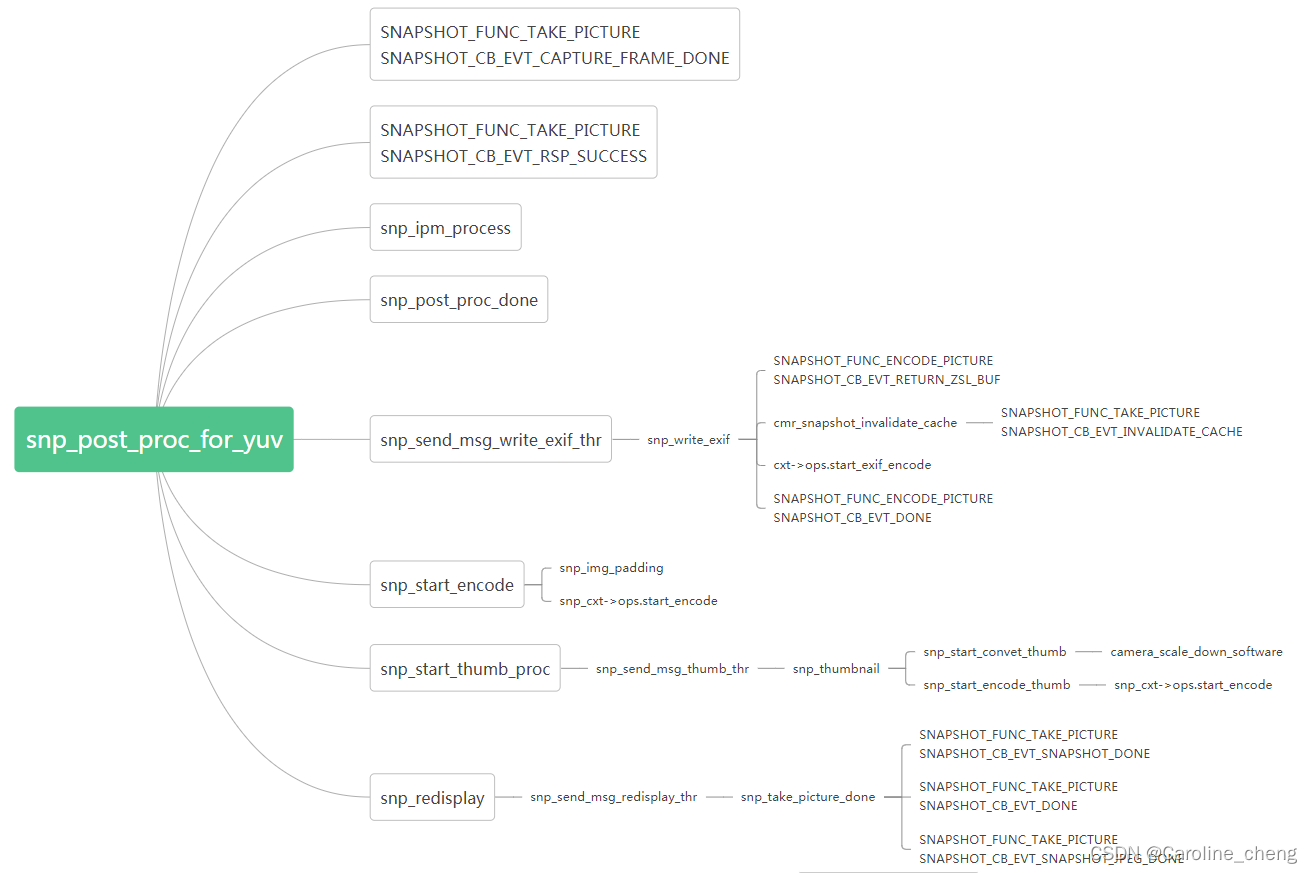
从上图可以看出,snp_post_proc_for_yuv 主要有两方面的内容:
- 消息回调:通知hal,当前拍照流程的进度及最后的拍照数据
- 编码:exif、thumb、图片原始数据
上述各个流程处理的数据,来自我们在set_param那节中介绍的各个参数数据。
关于cmr_snapshot.c的介绍就到这里了。到目前为止,oem的介绍只在单独的关键c文件,后面我们会通过介绍从hal到oem的整个预览和拍照的流程,将我们目前介绍的内容都串起来。
边栏推荐
- 365天挑战LeetCode1000题——Day 047 设计循环队列 循环队列
- 3年测试在职,月薪还不足2w,最近被裁员,用亲身经历给大家提个醒...
- STM32+MPU6050设计便携式Mini桌面时钟(自动调整时间显示方向)
- 情景剧《重走长征路》上演
- LayaBox - TypeScript - merge statement
- LayaBox---TypeScript---模块
- Question about #oracle#, how to solve it?
- Weak yen turns game consoles into "financial products" in Japan: scalpers make big profits
- LayaBox---TypeScript---Iterator and generator
- LeetCode每日一练 —— 225. 用队列实现栈
猜你喜欢
一体化在线政务服务平台,小程序容器技术加速建设步伐
MSYS2 QtCreator Clangd code analysis can not find mm_malloc.h problem remedy
多大数量级会出现哈希碰撞
MySql tens of millions of paging optimization, fast insertion method of tens of millions of data
5G基础学习1、5G网络架构、网络接口及协议栈

全新荣威RX5,27寸大屏吸引人,安全、舒适一个不落

软件测试岗位巨坑?阿里在职7年测试人告诉你千万别上当
Rear tube implements breadcrumb function
LeetCode每日一练 —— 225. 用队列实现栈
太帅了!我用炫酷大屏展示爬虫数据!
随机推荐
One Summer of Open Source | How to Quickly Integrate Log Modules in GO Language Framework
情景剧《重走长征路》上演
MySql模糊查询大全
Event 对象,你很了解吗?
mysql清除binlog日志文件
利用二维数据学习纹理三维网格生成(CVPR 2020)
深度学习100例 —— 卷积神经网络(CNN)实现mnist手写数字识别
行为型模式-模板方法模式
零代码工具推荐---HiFlow
阿里CTO程立:阿里巴巴开源的历程、理念和实践
The realization of the list
Event object, do you know it well?
Weak yen turns game consoles into "financial products" in Japan: scalpers make big profits
Smoothing of time series data in R language: smoothing time series data to remove noise using the dpill function and locpoly function of the KernSmooth package
使用较广泛的安全测试工具有哪些?
Oracle根据时间查询
Verilog's random number system task----$random
LayaBox---TypeScript---Mixins
AlphaFold又放大招,剑指整个生物界!
从测试入门到测试架构师,这10年,他是这样让自己成才的