当前位置:网站首页>[unity3d] rigid body component
[unity3d] rigid body component
2022-06-26 05:02:00 【little_ fat_ sheep】
1 Preface
rigid body (Rigidbody) yes kinematics (Kinematic) A concept in , It refers to the movement and force , The shape and size remain the same , And the relative positions of the interior points remain unchanged . stay Unity3D in , Rigid body components give game objects some kinematic properties , It mainly includes Mass( quality )、Drag( resistance )、Angular Drag( Angular resistance )、Use Gravity( Whether to use gravity )、Is Kinematic( Whether it is affected by physics )、Collision Detection( collision detection )、 Velocity( Speed )、Force( Stress )、Explosion Force( Explosive force ). No rigid body (RigidBody) Components , Game objects can penetrate each other , There's no collision .
1) Get the rigid body component
Rigidbody rig = GetComponent<Rigidbody>();2) Rigid body component panel properties
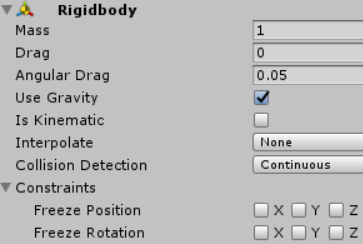
- Mass: The mass of the object ( Default in kilogram )
- Drag: The amount of air resistance to the object
- Angular Drag: When an object rotates , The magnitude of the rotational resistance received
- Use Gravity: If enabled , Objects will be affected by gravity
- Is Kinematic: If enabled , Objects will not be driven by the physics engine , Only by its Transform Component operations
- Interpolate: Interpolator of the moving position of the object
- Collision Detection: Collision detection type , When you see an object moving too fast through a wall , Collision detection frequency can be enhanced , choice Continuous Options
- Constraints: Restrictions on the motion and rotation of rigid bodies , The component on a coordinate axis remains unchanged when restricting the motion of an object
- velocity: Object motion vector velocity
3) Rigid body component method
//  The thrust on the rigid body
public void AddForce(Vector3 force)
//  The explosive force on the rigid body ,explosionForce: The magnitude of the explosive force ,explosionPosition: Explosion point ,explosionRadius: Explosion radius
public void AddExplosionForce(float explosionForce, Vector3 explosionPosition, float explosionRadius)
2 application
2.1 Application 1
1) Create game objects
establish Cube and Plane The game object , as follows :

2) to Cube Game objects add rigid body components
Choose Cube The game object , Click on Add Component Button , Search for Rigidbody, Add rigid body components .

3) add to RigidbodyController Script
RigidbodyController.cs
using UnityEngine;

public class RigidbodyController : MonoBehaviour {
	private Rigidbody rig;

	void Start () {
		rig = GetComponent<Rigidbody>();
	}

	void Update () {
		float hor = Input.GetAxis("Horizontal");
        float ver = Input.GetAxis("Vertical");
		float up = Mathf.Sqrt(hor * hor + ver * ver);
		if (up > 0.1) {
			rig.velocity = new Vector3(hor, up, ver);
		}
	}
}
4) Running effect
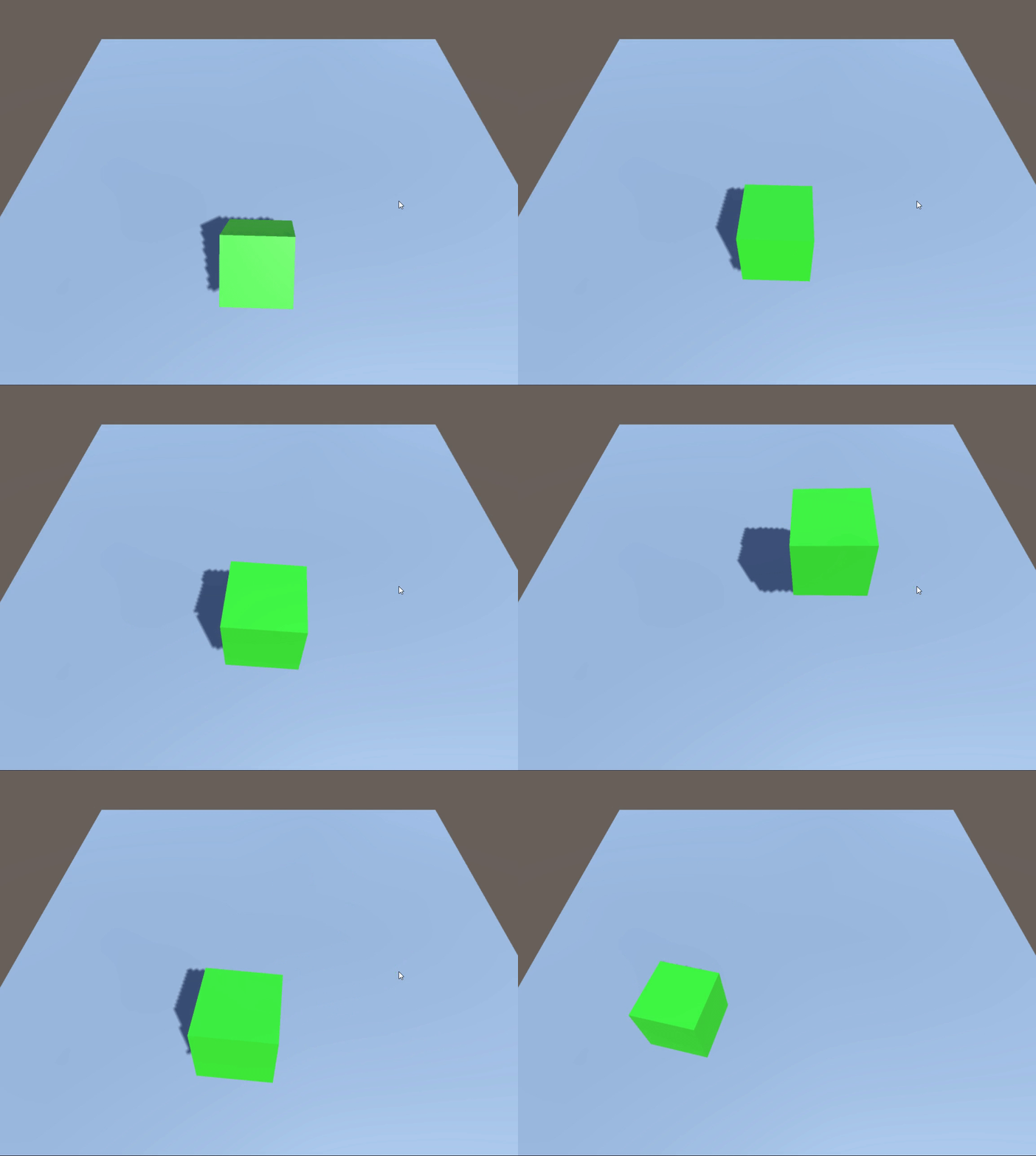
Use the up, down, left and right arrow keys , Control the cube to lift up to the surrounding sky , Release the key , The cube fell down under the action of gravity .
2.2 Application 2
1) add to RigidbodyController Script
On the basis of application one , take RigidbodyController The script is modified as follows :
RigidbodyController.cs
using UnityEngine;

public class RigidbodyController : MonoBehaviour {
	private Rigidbody rig;

	void Start () {
		rig = GetComponent<Rigidbody>();
	}

	void Update () {
		float hor = Input.GetAxis("Horizontal");
        float ver = Input.GetAxis("Vertical");
		float up = Mathf.Sqrt(hor * hor + ver * ver);
		if (up > 0.1) {
			rig.AddForce(new Vector3(hor, 0, ver) * 10); //  Add thrust
		}
	}
}
2) Running effect
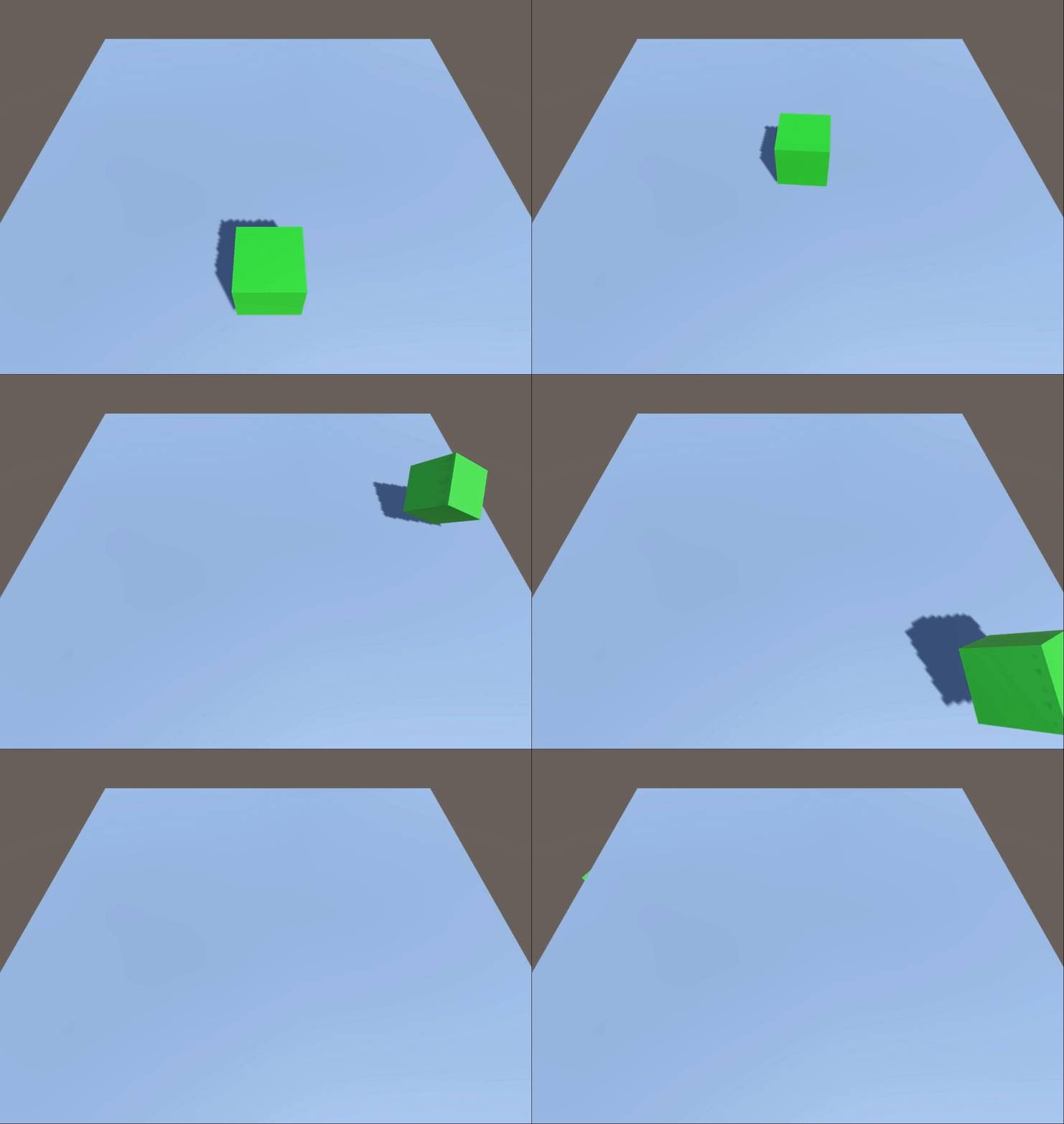
Use the up, down, left and right arrow keys , The control cube receives a push from all around .
2.3 Application 3
1) Create game objects
On the basis of application one , establish 4 individual Cube The game object ,position Respectively :(0, 1, 2)、(0, 1, -2)、(-2, 1, 0)、(2, 1, 0), as follows :

to 4 individual Cube Game objects are added Rigidbody Components and RigidbodyController Script components .
2) add to RigidbodyController Script
using UnityEngine;

public class RigidbodyController : MonoBehaviour {
	private Rigidbody rig;

	void Start () {
		rig = GetComponent<Rigidbody>();
	}

	void Update () {
		if (Input.GetKeyDown(KeyCode.Space)) {
            //  stay (0,0,0) Add... At coordinates 10 Within meters 300N Explosive force of
			rig.AddExplosionForce(300, Vector3.zero, 10);
		}
	}
}
3) Running effect
Press the space bar ,4 Three cubes are subjected to an explosive force from the center .

边栏推荐
- Final review of brain and cognitive science
- 记录一次循环引用的问题
- Sklearn Library -- linear regression model
- 【Unity3D】刚体组件Rigidbody
- Image translation /gan:unsupervised image-to-image translation with self attention networks
- 1.20 learning summary
- 文件上传与安全狗
- 【Unity3D】碰撞体组件Collider
- Record a circular reference problem
- YOLOV5超参数设置与数据增强解析
猜你喜欢

2.9 learning summary

【Latex】错误类型总结(持更)
Ai+ remote sensing: releasing the value of each pixel

The first gift of the project, the flying oar contract!

LeetCode 19. 删除链表的倒数第 N 个结点

记录一次循环引用的问题

5. <tag-栈和常规问题>补充: lt.946. 验证栈序列(同剑指 Offer 31. 栈的压入、弹出序列)

86. (cesium chapter) cesium overlay surface receiving shadow effect (gltf model)

2. < tag dynamic programming and conventional problems > lt.343 integer partition

1.16 learning summary
随机推荐
2022.2.11
LeetCode 94. Middle order traversal of binary tree
Computer Vision Tools Chain
torchvision_transform(图像增强)
Nabicat connection: local MySQL & cloud service MySQL and error reporting
为什么许多shopify独立站卖家都在用聊天机器人?一分钟读懂行业秘密!
文件上传与安全狗
torchvision_ Transform (image enhancement)
Use fill and fill in Matplotlib_ Between fill the blank area between functions
A company crawling out of its grave
Happy New Year!
记录一次循环引用的问题
微信小程序保存圖片的方法
LISP programming language
2022.2.17
钟珊珊:被爆锤后的工程师会起飞|OneFlow U
Multipass Chinese documents - improve mount performance
Use to_ Numeric to numeric type
Differences between TCP and UDP
ModuleNotFoundError: No module named ‘numpy‘