当前位置:网站首页>Stm32cubemx learning (I) USB HID bidirectional communication
Stm32cubemx learning (I) USB HID bidirectional communication
2022-06-12 07:04:00 【iqiaoqiao】
STM32CubeMX Study ( One ) USB HID Two-way communication
brief introduction
Using punctual atoms F407 Explorer development board , The test is based on USB HID Two way data communication .
CubeMX New project ( A serial port +LED)
Set the clock source 

Set debugger 
Set up LED
Set the serial port 
Set up USB OTG

Pinout preview 
engineering management 
In the picture above , You can put Heap Size and Stack Size Bigger , bring USB More smooth data communication .

The selection in the red box is mainly for the project to be packaged and directly used by others .
Finally, click GENERATE CODE Build project .
Test serial port and LED
stay usart.h The header file is introduced in stdio.h
/* USER CODE BEGIN Includes */
#include "stdio.h" // Import this file , For redirection printf
/* USER CODE END Includes */
stay usart.c Add redirection code in
/* USER CODE BEGIN 1 */
//  Redirect printf function
int fputc(int ch,FILE *f)
{

    uint8_t temp[1]={
    ch};
    HAL_UART_Transmit(&huart1,temp,1,2);
		return 0;
}
/* USER CODE END 1 */
For the convenience of debugging , stay main.c Add the following macro definitions to
/* USER CODE BEGIN PD */
#define USER_MAIN_DEBUG

#ifdef USER_MAIN_DEBUG
#define user_main_printf(format, ...) printf( format "\r\n",##__VA_ARGS__)
#define user_main_info(format, ...) printf("main.info:" format "\r\n",##__VA_ARGS__)
#define user_main_debug(format, ...) printf("main.debug:" format "\r\n",##__VA_ARGS__)
#define user_main_error(format, ...) printf("main.error:" format "\r\n",##__VA_ARGS__)
#else
#define user_main_printf(format, ...)
#define user_main_info(format, ...)
#define user_main_debug(format, ...)
#define user_main_error(format, ...)
#endif
/* USER CODE END PD */
stay main.c Add code to
  /* USER CODE BEGIN WHILE */
  while (1)
  {

    /* USER CODE END WHILE */

    /* USER CODE BEGIN 3 */
      printf("Enter main while loop!\r\n");
      user_main_debug("Main debug!\n");
      HAL_GPIO_WritePin(LED1_GPIO_Port,LED1_Pin,GPIO_PIN_RESET);
      HAL_Delay(500);
      HAL_GPIO_WritePin(LED1_GPIO_Port,LED1_Pin,GPIO_PIN_SET);
      HAL_Delay(500);
  }
  /* USER CODE END 3 */
Set to run automatically after downloading , Compile operation , Connect the serial port debugging assistant , Observe the phenomenon 
After compiling and downloading , Restart discovery LED1( A green light ) Flashing , The serial port receives character data .
If The program does not respond or the program is stuck after simulation BEAB BKPT 0xAB, resolvent :MDK Select Settings ,TARGET , Check Use MicroLIB
Set up USB HID
utilize HID descriptor Tool Software generates send receive 64byte Message descriptor data , Add to usbd_custom_hid_if.c Of documents CUSTOM_HID_ReportDesc_FS Function
/** Usb HID report descriptor. */
__ALIGN_BEGIN static uint8_t CUSTOM_HID_ReportDesc_FS[USBD_CUSTOM_HID_REPORT_DESC_SIZE] __ALIGN_END =
{

  /* USER CODE BEGIN 0 */
    0x05, 0x8c, // USAGE_PAGE (ST Page) /
    0x09, 0x01, // USAGE (Demo Kit) /
    0xa1, 0x01, // COLLECTION (Application) /
    /* 6 */
    // The Input report
    0x09,0x03, // USAGE ID - Vendor defined
    0x15,0x00, // LOGICAL_MINIMUM (0)
    0x26,0x00, 0xFF, // LOGICAL_MAXIMUM (255)
    0x75,0x08, // REPORT_SIZE (8)
    0x95,CUSTOM_HID_EPIN_SIZE, //0x95,0x16, REPORT_COUNT (20)
    0x81,0x02, // INPUT (Data,Var,Abs)
    //19
    // The Output report
    0x09,0x04, // USAGE ID - Vendor defined
    0x15,0x00, // LOGICAL_MINIMUM (0)
    0x26,0x00,0xFF, // LOGICAL_MAXIMUM (255)
    0x75,0x08, // REPORT_SIZE (8)
    0x95,CUSTOM_HID_EPOUT_SIZE, //0x95,0x16, REPORT_COUNT (20)
    0x91,0x02, // OUTPUT (Data,Var,Abs)
    //32
  /* USER CODE END 0 */
  0xC0    /* END_COLLECTION */
};
stay usbd_desc.c Revision in China USB HID Parameters
** @defgroup USBD_DESC_Private_Defines USBD_DESC_Private_Defines
  * @brief Private defines.
  * @{

  */

#define USBD_VID 1155
#define USBD_LANGID_STRING 1033
#define USBD_MANUFACTURER_STRING "STMicroelectronics"
#define USBD_PID_FS 22352
#define USBD_PRODUCT_STRING_FS "STM32 Custom Human interface"
#define USBD_CONFIGURATION_STRING_FS "Custom HID Config"
#define USBD_INTERFACE_STRING_FS "Custom HID Interface"


#define USB_SIZ_BOS_DESC 0x0C
stay usbd_conf.h Modify the sending data length and message length 
stay usbd_customhid.h: Modify the length and time interval of receiving and sending data 
among ,CUSTOM_HID_HS_BINTERVAL and CUSTOM_HID_FS_BINTERVAL The value of can also be in CubeMX Set in .CUSTOM_HID_FS_BINTERVAL The definition of is in the file usbd_conf.h in , See previous figure .
test USB HID signal communication
stay main.c in , Add the following code :
/* USER CODE BEGIN Includes */
#include "usbd_custom_hid_if.h"
#include "usbd_customhid.h" // Including sending function header file
extern USBD_HandleTypeDef hUsbDeviceFS; // External statement USB The handle of
/* USER CODE END Includes */
...
/* USER CODE BEGIN PV */
unsigned char USB_Recive_Buffer[64] = {
    1,2,3,4,5,6,7,8,9,}; //USB Receive cache
unsigned char USB_Received_Count = 0;//USB Received data count
/* USER CODE END PV */
...
  while (1)
  {

    /* USER CODE END WHILE */

    /* USER CODE BEGIN 3 */
      printf("Enter main while loop!\r\n");
      USBD_CUSTOM_HID_SendReport(&hUsbDeviceFS, USB_Recive_Buffer, 64);
      HAL_GPIO_WritePin(LED1_GPIO_Port,LED1_Pin,GPIO_PIN_RESET);
      HAL_Delay(500);
      HAL_GPIO_WritePin(LED1_GPIO_Port,LED1_Pin,GPIO_PIN_SET);
      HAL_Delay(500);
  }
  /* USER CODE END 3 */
stay usbd_custom_hid_it.c Add the following code to :
/* USER CODE BEGIN PV */
/* Private variables ---------------------------------------------------------*/
extern unsigned char USB_Recive_Buffer[64];
extern unsigned char USB_Received_Count;
/* USER CODE END PV */

...

/** * @brief Manage the CUSTOM HID class events * @param event_idx: Event index * @param state: Event state * @retval USBD_OK if all operations are OK else USBD_FAIL */
static int8_t CUSTOM_HID_OutEvent_FS(uint8_t event_idx, uint8_t state)
{

  /* USER CODE BEGIN 6 */
// UNUSED(event_idx);
// UNUSED(state);

    int i;
    /* Check the received data length */
    USB_Received_Count = USBD_GetRxCount( &hUsbDeviceFS,CUSTOM_HID_EPOUT_ADDR );  // The first parameter is USB Handle , The second parameter is the receiving end address ; To get the length of the sent data, change the second parameter to the sending end address
    //printf("USB_Received_Count = %d \r\n",USB_Received_Count);

    USBD_CUSTOM_HID_HandleTypeDef   *hhid; // Define a point USBD_CUSTOM_HID_HandleTypeDef Pointer to structure
    hhid = (USBD_CUSTOM_HID_HandleTypeDef*)hUsbDeviceFS.pClassData;// obtain USB Storage address for receiving data

    for(i=0;i<USB_Received_Count;i++)
    {

        USB_Recive_Buffer[i]=hhid->Report_buf[i];  // Send the received data to the user-defined cache for saving (Report_buf[i] by USB Receive buffer for )
    }

  /* Start next USB packet transfer once data processing is completed */
  USBD_CUSTOM_HID_ReceivePacket(&hUsbDeviceFS);

  return (USBD_OK);
  /* USER CODE END 6 */
}
Download after compiling , The test results are as follows :
Click on Endpoint 2/HID send out Button , give the result as follows :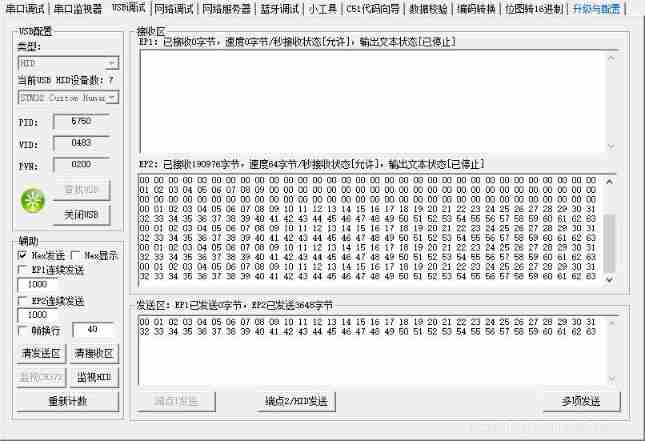
Bus Hound The capture is as follows :
Conclusion
According to the relevant information , Use HID The mode of transmission is interrupt transmission , Interrupt interval is determined by CUSTOM_HID_FS_BINTERVAL Set up , The minimum value is 1ms, That is to say, the maximum transmission speed is 64KByte/Sec. use Bus Hound The results of software testing are similar , Here's the picture :
Project files can be downloaded from my resources .
notes :Cmd.Phase.Ofs The first of the three data represents the command (Cmd), from 1 Start Statistics , Every time the device receives a new command, it adds 1.
The second means Phase This time (Cmd) Position in , Every time there is a data or status, add 1.
The third one indicates that the data is in this one Phase In the middle .
There is a bracket at the end , It indicates the number of times the duplicate data has been folded , stay Settings You can set the duplicate data consolidation display .
In this experiment , The rate of testing is about 1ms A bag !
边栏推荐
- leetcode:剑指 Offer 60. n个骰子的点数【数学 + 层次dp + 累计贡献】
- 基于eNSP加防火墙的千人中型校园/企业网络规划与设计(附所有配置命令)
- 4 expression
- sql server2019安装到这步无法进行下一步了,如何解决?
- leetcode:剑指 Offer 66. 构建乘积数组【前后缀积的应用】
- 【图像检测】基于深度差分和PCANet实现SAR图像变化检测附matlab代码
- Matlab 6-DOF manipulator forward and inverse motion
- descheduler 二次调度让 Kubernetes 负载更均衡
- 五月集训(第28天)——动态规划
- VSCode常用插件
猜你喜欢






随机推荐
MySQL group query to obtain the latest data date function of each group
8. form label
Unable to load bean of class marked with @configuration
Kotlin插件 kotlin-android-extensions
Oracle Database
D
Zhang Chi: is process a panacea?
June 9th training day - bit operation
Can official account also bring goods?
[image denoising] image denoising based on nonlocal Euclidean median (nlem) with matlab code
d的自动无垃集代码.
Planning and design of 1000 person medium-sized campus / enterprise network based on ENSP and firewall (with all configuration commands)
SSM integration
leetcode:剑指 Offer 66. 构建乘积数组【前后缀积的应用】
9 Sequence container
循环链表和双向链表—课上课后练
esp32 hosted
The first day of June training - array
Problems encountered in learning go
8. 表单标签