当前位置:网站首页>配置服务器环境
配置服务器环境
2022-07-26 18:10:00 【知道的都知道 不知道的慢慢了解】
vscode终端
user为自己的用户名
cd /home/503-2/
cp Anaconda3-2022.05-Linux-x86_64.sh /home/user
1.安装Anaconda
sh Anaconda3-2022.05-Linux-x86_64.sh
前面默认选择即可 一直enter
最后选择yes
在anaconda中安装
新建一个自己的python版本环境
conda create -n name python=3.8
name:你的环境名字,自定义
激活自己新建的环境
conda activate name
在自己的环境中安装torch
conda install pytorch torchvision torchaudio cudatoolkit=11.1 -c pytorch-lts -c nvidia
已测试可用
2.进入自己的文件夹里
cd home
ls
cd user
查看自己的环境
conda info -e
3.配置cuda
输入
vi .bashrc
添加
export PATH=/usr/local/cuda/bin${
PATH:+:${
PATH}}
export LD_LIBRARY_PATH=/usr/local/cuda/lib64${
LD_LIBRARY_PATH:+:${
LD_LIBRARY_PATH}}
3.关闭自己远程连接并重新连接
输入
nvcc -V
输出
nvcc: NVIDIA (R) Cuda compiler driver

Copyright (c) 2005-2021 NVIDIA Corporation

Built on Sun_Mar_21_19:15:46_PDT_2021

Cuda compilation tools, release 11.3, V11.3.58

Build cuda_11.3.r11.3/compiler.29745058_0
成功!!!!
自己直接使用anaconda
4.【GPU】nvidia-smi
1.基础命令
nvidia-smi
安装完成后在命令行或终端输入命令nvidia-smi,即可看到下面的信息(点击放大):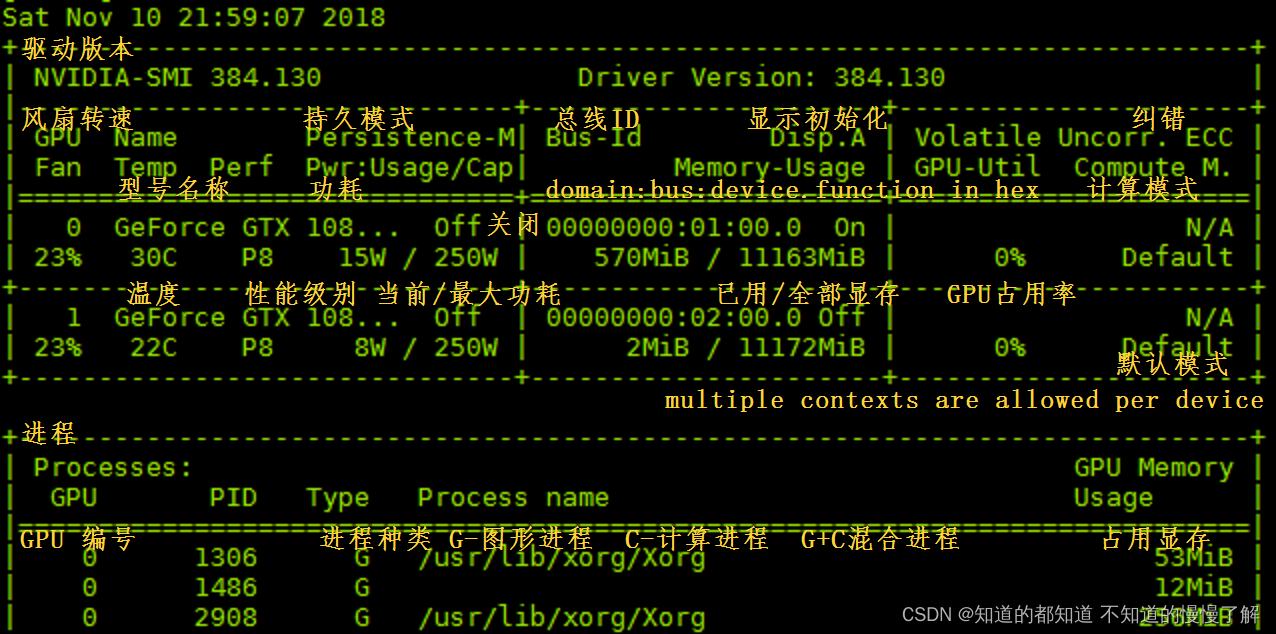
表头释义:Fan:显示风扇转速,数值在0到100%之间,是计算机的期望转速,如果计算机不是通过风扇冷却或者风扇坏了,显示出来就是N/A;
Temp:显卡内部的温度,单位是摄氏度;
Perf:表征性能状态,从P0到P12,P0表示最大性能,P12表示状态最小性能;
Pwr:能耗表示;
Bus-Id:涉及GPU总线的相关信息;
Disp.A:是Display Active的意思,表示GPU的显示是否初始化;
Memory Usage:显存的使用率; 主要看这个
Volatile GPU-Util:浮动的GPU利用率;
Compute M:计算模式;
下边的Processes显示每块GPU上每个进程所使用的显存情况。
2.查看GPU是否空闲
nvidia-smi
3.查看进程的具体信息
ps aux|grep pid
查看pid号进程的具体信息,可以看到是哪个用户运行哪个程序
判断进程是不是死在里面了或者可以询问实验室的同学什么时候能跑完实验
4.杀进程:
kill -9 pid
5.查看conda版本python版本
conda --version
python
参考链接
这些链接都是精华 如果没看懂我的 看看这些链接 总有一款包您满意
在服务器上搭建自己的python环境(针对小白)
在linux服务器上配置虚拟环境–python+TensorFlow
深度学习实验基础02:实验室服务器使用
在实验室服务器上装anaconda环境并简单使用
如何在Linux服务器上安装Anaconda(超详细)
边栏推荐
猜你喜欢
手写一个Starter

2022搭建企业级数据治理体系
C#获取本地时间/系统时间

基础模块及算例#pytorch学习

Covos: no need to decode! Semi supervised Vos acceleration using motion vectors and residuals of compressed video bitstreams (CVPR 2022)

Agenda express | list of sub forum agenda on July 27

ReentrantLock学习之---释放锁过程

PMP practice once a day | don't get lost in the exam -7.26 (including agility + multiple choices)

How to solve the problem that win11 has been switched on after upgrading

2022t elevator repair examination questions and online simulation examination
随机推荐
洋葱集团携手OceanBase实现分布式升级,全球数据首次实现跨云融合
LeetCode简单题之装满杯子需要的最短总时长
Tensorflow GPU 1.15 installation
2022 chemical automation control instrument test question simulation test platform operation
LeetCode笔记:Weekly Contest 303
Synchronized theory
Some time series modeling strategies (I)
千万不要随便把 Request 传递到异步线程里面 , 有坑 你拿捏不住,得用 startAsync 方法才行
如何保护电子商务网站免受网络攻击?
2022 Shanghai safety officer C certificate operation certificate examination question bank simulated examination platform operation
2022 welder (elementary) operation certificate examination question bank and simulation examination
2022G1工业锅炉司炉上岗证题库及模拟考试
.net CLR GC dynamic loading transient heap threshold calculation and threshold excess calculation
Leetcode simple question: the minimum total time required to fill a cup
Leetcode notes: Weekly contest 303
手机申请公募reits账户安全吗?
TypeScript阶段学习
2022 mobile crane driver test questions simulation test platform operation
How many pairs can an array of leetcode simple questions form
模板进阶(跑路人笔记)