当前位置:网站首页>Tensorflow --- creation and reading of tfrecord file
Tensorflow --- creation and reading of tfrecord file
2022-06-11 19:39:00 【Brother Shui is very water】
One 、 Environmental requirements
Python==3.7
Tensorflow==2.4.0
Two 、 Data preparation
The data set demonstrated in this blog can be downloaded through the following link
Baidu online disk extraction code :9q0f
3、 ... and 、TFRecord File creation
import os
import cv2
import tensorflow as tf
import tqdm as tqdm

if __name__ == '__main__':
    #  Root directory of data set to be processed
    Dataset_path = 'Split_Dataset'
    #  Used to generate the file path to be written
    file_names = [i.split('.')[0] for i in os.listdir(os.path.join(Dataset_path, 'DSM'))]
    dsm_filename = [os.path.join(Dataset_path, 'DSM', i + '.tif') for i in file_names]
    label_filename = [os.path.join(Dataset_path, 'Label', i + '.png') for i in file_names]
    rgb_filename = [os.path.join(Dataset_path, 'RGB', i + '.png') for i in file_names]
    #  To begin TFRecords File construction
    with tf.io.TFRecordWriter('Potsdam.tfrecords') as writer:
        tqdm_file = tqdm.tqdm(iterable=zip(dsm_filename, rgb_filename, label_filename), total=len(dsm_filename))
        for dsm, rgb, label in tqdm_file:
            #  Read the elevation map
            dsm_data = cv2.imread(dsm, -1)
            dsm_data = dsm_data.ravel()

            #  Read the optical map
            rgb_data = open(rgb, 'rb').read()

            #  Read the label
            label_data = open(label, 'rb').read()

            #  establish tf.train.Feature Dictionaries
            feature = {

                'dsm': tf.train.Feature(float_list=tf.train.FloatList(value=dsm_data)),
                'rgb': tf.train.Feature(bytes_list=tf.train.BytesList(value=[rgb_data])),
                'label': tf.train.Feature(bytes_list=tf.train.BytesList(value=[label_data]))
            }

            #  Create... From a dictionary Example
            example = tf.train.Example(features=tf.train.Features(feature=feature))
            #  take Example Serialize and write TFRecords file
            writer.write(example.SerializeToString())
        tqdm_file.close()
Four 、TFRecord File reading
import tensorflow as tf
import matplotlib.pyplot as plt

#  structure Feature structure , Tell the decoder everyone Feature What is it?
feature_description = {

    'dsm': tf.io.FixedLenFeature([512, 512, 1], tf.float32),
    'rgb': tf.io.FixedLenFeature([], tf.string),
    'label': tf.io.FixedLenFeature([], tf.string)
}


# Example Analytic function of
def parse_example(example_string):
    feature = tf.io.parse_single_example(serialized=example_string, features=feature_description)

    feature['rgb'] = tf.image.decode_png(feature['rgb'], channels=3)
    feature['rgb'] = tf.image.resize(feature['rgb'], [512, 512])
    feature['rgb'] = tf.cast(feature['rgb'], tf.float32)
    feature['rgb'] = feature['rgb'] / 255

    feature['label'] = tf.image.decode_png(feature['label'], channels=1)
    feature['label'] = tf.image.resize(feature['label'], [512, 512])
    feature['label'] = tf.cast(feature['label'], tf.int64)
    feature['label'] = tf.squeeze(feature['label'])

    return feature['dsm'], feature['rgb'], feature['label']


if __name__ == '__main__':
    dataset = tf.data.TFRecordDataset(r'Potsdam.tfrecords')
    dataset = dataset.map(parse_example)
    dataset = dataset.shuffle(buffer_size=500)

    for dsm, rgb, label in dataset.take(1):
        temp = (dsm - tf.reduce_min(input_tensor=dsm, axis=(0, 1, 2))) / (
                tf.reduce_max(input_tensor=dsm, axis=(0, 1, 2)) - tf.reduce_min(input_tensor=dsm, axis=(0, 1, 2)))

        plt.figure(figsize=(15, 5), dpi=150)
        plt.subplot(1, 3, 1)
        plt.imshow(temp)
        plt.axis('off')

        plt.subplot(1, 3, 2)
        plt.imshow(rgb)
        plt.axis('off')

        plt.subplot(1, 3, 3)
        plt.imshow(label)
        plt.axis('off')

        plt.show()
5、 ... and 、TFRecord File reading results

6、 ... and 、 Downloading project files
The project source file of this article can be obtained by clicking the following link
Project source file
边栏推荐
- SISO decoder for SPC (supplementary Chapter 1)
- Software requirements engineering review
- POJ 1458 longest common subsequence (dynamic planning exercise)
- MySQL - Basic select statement
- RTL仲裁器设计
- Proficient in xmake2
- Go语言入门(六)——循环语句
- 干货!基于序列超图神经网络的信息扩散预测
- Loop filtering to uncover the technical principle behind video thousand fold compression
- Calculate the number of 926 in the string to the power of 9260 of 926
猜你喜欢
CMU 15-445 database course lesson 5 text version - buffer pool

2022 the latest software testing classic summarized by major manufacturers. After reading it, I'm not afraid I won't get an offer

What is the workflow of dry goods MapReduce?

556. 下一个更大元素 III-(31. 下一个排列)-两次遍历

Golang学习笔记—基础篇
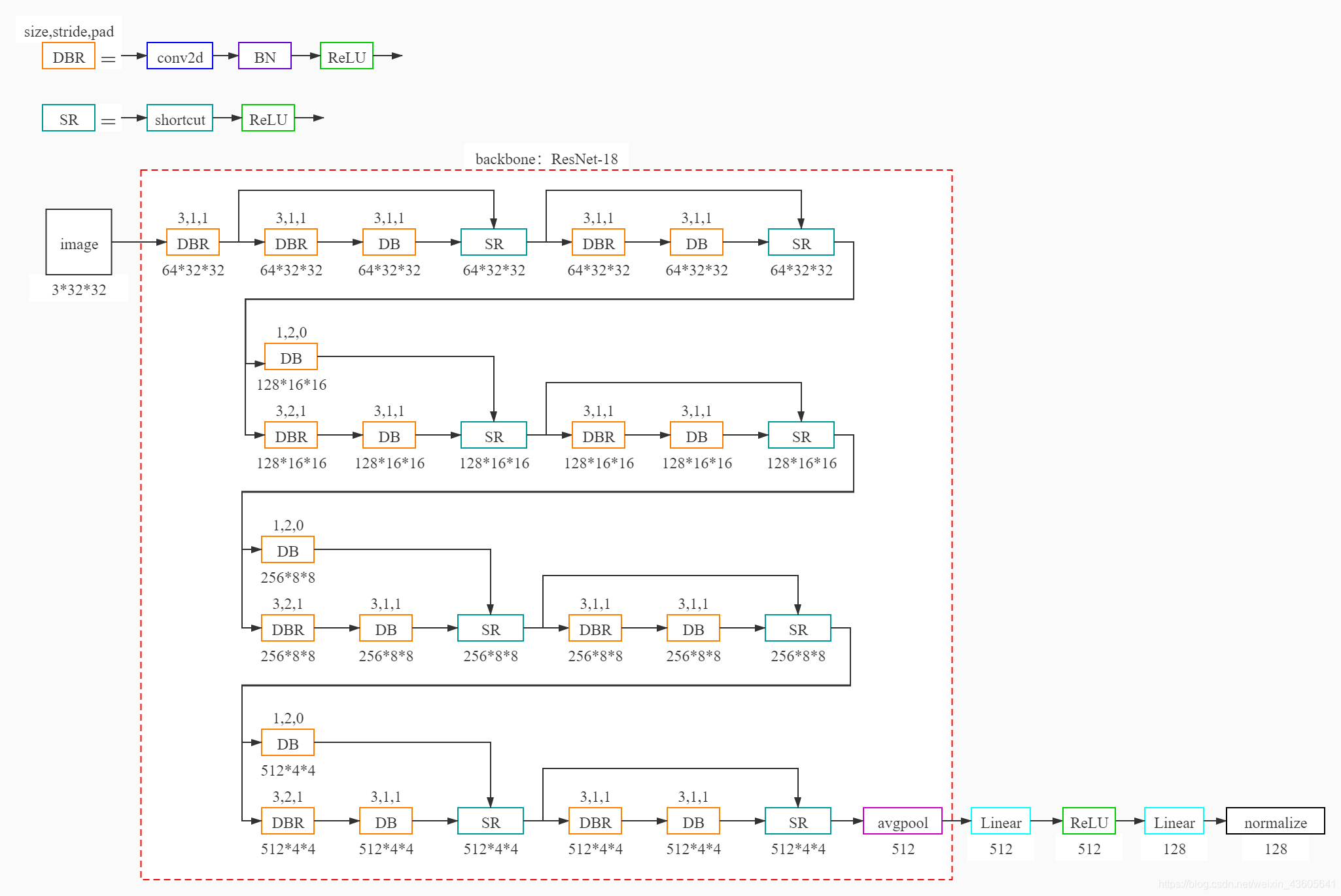
无监督图像分类《SCAN:Learning to Classify Images without》代码分析笔记(1):simclr
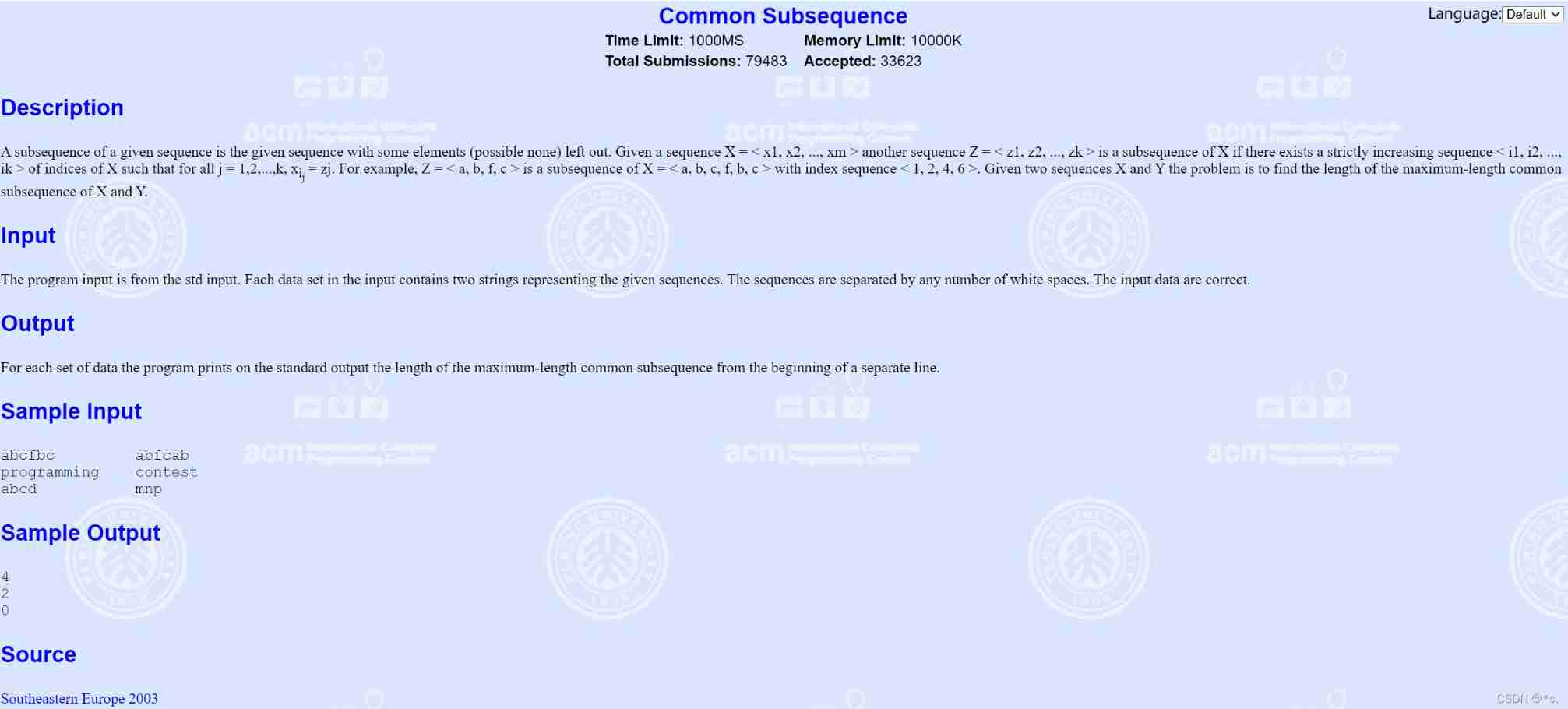
POJ 1458 longest common subsequence (dynamic planning exercise)

SLAM APP

【C语言刷题——Leetcode10道简单题】

计算926的9260次方里的字符串里有多少个926

随机推荐
Operator new and placement new
Proficient in xmake2
[bug resolution] unpickingerror: a load persistent ID instruction was encoded, but no persistent_ load.
基于 Vue + Codemirror 实现 SQL 在线编辑器
Unsupervised image classification code analysis notes of scan:learning to classify images without (1): simclr
图床:PicGo+腾讯云+typora
构建Web应用程序
Qubicle notes: Hello voxel
I don't want to open an account online. Is it safe to open an account online?
CMU 15-445 database course lesson 5 text version - buffer pool
Qubicle notes: self set shortcut keys (attached with Lao Wang's self set shortcut key file)
SLAM APP
Questions and requirements of marketing course design in autumn 21 of Dagong [standard answer]
09 MySQL lock
Loop filtering to uncover the technical principle behind video thousand fold compression
Neural network and deep learning-2-simple example of machine learning pytorch
Bottomsheetdialog usage details, setting fillet, fixed height, default full screen, etc
Judge whether it is a balanced binary tree
3D建模有什么技巧吗?
【mysql进阶】10种数据类型的区别以及如何优化表结构(三)