当前位置:网站首页>unity3d-对象池的用法
unity3d-对象池的用法
2022-07-26 07:10:00 【MaNongSa】
对象池的用法
对象池
提示:以下是本篇文章正文内容
- 什么时候使用对象池?
- 具有重复、频繁出现然后消失的物体、
以下有残影效果制作的code代码部分
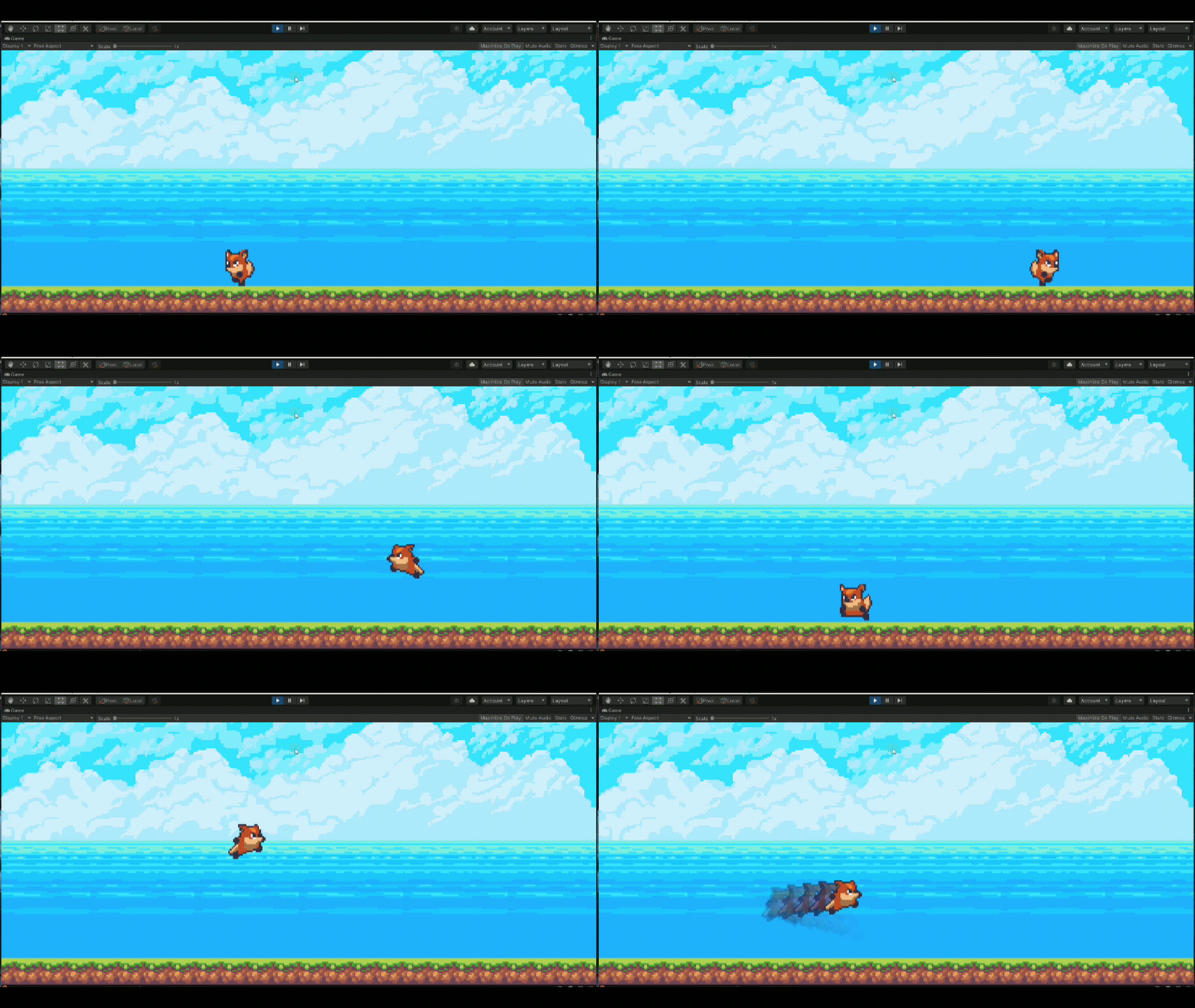
- 对象池设计模式概念(已残影生成为例)
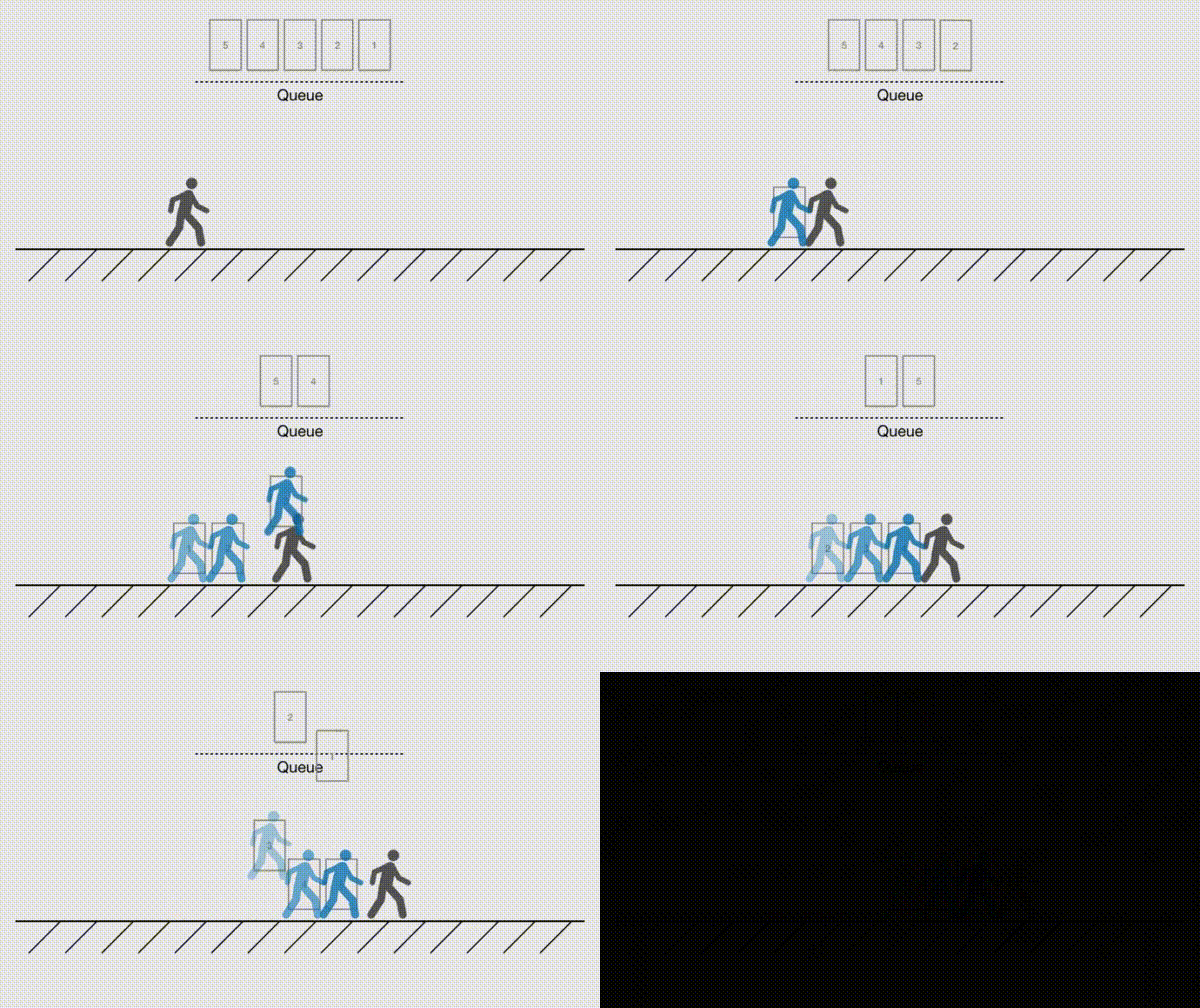
理解:对象池(Object Pool)但从字面理解就是一池子的物体,在我们需要使用的时候就拿出来一个,然后包装成我想用的样子。用完之后清空放回到池子里。
- 为什么要有对象池呢?
- 对象池用于减少内存开销,其原理就是把可能用到到的对象,先存在一个地方(池),要用的时候就调出来,不用就放回去。
- 如果我们频繁使用 Instantiate 和 Destroy 来生成后销毁,那么会占用大量的系统内存,甚至导致系统崩溃。
- 我们可以利用对象池的设计模式概念,在游戏的一开始就制作若干个数量的物体,将他们设置 SetActive(false) 当我们需要它们的时候,只要把它们设置成 SetActive(true) 就好了,用完了再次设置为false。以此方法来循环使用,以达到优化系统的作用。
- 如果不使用对象池,我们不经浪费了很多时间在寻找合适的内存上,更让内存产生了很多的内存碎片。
以冲锋残影的案例来说的话,我们只需要制作每一个残影的 Prefab 让它可以获得玩家的坐标位置和 Sprite 图像资源,然后随着时间推移降低不透明度,到达指定时间就返回对象池当中就可以了:

- 代码部分享,很有用哦!~所以赶紧收藏起来吧~
Player
using UnityEngine;

public class Player : MonoBehaviour
{
    private Animator animator;
    private Rigidbody2D rigidbody2d;
    private Collider2D collider2d;

    public float speed, jumpForce;
    public Transform layerCheck;
    public  LayerMask layerMask;

    public bool isJump, isLayer,isDash;

    private bool jumpPressed;
    private  int jumpCount;
    private float hor;

    [Header("Dash")]
    public float dashTime;//跳跃时长
    private float dashTimeLeft;//剩余时间
    private float lastDashTime=-10; //上一次dash时间点
    public float dashCoolDown;
    public float dashSpeed;

    private void Awake()
    {
        animator = GetComponent<Animator>();
        rigidbody2d = GetComponent<Rigidbody2D>();
        collider2d = GetComponent<Collider2D>();
    }

    private void Update()
    {
        if (Input.GetButtonDown("Jump")&&jumpCount>0)
        {
            jumpPressed = true;
        }
        //冲刺
        if (Input.GetKeyDown(KeyCode.J))
        {
            if (Time.time >= (dashCoolDown + lastDashTime))
            {
                //可以执行dash
                ReadyToDash();
            }
        }
    }

    private void FixedUpdate()
    {
        isLayer = Physics2D.OverlapCircle(layerCheck.transform.position,0.1f,layerMask);
        Movenemt();
        Jump();
        SwitchAnimation();
        //跳跃
        Dash();
    }

    private void Movenemt()
    {
        hor = Input.GetAxisRaw("Horizontal");
        rigidbody2d.velocity = new Vector2(hor*speed, rigidbody2d.velocity.y);

        if (hor != 0)
        {
            transform.localScale = new Vector3(hor, 1, 1);
        }
    }

    private void Jump()
    {
        if (isLayer)
        {
            isJump = false;
            jumpCount = 2;
        }
        if (jumpPressed && isLayer)
        {
            isJump = true;
            rigidbody2d.velocity = new Vector2(rigidbody2d.velocity.x, jumpForce);
            jumpCount--;
            jumpPressed = false;
        }else if (jumpPressed && isJump && jumpCount>0)
        {
            rigidbody2d.velocity = new Vector2(rigidbody2d.velocity.x, jumpForce);
            jumpCount--;
            jumpPressed = false;
        }
    }

    private void SwitchAnimation()
    {

        animator.SetFloat("isRun", Mathf.Abs(rigidbody2d.velocity.x));

        if (isLayer)
        {
            animator.SetBool("luo", false);
            animator.SetBool("isIdel", true);
        }
        else if (!isLayer && rigidbody2d.velocity.y > 0)
        {
            animator.SetBool("isIdel", false);
            animator.SetBool("isJump", true);
        }
        else if( rigidbody2d.velocity.y < 0)
        {
            animator.SetBool("isJump", false);
            animator.SetBool("luo", true);
        }
    }

    private void ReadyToDash()
    {

        isDash = true;

        dashTimeLeft = dashTime;

        lastDashTime = Time.time;

    }

    private void Dash()
    {
        if (isDash)
        {

            if (dashTimeLeft > 0)
            {

                if (rigidbody2d.velocity.y > 0&& isLayer)
                {
                    rigidbody2d.velocity = new Vector2(dashSpeed * hor, jumpForce);
                }
                rigidbody2d.velocity = new Vector2(dashSpeed * hor, rigidbody2d.velocity.y);

                dashTimeLeft -= Time.deltaTime;

                ShadowPool.Instance.DequeueS();
            }
            if (dashTimeLeft <= 0)
            {
                isDash = false;
                if (!isLayer)
                {
                    //目的为了在空中结束 Dash 的时候可以接一个小跳跃。根据自己需要随意删减调整
                    rigidbody2d.velocity = new Vector2(dashSpeed * hor, jumpForce);
                }
            }
        }

    }
}

ShadowPool
using System.Collections;
using UnityEngine;

public class ShadowPool : MonoBehaviour
{
    public static ShadowPool Instance;
    //队列
    private Queue queueS = new Queue();

    public GameObject shadowPrefab;

    public int createpPrefabCount;

    private void Awake()
    {
        Instance = this;
        FillPool();
    }

    private void FillPool()
    {
        for (int i = 0; i < createpPrefabCount; i++)
        {
            var player = Instantiate(shadowPrefab);
            player.transform.SetParent(transform);

            //取消启动 返回对象池
            EnqueueS(player);
        }
    }

    public void EnqueueS(GameObject gameObject)
    {
        gameObject.SetActive(false);

        queueS.Enqueue(gameObject);
    }

    public GameObject DequeueS()
    {
        if (queueS.Count == 0)
        {
            FillPool();
        }

        var showShadow = (GameObject)queueS.Dequeue();

        showShadow.SetActive(true);

        return showShadow;
    }
}

ShadowPrefab
using UnityEngine;

public class ShadowPrefab : MonoBehaviour
{
    private Transform player;

    private SpriteRenderer plyerSprite;
    private SpriteRenderer thisSprite;

    [Header("颜射")]
    private Color thisColor;

    [Header("事件")]
    private float startTime;
    public float time;

    [Header("对象的透明度")]
    private float lucency;
    public float startLucencyValue;
    public  float lucencyRide;


    private void OnEnable()
    {
        player = GameObject.FindGameObjectWithTag("Player").transform;
        plyerSprite = player.GetComponent<SpriteRenderer>();
        thisSprite = GetComponent<SpriteRenderer>();
        thisSprite.sprite = plyerSprite.sprite;


        lucency=startLucencyValue;

        transform.position = player.transform.position;
        transform.rotation = player.rotation;
        transform.localScale = player.localScale;

        startTime = Time.time;

    }

    private void Update()
    {
        lucency *= lucencyRide;

        thisColor = new Color(0.5f, 0.5f, 1, lucency);

        thisSprite.color = thisColor;

        if (Time.time >= startTime + time)
        {
            //返回对象池
            ShadowPool.Instance.EnqueueS(this.gameObject);
        }
    }
}

GitHub项目分享地址:https://github.com/Gitxiaomanong/unity3d-ObjectPool
unity版本2020.3
边栏推荐
- Analysis of strong tennis cup 2021 PWN competition -- baby_ diary
- Event loop in browser
- 强网杯2021 pwn 赛题解析——baby_diary
- Overview of new features of es11, ES12 and es13
- Why can't extern compile variables decorated with const?
- 你了解MySQL都包含哪些“零件“吗?
- Opencv learning drawing shapes and text
- What are the ways to open the JDBC log of Youxuan database
- Heap parsing and heap sorting
- Drools(3):Drools基础语法(1)
猜你喜欢

Screen: frame paste, 0 fit, full fit

常用的cmd指令

Solve the problem that Chrome browser is tampered with by drug bullies
解决 Chrome 浏览器被毒霸篡改问题

Yolov5 improvements: add attention mechanism (video tutorial)

IDEA——使用@Slf4j打印日志

Drools(4):Drools基础语法(2)

微信小程序 - 从入门到入土

基于C51实现led流水灯

The results of the soft test can be checked, and the entry to query the results of the soft test has been opened in the first half of 2022
随机推荐
Advanced Mathematics (Seventh Edition) Tongji University General exercises two person solution
Shared lock
Idea -- use @slf4j to print logs
Weekly tip 142: multi parameter constructors and explicit
二叉树知识总结
[arm learning (8) AXF tool analysis]
Opencv learning warp Perspective
AcWing-每日一题
在第一次使用德国小鸡要注意的地方
20220725 自动控制原理中的卷积Convolution
Heap parsing and heap sorting
Deep learning visualization
From scratch, we will completely develop an online chess game [Gobang] Based on websocket, and only use dozens of lines of code to complete all the logic.
Analysis of strong tennis cup 2021 PWN competition -- baby_ diary
【数据库】CTE(Common Table Expression(公共表表达式))
Image annotation software reference
[romance understood by technical talents] tidb community has prepared a gift for your partner for the "Tanabata Festival". Reply: if I want to challenge, I can participate in the activity!
【无标题】转载
opengauss简易版安装报错
On stock price prediction model (3): are you falling into the trap of machine learning