当前位置:网站首页>【RT-Thread】nxp rt10xx 设备驱动框架之--hwtimer搭建和使用
【RT-Thread】nxp rt10xx 设备驱动框架之--hwtimer搭建和使用
2022-07-03 17:07:00 【L_17】
hwtimer 为我们常用的硬件定时器,下面将使用gpt定时器实现设备驱动搭建
开发前准备
- 硬件平台:nxp rt10xx单片机
- IDE: Keil
1.Kconfig 修改和menuconfig配置
在Env环境menuconfig中 RT-Thread Components->Device Drivers 设备驱动默认为n,所以需要开启

先在Kconfig中添加如下语句,然后在Env环境menuconfig中 Hardware Drivers Config->On-Chip Peripheral Drivers,然后根据需要选择指定HWTIMER,笔者用的外设GPT1即:HWTIMER1

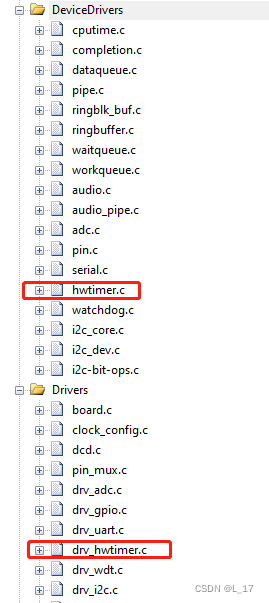
2.工程添加HWTIMER驱动框架和BSP驱动接口
设备驱动框架:hwtimer.c BSP接口:drv_hwtimer.c fsl_gpt.c
3.添加或修改drv_hwtimer.c
笔者查阅了文件,该驱动比较完善,笔者改动了时钟源,使用osc 24M做为时钟源,另外把一些多余配置删除掉了
struct rt_hwtimer_ops
{

    void (*init)(struct rt_hwtimer_device *timer, rt_uint32_t state);
    rt_err_t (*start)(struct rt_hwtimer_device *timer, rt_uint32_t cnt, rt_hwtimer_mode_t mode);
    void (*stop)(struct rt_hwtimer_device *timer);
    rt_uint32_t (*count_get)(struct rt_hwtimer_device *timer);
    rt_err_t (*control)(struct rt_hwtimer_device *timer, rt_uint32_t cmd, void *args);
};
static const struct rt_hwtimer_ops imxrt_hwtimer_ops =
{

    .init = imxrt_hwtimer_init,
    .start = imxrt_hwtimer_start,
    .stop = imxrt_hwtimer_stop,
    .count_get = imxrt_hwtimer_count_get,
    .control = imxrt_hwtimer_control,
};
int rt_hw_hwtimer_init(void)
{

    int ret = RT_EOK;

#ifdef BSP_USING_HWTIMER1
    GPT_timer1.info = &imxrt_hwtimer_info;
    GPT_timer1.ops  = &imxrt_hwtimer_ops;
    ret = rt_device_hwtimer_register(&GPT_timer1, "gpt1", GPT1);

    if (ret != RT_EOK)
    {

        LOG_E("gpt1 register failed\n");
    }
#endif

#ifdef BSP_USING_HWTIMER2
    GPT_timer2.info = &imxrt_hwtimer_info;
    GPT_timer2.ops = &imxrt_hwtimer_ops;
    ret = rt_device_hwtimer_register(&GPT_timer2, "gpt2", GPT2);

    if (ret != RT_EOK)
    {

        LOG_E("gpt1 register failed\n");
    }
#endif

    return ret;
}
时钟源选择和中断优先级是笔者改掉的地方,这里全部贴上代码
#define GPT_CLK_FREQ CLOCK_GetFreq(kCLOCK_OscClk)
#define SAI_ISR_PRE (14U)

static void NVIC_Configuration(void)
{

#ifdef BSP_USING_HWTIMER1
	NVIC_SetPriority(GPT1_IRQn,SAI_ISR_PRE);
    EnableIRQ(GPT1_IRQn);
#endif

#ifdef BSP_USING_HWTIMER2
	NVIC_SetPriority(GPT2_IRQn,SAI_ISR_PRE);
    EnableIRQ(GPT2_IRQn);
#endif
}

static rt_err_t imxrt_hwtimer_control(rt_hwtimer_t *timer, rt_uint32_t cmd, void *args)
{

    rt_err_t err = RT_EOK;
    GPT_Type *hwtimer_dev;
    hwtimer_dev = (GPT_Type *)timer->parent.user_data;

    RT_ASSERT(timer != RT_NULL);

    switch (cmd)
    {

        case HWTIMER_CTRL_FREQ_SET:
        {

            uint32_t clk;
            uint32_t pre;
            clk = GPT_CLK_FREQ;
            pre = clk / *((uint32_t *)args);
            GPT_SetClockDivider(hwtimer_dev, pre);
        }
        break;
        default:
            err = -RT_ENOSYS;
            break;
    }
    return err;
}

static rt_uint32_t imxrt_hwtimer_count_get(rt_hwtimer_t *timer)
{

    rt_uint32_t CurrentTimer_Count;
    GPT_Type *hwtimer_dev;
    hwtimer_dev = (GPT_Type *)timer->parent.user_data;

    RT_ASSERT(timer != RT_NULL);

    CurrentTimer_Count = GPT_GetCurrentTimerCount(hwtimer_dev);

    return CurrentTimer_Count;
}

static void imxrt_hwtimer_init(rt_hwtimer_t *timer, rt_uint32_t state)
{

    GPT_Type *hwtimer_dev;
    gpt_config_t gptConfig;
    hwtimer_dev = (GPT_Type *)timer->parent.user_data;

    RT_ASSERT(timer != RT_NULL);

    if (state == 1)
    {

        /* Initialize GPT module by default config */
        GPT_GetDefaultConfig(&gptConfig);
        gptConfig.clockSource = kGPT_ClockSource_Osc; //选择外设时钟
        gptConfig.divider = 24;	                      //设置分频系数 24M/24 = 1M
        GPT_Init(hwtimer_dev, &gptConfig);
    }
}

static rt_err_t imxrt_hwtimer_start(rt_hwtimer_t *timer, rt_uint32_t cnt, rt_hwtimer_mode_t mode)
{

    GPT_Type *hwtimer_dev;
    hwtimer_dev = (GPT_Type *)timer->parent.user_data;

    RT_ASSERT(timer != RT_NULL);

    hwtimer_dev->CR |= (mode != HWTIMER_MODE_PERIOD) ? GPT_CR_FRR_MASK : 0U;

    GPT_SetOutputCompareValue(hwtimer_dev, kGPT_OutputCompare_Channel1, cnt);

    GPT_EnableInterrupts(hwtimer_dev, kGPT_OutputCompare1InterruptEnable);

    NVIC_Configuration();

    GPT_StartTimer(hwtimer_dev);

    return RT_EOK;
}

static void imxrt_hwtimer_stop(rt_hwtimer_t *timer)
{

    GPT_Type *hwtimer_dev;
    hwtimer_dev = (GPT_Type *)timer->parent.user_data;

    RT_ASSERT(timer != RT_NULL);

    GPT_StopTimer(hwtimer_dev);
}
4.搭建应用层demo
开启定时器,查阅时间精度是否ok
/**************************************************START OF FILE*****************************************************/


/*------------------------------------------------------------------------------------------------------------------ Includes */
#include <rtthread.h>
#include <rtdevice.h>


/*------------------------------------------------------------------------------------------------------------------ Macros */
#define HWTIMER_DEVICE_NAME "gpt1" /* 硬件定时器设备名称 */


/*------------------------------------------------------------------------------------------------------------------ Variables */


/*------------------------------------------------------------------------------------------------------------------ Functions */
/* 定时器超时回调函数 */
static rt_err_t timer_callback(rt_device_t dev, rt_size_t size)
{

     rt_kprintf("this is hwtimer timeout callback fucntion!\n");
     rt_kprintf("tick is :%d !\n", rt_tick_get());

    return 0;
}

int xAPP_HwTimerInit(void)
{

    rt_err_t ret = RT_EOK;
    rt_hwtimerval_t timeout_s;      /* 定时器超时值 */
    rt_device_t hw_dev = RT_NULL;   /* 定时器设备句柄 */
    rt_hwtimer_mode_t mode;         /* 定时器模式 */
    rt_uint32_t freq = 100000;      /* 计数频率 */

    hw_dev = rt_device_find(HWTIMER_DEVICE_NAME);
    if (hw_dev == RT_NULL)
    {

        rt_kprintf("hwtimer sample run failed! can't find %s device!\n", HWTIMER_DEVICE_NAME);
        return RT_ERROR;
    }

    ret = rt_device_open(hw_dev, RT_DEVICE_OFLAG_RDWR);
    if (ret != RT_EOK)
    {

        rt_kprintf("open %s device failed!\n", HWTIMER_DEVICE_NAME);
        return ret;
    }

    /* 设置超时回调函数 */
    rt_device_set_rx_indicate(hw_dev, timer_callback);

    /* 设置计数频率(若未设置该项,默认为1Mhz 或 支持的最小计数频率) */
    rt_device_control(hw_dev, HWTIMER_CTRL_FREQ_SET, &freq);
    mode = HWTIMER_MODE_PERIOD;
    ret = rt_device_control(hw_dev, HWTIMER_CTRL_MODE_SET, &mode);
    if (ret != RT_EOK)
    {

        rt_kprintf("set mode failed! ret is :%d\n", ret);
        return ret;
    }

    /* 设置定时器超时值为5s并启动定时器 */
    timeout_s.sec = 5;      /* 秒 */
    timeout_s.usec = 0;     /* 微秒 */
    if (rt_device_write(hw_dev, 0, &timeout_s, sizeof(timeout_s)) != sizeof(timeout_s))
    {

        rt_kprintf("set timeout value failed\n");
        return RT_ERROR;
    }

    /* 延时3200ms */
    rt_thread_mdelay(3200);
    rt_device_read(hw_dev, 0, &timeout_s, sizeof(timeout_s));
    rt_kprintf("Read: Sec = %d, Usec = %d\n", timeout_s.sec, timeout_s.usec);

    return ret;
}

/****************************************************END OF FILE*****************************************************/

补充一下,gpt换算方式:
时钟源为24M,分频系数 0xEF + 1 = 240,可得时钟为:100000Hz,COMP:0x7A120 即:500000
500000/100000=5s 所以5s中断一次

边栏推荐
- 网络安全web渗透技术
- MySQL user management
- 匯編實例解析--實模式下屏幕顯示
- IL Runtime
- Redis: operation commands for list type data
- Depth first search of graph
- Kotlin学习快速入门(7)——扩展的妙用
- An example of HP array card troubleshooting
- Informatics Olympiad all in one YBT 1175: divide by 13 | openjudge noi 1.13 27: divide by 13
- 2022.02.14_ Daily question leetcode five hundred and forty
猜你喜欢
The largest matrix (H) in a brush 143 monotone stack 84 histogram
Daily code 300 lines learning notes day 10

Build your own website (23)

大消费企业怎样做数字化转型?
ANOVA example
Mysql database -dql

What is the material of 13mnnimor? 13mnnimor steel plate for medium and low temperature pressure vessels
Talk about several methods of interface optimization

人生还在迷茫?也许这些订阅号里有你需要的答案!

Redis: operation commands for list type data
随机推荐
LeetCode13.罗马数字转整数(三种解法)
Daily code 300 lines learning notes day 10
Necessary ability of data analysis
Mysql database -dql
CC2530 common registers for port interrupts
Kotlin学习快速入门(7)——扩展的妙用
mysql用户管理
Résolution de l'instance d'assemblage - - affichage à l'écran en mode réel
CC2530 common registers for crystal oscillator settings
Free data | new library online | cnopendata complete data of China's insurance intermediary outlets
Visual studio "usually, each socket address (Protocol / network address / port) can only be used once“
Vs code plug-in korofileheader
美团一面:为什么线程崩溃崩溃不会导致 JVM 崩溃
New features of C 10
One brush 147-force deduction hot question-4 find the median of two positive arrays (H)
Life is still confused? Maybe these subscription numbers have the answers you need!
跨境电商:外贸企业做海外社媒营销的优势
UCORE overview
Kindeditor editor upload image ultra wide automatic compression -php code
Pools de Threads: les composants les plus courants et les plus sujets aux erreurs du Code d'affaires