当前位置:网站首页>Unity skframework framework (XII), score scoring module
Unity skframework framework (XII), score scoring module
2022-07-02 13:20:00 【CoderZ1010】
Catalog
5、 ... and 、 Calculate the total score
One 、 The configuration file
1. newly build
Right click /Create/Score Profile Create a score Profile

2. edit
First, in the ScoreIDConstant Write a score item in the script ID Of int Constant

Fill in the configuration file

ID by Score item ID,Description by Score item description information ,Value by Score item score .
3. route
The default configuration file loading path in the module is Resources/Score Profile, You can also make changes in the code
// Load profile
Resources.Load<ScoreProfile>("Score Profile");
Two 、 Create scores
1. Create a single score
Use Create Method to create a single score , Parameters of the incoming Score item ID
using UnityEngine;
using SK.Framework;

public class Example : MonoBehaviour
{
    private void Start()
    {
        Score.Create(ScoreIDConstant.QUESTION_1);
    }
}
2. Create a score combination
Use CreateGroup Method to create a score combination , The first parameter is passed in The naming of fraction combination ; The second parameter is passed in Scoring method , There are two scoring methods ,Additive Indicates that the score is Cumulative ,Mutually Exclusive Indicates that there is Mutually exclusive ; The following parameters are Score item ID, Is an optional parameter .
using UnityEngine;
using SK.Framework;

public class Example : MonoBehaviour
{
    private void Start()
    {
        Score.CreateGroup(" choice question ", ValueMode.Additive,
            ScoreIDConstant.QUESTION_1,
            ScoreIDConstant.QUESTION_2,
            ScoreIDConstant.QUESTION_3,
            ScoreIDConstant.QUESTION_4);
    }
}
3、 ... and 、 Get points
When creating a score item, the corresponding number of identification , You can get 、 Cancel score .
using UnityEngine;
using SK.Framework;

public class Example : MonoBehaviour
{
    private void Start()
    {
        // Create a score combination   Record identification
        string[] flags = Score.CreateGroup(" choice question ", ValueMode.Additive,
            ScoreIDConstant.QUESTION_1,
            ScoreIDConstant.QUESTION_2,
            ScoreIDConstant.QUESTION_3,
            ScoreIDConstant.QUESTION_4);

        // Score by logo
        Score.Obtain(" choice question ", flags[0]);
    }
}
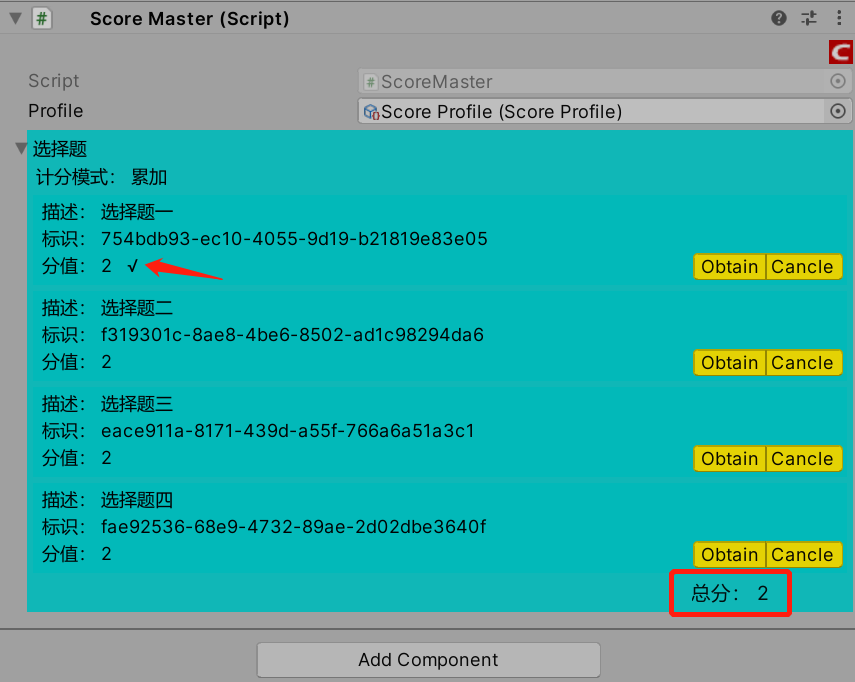
In the above example, it means to get " choice question " The score of the first score item of the score combination , That is to say ID by QUESTION_1 The score of the score item .
Four 、 Cancel score
If you want to cancel a score that has been obtained , adopt Cancle Method realization
using UnityEngine;
using SK.Framework;

public class Example : MonoBehaviour
{
    private void Start()
    {
        // Create a score combination   Record identification
        string[] flags = Score.CreateGroup(" choice question ", ValueMode.Additive,
            ScoreIDConstant.QUESTION_1,
            ScoreIDConstant.QUESTION_2,
            ScoreIDConstant.QUESTION_3,
            ScoreIDConstant.QUESTION_4);

        // Score by logo
        Score.Obtain(" choice question ", flags[0]);

        // Cancel score
        Score.Cancle(" choice question ", flags[0]);
    }
}
As shown in the figure ,Obtain Get the score and then pass Cancle Cancel score , The score obtained has been cancelled

5、 ... and 、 Calculate the total score
adopt GetSum Method to obtain the total score obtained
using UnityEngine;
using SK.Framework;

public class Example : MonoBehaviour
{
    private void Start()
    {
        // Create a score combination   Record identification
        string[] flags = Score.CreateGroup(" choice question ", ValueMode.Additive,
            ScoreIDConstant.QUESTION_1,
            ScoreIDConstant.QUESTION_2,
            ScoreIDConstant.QUESTION_3,
            ScoreIDConstant.QUESTION_4);

        // Score by logo
        Score.Obtain(" choice question ", flags[0]);

        // Get total score
        float sum = Score.GetSum();
    }
}
In addition, you can use GetGroupSum Method to obtain the total score obtained in a score combination
using UnityEngine;
using SK.Framework;

public class Example : MonoBehaviour
{
    private void Start()
    {
        // Create a score combination   Record identification
        string[] flags = Score.CreateGroup(" choice question ", ValueMode.Additive,
            ScoreIDConstant.QUESTION_1,
            ScoreIDConstant.QUESTION_2,
            ScoreIDConstant.QUESTION_3,
            ScoreIDConstant.QUESTION_4);

        // Score by logo
        Score.Obtain(" choice question ", flags[0]);

        // Get the total score of a score combination
        float sum = Score.GetGroupSum(" choice question ");
    }
}边栏推荐
- Tencent three sides: in the process of writing files, the process crashes, and will the file data be lost?
- Answer: can the audio be set to on by default during easydss video on demand?
- Can automatically update the universal weekly report template, you can use it with your hand!
- 日本赌国运:Web3.0 ,反正也不是第一次失败了!
- 阿里初面被两道编程题给干掉,再次内推终上岸(已拿电子offer)
- Unity SKFramework框架(二十一)、Texture Filter 贴图资源筛选工具
- 2、 Frame mode MPLS operation
- Fundamentals of face recognition (facenet)
- JS reverse row query data decryption
- Analog to digital converter (ADC) ade7913ariz is specially designed for three-phase energy metering applications
猜你喜欢
![Jerry's watch gets the default ringtone selection list [article]](/img/94/e469864fa6ab688dabe46f606efdbc.jpg)
Jerry's watch gets the default ringtone selection list [article]

Counter attack of flour dregs: MySQL 66 questions, 20000 words + 50 pictures in detail! A little six
C operator

We sincerely invite young creators to share with investors and entrepreneurs how to make choices in life in the metauniverse
最近公共祖先LCA的三种求法

3 a VTT terminal regulator ncp51200mntxg data

Everyone wants to eat a broken buffet. It's almost cold
国产免费数据仓库ETL调度自动化运维专家—TASKCTL
Can automatically update the universal weekly report template, you can use it with your hand!
![[true topic of the Blue Bridge Cup trials 43] scratch space flight children's programming explanation of the true topic of the Blue Bridge Cup trials](/img/42/21f6d0fdd159faa8b63713624c95a2.png)
[true topic of the Blue Bridge Cup trials 43] scratch space flight children's programming explanation of the true topic of the Blue Bridge Cup trials
随机推荐
How much do you know about free SSL certificates? The difference between free SSL certificate and charged SSL certificate
The UVM Primer——Chapter2: A Conventional Testbench for the TinyALU
能自动更新的万能周报模板,有手就会用!
Structured data, semi-structured data and unstructured data
【蓝桥杯选拔赛真题43】Scratch航天飞行 少儿编程scratch蓝桥杯选拔赛真题讲解
【云原生数据库】遇到慢SQL该怎么办(上)?
linux下清理系统缓存并释放内存
[opencv learning] [moving object detection]
【OpenGL】笔记二十九、高级光照(镜面高光)
Unity SKFramework框架(十四)、Extension 扩展函数
OLED screen driver based on stm32
D如何检查null
PR usage skills, how to use PR to watermark?
最近公共祖先LCA的三种求法
How to modify the error of easydss on demand service sharing time?
Variable, "+" sign, data type
三翼鸟两周年:羽翼渐丰,腾飞指日可待
TVOC, VOC, VOCs gas detection + Solution
2、 Frame mode MPLS operation
Can automatically update the universal weekly report template, you can use it with your hand!