当前位置:网站首页>Local rviz call and display of remote rostopic
Local rviz call and display of remote rostopic
2022-07-03 06:22:00 【Daytime plus】
hypothesis
Robotic IP: 192.168.0.11 // remote computer (robot)
Local PC Of IP: 192.168.0.111 // local computer Ubuntu (host)
see IP Address method : Reference resources 1, Reference resources 2
Local PC adopt ssh Link remote robot , Such as utilization Mobaxterm or VSCode
Input the following commands in the remote command line terminal :
export ROS_MASTER_URI=http://192.168.0.11:11311   //this ensures that we do not use localhost, but the real IP address as master node
export ROS_IP=192.168.0.11 		//this ensures that ROS knows that we cannot use hostname directly (due to DHCP firewall issues)
then
roscore
Remote plug usb camera , Reference resources ROS call USB Binocular camera module call usb_cam, After running through, there will be the following pile topic: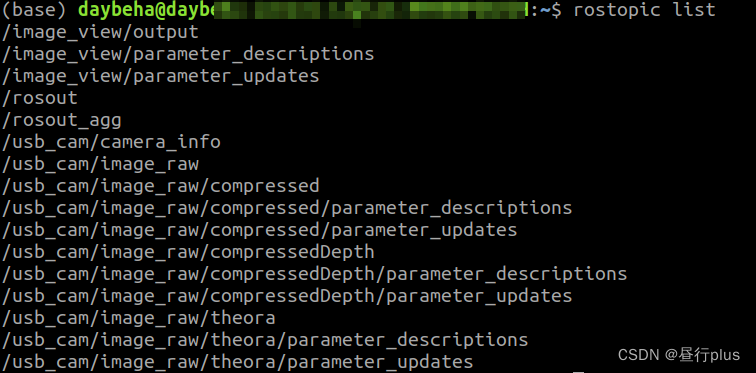
Then turn on the local PC Terminal , Enter the following command :
export ROS_MASTER_URI=http://192.168.0.11:11311   //tells local computer to look for the remote here
export ROS_IP=192.168.0.111		//this ensures that ROS knows that we cannot use hostname directly (due to DHCP firewall issues)
“11311” What does it mean? I haven't cleared it yet …… Thank you for telling me in the comment area !
then
rosrun rviz rviz // fires up rviz on local computer. It will attach to the master node of the remote computer
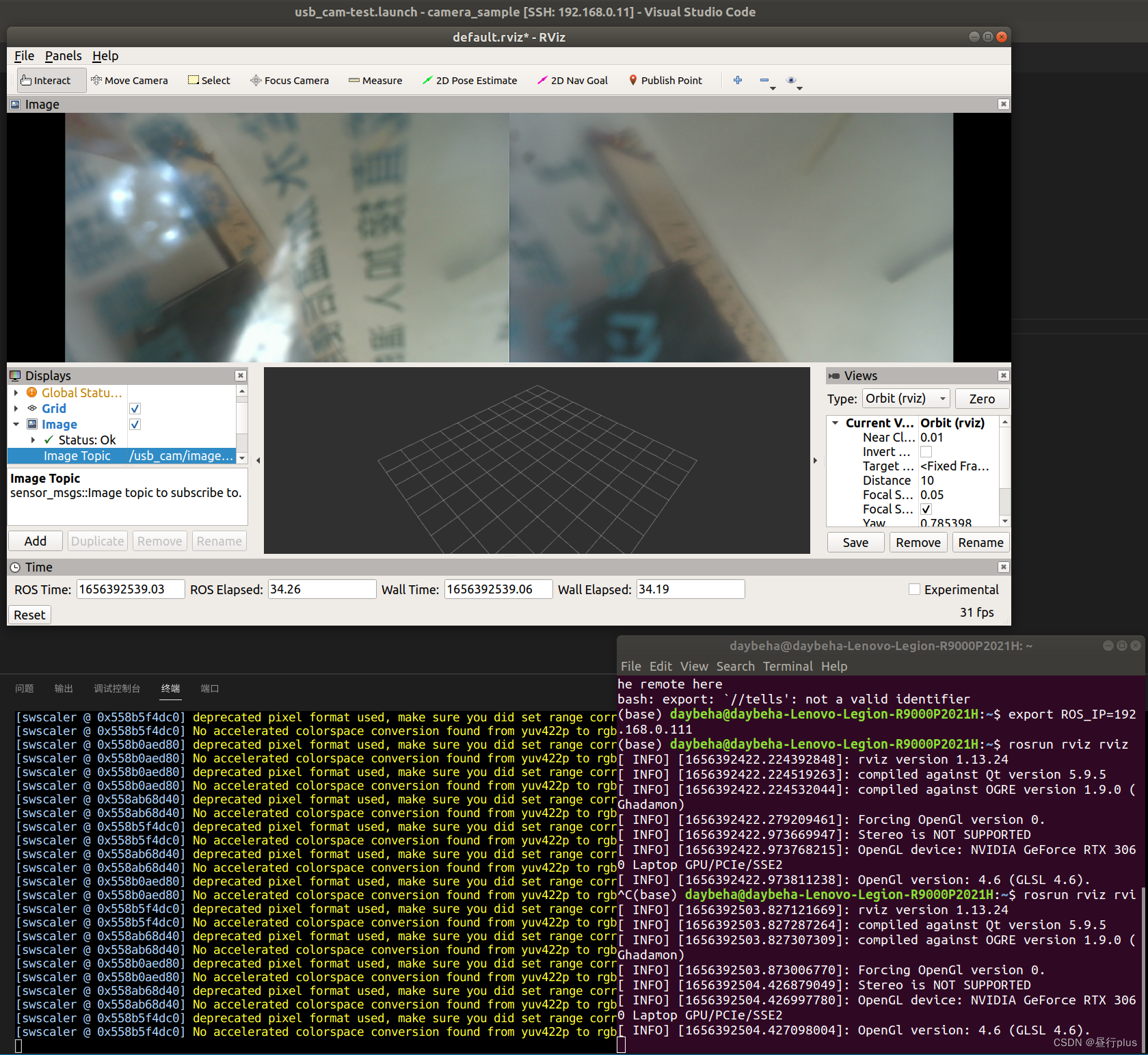
Using the above export Every time you open a terminal, you have to input it .
If you use more , For convenience , You can also modify environment variables directly :
sudo gedit ~/.bashrc //add the two export commands at the end of the file.
source ~/.bashrc //and restart terminal
however Remember to remove the top when you don't need it export The order of !
Reference
ROS The journey ( 6、 ... and ) Distal rviz monitor
rviz Remote desktop startup problem solved , Multi machine distributed local operation rviz
Ubuntu see IP Address
ubuntu see ip Address order ( How to be in Ubuntu Check your IP Address )
边栏推荐
- 使用 Abp.Zero 搭建第三方登录模块(一):原理篇
- Naive Bayes in machine learning
- How to scan when Canon c3120l is a network shared printer
- Introduction to software engineering
- The mechanical hard disk is connected to the computer through USB and cannot be displayed
- 轻松上手Fluentd,结合 Rainbond 插件市场,日志收集更快捷
- Cesium entity(entities) 实体删除方法
- arcgis创建postgre企业级数据库
- Une exploration intéressante de l'interaction souris - pointeur
- phpstudy设置项目可以由局域网的其他电脑可以访问
猜你喜欢
Kubernetes notes (IX) kubernetes application encapsulation and expansion

Kubesphere - Multi tenant management
Project summary --04
Cesium Click to obtain the longitude and latitude elevation coordinates (3D coordinates) of the model surface

scroll-view指定滚动元素的起始位置

智牛股--03
Selenium ide installation recording and local project maintenance
SQL实现将多行记录合并成一行

Important knowledge points of redis

Simple understanding of ThreadLocal
随机推荐
Reinstalling the system displays "setup is applying system settings" stationary
Selenium - 改变窗口大小,不同机型呈现的宽高长度会不一样
Simple solution of small up main lottery in station B
Kubernetes notes (VI) kubernetes storage
Use abp Zero builds a third-party login module (I): Principles
Introduction to software engineering
数值法求解最优控制问题(一)——梯度法
Common interview questions
pytorch练习小项目
智牛股--03
Difference between shortest path and minimum spanning tree
Cesium entity(entities) 实体删除方法
Push box games C #
arcgis创建postgre企业级数据库
Kubernetes cluster environment construction & Deployment dashboard
有意思的鼠标指针交互探究
Tabbar settings
Kubesphere - set up redis cluster
2022 CISP-PTE(三)命令执行
Install VM tools