当前位置:网站首页>Uni app learning (II)
Uni app learning (II)
2022-07-27 00:18:00 【An Cheng Qing Mu】
uni-app Life cycle
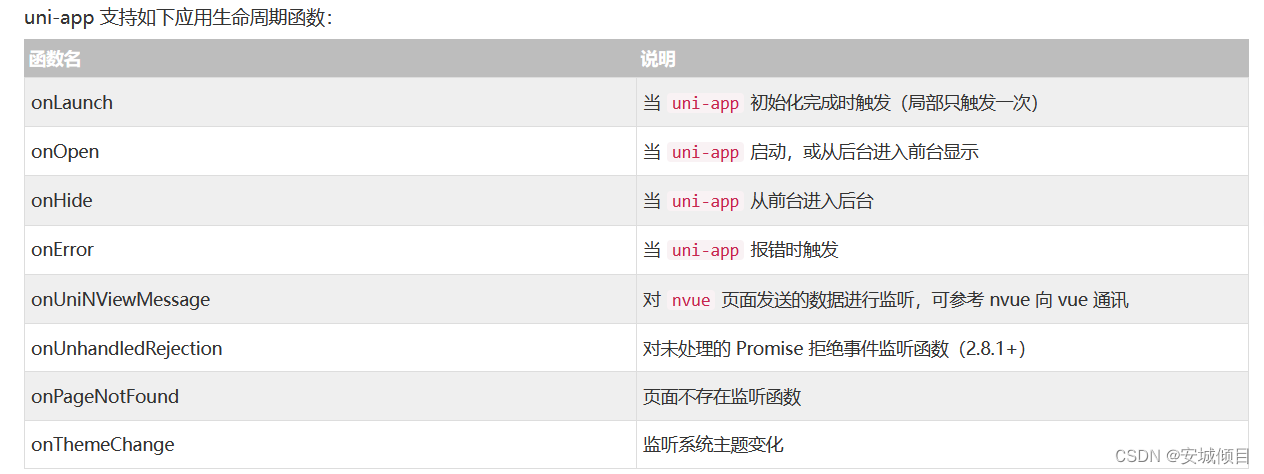
Some periodic functions and comments , And page Jump and information reading are displayed in the background and read on the console
<template>
	<view>
		 Life cycle function
		<view v-for="(item,index) in list" :key="index">
			{
   {item}}
		</view>
		<!--  data fetch  -->
		<button @click="saveInfo"> Sign in </button>
		<button @click="getInfo"> Take out </button>
		<button @click="delName"> Delete local information </button>
		<!--  Page Jump  -->
		<button @click="todemo()"> Jump to non tabbar page </button>
		<button @click="toimge"> Jump to the upload picture page </button>
		<button @click="toindex()"> Jump to home page </button>
	</view>
</template>

<script>
	export default {
		data() {
			return {
				list:[' Xiaohong ',' Little green ',' The small white '],
				num:30

			}
		},
		methods: {
			saveInfo(){
		//  Store some information locally ( Key value pair form )
		// uni.setStorageSync( Key name , Specific stored data )
		//  Duplicate key names will overwrite the previous
			uni.setStorageSync('name',' rind ')
			uni.setStorageSync('list',this.list)
		},
			getInfo(){
		// Fetch local data , Get the corresponding data through the key name
			let name = uni.getStorageSync('name')
			console.log(name)
			console.log(uni.getStorageSync('list'))
	    },
			delName(){
		// Delete local data , Delete the corresponding data through the key name
			uni.removeStorageSync('name')
			console.log(" Deleted ")
		},
		todemo(){   // Can only be used to jump to non tabbar( Non bottom bar page ) page -- Save the previous page after jump ( Can return )
			uni.navigateTo({
				url:'../demo/demo' // The relative address of the jump page
			})
		},
		toimge(){ // Can only be used to jump to non tabbar( Non bottom bar page ) page -- Cannot save the previous page after jump ( Can't return )
			uni.redirectTo({
				url:'../text/text'
			})
		},
		toindex(){  // Used to jump to tabbar( Non bottom bar page ) page -- Cannot save the previous page after jump () Can't return )
			uni.switchTab({
				url:'../index/index'
			})
		}

	},
		onLoad(){ // When the page starts   Automatic operation --onLoad() function
			console.log(' The page is loaded ')
		},
		onShow(){ // When the page is displayed   Automatic operation --onShow() function
			console.log(' The page shows ')
		},
		onPullDownRefresh() {// Drop down refresh   Automatic operation  --onPullDownRefresh() function
			this.list.reverse() // take list The data in is arranged in reverse order
			setTimeout(()=>{uni.stopPullDownRefresh()}, 2000);
			// Stop refreshing
		},
		onReachBottom(){
			this.num+=20 // Roll to the side and jump to the bottom    Make the page display more information
		},
		onUnload() {// When the page is closed   Automatic operation
			console.log(' It was unloaded !')
		}

	}
</script>

<style>

</style>
Image upload and custom components , The child and parent components pass values to each other
Create custom components ( Child components )

Create content in custom components , And value transfer
<template>
	<view>
		<view class="title"  :style="{color:ticolor}"> list </view>
		<view class="listcol" v-for="(item,index) in list" :key="index">
	     	{
   {item}} <!-- // Print list list The value in  -->
		</view>
		<view class="listcol" v-for="(item,index) in studentlist" :key="index">
		 	{
   {item}} <!--  Print the received from the parent component studentlist Value  -->
		</view>
		<!--  Child components pass values to parent components  -->
		<button @click="sendMsg"> Pass value to parent component </button>
	</view>
</template>

<script>
	export default {
		name:"mylist",
		// Accept the data transmitted by the parent component  props
		props:['studentlist','ticolor'],

		data() {
			return {
				list:[' Zhang San 1',' Li Si 1',' Wang Wu 1']
			};
		},
		methods: {
			sendMsg(){
				// Pass value to parent component
				this.$emit('getms',' I'm the data of the subcomponent ')// Events that can trigger parent components , And transfer parameters
			}
		}
	}
</script>

<style>
.listcol:nth-child(2n){
	background-color: cornflowerblue;
}
.listcol{
	line-height: 40px;
	padding-left: 10px;
}
.title{
	font-size: 28px;
	font-weight: bold;
}
</style>
Image upload, image preview and custom component configuration , Pass value of parent component
<template>
	<view>
		<button @click="chooseImg"> To upload pictures </button>
		<image v-for="(item,index) in imglist " :key='index' :src="item" @click="read(item)"></image>
		<button @click="delectImg"> Not satisfied with the picture ? Click delete </button>
		<!--  conditional comments  -->
		<!-- #ifdef MP-WEIXIN -->
		<view> It can only be seen in wechat applet </view>
		<!-- #endif -->
		<!-- #ifdef H5 -->
		<view> Only in H5 Can be seen in </view>
		<!-- #endif -->
		<!--  Use custom components    Print mylist The result of the method in  -->
		<!-- <mylist></mylist> -->
		<!--  Use custom attributes (studentlist) Pass values to sub attributes  -->
		<mylist :studentlist="studentList"  :ticolor="titleColor"  @getms="getmsg"></mylist>
	</view>
</template>

<script>
	import mylist from "../../components/mylist/mylist.vue" // Introduce custom components
	export default {
		   components:{   // Certified components
				mylist
			},
		data() {
			return {
				imglist:[],
				// Passing data to subcomponents
				studentList:[' Zhang San ',' Li Si ',' Wang Wu '],
				titleColor:'red'
			}
		},
		methods: {
			getmsg(msg){// Get values from subcomponents
				console.log(' The parent component gets from the child component :',msg)
			},
			chooseImg(){
				uni.chooseImage({
					count:3,
					// Arrow function   solve this Point to the problem
					success:(res)=> {// The code executed after uploading successfully
						console.log(res.tempFilePaths)// Print a list of local paths where pictures are stored
						this.imglist=res.tempFilePaths
					}
				})
			},
			delectImg(){
				this.imglist="" // Leave the picture address blank    Delete pictures
			},
			read(img){//img by list The address of each picture in
				uni.previewImage({   // The preview image
					urls:this.imglist, // Picture link list address
					current:img // The address of the picture
				})

			}

		},
		onLoad(){
			//#ifdef MP-H5
			console.log(' Only in H5 You can see me in ')
			//#endif
		}
	}
</script>

<style>

</style>
flex Layout ---- Elastic layout
Define the way
.box{
   display : flex;
}
Define the box
<template>
	<view>
		<view class="bigbox">
			<view class="smbox smbox1"></view>
			<view class="smbox smbox2"></view>
		</view>
	</view>
</template>

<script>
	export default {
		data() {
			return {

			}
		},
		methods: {

		}
	}
</script>

<style>
.bigbox{
	width: 100%;
	height: 500px;
	border: 4px solid red;
	/*  Set the box size to subtract mode   That is, the width after the width of the bracket is the set size  */
	box-sizing: border-box;
    display: flex;// Defined as an elastic box
    /*  Define the main axis as the vertical axis ,flex The layout defaults to horizontal axis , The boxes are arranged in order according to the direction of the spindle  */
	flex-direction: column;
}
.smbox{
	width: 100px;
	height: 100px;
}
.smbox1{
	background-color: coral;
}
.smbox2{
	background-color: crimson;
}
</style>
边栏推荐
猜你喜欢
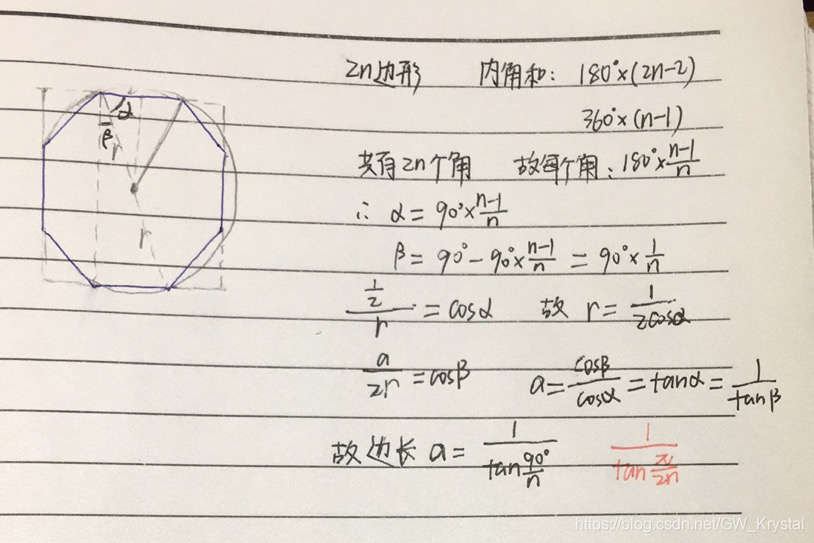
Codeforces C1. Simple Polygon Embedding

Dynamic memory management

Chapter 3 cross domain issues
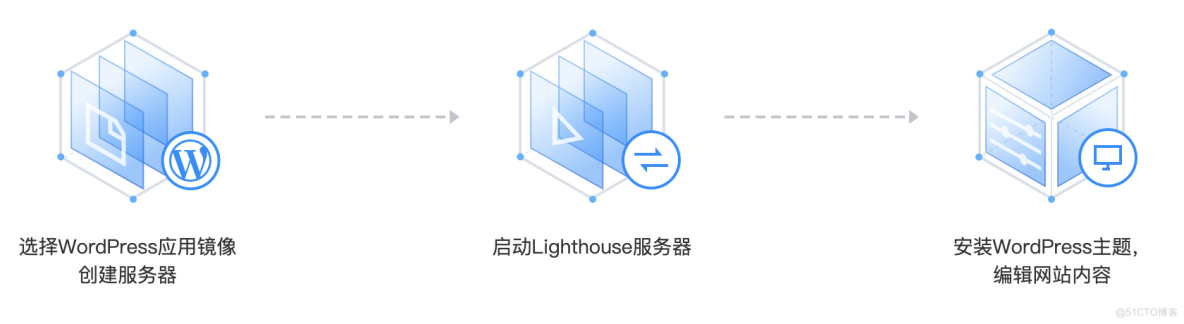
What scenarios are Tencent cloud lightweight application servers suitable for?
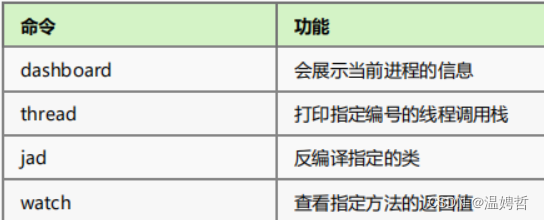
Arthas quick start

Apple TV HD with the first generation Siri remote is listed as obsolete

Push to origin/master was rejected error resolution
放图仓库-Tsai

今日份20220719折腾deeplabcut
push to origin/master was rejected 错误解决方法
随机推荐
Deep learning of parameter adjustment skills
傅里叶分析(基础介绍)
LeetCode题目——二叉树篇
Complex SQL_ 01
Training team lpoj round10 e Jumping Frog
蒙着头配置deeplabcut 1
Deeplabcut uses 1
Practice of intelligent code reconstruction of Zhongyuan bank
13_ conditional rendering
Tree and binary tree (learning notes)
Relationship between Unicode and UTF-8
Modulo (remainder) operation in the range of real numbers: how to find the remainder of negative numbers
Mysql8 installation
4. Talk about the famous Zhang Zhengyou calibration method
Recent answers - column
DHCP, VLAN, NAT, large comprehensive experiment
第1章 需求分析与ssm环境准备
PTA 7-3 lists leaf nodes
Double. isNaN(double var)
知识蒸馏——pytorch实现