当前位置:网站首页>Improvement of wechat applet 28 hot search list ①
Improvement of wechat applet 28 hot search list ①
2022-07-25 19:13:00 【Mu Quanyu [dark cat]】
28.1 Hot search list 、placeholder Dynamic data
Interface http://localhost:3000/search/default

onLoad(options) {

        this.getInitData();
    },

    //  Get initialized data
    async getInitData() {

        let placeholderData = await request("search/default",{
    });
        this.setData({

            placeholderContent: placeholderData.data.showKeyword
        });
    },
<input type="text" placeholder="{
     {placeholderContent}}" placeholder-class="placeholder"></input>

Interface http://localhost:3000/search/hot/detail

    onLoad(options) {

        this.getInitData();
    },

    //  Get initialized data
    async getInitData() {

        let placeholderData = await request("search/default",{
    });
        let hotListData = await request("search/hot/detail");
        this.setData({

            placeholderContent: placeholderData.data.showKeyword,
            hotList: hotListData.data
        });
    },
<view class="searchContainer">
<!--  Head -->
    <view class="header">
        <view class="searchInput">
            <text class="iconfont icon-search searchIcon"></text>
            <input type="text" placeholder="{
     {placeholderContent}}" placeholder-class="placeholder"></input>
        </view>
        <text class="cancel"> Cancel </text>
    </view>
<!-- Hot search list -->
    <view class="hotContainer">
        <view class="title"> Hot search list </view>
<!--  Hot search list -->
        <view class="hotList">
            <view class="hotItem" wx:for="{
     {hotList}}" wx:key="score">
                <text class="order">{
   {index + 1}}</text>
                <text>{
   {item.searchWord}}</text>
                <image class="iconImg" wx:if="{
     {item.iconUrl}}" src="{
     {item.iconUrl}}"></image>
            </view>
        </view>
    </view>

</view>

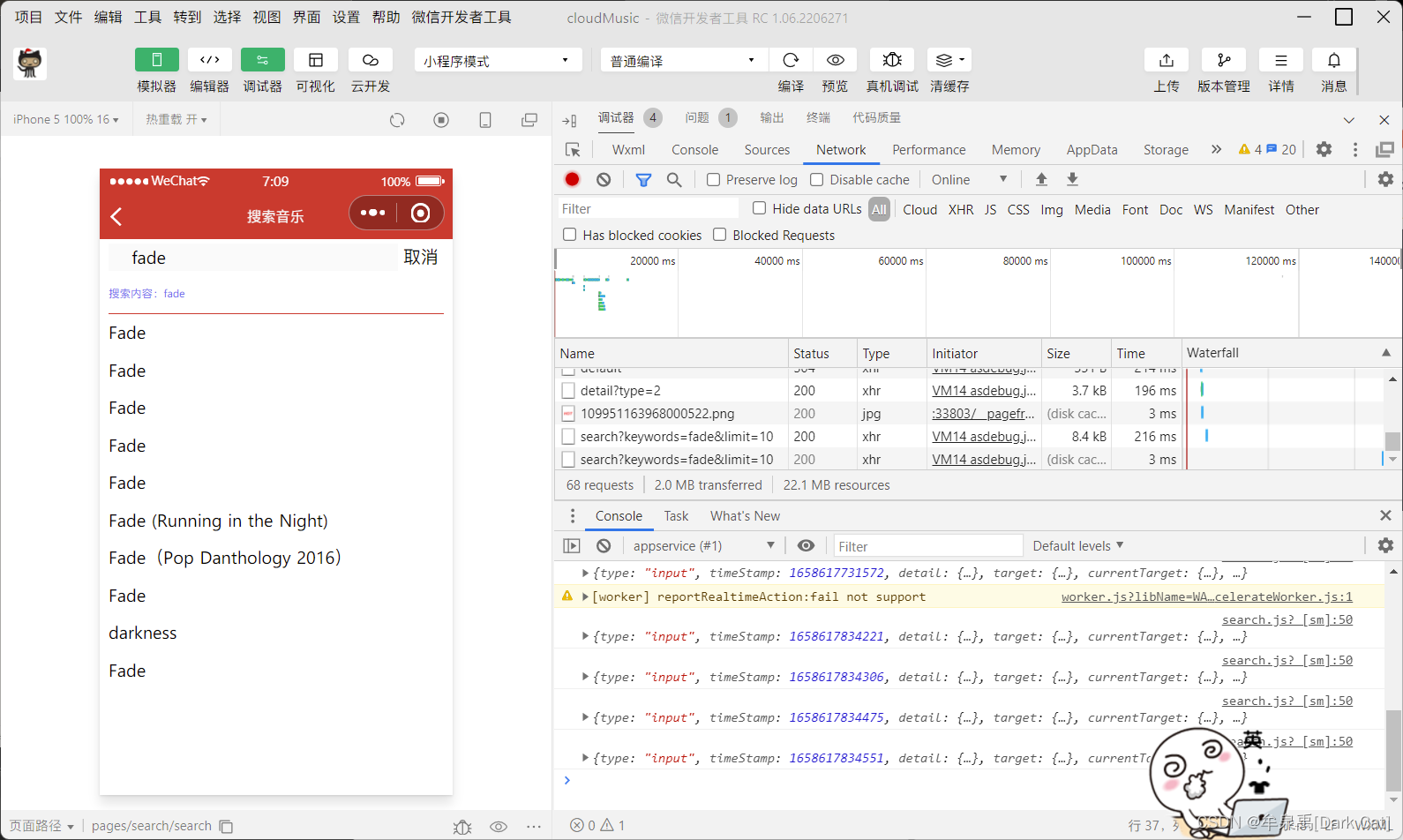
28.2 Fuzzy matching search data
bindinput event : Whether or not you lose focus , Just change the content , All trigger .
bindcheck event : You need to lose focus to trigger this event .
Interface http://localhost:3000/search?keywords=fade&limit=10

<input bindinput="handelInputChange" type="text" input placeholder="{
     {placeholderContent}}" placeholder-class="placeholder"></input>
    data: {

        placeholderContent: '', // placeholder  Content
        hotList: [], //  Hot search list data
        searchContent: '', //  Form item data entered by the user
        searchList: [], //  Keyword fuzzy matching data
    },

//  obtain   Function of searching data

    async getSearchList(){

        let searchListData = await request("search", {
    keywords: this.data.searchContent, limit: 10});
        this.setData({

            searchList: searchListData.result.songs
        })
    },

    //  The event that the content of the form changes
    handelInputChange(event) {

        console.log(event);
        this.setData({

            searchContent: event.detail.value.trim()
        });

        //  Function throttling
        if (isSend) {

            return;
        }
        isSend = true;

        setTimeout(() => {

            isSend = false;
            this.getSearchList();
        }, 1000);

    },

28.3 Search content display
Write it html General structure
<view class="searchContainer">
<!--  Head -->
    <view class="header">
        <view class="searchInput">
            <text class="iconfont icon-search searchIcon"></text>
            <input bindinput="handelInputChange" type="text" input placeholder="{
     {placeholderContent}}" placeholder-class="placeholder"></input>
        </view>
        <text class="cancel"> Cancel </text>
    </view>
    <block wx:if="{
     {searchList.length}}">
        <!--  Search content display -->
        <view class="showSearchContent">
            <view class="searchContent"> Search content :{
   {searchContent}}</view>
            <view class="searchList">
                <view class="searchItem" wx:for="{
     {searchList}}" wx:key="id">
                    <text class="iconfont icon-search"></text>
                    <text>{
   {item.name}}</text>
                </view>
            </view>
        </view>
    </block>

    <block wx:else>
        <!-- Hot search list -->
        <view class="hotContainer">
            <view class="title"> Hot search list </view>
            <!--  Hot search list -->
            <view class="hotList">
                <view class="hotItem" wx:for="{
     {hotList}}" wx:key="score">
                    <text class="order">{
   {index + 1}}</text>
                    <text>{
   {item.searchWord}}</text>
                    <image class="iconImg" wx:if="{
     {item.iconUrl}}" src="{
     {item.iconUrl}}"></image>
                </view>
            </view>
        </view>
    </block>

</view>
/* pages/search/search.wxss */

.searchContainer {

    padding: 0 20rpx;
}

.header {

    display: flex;
    height: 60rpx;
    line-height: 60rpx;
    padding: 10rpx 0;
}

.searchInput {

    position: relative;
    flex: 1;
    background: rgba(237,237,237,0.3);
    border-right: 30rpx;
}

.cancel {

    width: 100rpx;
    text-align: center;
}

.searchIcon {

    position: absolute;
    left: 15rpx;
}

.searchInput input{

    margin-left: 50rpx;
    height: 60rpx;
}

/*h5  One of the new features , Can be  placeholder  Set up  class  and   style */
.placeholder {

    color: #d43c33;
    font-size: 28rpx;
}

/* Hot search list */
.hotContainer .title {

    font-size: 28rpx;
    height: 80rpx;
    line-height: 80rpx;
    border-bottom: 1rpx solid #eee;
}

.hotList {

    display: flex;
    flex-wrap: wrap;
}

.hotItem {

    width: 50%;
    height: 80rpx;
    line-height: 80rpx;
    font-size: 26rpx;
}

.hotItem .order {

    margin: 0 10rpx;
}

.hotItem .iconImg {

    width: 35rpx;
    height: 20rpx;
    margin-left: 10rpx;
}

/* Search content display */

.searchContent {

    color: rgba(107, 100, 238, 0.96);
    height: 80rpx;
    line-height: 82rpx;
    font-size: 24rpx;
    border-bottom: 1rpx solid #d43c33;
}

.searchItem {

    height: 80rpx;
    line-height: 80rpx;
    display: flex;
}

.searchItem .content {

    flex: 1;
    margin-left: 20rpx;
    border-bottom: 1rpx solid #eee;
    font-size: 26rpx;
}
// pages/search/search.js
import request from "../../utils/request";
let isSend = false; //  be used for   function   Throttling use
Page({


    /** *  Initial data of the page  */
    data: {

        placeholderContent: '', // placeholder  Content
        hotList: [], //  Hot search list data
        searchContent: '', //  Form item data entered by the user
        searchList: [], //  Keyword fuzzy matching data
    },

    /** *  Life cycle function -- Monitor page loading  */
    onLoad(options) {

        this.getInitData();
    },

    //  Get initialized data
    async getInitData() {

        let placeholderData = await request("search/default",{
    });
        let hotListData = await request("search/hot/detail");
        this.setData({

            placeholderContent: placeholderData.data.showKeyword,
            hotList: hotListData.data
        });
    },

    //  obtain   Function of searching data

    async getSearchList(){

        if(!this.data.searchContent){

            this.setData({

                searchList: []
            });
            return;
        }
        let searchListData = await request("search", {
    keywords: this.data.searchContent, limit: 10});
        this.setData({

            searchList: searchListData.result.songs
        })
    },

    //  The event that the content of the form changes
    handelInputChange(event) {

        console.log(event);
        this.setData({

            searchContent: event.detail.value.trim()
        });

        //  Function throttling
        if (isSend) {

            return;
        }
        isSend = true;

        setTimeout(() => {

            isSend = false;
            this.getSearchList();
        }, 500);

    },

    /** *  Life cycle function -- Listening page first rendering completed  */
    onReady() {


    },

    /** *  Life cycle function -- Monitor page display  */
    onShow() {


    },

    /** *  Life cycle function -- Monitor page hidden  */
    onHide() {


    },

    /** *  Life cycle function -- Monitor page uninstall  */
    onUnload() {


    },

    /** *  Page related event handler -- Monitor user pull-down action  */
    onPullDownRefresh() {


    },

    /** *  Handling function of page pull bottom event  */
    onReachBottom() {


    },

    /** *  Users click the upper right corner to share  */
    onShareAppMessage() {


    }
})

边栏推荐
- Baklib:制作优秀的产品说明手册
- FPGA based 1080p 60Hz bt1120 interface debugging process record
- Actual combat of MySQL database design project of online mall system
- The difference between QT exec and show
- 浅析IM即时通讯开发出现上网卡顿?网络掉线?
- C 调的满级和玄
- [applet development] common components and basic usage details
- kubernetes RBAC
- What is the application value of MES management system
- Ping command details [easy to understand]
猜你喜欢

微信小程序 26 播放音乐页的完善②

阿里云免费SSL证书申请详细流程

How to design product help center? The following points cannot be ignored

Real estate enterprises have launched a "war of guarantee"

Talk about 11 tips for interface performance optimization

Wechat campus maintenance and repair application applet graduation design finished product of applet completion work (6) opening defense ppt

【iniparser】项目配置工具iniparser的简单使用

Pymoo learning (6): termination conditions

华为交换机系统软件升级和安全漏洞修复教程
With 8 years of product experience, I have summarized these practical experience of continuous and efficient research and development
随机推荐
Interface automation test platform fasterrunner series (II) - function module
Yarn installation and use tutorial [easy to understand]
Microsoft azure and Analysys jointly released the report "Enterprise Cloud native platform driven digital transformation"
Interface automation test platform fasterrunner series (I) - introduction, installation and deployment, startup service, access address, configuration supplement
I3 status configuration
SQL Server 2019 installation tutorial
srec_cat 常用参数的使用
Everyone can participate in the official launch of open source activities. We sincerely invite you to experience!
基础乐理--配置和弦
“未来杯”第二届知识图谱锦标赛正式启动
ThreadLocal Kills 11 consecutive questions
Clip can also do segmentation tasks? The University of Gottingen proposed a model clipseg that uses text and image prompt and can do three segmentation tasks at the same time, squeezing out the clip a
Wechat campus maintenance application applet graduation design finished product of applet completion work (8) graduation design thesis template
21 days proficient in typescript-4 - type inference and semantic check
小程序毕设作品之微信校园维修报修小程序毕业设计成品(1)开发概要
基于Mysql-Exporter监控Mysql
【云原生之kubernetes】kubernetes集群下Secret存储对象的管理
阿里云免费SSL证书申请详细流程
果链“围城”:傍上苹果,是一场甜蜜与苦楚交错的旅途
[iniparser] simple use of the project configuration tool iniparser