当前位置:网站首页>Js8day (rolling event (scroll family), offset family, client family, carousel map case (to be done))
Js8day (rolling event (scroll family), offset family, client family, carousel map case (to be done))
2022-07-02 12:41:00 【By the Difeng River】
List of articles
Scroll Events
Event triggered when the page scrolls
- Why learn ?
Many web pages need to detect that users scroll the page to a certain area and do some processing , For example, fixed navigation bar , For example, back to the top - Event name :
scroll - Monitor entire page scrolling :
towindowordocumentadd toscrollevent
Listen to the internal scrolling of an element and add it directly to an element
      window.addEventListener('scroll', function () {

          console.log('scroll')
      })
Loading event
Method 1
Load external resources ( Such as images 、 Outreach CSS and JavaScript etc. ) Event triggered when loading is complete
- Why learn ?
Sometimes you need to wait until all the page resources are processed and do something
Old code likes to put script Written in head in , At this time, go straight to dom Element not found - Event name :
load - All resources on the listening page are loaded :
to window add toloadevent
      window.addEventListener('load', function () {

          console.log('load')
      })
- Be careful : You can not only listen to the whole page, but also when the resources are loaded , You can also bind to a resource
loadevent
Method 2
- When the initial
HTMLAfter the document is fully loaded and parsed ,DOMContentLoadedEvent is triggered , Without waiting for the stylesheet 、 Images, etc. are fully loaded . - Event name :
DOMContentLoaded - Monitor page DOM Loading finished :
todocumentadd toDOMContentLoadedevent
        window.addEventListener('DOMContentLoaded', function () {

            console.log('DOMContentLoaded')
        })
scroll family (scroll dimensions Rolling dimensions )
- Get wide height :
Fetch elementContentTotal width and height ( No scrollbars ) Return value without unitscrollWidthandscrollHeight - To obtain position :
Get the element content to the left 、 Roll up and out of sightscrollLeftandscrollTop
These two attributes are Modifiable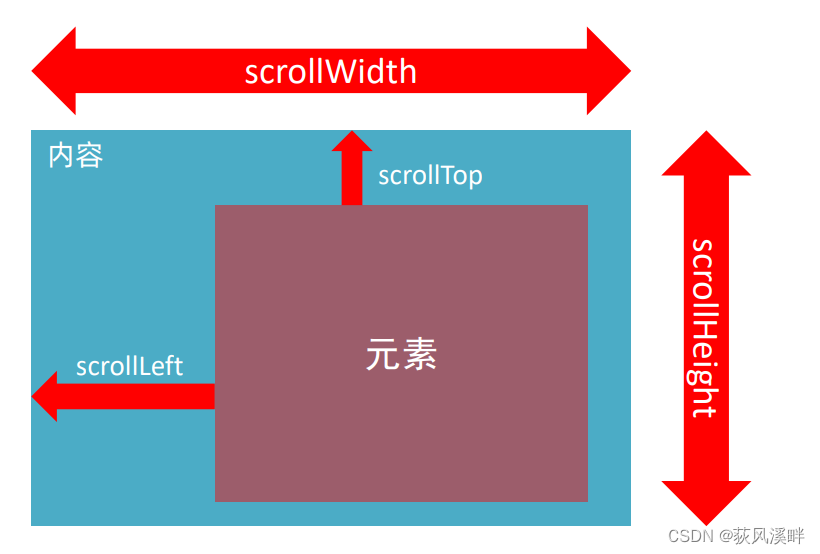
     div.addEventListener('scroll', function () {

         console.log(this.scrollTop)
     })

- scrollWidth and scrollHeight Is to get the width and height of elements ?
Content width and height , No scrollbars- The rolled out head or left side uses that attribute ? Can I read and modify ?
scrollTop / scrollLeft
Can read , You can also modify ( assignment )- Detect the head distance of page scrolling ( The rolled head ) Use that attribute ?
document.documentElement.scrollTop
The page scrolls back to the top button ( Case study )

Part of the code :
<body>
    <div class="content"></div>
    <div class="backtop">
        <img src="./images/close2.png" alt="">
        <a href="javascript:;"></a>
    </div>
    <script>
        let backtop = document.querySelector('.backtop')
        window.addEventListener('scroll', function () {
      // Page scrolling detection
            let num = document.documentElement.scrollTop
            console.log(num)
            if (num >= 500) {

                backtop.style.display = 'block';
            }
            else {

                backtop.style.display = 'none';

            }
        })
        // Don't write in it , Low efficiency ( Scroll to monitor one time in turn )
        backtop.children[1].addEventListener('click', function () {

            document.documentElement.scrollTop = 0
        })

    </script>
</body>
offset family (offset dimensions Offset dimension )

- Get wide height :
Get the width and height of the element itself 、 Contains the width and height set by the element itself 、padding、borderoffsetWidthandoffsetHeight - To obtain position :
Gets the distance from the element to the left of the parent element 、 Up the distanceoffsetLeftandoffsetTopNote that Read-only property ( If you have to give value, usemargin-top,margin-leftOr in positioningtop and left)
1.offsetWidthandoffsetHeightIs to get the width and height of elements ?
Content + padding + border
2.offsetTopandoffsetLeftWho gets the position ?
(1) Parent with positioning
(2) If there is none, take the upper left corner of the document Subject to
Elevator navigation case part code :
     // 1.  Get the yuan and take the element
     let items = document.querySelectorAll('.item')
     //  Content box access
     let neirongs = document.querySelectorAll('.neirong')
     // 2.  left aside  modular   Click who , Who highlights
     for (let i = 0; i < items.length; i++) {

         items[i].addEventListener('click', function () {

             //  Find the last one active  Remove class
             document.querySelector('.aside .active').classList.remove('active')
             //  Click who adds the class
             this.classList.toggle('active')
             // 3.  Follow the content on the right   Let the page scroll to the corresponding offsetTop Value position
             // console.log(neirongs[i].offsetTop)  Don't give it to the unit
             document.documentElement.scrollTop = neirongs[i].offsetTop
         })
     }
client family (client dimensions Client size )
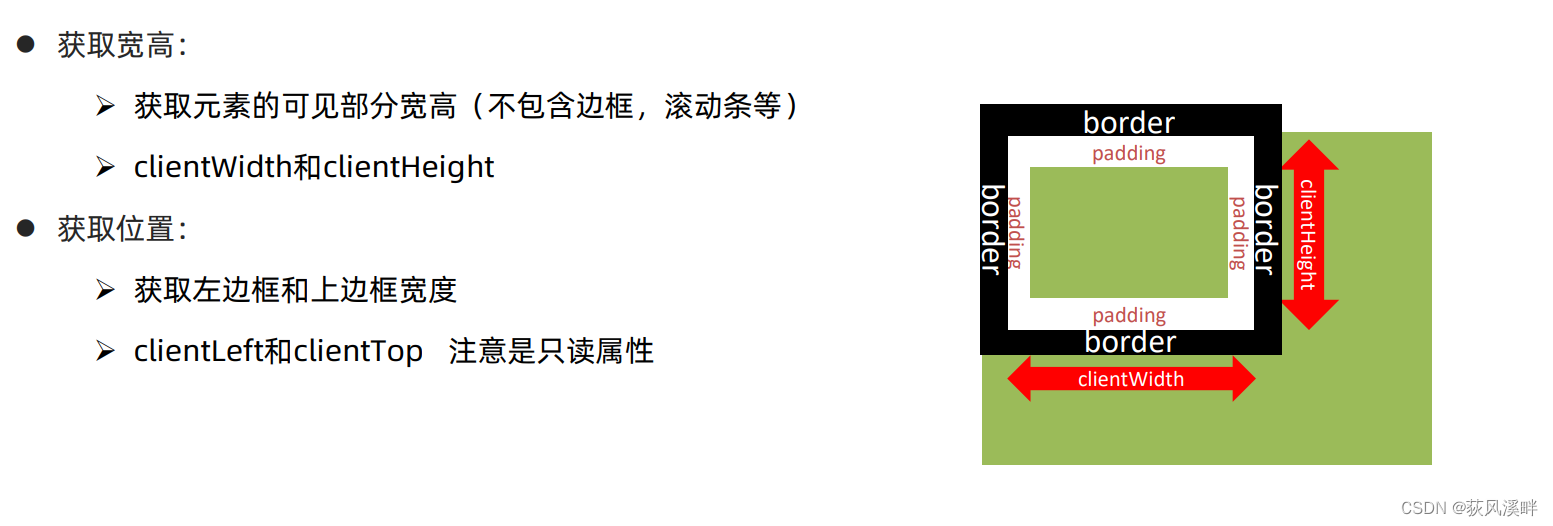
Browser background color change case part code
        window.addEventListener('resize', function () {
       //resize  Monitor browser for window changes
            let w = document.documentElement.clientWidth
            console.log(w)
            if (w >= 1920) {
        // Browser visual window clientWidth If it changes, the background color changes
                document.body.style.backgroundColor = 'blue'
            }
            else if (w > 540) {

                document.body.style.backgroundColor = 'hotpink'

            }
            else {

                document.body.style.backgroundColor = 'red'

            }
        })
summary
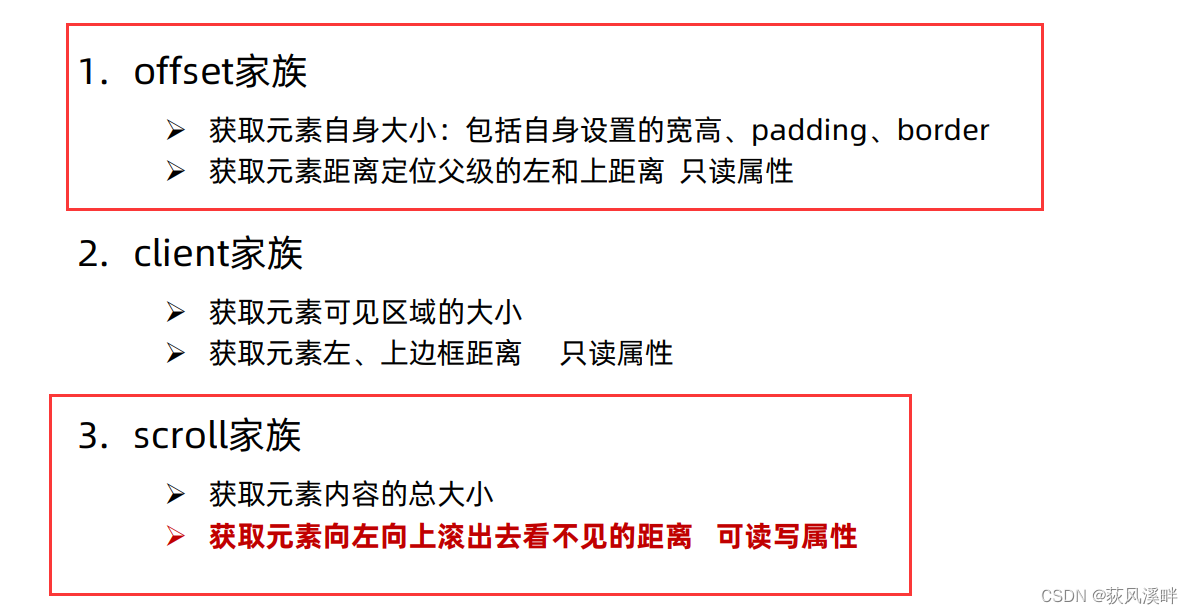
        // scrollWidth scrollHeight  Content   Wide and high  ( understand )
        let div = document.querySelector('div')
        console.log(div.scrollWidth)  // 150  No unit
        console.log(div.scrollHeight)  // 336  No unit
        console.log('----------------------------')
        // offset  The size of the box element  =  The width and height of the box itself  + padding + border
        console.log(div.offsetWidth)  // 150  No unit
        console.log(div.offsetHeight)  // 150  No unit
        // console.log(div.offsetTop) //
        // console.log(div.offsetLeft)
        // client  Current viewable area   No scrollbars   Borders and so on
        console.log('----------------------------')
        console.log(div.clientWidth)
        console.log(div.clientHeight)
        console.log(div.clientTop)  //  The width of the border   understand
        console.log(div.clientLeft)
边栏推荐
- 3 A VTT端接 稳压器 NCP51200MNTXG资料
- MySQL and PostgreSQL methods to grab slow SQL
- [old horse of industrial control] detailed explanation of Siemens PLC TCP protocol
- NTMFS4C05NT1G N-CH 30V 11.9A MOS管,PDF
- Calculate the maximum path sum of binary tree
- Redis transaction mechanism implementation process and principle, and use transaction mechanism to prevent inventory oversold
- 哈希表 AcWing 840. 模拟散列表
- arcgis js 4. Add pictures to x map
- JS6day(DOM结点的查找、增加、删除。实例化时间,时间戳,时间戳的案例,重绘和回流)
- When uploading a file, the server reports an error: iofileuploadexception: processing of multipart / form data request failed There is no space on the device
猜你喜欢

Go学习笔记—多线程
深拷貝 事件總線
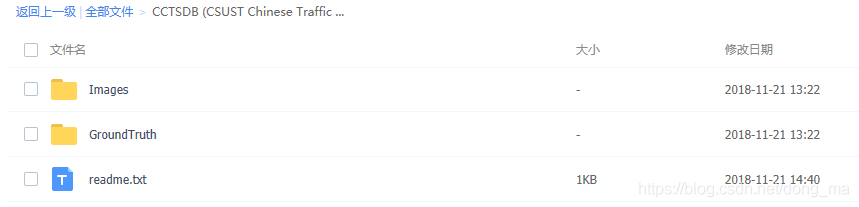
China traffic sign detection data set

Simple understanding of ThreadLocal

Docker compose configuration mysql, redis, mongodb

线性DP AcWing 899. 编辑距离

Use sqoop to export ads layer data to MySQL
线性DP AcWing 896. 最长上升子序列 II
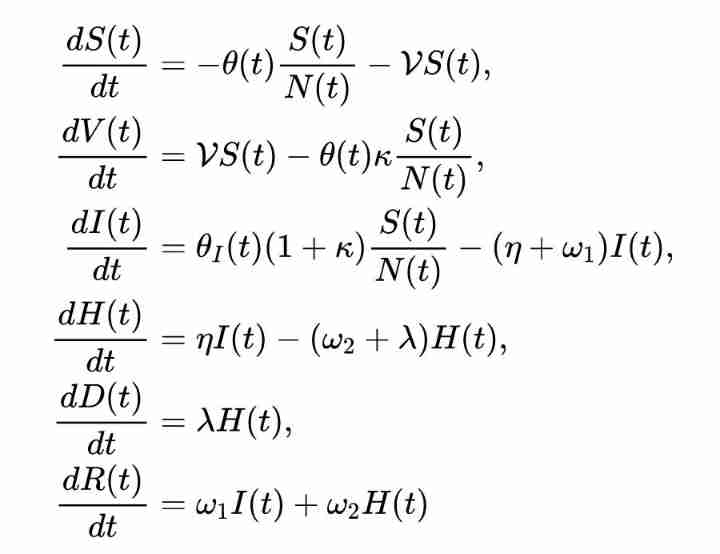
Is the neural network (pinn) with embedded physical knowledge a pit?

arcgis js 4. Add pictures to x map
随机推荐
Leetcode - < dynamic planning special> Jianzhi offer 19, 49, 60
Use MySQL events to regularly perform post seven world line tasks
Oracle从入门到精通(第4版)
Go learning notes - go based interprocess communication
趣味 面试题
High performance erasure code coding
Docker-compose配置Mysql,Redis,MongoDB
线性DP AcWing 899. 编辑距离
Mongodb redis differences
C#运算符
Redis transaction mechanism implementation process and principle, and use transaction mechanism to prevent inventory oversold
LeetCode—剑指 Offer 37、38
In development, why do you find someone who is paid more than you but doesn't write any code?
LeetCode—剑指 Offer 51. 数组中的逆序对
8A 同步降压稳压器 TPS568230RJER_规格信息
async/await 异步函数
寻找二叉树中任意两个数的公共祖先
2.7 binary tree, post order traversal - [FBI tree]
线性DP AcWing 897. 最长公共子序列
深拷貝 事件總線