当前位置:网站首页>among us私服搭建
among us私服搭建
2022-06-28 15:36:00 【是Mumuzi】
amongus私人服务器搭建
项目地址: https://github.com/Impostor/Impostor
Im的更新还是挺快的,621版本出了就马上更了。
为了搭建方便,于是用docker进行操作。如果直接运行docker的话,里面会有抽风的反作弊系统,私服的话建议关掉反作弊,因此整个流程如下(全程root)
首先需要有一个国内的服务器
安装screen
为了保证关掉与服务器交互的窗口后仍然在运行,因此需要安装screen,直接运行
apt install screen
拉取镜像并关闭反作弊
pull镜像
docker pull aeonlucid/impostor
反作弊配置文件在app/config.json中,因此执行
find /var/lib/docker -name "config.json"

直接用vim修改config.json(每个人的那串id是不一样的)
vim /var/lib/docker/overlay2/7c6397c1e7d2fa13e0a65add69f7401576512b2a523b1a0ecaf9f61f4f970c2b/diff/app/config.json
将两处的true都改成false,如图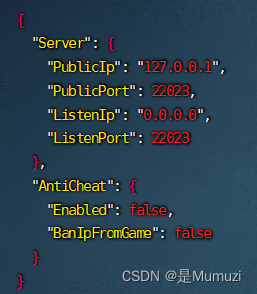
然后按下esc,:wq保存退出
运行docker
首先创建一个新的窗口,命名为au
screen -S au
接下来看一下刚刚pull的docker
docker images

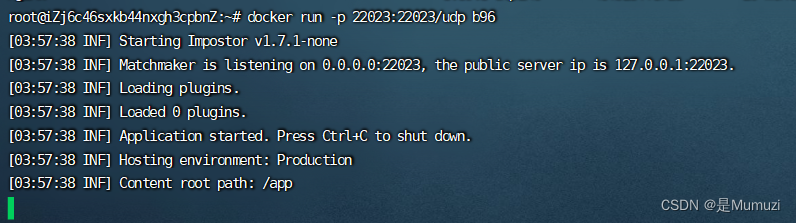
然后开放指定端口,执行该命令
docker run -p 22023:22023/udp b96
导入配置文件
打开https://impostor.github.io/Impostor/
在server address里输入自己的服务器ip,在server name处输入你想命的名字
然后下载文件,将如果命名后有(1)等字样,请去掉,保证文件名为"regionInfo.json",不能错字 少字。
如果打不开上面的网站去下载文件,请将最后一行的xxx改成自己的IP与名字,完事后保存为regionInfo.json{"CurrentRegionIdx":3,"Regions":[{"$type":"DnsRegionInfo, Assembly-CSharp","Fqdn":"na.mm.among.us","DefaultIp":"50.116.1.42","Port":22023,"Name":"North America","TranslateName":289,"UseDtls":true},{"$type":"DnsRegionInfo, Assembly-CSharp","Fqdn":"eu.mm.among.us","DefaultIp":"172.105.251.170","Port":22023,"Name":"Europe","TranslateName":290,"UseDtls":true},{"$type":"DnsRegionInfo, Assembly-CSharp","Fqdn":"as.mm.among.us","DefaultIp":"139.162.111.196","Port":22023,"Name":"Asia","TranslateName":291,"UseDtls":true},{"$type":"DnsRegionInfo, Assembly-CSharp","Fqdn":"xxx.xxx.xxx.xxx(IP)","DefaultIp":"xxx.xxx.xxx.xxx(IP)","Port":22023,"Name":"xxxxxxx(name)","TranslateName":1003,"UseDtls":false}]}
然后按下win+r,输入%APPDATA%\..\LocalLow\Innersloth\Among Us后按下enter
直接替换掉下面的regionInfo.json
接下来即可关掉与服务器交互的窗口,并打开游戏选择自己的服务器。
如果要回到之前的au窗口,只需要输入
screen -R au


mod问题
在玩mod的时候(如LMv),可能会在创建房间时出现下面这个问题
服务器没有响应握手。
解决方法是修改游戏目录下的BepInEx\config\gg.reactor.api.cfg文件,将Allow vanilla servers = false改成Allow vanilla servers = ture(允许普通服务器)
如果是玩多模,还是推荐GM(
边栏推荐
- Analysis of PostgreSQL storage structure
- Coding Devops helps Sinochem information to build a new generation of research efficiency platform and drive the new future of "online Sinochem"
- The best time to buy and sell stocks
- sql语句 练习题
- GBASE南大通用亮相第六届世界智能大会
- ROS知识点——话题消息的定义与使用
- Experiment 6 8255 parallel interface experiment [microcomputer principle] [experiment]
- A bug liver a week I can't help mentioning issue
- 国债与定期存款哪个更安全 两者之间有何区别
- 关于针对tron API签名广播时使用curl的json解析问题解决方案及针对json.loads方法的问题记录
猜你喜欢

实验6 8255并行接口实验【微机原理】【实验】

【LeetCode】13、罗马数字转整数

Halcon basic summary (I) cutting pictures and rotating images

PostgreSQL 存储结构浅析

NAACL 2022 | 机器翻译SOTA模型的蒸馏

MIPS汇编语言学习-01-两数求和以及环境配置、如何运行

Realization of a springboard machine

GBASE南大通用亮相第六届世界智能大会

SAP MTS/ATO/MTO/ETO专题之九:M+M模式前后台操作,策略用50,提前准备原材料和半成品

C#/VB.NET 将PDF转为Excel
随机推荐
一文教你快速生成MySQL数据库关系图
Flutter simply implements multilingual internationalization
openGauss内核:SQL解析过程分析
Not being a meta universe now is like not buying a house 20 years ago!
字节跳动数据平台技术揭秘:基于ClickHouse的复杂查询实现与优化
Talking about open source - Linus and Jim talk about open source in China
机器学习之深度学习简介
字节跳动数据平台技术揭秘:基于 ClickHouse 的复杂查询实现与优化
R语言ggplot2可视化:使用patchwork包将两个ggplot2可视化结果横向构成新的结果可视化组合图(使用|符号)
Ros21 lecture
SQL statement exercises
10年测试经验,在35岁的生理年龄面前,一文不值
ROS knowledge points - definition and use of topic messages
MIPS assembly language learning-01-sum of two numbers, environment configuration and how to run
【LeetCode】13、罗马数字转整数
Web worker poll request
Fleet |「后台探秘」第 3 期:状态管理
R语言ggplot2可视化:patchwork包将一个ggplot2可视化结果和一个plot函数可视化结果横向组合起来形成最终结果图、两个可视化的组合结果对齐、并为组合图像的每个子图添加标题
数组中的第K大元素[堆排 + 建堆的实际时间复杂度]
隆重推出 Qodana:您最爱的 CI 的代码质量平台