当前位置:网站首页>Introduction to jupyter notebook
Introduction to jupyter notebook
2022-07-25 13:16:00 【Ice ice_】
One 、Jupyter Notebook Has rapidly become a data analysis , machine learning Required tools for . Because it allows data analysts to focus on explaining the entire analysis process to users .
Jupyter notebook(http://jupyter.org/) It's a kind of Web application , It allows the user to translate the description text 、 Mathematical equation 、 Code and visualization are all combined into one document that is easy to share .
- The name comes from Julia、Python and R( Three open source languages for data science )
- Is a programmer and scientific workers programming / file / note / Display the software
.ipynbThe file format is used for computational narration JSON Formal specification of document format

Two 、 start-up Jupyter Notebook
First installation Jupyter The easiest way to do this is to use Anaconda. This release comes with Jupyter notebook. You can use... By default notebook. Make sure you have installed Anaconda.

Anaconda https://www.anaconda.com/products/individual Or download directly from the official website

It is also an integrated software , Because I can see Process operation results , Do data analysis pycharm More friendly . Hope to be independent from the original , Optional installation .
3、 ... and 、 Quick start notebook
1、 Directly click

Auto start page

2. newly build notebook file
- notebook The document format is
.ipynb

3. Content interface operation
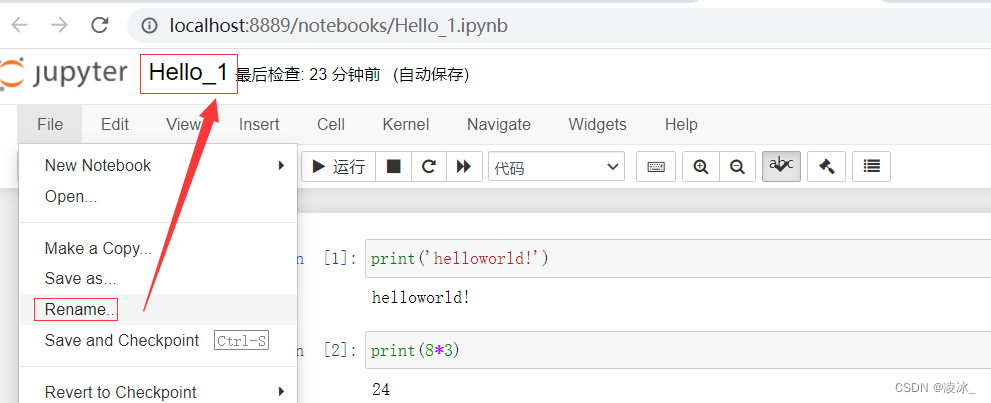
The title bar : Click on the title ( Such as Untitled) Modify the document name ( top left corner )

You can modify the name
4. cell operation
cell: a pair In Out A session is considered a unit of code , be called cell

cell In front of the line number * , Indicates that the code is running

Jupyter Two modes are supported :
Edit mode (Enter)
Enter in command mode Enter Or double-click cell Enter edit mode
Can operate cell Inner text or code , shear / Copy / Paste move and so on
Command mode (Esc)
Press Esc Exit the editor , Enter command mode
Can operate cell The unit itself cuts / Copy / Paste / Moving and so on
5. The mouse operation 
6. close notebook file

7、 Upload notebook file

8、 Share your notebook
single click File->Download as, You can choose many formats to download your notebook. Generally, I will choose different download formats according to the following purposes :
1) If I want to share my data analysis results with customers , I will choose to notebook Download as HTML file .
2) If I want to embed my data analysis results and code into the project , For example, make a data analysis sub module for the pharmacy management system , I will choose Python(.py) modular , This can integrate my code into the project , Become a sub module , It is convenient to complete tasks with other developers .
3) If you want to use it in blogs or documents notebook, I will choose Markdown Format .
4) default notebook The file suffix is .ipynb

9、 close Jupler notebook The server
Directly close and open notebook The page of . Once again remind , This will immediately shut down all running notebook, therefore , Please make sure you save your work !
close notebook After the server , Open it again next time notebook, When you continue in this notebook When writing code in , It is found that the previous variables cannot be accessed . Need you in this notebook Of Kernerl Tab “Run All” Recompile the previous code .

10、 Shortcut operation
Two modes universal shortcut keys
Shift+Enter, Execute the code in this unit , And jump to the next unit
Ctrl+Enter, Execute the code in this unit , Stay in this unit
Command mode : Press ESC Get into
Y,cell Switch to Code Pattern
M,cell Switch to Markdown Pattern
A, At present cell To the top of cell
B, At present cell add cell
other ( understand )
double-click D: Delete the current cell
Z, Back off
L, For the current cell Add a line number <!–
Ctrl+Shift+P, Dialog box input command directly run
Quick jump to the first one cell,Crtl+Home
Quick jump to the last one cell,Crtl+End -->
Edit mode : Press Enter Get into
The completion code : Variable 、 Methods the heel Tab key
Add for one or more lines of code / uncomment :Ctrl+/(Mac:CMD+/)
other ( understand ):
Multiple cursor operation :Ctrl Click the mouse (Mac:CMD+ The click of a mouse )
Back off :Ctrl+Z(Mac:CMD+Z)
redo :Ctrl+Y(Mac:CMD+Y)
Four 、 Jupyter Notebook Automatic completion of code related functions
install :
pip install jupyter_contrib_nbextensions
function
jupyter contrib nbextension install --user --skip-running-check
Open your jupyter notebook, You'll find out , There is an extra column above the menu bar Nbextension, Check the extension function you want in there .
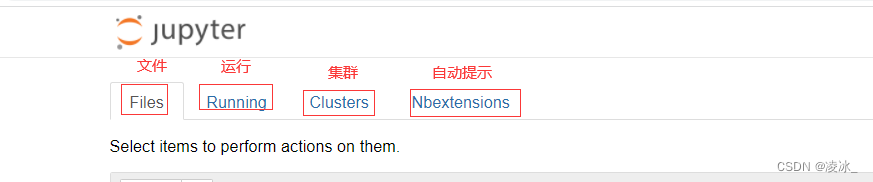
Select the following :
effect :

边栏推荐
- Docker学习 - Redis集群-3主3从-扩容-缩容搭建
- 0713RHCSA
- CONDA common commands: install, update, create, activate, close, view, uninstall, delete, clean, rename, change source, problem
- 【CTR】《Towards Universal Sequence Representation Learning for Recommender Systems》 (KDD‘22)
- G027-OP-INS-RHEL-04 RedHat OpenStack 创建自定义的QCOW2格式镜像
- Excel import and export source code analysis
- 7行代码让B站崩溃3小时,竟因“一个诡计多端的0”
- yum和vim须掌握的常用操作
- AtCoder Beginner Contest 261 F // 树状数组
- The programmer's father made his own AI breast feeding detector to predict that the baby is hungry and not let the crying affect his wife's sleep
猜你喜欢

Docekr学习 - MySQL8主从复制搭建部署

Convolutional neural network model -- vgg-16 network structure and code implementation

Redis可视化工具RDM安装包分享
 [email protected](using password:YES)"/>
全网最简单解决方式1045-Access denied for user [email protected](using password:YES)

R language GLM generalized linear model: logistic regression, Poisson regression fitting mouse clinical trial data (dose and response) examples and self-test questions

0710RHCSA
Convolutional neural network model -- lenet network structure and code implementation
TCP的拥塞控制

Connotation and application of industrial Internet

Programmer growth chapter 27: how to evaluate requirements priorities?

随机推荐
Go: Gin custom log output format
【AI4Code】《IntelliCode Compose: Code Generation using Transformer》 ESEC/FSE 2020
业务可视化-让你的流程图'Run'起来(3.分支选择&跨语言分布式运行节点)
【视频】马尔可夫链原理可视化解释与R语言区制转换MRS实例|数据分享
Simple understanding of flow
[Video] visual interpretation of Markov chain principle and Mrs example of R language region conversion | data sharing
The world is exploding, and the Google server has collapsed
牛客论坛项目部署总结
R language GLM generalized linear model: logistic regression, Poisson regression fitting mouse clinical trial data (dose and response) examples and self-test questions
How to use causal inference and experiments to drive user growth| July 28 tf67
Seven lines of code made station B crash for three hours, but "a scheming 0"
Any time, any place, super detective, seriously handle the case!
Brpc source code analysis (III) -- the mechanism of requesting other servers and writing data to sockets
机器学习强基计划0-4:通俗理解奥卡姆剃刀与没有免费午餐定理
Arrays常用方法
Chapter5 : Deep Learning and Computational Chemistry
Zero basic learning canoe panel (12) -- progress bar
Business visualization - make your flowchart'run'(3. Branch selection & cross language distributed operation node)
面试官问我:Mysql的存储引擎你了解多少?
Masscode is an excellent open source code fragment manager