当前位置:网站首页>deeplab实现自己遥感地质分割数据集
deeplab实现自己遥感地质分割数据集
2022-07-31 10:55:00 【我是一个小稻米】
1. 数据集下载


下载链接
提取码:2022
数据集文件夹中存放了样例image和label,可以查看他们的通道等信息,方便处理自己的数据集。
2. 数据集预处理
参考另一篇文章:图像预处理
- 数据集image
- 是24位深度
- 3通道RGB图像
- 数据集label
- 是8位深度
- 标签取值为0,1,2,…(有n类取值就到n-1)
如果您的数据集标签取值为255,需要转化为0,1,2,等(视自己情况而定)
例如:
Background [0,0,0]--------------0

Person [192,128,128]--------------1

Bike [0,128,0]----------------------2

Car [128,128,128]----------------- 3

Drone [128,0,0]--------------------4

Boat [0,0,128]--------------------- 5

Animal [192,0,128]---------------- 6

Obstacle [192,0,0]------------------7

Construction [192,128,0]-----------8

Vegetation [0,64,0]-----------------9

Road [128,128,0]-------------------10

Sky [0,128,128]---------------------11
如果显存不够,可以裁剪图像为256大小,对应代码如下:
裁剪后的图像保存在image和label中
import os
import numpy as np
import cv2

images_path = './JPEGImages/'
labels_path = './SegmentationClass/'

image_files = os.listdir(images_path)

for s in image_files:
    image_path = images_path + s
    label_path = labels_path + s[:-4]+'.png'
    image = cv2.imread(image_path)
    label = cv2.imread(label_path)
    #print(image.shape)
    index = 0
    for i in range(4):
        for j in range(4):
            #print(i*256, ((i+1)*256-1), j*256, ((j+1)*256-1))
            new_image = image[i*256 : ((i+1)*256), j*256 : ((j+1)*256), :]
            new_label = label[i*256 : ((i+1)*256), j*256 : ((j+1)*256), :]
            cv2.imwrite('./image/'+ 'b_' + s[:-4] +'_'+ str(index) + '.png', new_image)
            new_label = cv2.cvtColor(new_label, cv2.COLOR_BGR2GRAY)
            cv2.imwrite('./label/'+ 'b_' + s[:-4] +'_'+ str(index) + '.png', new_label)
            index+=1
    print(s)
3. 模型下载
4. 检查数据
- 数据准备完成之后,首先运行
voc_annotation.py文件,生成数据列表,运行命令:python voc_annotation.py,此处一般不会报错,如果报错可以按照下面的方式检查:检查标签是否是
8位深度,如果不是,运行下面的代码:import os import cv2 file_names = os.listdir('./SegmentationClass/') for s in file_names: image_path = os.path.join('./SegmentationClass/', s) image = cv2.imread(image_path) image = cv2.cvtColor(image, cv2.COLOR_BGR2GRAY) cv2.imwrite('./SegmentationClass/' + s , image)检查标签中是否有其他值,比如说
类别为3,那么标签中的取值只能是0,1,2,如果出现其他值,就可能会报错;即便此处不报错,也可能在训练中出现问题,所以如果有这个问题,一定要记得修改。如果这种值不是特别多,可以直接设为0;如果特别多,那就需要检查是哪一步造成这个问题,如果找不到建议换数据集吧。
5. 训练模型
- 修改train.py代码
图像的尺寸(重要)
图像类别(重要)
batch_size等其他参数视情况而定
- 运行
python train.py来训练
6. 模型评估
- 修改deeplab.py内容,分别是训练好的模型。类别数(包括背景在内)。图像尺寸

- 修改get_miou.py内容

- 运行
python get_miou.py命令
7. 模型预测
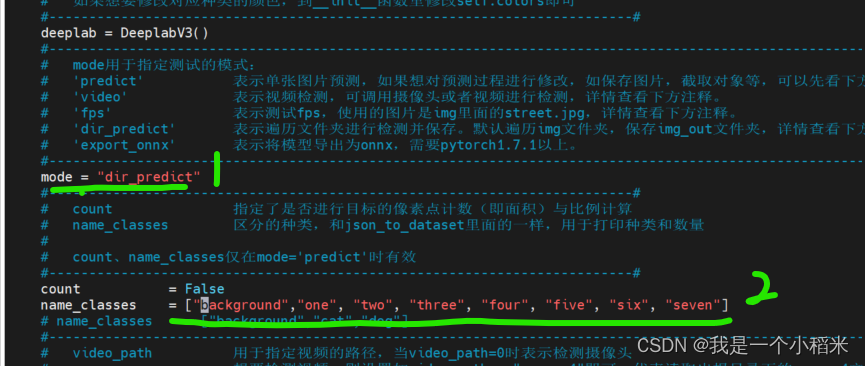
- 修改deeplab.py内容,分别是训练好的模型。类别数(包括背景在内)。图像尺寸
- 修改predict.py内容。name_classes表示每个类别对应的名称
- 运行
python predict.py命令
边栏推荐
猜你喜欢
Master SSR

SQL study notes - REGEXP operator
PyQt5快速开发与实战 9.5 PyQtGraph在PyQt中的应用 && 9.6 Plotly在PyQt中的应用

redis-企业级使用
半个月时间把MySQL重新巩固了一遍,梳理了一篇几万字 “超硬核” 文章!

KVM virtualization job

Redis - Basics

《云原生的本手、妙手和俗手》——2022全国新高考I卷作文

Sql optimization summary!detailed!(Required for the latest interview in 2021)

Redis缓存面临的缓存穿透问题
随机推荐
pycharm汉化教程(碧蓝幻想汉化插件安装)
Inversion problem - key point
How SQL intercepts specified characters from strings (three functions of LEFT, MID, RIGHT)
Usage of exists in sql
SQL去重的三种方法汇总
SQLSERVER merges subquery data into one field
便利贴--46{基于移动端长页中分页加载逻辑封装}
Usage of JOIN in MySQL
浅谈Attention与Self-Attention,一起感受注意力之美
基于Multisim的函数信号发生器–方波、三角波、正弦波[通俗易懂]
实现弹框组件
出色的移动端用户验证
redis-enterprise use
oracle优化:instr做join条件很慢「建议收藏」
Qt compile error: C2228: '.key' must have class/struct/union on the left
[Go Affair] See through Go's collections and slices at a glance
csdn file export to pdf
单点登录的三种方式
SQL学习笔记——REGEXP运算符
7 天学个Go,Go 结构体 + Go range 来学学