当前位置:网站首页>Basic web in PLSQL
Basic web in PLSQL
2022-08-04 23:13:00 【梦想家DBA】
Introduction to HTML
Even the language of the Web,HTML,one of a broad class of markup languages,is derived from a more mature open standard called Standard Generalized Markup Language,or SGML. The earlier standard is dense and complex. Fortunately for us, HTML is a lot simpler than SGML
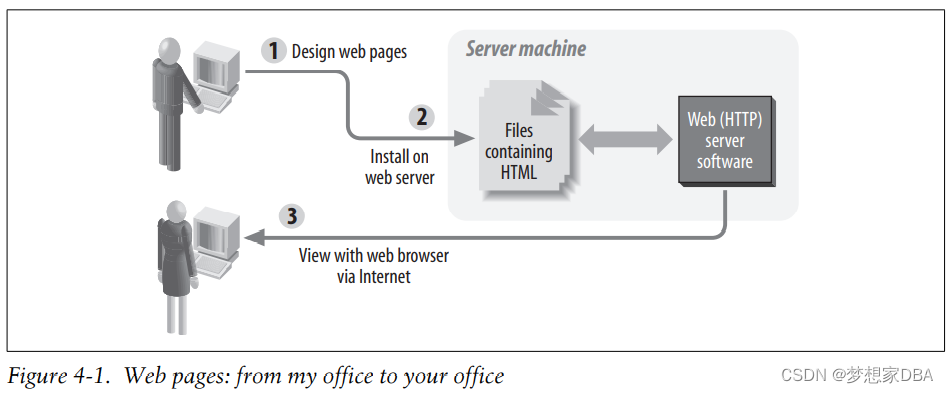
Where Do Web Pages Come From?
HTML Basics
HTML provides a way to mark up plain text so that it can have structure such as headings,paragraphs,and tables,and so that it can include non-textual elements such as images,buttons,and lines. HTML defines some special tags to designate the elements of the document. An element is a predefined logical part of the document such as a section heading. A tag is a name given to the element; tags appear between angle brackets (greater-than and less-than signs). Most elements are delimited with a pair of tags following the pattern: my document
<tagname>my document element</tagname>Notice the slash in front of the tag name at the end. It is this slash that designates the closing tag.
In addition to tags,HTML elements can have properties known as attributes. Attributes appear inside the tag, taking the general form:
<tagname attribute="value">my text here</tagname>In the following example of using an attribute,I define the background color of an HTML document to be white rather than the browser default (often gray). As you can see, bgcolor is an attribute of the BODY element:
<BODY bgcolor="white">
 my document body
</BODY>
You will want at least two sections in your document:
• A header section,delimited by the HEAD element,which contains information such as the page title.
• A body section,delimited by the BODY element,which contains the content of the page. This is the main part of the document.
The pattern for a simple HTML document is:
<HTML>
 <HEAD>
 <TITLE>Document title</TITLE>
...other "declarative" information
 </HEAD>
 <BODY>
content of page
 </BODY>
</HTML>
The following list describes these components:
HTML element
The HTML element,bounded by the <HTML> and </HTML> tags,houses the document’s head and body.
HEAD element
This section contains “declarative” information (that is,information that applies
to the entire page). The document title,keywords for search engines,and special instructions to the browser all go here, between <HEAD> and </HEAD>.
BODY element
The body corresponds to the visible parts of the web page. Between <BODY> and
</BODY> you put your text,marked up to indicate subheadings,images,links,
tables, and other presentable elements—everything you want the user to see.
At last we’re ready to look at our first HTML document:
<HTML>
<HEAD>
<TITLE>Famous Quotations: Richard III</TITLE>
</HEAD>
<BODY>
"A horse, a horse, my kingdom for a horse!" - Richard III
</BODY>
</HTML><html>
<head>
<title>Famous Quotations: Maxwell</title>
</head>
<body>
"A horse, a horse, my kingdom for a horse!" - Maxwell
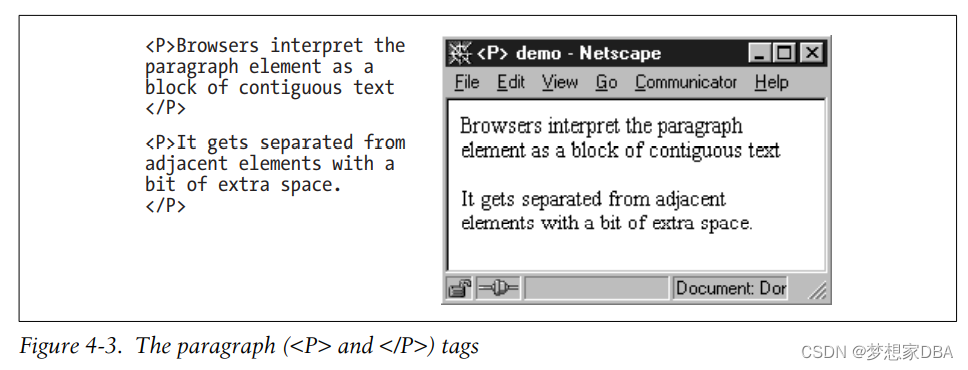
<p> Browers interpret the paragraph element as a block of contiguous text</p>
<p>It gets separated from adjacent elements with a bit of extra space.</p>
<p>
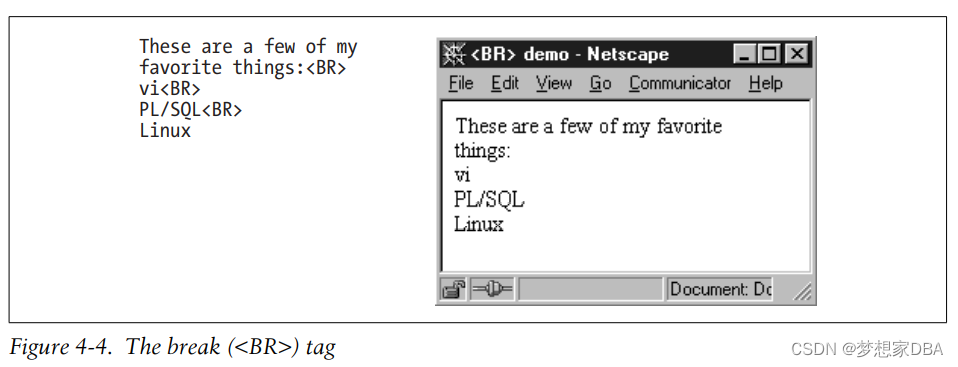
These are a few of my favorite things:<br>
vi<br>
PL/SQL<br>
Linux
</p>
</body>
</html> 

Building a web-based library form
The following is the HTML for the form:
<!--
 * @Author: Maxwell
 * @Date: 2022-08-04 14:50:42
 * @LastEditTime: 2022-08-04 15:09:11
 * @FilePath: \Web\weblearning\webyong.html
 * @Description: build the beginnings of the web-based application
 * Software:VSCode,env:
-->
<html>
<HEAD>
    <TITLE>Add Book to Catalog</TITLE>
</HEAD>
<BODY bgcolor="white">
<H1>Add Book to Catalog</H1>
<FROM method="post" action="eat_add_book_form">
    <P>ISBN
        <INPUT type="text" name="isbn" maxlength="13" size="13">
    </P>
    <P>Title
         <INPUT type="text" name="title" size="70" maxlength="2000">
    </P>
    <P>Bar code
         <INPUT type="text" name="barcode_id" maxlength="100" size="35">
    </P>
    <p>Summary
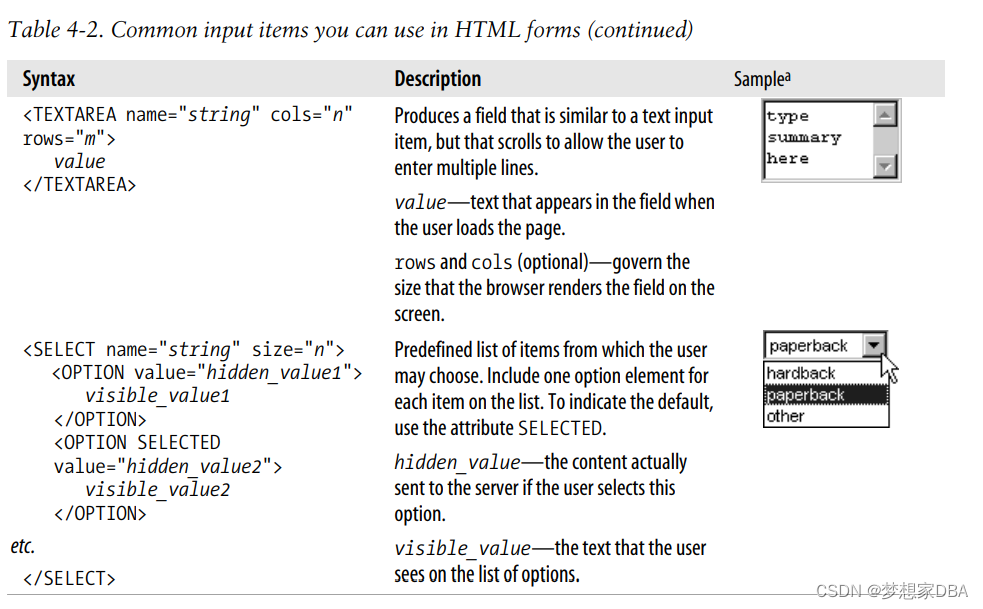
        <textarea name="summary" color="60" rows="8"></textarea>
    </p>
    <p>Author
        <INPUT type="text" name="author" maxlength="200" size="40">
    </p>
    <p>Date published
       <INPUT type="text" name="date_published" size="20" maxlength="40">
    </p>
    <p>Page count
       <INPUT type="text" name="page_count" maxlength="6" size="6">
    </p>
    <p>
        <INPUT type="submit" name="Submit" value="Submit">
    </p>
</FROM>
</BODY>
</html>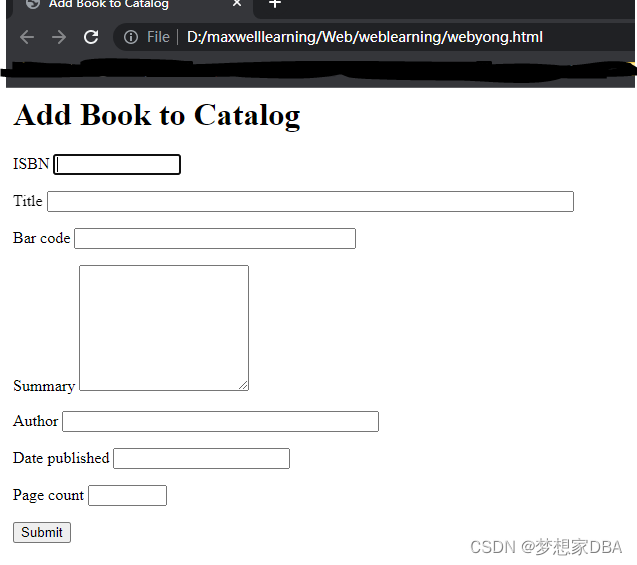
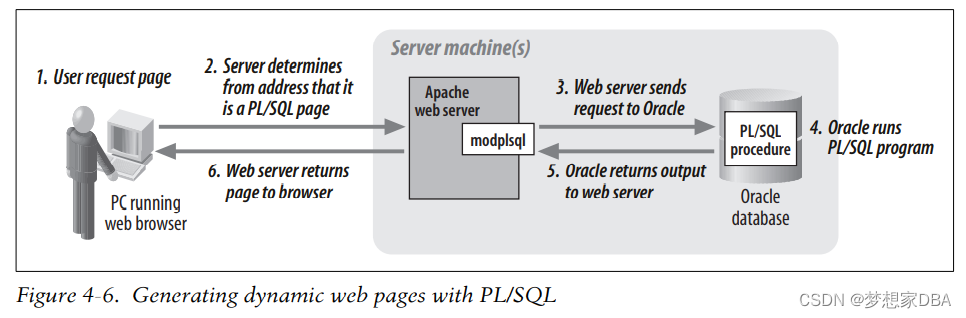
Using PL/SQL to Create Web Pages


边栏推荐
猜你喜欢


随机推荐
【内存操作函数内功修炼】memcpy + memmove + memcmp + memset(四)
Based on the results of the facts
kernel hung_task死锁检测机制原理实现
【云原生 · Kubernetes】Kubernetes运维
堪称奔驰“理财产品”,空间媲美宝马X5,采用了非常运动的外观
一点点读懂cpufreq(二)
good luck
【3D建模制作技巧分享】如何使用ZBrush导出效果图
js中小数四则运算精度问题原因及解决办法
Vscode连接远程服务器(一套配置成功)
零基础如何入门软件测试?再到测开(小编心得)
被领导拒绝涨薪申请,跳槽后怒涨9.5K,这是我的心路历程
【软件测试】常用ADB命令
自从新来了个字节20K出来的,就见识到了什么是天花板
一点点读懂Thremal(二)
【3D建模制作技巧分享】ZBrush如何使用Z球
PID控制器改进笔记之七:改进PID控制器之防超调设定
【七夕快乐篇】Nacos是如何实现服务注册功能的?
[QNX Hypervisor 2.2用户手册]10.5 vdev ioapic
temp7777