当前位置:网站首页>『Three.js』辅助坐标轴
『Three.js』辅助坐标轴
2022-06-12 07:48:00 【InfoQ】
本文简介
Three.jsThree.js编码
<style>
body {
margin: 0;
}
</style>
<div id="canvasBox"></div>
<script type="module">
import {
Scene,
PerspectiveCamera,
WebGLRenderer,
BoxGeometry,
MeshBasicMaterial,
Mesh
} from '../js/Three/Three.js'
// 场景
const scene = new Scene()
// 相机
const camera = new PerspectiveCamera(75, window.innerWidth / window.innerHeight, 0.1, 1000)
// 渲染器
const renderer = new WebGLRenderer()
// 将渲染器的大小设置为窗口的大小
renderer.setSize(window.innerWidth, window.innerHeight)
// 将渲染器绑定到指定的DOM元素中
document.getElementById('canvasBox').appendChild(renderer.domElement)
// 几何体
const geometry = new BoxGeometry()
// 网格基础材质,设置颜色
const material = new MeshBasicMaterial({color: 0xff2299})
const cube = new Mesh(geometry, material)
scene.add(cube)
// 设置摄像机在z轴上的距离
camera.position.x = -3
camera.position.y = 5
camera.position.z = 5
// 将摄像机的方向对准场景的中心点
camera.lookAt(scene.position)
// 适当的旋转一下立方体
cube.rotation.x += 0.8
cube.rotation.y += 0.8
// 将场景和相机添加到渲染器中并执行渲染
renderer.render(scene, camera)
</script>

创建坐标轴
AxesHelper<!-- 省略上面的 html 代码 -->
<script type="module">
import {
// 省略前面的引入
AxesHelper
} from '../js/Three/Three.js'
// 省略部分代码...
// 创建坐标轴
const axes = new AxesHelper()
// 将坐标轴添加到场景中
scene.add(axes)
// 将场景和相机添加到渲染器中并执行渲染
renderer.render(scene, camera)
</script>

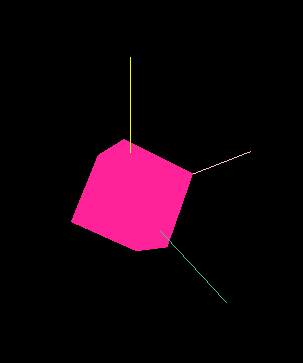
设置坐标轴长度
const axes = new AxesHelper(2)
设置坐标轴颜色
setColors// 创建坐标轴
const axes = new AxesHelper(2)
// 设置坐标轴颜色
axes.setColors('pink', 0xf0ff00, 'rgb(60, 200, 130)')
代码仓库
边栏推荐
- Voice assistant - DM - distribution and sorting
- 2022 electrician (elementary) examination question bank and simulation examination
- 20220524 backbone deep learning network framework
- Cold start problem of recommended system
- Chapter V - message authentication and digital signature
- LeetCode笔记:Biweekly Contest 79
- Summary of machine learning + pattern recognition learning (V) -- Integrated Learning
- Voice assistant -- Architecture and design of Instruction Assistant
- The Poisson regression model (posion) is constructed by GLM function of R language, and the poisgof function of epidisplay package is used to test the goodness of fit of the fitted Poisson regression
- Continuous local training for better initialization of Federated models
猜你喜欢

Modelants II

Chapter 3 - Fundamentals of cryptography

Seeking for a new situation and promoting development, the head goose effect of Guilin's green digital economy

Arrangement of statistical learning knowledge points -- maximum likelihood estimation (MLE) and maximum a posteriori probability (map)

Voice assistant - Multi round conversation (process implementation)
L'effet de l'oie sauvage sur l'économie numérique verte de Guilin

Primal problem and dual problem
Hongmeng OS first training

经典论文回顾:Palette-based Photo Recoloring

Missing getting in online continuous learning with neuron calibration thesis analysis + code reading
随机推荐
Ecmascript6 interview questions
Voice assistant - overall architecture and design
Federated reconnaissance: efficient, distributed, class incremental learning paper reading + code analysis
20220526 损失函数
R语言使用neuralnet包构建神经网络回归模型(前馈神经网络回归模型),计算模型在测试集上的MSE值(均方误差)
Interview computer network - transport layer
Voice assistant - Multi round conversation (theory and concept)
2D visualization of oil storage, transportation and production, configuration application enables intelligent development of industry
Leetcode notes: Weekly contest 295
Interview questions on mobile terminal, Android and IOS compatibility
Utilize user behavior data
Chapter 3 - Fundamentals of cryptography
20220607. 人脸识别
Model deployment learning notes (I)
BI技巧丨当月期初
Voice assistant -- Qu -- query error correction and rewriting
Logistic regression
R语言dplyr包mutate_at函数和one_of函数将dataframe数据中指定数据列(通过向量指定)的数据类型转化为因子类型
解决上传SFTPorg.apache.commons.net.MalformedServerReplyException: Could not parse respon
The latest hbuilderx editing uni app project runs in the night God simulator