当前位置:网站首页>Arc GIS basic operation 3
Arc GIS basic operation 3
2022-07-26 09:22:00 【Mizuzi (guess】
4 month 2 No 3 Second class
Traps of planar objects
1. newly build gbd file
2. Set properties ( choice Face object )
3. Set the corresponding content options
Specific operation and the first part The creation steps of linear objects are the same
Trap pattern
Under the edit bar Create elements Tab , Select facet , Start tracing . Double click to end
Be careful : Be sure to make the line closed
Tool is introduced

1.
If you find that your line does not coincide well with what you want , You can use this to insert the folding point , Drag the break point to adjust the status quo .
2.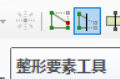
Crop shaping elements It is to eliminate the cut and segmented graphics , And delete
3.
Crop face tool It is to divide small areas on the basis of large areas , Independent .
Be careful : It must form a trap pattern with the boundary line , Otherwise, double click to display an error , Redraw point !!!
Tracking of public side
utilize Tracking tools , To draw coincident edges . But be careful not to appear “ double-fold eyelids ”.
Cut and discard duplicate areas
1. After drawing the boundary of aquifer with broken points , The default large image is on the top . First remove the top layer , Choose One Small contained faceted objects .
2. then withdraw edit . Select shear 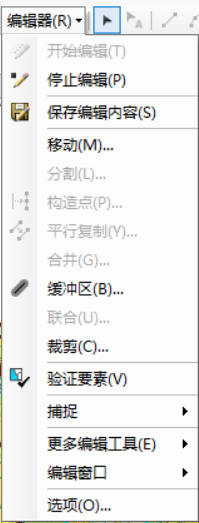
3. Check discard intersection 
Cut on a large area


Personally think that , Snap sketch In this step , May point , Don't order . You can also go directly to the next step ~~~
In this state , Draw lines normally .
Drawing skills
! First draw a large area , Then draw a small area
! When drawing , Be sure to select the drawing object , That is, the outer frame turns blue
! When drawing large areas , First eliminate unnecessary
! Reduce the use of tracking
! Painting layer by layer , Use Snap sketch + shear
!!! Be sure to choose First select the big picture layer **! Then divide the small layer !**
ps: If you draw a small layer first , After outlining , Follow up needs to keep tracking the public side , Now , For some reason ( I think it's the intensive reading problem of pixel recognition ), It is easy to appear that the common edges do not coincide , And you need to select small layer segmentation , Easy to move other painted layers . This is wrong ! Maybe I couldn't see it at that time , But when it comes to subsequent operations , I want to cry without tears !!!
Postscript : There are some things , You don't realize that some steps are so critical , You need to try before you realize the meaning of this step
therefore , When learning new knowledge , Need timely feedback , In this way, one step will not go wrong , Step by step in the wrong
meanwhile , Don't forget , Summarize and record the importance of practice application
To warn yourself ( The future and the present )
边栏推荐
- redis原理和使用-安装和分布式配置
- 滑动窗口、双指针、单调队列、单调栈
- Under a directory of ext3 file system, subfolders cannot be created, but files can be created
- Zipkin installation and use
- Local cache
- 2B and 2C
- HBuilderX 运行微信开发者工具 “Fail to open IDE“报错解决
- 2022 Shanghai safety officer C certificate examination questions and mock examination
- Object 的Wait Notify NotifyAll 源码解析
- Li Mu D2L (VI) -- model selection
猜你喜欢

ZXing简化版,转载

The child and binary tree- open root inversion of polynomials

Your login IP is not within the login mask configured by the administrator

Redis principle and usage - installation and distributed configuration

Li Mu D2L (V) -- multilayer perceptron
volatile 靠的是MESI协议解决可见性问题?(下)

Under a directory of ext3 file system, subfolders cannot be created, but files can be created

【Mysql】redo log,undo log 和binlog详解(四)

李沐d2l(四)---Softmax回归

【Mysql】认识Mysql重要架构(一)
随机推荐
Object 的Wait Notify NotifyAll 源码解析
Pat grade a a1013 battle over cities
756. 蛇形矩阵
Redis principle and use - Basic Features
Nuxt - Project packaging deployment and online to server process (SSR server rendering)
Exception handling mechanism II
839. Simulation reactor
2022化工自动化控制仪表操作证考试题模拟考试平台操作
js在控制台输出菱形
Server memory failure prediction can actually do this!
大二上第二周学习笔记
点击input时,不显示边框!
自定义密码输入框,无圆角
(2006,Mysql Server has gone away)问题处理
Selection and practice of distributed tracking system
Where are the laravel framework log files stored? How to use it?
Laravel框架日志文件存放在哪里?怎么用?
【Mysql】redo log,undo log 和binlog详解(四)
2B和2C
ZXing简化版,转载