当前位置:网站首页>WPF 截图控件之画笔(八)「仿微信」
WPF 截图控件之画笔(八)「仿微信」
2022-08-04 11:31:00 【yanjinhua】
前言
接着上周写的截图控件继续更新添加 画笔。
1.WPF实现截屏「仿微信」
2.WPF 实现截屏控件之移动(二)「仿微信」
3.WPF 截图控件之伸缩(三) 「仿微信」
4.WPF 截图控件之绘制方框与椭圆(四) 「仿微信」
5.WPF 截图控件之绘制箭头(五)「仿微信」
6.WPF 截图控件之绘制箭头禁止越界(六)「仿微信」
7.WPF 截图控件之文字(七)「仿微信」
正文
一、接着ScreenCut继续发电;
1)添加画笔操作只允许在可编辑区域内;
再添加 画笔、使用 Polyline来实现;当前坐标 X大于Left并小于Right允许绘制;当前坐标 Y大于Top并小于Bootom允许绘制;
  void DrwaInkControl(Point current)
        {
            CheckPoint(current);
            if (current.X >= rect.Left
            &&
            current.X <= rect.Right
            &&
            current.Y >= rect.Top
            &&
            current.Y <= rect.Bottom)
            {
                if (polyLine == null)
                {
                    polyLine = new Polyline();
                    polyLine.Stroke = _currentBrush == null ? Brushes.Red : _currentBrush;
                    polyLine.Cursor = Cursors.Hand;
                    polyLine.StrokeThickness = 3;
                    polyLine.StrokeLineJoin = PenLineJoin.Round;
                    polyLine.StrokeStartLineCap = PenLineCap.Round;
                    polyLine.StrokeEndLineCap = PenLineCap.Round;
                    polyLine.MouseLeftButtonDown += (s, e) =>
                    {
                        _radioButtonInk.IsChecked = true;
                        _radioButtonInk_Click(null, null);
                        SelectElement();
                        frameworkElement = s as Polyline;
                        frameworkElement.Opacity = .7;
                    };
                    _canvas.Children.Add(polyLine);
                }
                polyLine.Points.Add(current);
            }

        }
完整代码如下
ScreenCut GitHub[1] ScreenCut.xaml Gitee[2] ScreenCut Gitee[3] ScreenCut.xaml Gitee[4]
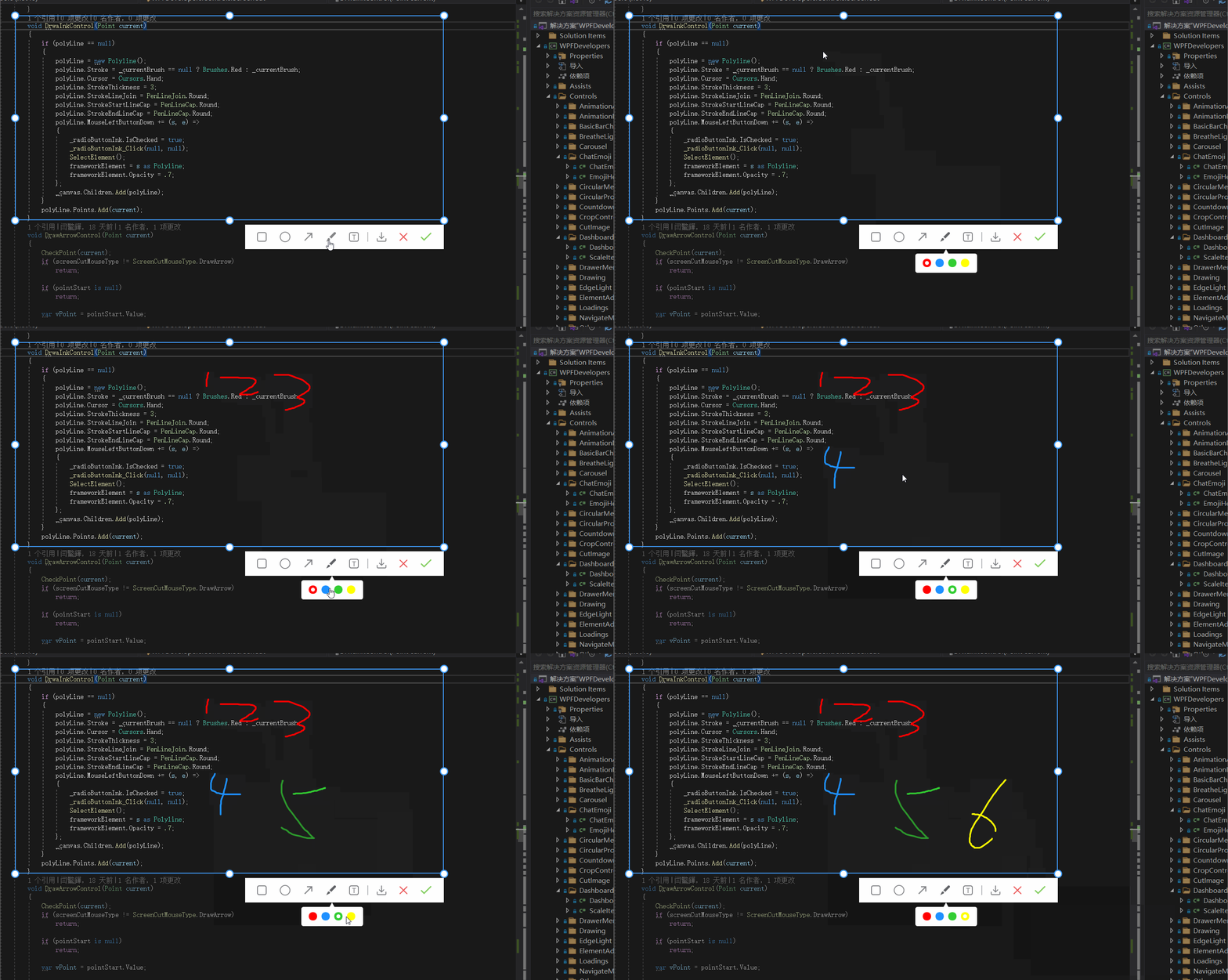
项目地址
框架名:WPFDevelopers 作者:WPFDevelopers GitHub[5] Gitee[6]
参考资料
ScreenCut GitHub: https://github.com/WPFDevelopersOrg/WPFDevelopers/blob/master/src/WPFDevelopers/Controls/ScreenCut/ScreenCut.cs
[2]ScreenCut.xaml Gitee: https://github.com/WPFDevelopersOrg/WPFDevelopers/blob/master/src/WPFDevelopers/Themes/ScreenCut.xaml
[3]ScreenCut Gitee: https://gitee.com/WPFDevelopersOrg/WPFDevelopers/blob/master/src/WPFDevelopers/Controls/ScreenCut/ScreenCut.cs
[4]ScreenCut.xaml Gitee: https://gitee.com/WPFDevelopersOrg/WPFDevelopers/blob/master/src/WPFDevelopers/Themes/ScreenCut.xaml
[5]GitHub:: https://github.com/WPFDevelopersOrg
[6]Gitee:: https://gitee.com/WPFDevelopersOrg
边栏推荐
猜你喜欢

国际原子能机构总干事警告称扎波罗热核电站安全形势已“完全失控”
深度学习------pytorch实现划拳模型训练

今天15:00 | CVPR 2022 论文分享精彩继续

Zikko上市同时搭载HDMI2.1和2.5GbE新款雷电4扩展坞
面试蚂蚁(P7)竟被MySQL难倒,奋发图强后二次面试入职蚂蚁金服

Oracle中对临时表空间执行shrink操作
Leetcode - using sequence traversal features first completed 114. The binary tree to the list
God Space - the world's first Web3.0-based art agreement creative platform, broadening the boundaries of multi-art integration
*iframe*
秒云成功入选《2022爱分析 · 银行数字化厂商全景报告》,智能运维能力获认可
随机推荐
winform 在Datatable插入一笔数据
Rust 从入门到精通04-变量
【无标题】
Leetcode——利用先序遍历特性完成114. 二叉树展开为链表
复盘:经典的HR面试问题,这些问题可以挖掘你个人的素质,看看你是否合适合我们部门
*W3C* 标准组织
MySQL 45 讲 | 10 MySQL为什么有时候会选错索引?
傅里叶级数与傅里叶变换学习
Learn to use the basic interface of set and map
Leetcode brush questions - 543. Diameter of binary trees, 617. Merging binary trees (recursive solution)
ORA-00054 资源正忙
MySQL最大建议行数2000w, 靠谱吗?
子查询
123
【地平线旭日X3派试用体验】从开机到点灯(第一节)
Four ways to traverse a Map
mysqldump远程备份数据库
【目标检测】YOLOv4特征提取网络——CSPDarkNet53结构解析及PyTorch实现
Xilinx VIVADO 中 DDR3(Naive)的使用(1)创建 IP 核
数据库表列类型;DML_添加数据;DDL_修改,删除数据库表