当前位置:网站首页>C code production YUV420 planar format file
C code production YUV420 planar format file
2022-07-03 07:15:00 【Hui's technical notes】
YUV420 knowledge
For all YUV420 Images , Their Y The values are arranged exactly the same , Because only Y The image of is a grayscale image .
YUV420 According to the storage form , It is divided into YUV420sp(semi-Planar Half plane ) And YUV420p(planar Plane ), Their data format is UV The arrangement is different .420p It is to put U perhaps V After storage , Re storage V perhaps U, in other words UV They are continuous , and 420sp yes UV Alternate storage .
I420(YU12) and YV12 Belong to YUV420p Format , take Y、U、V Pack the components separately , Store... In sequence .NV12 And NV21 similar ,U and V staggered , Belong to YUV420sp.
YUV 4:2:0 sampling , Every four Y Share a group UV component . therefore , Work out a YUV420 The size of storage in memory , It's below. Y,U,V The sum of the sizes of the components , namely :Y+U+V => width * height * 3/2
Y = width * hight
U = Y / 4
V = Y / 4
Icon :1 A pixel YUV Storage , Each letter represents a ,
I420: YYYYYYYY UUVV  =>  YUV420P
YV12: YYYYYYYY VVUU  =>  YUV420P
NV12: YYYYYYYY UVUV  =>  UV420SP
NV21: YYYYYYYY VUVU  =>  YUV420SP
In the name ,“YV” Represents the plane order :Y, then V( then U).12 Refers to pixel depth : about YV12, Each pixel 12 position .NV12 Medium 12 It also means per pixel 12 position .
Grey white YUV
The following code produces a 1080x720 Of YUV file , The format is YUV420 planar, about planar Of YUV Format , First, store all pixels in a row Y, And then it stores all the pixels U, And then all the pixels V.
therefore ,data Its size is width * height * 3 / 2, First write width * height Size data , Color bit 0xb4, To write width * height / 2 The size of as uv The data of , Here's the choice UV The color is the same , So I wrote together . The document written in this way has been used ubuntu Upper YUVView Tool view is grayish white .
int width = 1080;
int height = 720;
int size = width * height * 3 / 2;
uint8_t *data = (uint8_t *)malloc(size);

memset(data, 0xb4, size);
fwrite(data, width * height, 1, fp); // write y data

memset(data + width*height, 0x80, size);
fwrite(data, width*height/2, 1, fp); //write uv data
fclose(fp);
Cyan YUV
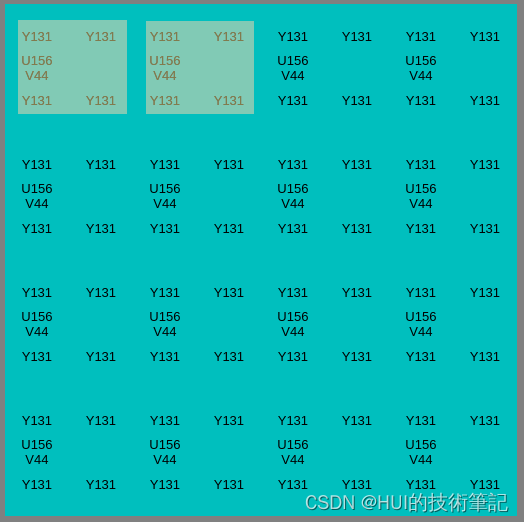
The size of the cyan file definition is 8x8 The file of , Because discovery passed YUVView Tools , Zoom in 8x8 Of YUV After the image , You can see clearly YUV The distribution of components in the picture .
Apply first in the following code data Memory , Then set different values , Finally, write by size .
int width = 8;
int height = 8;
int size = width * height * 3 / 2;
uint8_t *data = (uint8_t *)malloc(size);


// set Y to 131
memset(data, 0x83/* 131 */, width*height);
// set U to 156
memset(data + width*height, 0x9c/* 156 */, width*height/4);
// set V to 44
memset(data + width*height + width*height/4, 0x2c/* 44 */, width*height/4);

FILE* fp = nullptr;
fp = fopen("/sdcard/h264.yuv", "wb");
// write Y
fwrite(data, width * height, 1, fp);
// write UV
fwrite(data+ width*height, width*height/2, 1, fp);
fclose(fp);
adopt ubuntu On YUView Tools , Zoom in to 64 times , You can see that YUV Distribution of ,YUV420 One of the four points UV value :
Replace the code with an array
width = 8;
height = 8;
int size = width * height * 3 / 2;
uint8_t *data = (uint8_t *)malloc(size);
memset(data, 0, size);

FILE* fp = nullptr;
fp = fopen("/sdcard/h264.yuv", "wb");

// set Y to 131
for(int i = 0; i < height; i++) {

    for(int j = 0; j < width; j++) {

        data[i*width + j] = 131;
    }
}

// set U to 156
int offset = width * height;
for(int i = 0; i < height/4; i++) {

    for(int j = 0; j < width; j++) {

        data[offset + i*width + j] = 156;
    }
}

// set V to 45
offset = width*height + width*height/4;
for(int i = 0; i < height/4; i++) {

    for(int j = 0; j < width; j++) {

        data[offset + i*width + j] = 45;
    }
}

fwrite(data, width * height, 1, fp);
//write UV
fwrite(data+ width*height, width*height/2, 1, fp);

fclose(fp);
YUView see , And the one in front V Values are not the same :

The color table reference in the previous code
| Nominal range | white | yellow | Cyan | green | Red | Blue | black | |
|---|---|---|---|---|---|---|---|---|
| Y | 16~235 | 180 | 162 | 131 | 112 | 65 | 35 | 16 |
| Cb | 16~240 | 128 | 44 | 156 | 72 | 100 | 212 | 128 |
| Cr | 16~240 | 128 | 142 | 44 | 58 | 212 | 114 | 128 |
边栏推荐
猜你喜欢

On the practice of performance optimization and stability guarantee
Common problems in io streams

691. 立方体IV
![[Fiddler actual operation] how to use Fiddler to capture packets on Apple Mobile Phones](/img/d0/850e095a43610366d6144b2471f3f7.jpg)
[Fiddler actual operation] how to use Fiddler to capture packets on Apple Mobile Phones
dataworks自定义函数开发环境搭建

【已解决】Unknown error 1146

Software testing learning - day 3

Flask Foundation
My 2020 summary "don't love the past, indulge in moving forward"

Jmeter+influxdb+grafana of performance tools to create visual real-time monitoring of pressure measurement -- problem record
随机推荐
[vscode - vehicle plug-in reports an error] cannot find module 'xxx' or its corresponding type declarations Vetur(2307)
LeetCode
[cmake] cmake link SQLite Library
Gridome + strapi + vercel + PM2 deployment case of [static site (3)]
萬卷書 - 價值投資者指南 [The Education of a Value Investor]
IP home online query platform
SecureCRT password to cancel session recording
Win 2008 R2 crashed at the final installation stage
How to specify the execution order for multiple global exception handling classes
Advanced API (multithreading 02)
POI excel percentage
深度学习参数初始化(一)Xavier初始化 含代码
Sorting, dichotomy
7.2 brush two questions
【无标题】
[set theory] equivalence classes (concept of equivalence classes | examples of equivalence classes | properties of equivalence classes | quotient sets | examples of quotient sets)*
Software testing learning - the next day
Thoughts in Starbucks
EasyExcel
Inno Setup 制作安装包