当前位置:网站首页>[shutter] bottom navigation bar implementation (bottomnavigationbar bottom navigation bar | bottomnavigationbaritem navigation bar entry | pageview)
[shutter] bottom navigation bar implementation (bottomnavigationbar bottom navigation bar | bottomnavigationbaritem navigation bar entry | pageview)
2022-07-03 02:02:00 【Programmer community】
List of articles
- One 、Scaffold Components
- Two 、 The overall structure of the bottom navigation bar
- 3、 ... and 、BottomNavigationBar Bottom navigation bar
- Four 、BottomNavigationBarItem Navigation bar entry
- 5、 ... and 、PageView Components
- 6、 ... and 、 Complete code example
- 7、 ... and 、 Related resources
One 、Scaffold Components
Flutter Medium Scaffold The component realizes the basic material design ( Material Design ) Visual layout structure ;
Scaffold It provides the left side pull navigation bar , Bottom navigation , Floating button, etc API ;
Scaffold The constructor is as follows :
class Scaffold extends StatefulWidget {
      /// Creates a visual scaffold for material design widgets.  const Scaffold({
        Key? key,    this.appBar,	//  Title bar at the top     this.body,		//  The core part of the middle display  ,  The sections below the title bar are      this.floatingActionButton,			//  The levitation button in the lower right corner  (  Changeable position  )    this.floatingActionButtonLocation,    this.floatingActionButtonAnimator,    this.persistentFooterButtons,    this.drawer,	//  Side pull navigation bar      this.onDrawerChanged,    this.endDrawer,    this.onEndDrawerChanged,    this.bottomNavigationBar,    this.bottomSheet,    this.backgroundColor,    this.resizeToAvoidBottomInset,    this.primary = true,    this.drawerDragStartBehavior = DragStartBehavior.start,    this.extendBody = false,    this.extendBodyBehindAppBar = false,    this.drawerScrimColor,    this.drawerEdgeDragWidth,    this.drawerEnableOpenDragGesture = true,    this.endDrawerEnableOpenDragGesture = true,    this.restorationId,  }) : assert(primary != null),       assert(extendBody != null),       assert(extendBodyBehindAppBar != null),       assert(drawerDragStartBehavior != null),       super(key: key);
Two 、 The overall structure of the bottom navigation bar
By setting Scaffold Component's bottomNavigationBar Field , Set one for it BottomNavigationBar Bottom navigation bar component , The bottom navigation bar item Set the icon and text component array , onTap Field settings ValueChanged<int> Click callback method , Set the currently selected page index value through this method ;
Scaffold The theme of the component body Field settings PageView Components , This component is mainly set PageController? controller and List<Widget> children Field , PageController Used to control the PageView Page Jump in , children The middle is PageView Encapsulated multiple interface components , Only one is displayed at a time ;
3、 ... and 、BottomNavigationBar Bottom navigation bar
adopt Scaffold Component's bottomNavigationBar Field , You can set the bottom navigation bar menu , Set up a BottomNavigationBar Components ;
BottomNavigationBar Components can be set int currentIndex The current index , ValueChanged? onTap Click event ,
BottomNavigationBar Components need to set the type of components , stay BottomNavigationBarType? type Field settings , There are two optional types , fixed and shifting ;
enum BottomNavigationBarType {
      /// BottomNavigationBar  At the bottom of the navigation bar  BottomNavigationBarItem  The width does not change   fixed,  /// BottomNavigationBar  At the bottom of the navigation bar  BottomNavigationBarItem  Location and size of components  ,  ///  Will change according to the currently clicked option  ,   ///  When changing, there is switching animation   ///  When selected, the text of the bottom icon is displayed    ///  Hide the text content at the bottom when it is not selected    shifting,}
BottomNavigationBar Of List<BottomNavigationBarItem> items Field acceptance BottomNavigationBarItem Set of components ;
Click event... In the bottom navigation bar , ValueChanged<int>? onTap Field setting click event , The parameter passed in is the index value of the bottom navigation bar clicked ;
BottomNavigationBar Constructors :
  BottomNavigationBar({
        Key? key,    required this.items,    this.onTap,    this.currentIndex = 0,    this.elevation,    this.type,    Color? fixedColor,    this.backgroundColor,    this.iconSize = 24.0,    Color? selectedItemColor,    this.unselectedItemColor,    this.selectedIconTheme,    this.unselectedIconTheme,    this.selectedFontSize = 14.0,    this.unselectedFontSize = 12.0,    this.selectedLabelStyle,    this.unselectedLabelStyle,    this.showSelectedLabels,    this.showUnselectedLabels,    this.mouseCursor,    this.enableFeedback,  }) : assert(items != null),       assert(items.length >= 2),       assert(        items.every((BottomNavigationBarItem item) => item.title != null) ||        items.every((BottomNavigationBarItem item) => item.label != null),        'Every item must have a non-null title or label',       ),       assert(0 <= currentIndex && currentIndex < items.length),       assert(elevation == null || elevation >= 0.0),       assert(iconSize != null && iconSize >= 0.0),       assert(         selectedItemColor == null || fixedColor == null,         'Either selectedItemColor or fixedColor can be specified, but not both'       ),       assert(selectedFontSize != null && selectedFontSize >= 0.0),       assert(unselectedFontSize != null && unselectedFontSize >= 0.0),       selectedItemColor = selectedItemColor ?? fixedColor,       super(key: key);
Code example :
BottomNavigationBar(  ///  Set the current navigation page index   currentIndex: _currentIndex,  ///  Navigation bar button click event   onTap: (pageIndex) {
        ///  Jump to the corresponding navigation page     _pageController.jumpToPage(pageIndex);    setState(() {
          _currentIndex = pageIndex;    });  },  ///  The icon and text positions remain unchanged   type: BottomNavigationBarType.fixed,  ///  Button entries in the bottom navigation bar   items: datas.map((TabData data) {
        ///  Single button entry     return BottomNavigationBarItem(      //  Icon in normal state  ,  green       icon: Icon(        data.icon,        color: Colors.green,      ),      ///  The icon in the selected state  ,  Red       activeIcon: Icon(        data.icon,        color: Colors.red,      ),      ///  And  text  similar  ,  You can only set one       label: data.title,    );  }).toList(),),
Four 、BottomNavigationBarItem Navigation bar entry
BottomNavigationBar Need to be set in BottomNavigationBarItem Array elements , This requires creating several BottomNavigationBarItem Components ;
BottomNavigationBarItem Can be set in
- Default icon Widget icon
- Bottom copy Widget? title
- Check the status icon Widget activeIcon
- The background color Color? backgroundColor
BottomNavigationBarItem Component constructor :
  const BottomNavigationBarItem({
        required this.icon,    @Deprecated(      'Use "label" instead, as it allows for an improved text-scaling experience. '      'This feature was deprecated after v1.19.0.'    )    this.title,    this.label,    Widget? activeIcon,    this.backgroundColor,    this.tooltip,  }) : activeIcon = activeIcon ?? icon,       assert(label == null || title == null),       assert(icon != null);
5、 ... and 、PageView Components
PageView The two most important fields of the component :
- PageController? controller
- List<Widget> children
PageController Used to control the PageView The jump , PageController The main function is to call void jumpToPage(int page) Method , Page Jump ;
jumpToPage The page jumps to... In the menu bar at the bottom onTap Click in the event to call , After updating the current page , Need to call setState Method update interface ;
PageView Constructors :
  PageView({
        Key? key,    this.scrollDirection = Axis.horizontal, //  Set the scroll direction   vertical  /  level      this.reverse = false,	//  Reverse scrolling      PageController? controller,	//  Scroll control class      this.physics,	//  Scroll logic  ,  Don't roll  /  rolling  /  Scroll to whether the edge bounces      this.pageSnapping = true,	//  If you set  false ,  You cannot capture page gestures      this.onPageChanged, 	//  Call back this function when switching pages      List<Widget> children = const <Widget>[],    this.dragStartBehavior = DragStartBehavior.start,    this.allowImplicitScrolling = false,    this.restorationId,    this.clipBehavior = Clip.hardEdge,  }) : assert(allowImplicitScrolling != null),       assert(clipBehavior != null),       controller = controller ?? _defaultPageController,       childrenDelegate = SliverChildListDelegate(children),       super(key: key);
PageView Code example :
///  Sliding components  ,  The core elements of the interface PageView(  ///  The controller that controls page flipping   controller: _pageController,  /// Widget  Component array  ,  Set up multiple  Widget  Components   children: datas.map((TabData data) {
        return Padding(      ///  padding  20      padding: const EdgeInsets.all(20.0),      /// PageView  Components shown individually in       child: TabContent(data: data),    );  }).toList(),  physics: NeverScrollableScrollPhysics(),),
6、 ... and 、 Complete code example
Complete code example :
import 'package:flutter/material.dart';///  Example of bottom navigation bar void main() {
      runApp(      BottomNavigatorWidget()  );}class BottomNavigatorWidget extends StatefulWidget {
      @override  _BottomNavigatorWidgetState createState() => _BottomNavigatorWidgetState();}class _BottomNavigatorWidgetState extends State<BottomNavigatorWidget>    with SingleTickerProviderStateMixin {
      ///  The current index value   int _currentIndex = 0;  /// PageView  controller  ,  Used to control the  PageView  var _pageController = PageController(    ///  Initial index value     initialPage: 0,  );  @override  void dispose() {
        super.dispose();    ///  The destruction  PageView  controller     _pageController.dispose();  }  @override  Widget build(BuildContext context) {
        ///  The root component     return MaterialApp(      home: Scaffold(        ///  Sliding components  ,  The core elements of the interface         body: PageView(          ///  The controller that controls page flipping           controller: _pageController,          /// Widget  Component array  ,  Set up multiple  Widget  Components           children: datas.map((TabData data) {
                return Padding(              ///  padding  20              padding: const EdgeInsets.all(20.0),              /// PageView  Components shown individually in               child: TabContent(data: data),            );          }).toList(),          physics: NeverScrollableScrollPhysics(),        ),        bottomNavigationBar: BottomNavigationBar(          ///  Set the current navigation page index           currentIndex: _currentIndex,          ///  Navigation bar button click event           onTap: (pageIndex) {
                ///  Jump to the corresponding navigation page             _pageController.jumpToPage(pageIndex);            setState(() {
                  _currentIndex = pageIndex;            });          },          ///  The icon and text positions remain unchanged           type: BottomNavigationBarType.fixed,          ///  Button entries in the bottom navigation bar           items: datas.map((TabData data) {
                ///  Single button entry             return BottomNavigationBarItem(              //  Icon in normal state  ,  green               icon: Icon(                data.icon,                color: Colors.green,              ),              ///  The icon in the selected state  ,  Red               activeIcon: Icon(                data.icon,                color: Colors.red,              ),              ///  And  text  similar  ,  You can only set one               label: data.title,            );          }).toList(),        ),      ),    );  }}///  Encapsulate the icon and text data of the navigation bar class TabData {
      ///  Navigation data constructor   const TabData({
    this.title, this.icon});  ///  Navigation title   final String title;  //  Navigation icons   final IconData icon;}///  Navigation bar data set const List<TabData> datas = const <TabData>[  const TabData(title: '3D', icon: Icons.threed_rotation),  const TabData(title: ' The printer ', icon: Icons.print),  const TabData(title: ' Animation ', icon: Icons.animation),  const TabData(title: ' Transformation ', icon: Icons.transform),  const TabData(title: ' Height ', icon: Icons.height),  const TabData(title: ' describe ', icon: Icons.description),  const TabData(title: ' forward ', icon: Icons.forward),  const TabData(title: ' The camera ', icon: Icons.camera),  const TabData(title: ' Set up ', icon: Icons.settings),  const TabData(title: ' Academic degree ', icon: Icons.school),];///  adopt  TabBar  The navigation bar switches the main contents of the display ///  Used in  TabBarView  Components shown in class TabContent extends StatelessWidget {
      const TabContent({
    Key key, this.data}) : super(key: key);  ///  Generate components based on this data entry   final TabData data;  @override  Widget build(BuildContext context) {
        TextStyle textStyle = TextStyle(color: Colors.yellow, fontSize: 50);    return Card(      ///  Set up  20  Pixel margin       margin: EdgeInsets.all(20),      ///  Set shadow       elevation: 10,      ///  The card color is black       color: Colors.black,      ///  The elements in the card are displayed in the center       child: Center(        ///  Linear layout in vertical direction         child: Column(          ///  On the spindle  (  vertical direction  )  The size occupied           mainAxisSize: MainAxisSize.min,          ///  centered           crossAxisAlignment: CrossAxisAlignment.center,          children: <Widget>[            ///  Set icon             Icon(data.icon, size: 128.0, color: Colors.green),            ///  Set text             Text(data.title, style: TextStyle(color: Colors.yellow, fontSize: 50)),          ],        ),      ),    );  }}
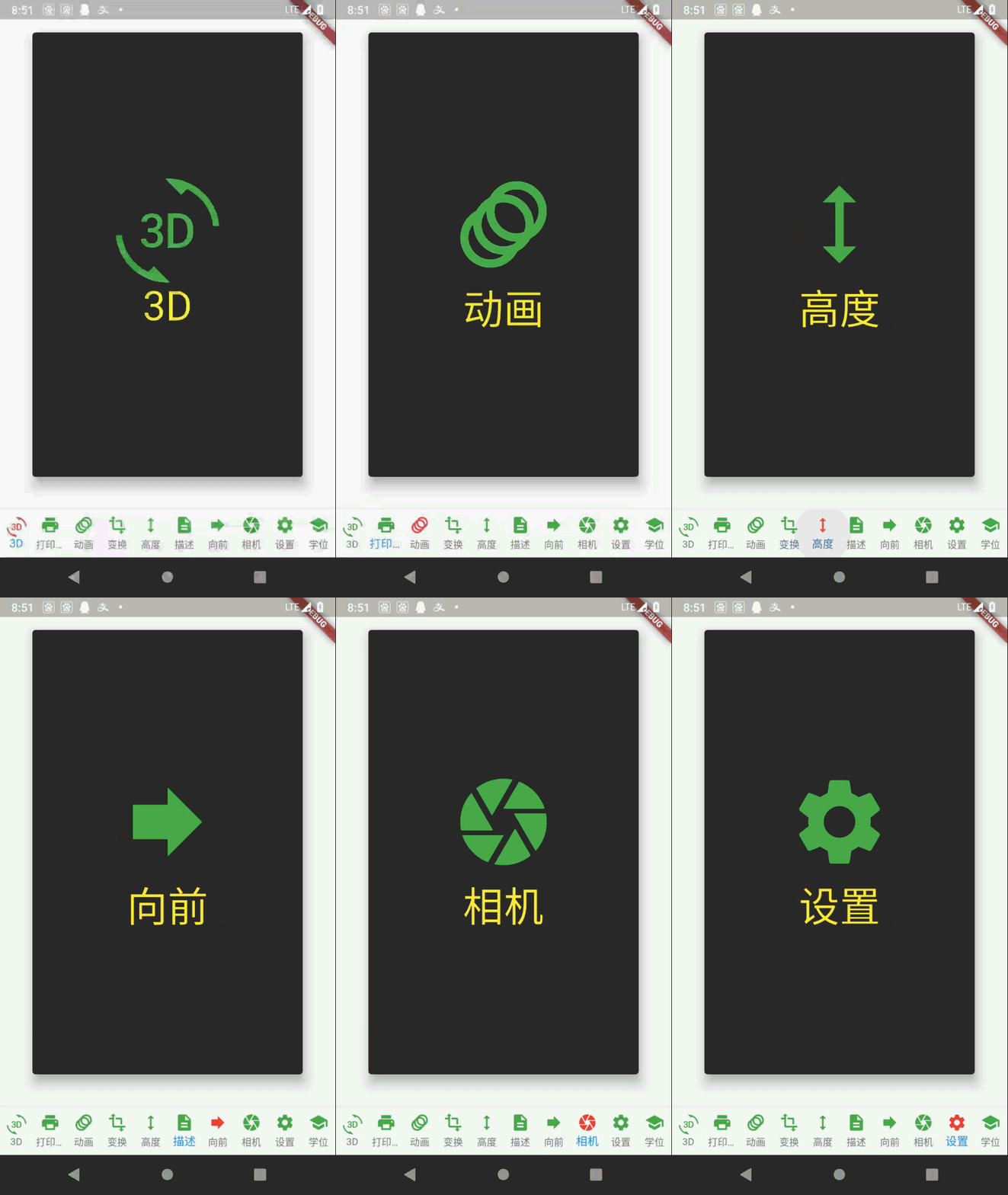
Running effect :
7、 ... and 、 Related resources
Reference material :
- Flutter Official website : https://flutter.dev/
- Flutter Plug in download address : https://pub.dev/packages
- Flutter Developing documents : https://flutter.cn/docs ( Strongly recommend )
- official GitHub Address : https://github.com/flutter
- Flutter The Chinese community : https://flutter.cn/
- Flutter Practical tutorial : https://flutter.cn/docs/cookbook
- Flutter CodeLab : https://codelabs.flutter-io.cn/
- Dart Chinese document : https://dart.cn/
- Dart Developer website : https://api.dart.dev/
- Flutter Chinese net : https://flutterchina.club/ , http://flutter.axuer.com/docs/
- Flutter Related issues : https://flutterchina.club/faq/ ( It is recommended to watch it at the introductory stage )
- GitHub Upper Flutter Open source examples : https://download.csdn.net/download/han1202012/15989510
- Flutter Practical e-books : https://book.flutterchina.club/chapter1/
Important topics :
- Flutter Animation reference documentation : https://flutterchina.club/animations/
Blog source download :
GitHub Address : https://github.com/han1202012/flutter_frame ( Keep updating with the progress of the blog , There may not be the source code of this blog )
Blog source snapshot : https://download.csdn.net/download/han1202012/16276633 ( The source code snapshot of this blog , You can find the source code of this blog )
边栏推荐
- Vant implements a simple login registration module and a personal user center
- 全链路数字化转型下,零售企业如何打开第二增长曲线
- 网络安全-中间人攻击
- 【Camera专题】手把手撸一份驱动 到 点亮Camera
- Analysis, use and extension of open source API gateway apisex
- Basic operation of view
- [camera topic] complete analysis of camera dtsi
- DQL basic operation
- Method of removing webpage scroll bar and inner and outer margins
- Network security - Information Collection
猜你喜欢

Huakaiyun (Zhiyin) | virtual host: what is a virtual host

Hard core observation 547 large neural network may be beginning to become aware?
PS去除水印详解

stm32F407-------DMA
![[camera topic] turn a drive to light up the camera](/img/d3/7aabaa5c75813abc4a43820b4c3706.png)
[camera topic] turn a drive to light up the camera
In the face of difficult SQL requirements, HQL is not afraid
In 2022, 95% of the three most common misunderstandings in software testing were recruited. Are you that 5%?

Custom components, using NPM packages, global data sharing, subcontracting

Introduction to kotlin collaboration
【Camera专题】手把手撸一份驱动 到 点亮Camera
随机推荐
leetcode961. Find the elements repeated N times in the array with length 2n
Socket programming
可视化yolov5格式数据集(labelme json文件)
微信小程序开发工具 POST net::ERR_PROXY_CONNECTION_FAILED 代理问题
网络安全-防火墙
How to find summer technical internship in junior year? Are you looking for a large company or a small company for technical internship?
【Camera专题】手把手撸一份驱动 到 点亮Camera
Caused by: com.fasterxml.jackson.databind.exc.MismatchedInputException: Cannot construct instance o
转载收录6.5大侠写的部分Qt开发经验
全链路数字化转型下,零售企业如何打开第二增长曲线
Comment le chef de file gère - t - il l'équipe en cas d'épidémie? Contributions communautaires
DML Foundation
Network security - cracking system passwords
Smart management of Green Cities: Digital twin underground integrated pipe gallery platform
【Camera专题】OTP数据如何保存在自定义节点中
Niuniu's ball guessing game (dynamic planning + prefix influence)
ByteDance data Lake integration practice based on Hudi
Asian Games countdown! AI target detection helps host the Asian Games!
Vant implements a simple login registration module and a personal user center
[data mining] task 4:20newsgroups clustering