当前位置:网站首页>Lvgl usage demo and instructions 2
Lvgl usage demo and instructions 2
2022-06-27 08:05:00 【Passing bear~】
brief introduction
This article continues the unfinished work above lvgl, Use examples to illustrate .
lvgl Introduction to canvas usage
Commonly used API explain
// Canvas creation
lv_canvas_create(lv_obj_t * parent);

// Set canvas BUFF
lv_canvas_set_buffer(lv_obj_t * obj, void * buf, lv_coord_t w, lv_coord_t h, lv_img_cf_t cf);

// Sketchpad initialization
lv_canvas_set_palette(lv_obj_t * obj, uint8_t id, lv_color_t c);

// Fill the canvas with color using the palette
lv_canvas_fill_bg(lv_obj_t * canvas, lv_color_t color, lv_opa_t opa);

// In the specified X,Y Area fill specifies the palette color
lv_canvas_set_px(lv_obj_t * obj, lv_coord_t x, lv_coord_t y, lv_color_t c);

// Place the converted image on the canvas
void lv_canvas_transform(lv_obj_t *canvas, lv_img_dsc_t *img, int16_t angle, uint16_t zoom, lv_coord_t offset_x, lv_coord_t offset_y, int32_t pivot_x, int32_t pivot_y, bool antialias);

// Draw a rectangle on the canvas
void lv_canvas_draw_rect(lv_obj_t *canvas, lv_coord_t x, lv_coord_t y, lv_coord_t w, lv_coord_t h, const lv_draw_rect_dsc_t *draw_dsc);

// Draw a text on the canvas
void lv_canvas_draw_text(lv_obj_t *canvas, lv_coord_t x, lv_coord_t y, lv_coord_t max_w, lv_draw_label_dsc_t *draw_dsc, const char *txt);

// Draw an image on the canvas
void lv_canvas_draw_img(lv_obj_t *canvas, lv_coord_t x, lv_coord_t y, const void *src, const lv_draw_img_dsc_t *draw_dsc);

// Draw a line on the canvas
void lv_canvas_draw_line(lv_obj_t *canvas, const lv_point_t points[], uint32_t point_cnt, const lv_draw_line_dsc_t *draw_dsc);

// Draw a polygon on the canvas
void lv_canvas_draw_polygon(lv_obj_t *canvas, const lv_point_t points[], uint32_t point_cnt, const lv_draw_rect_dsc_t *draw_dsc);
Examples
#define CANVAS_WIDTH 50
#define CANVAS_HEIGHT 50
/*Create a buffer for the canvas*/
static lv_color_t cbuf[LV_CANVAS_BUF_SIZE_INDEXED_1BIT(CANVAS_WIDTH, CANVAS_HEIGHT)];

/*Create a canvas and initialize its palette*/
lv_obj_t * canvas = lv_canvas_create(lv_scr_act());
lv_canvas_set_buffer(canvas, cbuf, CANVAS_WIDTH, CANVAS_HEIGHT, LV_IMG_CF_INDEXED_1BIT);
lv_canvas_set_palette(canvas, 0, lv_palette_main(LV_PALETTE_YELLOW));
lv_canvas_set_palette(canvas, 1, lv_palette_main(LV_PALETTE_BLUE));

/*Create colors with the indices of the palette*/
lv_color_t c1;
lv_color_t c0;

c1.full = 1;
c0.full = 0;

/*Red background (There is no dedicated alpha channel in indexed images so LV_OPA_COVER is ignored)*/
lv_canvas_fill_bg(canvas, c1, LV_OPA_COVER);

/*Create hole on the canvas*/
uint32_t x;
uint32_t y;
for( y = 0; y < 25; y++)
{

    for( x = 0; x < 25; x++)
    {

        lv_canvas_set_px(canvas, x, y, c0);
    }
}
The effect is as follows

lvgl image Control instructions
Commonly used API Introduce
// establish image The widget
lv_obj_t * lv_img_create(lv_obj_t * parent);

// Set image data for the display object
void lv_img_set_src(lv_obj_t * obj, const void * src);

// Set... For the image X Direction shift
void lv_img_set_offset_x(lv_obj_t *obj, lv_coord_t x);

// Set... For the image Y Direction shift
void lv_img_set_offset_y(lv_obj_t *obj, lv_coord_t y);

// Image rotation specified angle
void lv_img_set_angle(lv_obj_t *obj, int16_t angle);

// Picture antialiasing enable settings
void lv_img_set_antialias(lv_obj_t *obj, bool antialias);
Use examples
LV_IMG_DECLARE(img_cogwheel_argb);
lv_obj_t * img1 = lv_img_create(lv_scr_act());
lv_img_set_src(img1, &img_cogwheel_argb);
lv_obj_align(img1, LV_ALIGN_CENTER, 0, -20);
lv_obj_set_size(img1, 200, 200);
The effect is as follows

LVGL Layout introduction
level 、 Vertical layout
Commonly used API
// Create base object
lv_obj_create(lv_scr_act());

//  Set the object to use a row based drain flex layout flex
lv_obj_set_flex_flow(cont_row, LV_FLEX_FLOW_ROW);

//  Set the object to use a column based dropout elastic layout flex
lv_obj_set_flex_flow(cont_col, LV_FLEX_FLOW_COLUMN);

// Add layout settings when creating widget objects , Make it in the specified layout
lv_btn_create(cont_row);
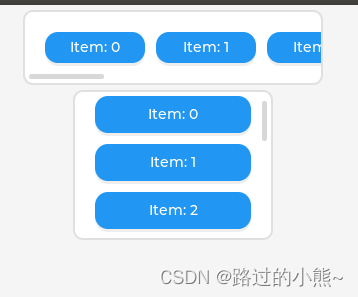
Use examples 1
/* Create a container with horizontal expansion direction */
lv_obj_t * cont_row = lv_obj_create(lv_scr_act()); // Create base object
lv_obj_set_size(cont_row, 300, 75); // Set container size
lv_obj_align(cont_row, LV_ALIGN_TOP_MID, 0, 5); // Set alignment ( Align the middle and top of the screen )
lv_obj_set_flex_flow(cont_row, LV_FLEX_FLOW_ROW); //  Set the object to use a row based drain flex layout flex

/* Create a container with a vertical expansion direction */
lv_obj_t * cont_col = lv_obj_create(lv_scr_act()); // Create base object
lv_obj_set_size(cont_col, 200, 150); // Set container size
lv_obj_align_to(cont_col, cont_row, LV_ALIGN_OUT_BOTTOM_MID, 0, 5); // Set alignment ( The column layout is outside the row layout and below the center - That is, the outer lower middle alignment )
lv_obj_set_flex_flow(cont_col, LV_FLEX_FLOW_COLUMN);  //  Set the object to use a column based dropout elastic layout flex

uint32_t i;
for(i = 0; i < 10; i++)
{

   lv_obj_t * obj;
   lv_obj_t * label;

   /*Add items to the row*/
   obj= lv_btn_create(cont_row); // Add the created keys to the horizontal layout
   lv_obj_set_size(obj, 100, LV_PCT(100));

   label = lv_label_create(obj);
   lv_label_set_text_fmt(label, "Item: %u", i); // Set key name
   lv_obj_center(label);

   /*Add items to the column*/
   obj = lv_btn_create(cont_col); // Add the created keys to the vertical layout
   lv_obj_set_size(obj, LV_PCT(100), LV_SIZE_CONTENT);

   label = lv_label_create(obj);
   lv_label_set_text_fmt(label, "Item: %u", i); // Set key name
   lv_obj_center(label);
}
The effect is as follows
Use examples 2
Add other layouts to the horizontal layout , for example :
lv_obj_t * cont = lv_obj_create(lv_scr_act());
lv_obj_set_size(cont, 300, 220);
lv_obj_center(cont);
lv_obj_set_flex_flow(cont, LV_FLEX_FLOW_ROW);

lv_obj_t * obj;
obj = lv_obj_create(cont);
lv_obj_set_size(obj, 40, 40);           /*Fix size*/

obj = lv_obj_create(cont);
lv_obj_set_height(obj, 40);
lv_obj_set_flex_grow(obj, 1);           /*1 portion from the free space*/

obj = lv_obj_create(cont);
lv_obj_set_height(obj, 40);
lv_obj_set_flex_grow(obj, 2);           /*2 portion from the free space*/

obj = lv_obj_create(cont);
lv_obj_set_size(obj, 40, 40);           /*Fix size. It is flushed to the right by the "grow" items*/
The effect is as follows

边栏推荐
- [batch dos-cmd command - summary and summary] - how to distinguish the internal command and external command of CMD, and the difference between CMD command and run (win+r) command,
- 【c ++ primer 笔记】第4章 表达式
- Preliminary understanding of C #
- JS, and output from small to large
- Zabbix部署说明(Server+Win客户端+交换机(H3C))
- Cookie加密6
- 无论LCD和OLED显示技术有多好,都无法替代这个古老的显示数码管
- L'enquête en aveugle a montré que les femmes étaient meilleures que les hommes.
- [10. difference]
- Install Jenkins
猜你喜欢
Win10 how to manage startup items?

Index +sql exercise optimization

Rust async: SMOL source code analysis -executor

Mapping of Taobao virtual product store opening tutorial

JS to print prime numbers between 1-100 and calculate the total number of optimized versions

PayPal account has been massively frozen! How can cross-border sellers help themselves?

游戏六边形地图的实现

【批处理DOS-CMD命令-汇总和小结】-将文件夹映射成虚拟磁盘——subst

C how to call line and rows when updating the database

Recognize the ordering of O (nlogn)
随机推荐
【11. 二维差分】
【批处理DOS-CMD命令-汇总和小结】-cmd的内部命令和外部命令怎么区分,CMD命令和运行(win+r)命令的区别,
js中如何查看程序运行时间(计时器)
Set the address book function to database maintenance, and add user name and password
ACM课程学期总结
Read datasets iteratively with xgboost
期货反向跟单—交易员的培训问题
c#的初步认识
ACM course term summary
Coggle 30 days of ML July competition learning
University database mysql
The IPO of Yefeng pharmaceutical was terminated: Yu Feng, the actual controller who had planned to raise 540million yuan, made P2P investment
JS output shape
JS use the switch statement to output the corresponding English day of the week according to 1-7
Speech signal processing - concept (II): amplitude spectrum (STFT spectrum), Mel spectrum [the deep learning of speech mainly uses amplitude spectrum and Mel spectrum] [extracted with librosa or torch
(resolved) the following raise notimplementederror occurs when Minet tests
Cookie encryption 6
After working in a large factory for ten years with an annual salary of 400000 yuan, I was suddenly laid off. If the company wanted to abandon you, it wouldn't leave any kindness
关联GIS:条条道路通UE5城
野风药业IPO被终止:曾拟募资5.4亿 实控人俞蘠曾进行P2P投资