当前位置:网站首页>找到页面当前元素z-index最高的数值
找到页面当前元素z-index最高的数值
2022-07-02 06:10:00 【可缺不可滥】
z-index 属性设置元素的堆叠顺序。拥有更高堆叠顺序的元素总是会处于堆叠顺序较低的元素的前面。
z-index 需要与position属性配合使用才可以生效。
使用背景
为什么需要找到页面当前元素z-index最高的数值?
我们在使用某些弹层组件的时候,希望它出现在页面的最顶层,盖住页面的其它内容,做这样的交互。
哪些组件需要找到当前页面的最高z-index?
比如常见的tooltip dialog popup alert等组件。
我设置一个很大的数字赋值给z-index不行么?
情景1: 一个页面或者一个项目可能不只一个人同时开发,你可以设置一个很大的number给z-index在你需要的地方。当你同事开发的时候,如果他发现他的开发内容被你的开发内容遮住时,就只有设置一个更大的数字给z-index。
情景2:一个dialog里面继续弹出一个dialog,这样你就得分别设置两次dialog的z-index,
长此以往,会给前端开发带来许多不便。
解决的办法有两种
- 前端团队形成统一规范,不同的组件设置不同的z-index范围,不同的业务使用固定的组件。
- 自动获取当前z-index最高的值,然后在它基础上加一。
如果是第一种方式,如何形成规范,这里不再继续讨论。
获取z-index最高的值
- 将整个页面的所有dom获取到,并转成数组。
document.all 实际上是一个伪数组,需要使用Array.from转换一下
const allElement = Array.from(document.all);
- 使用window.getComputedStyle()方法获取元素的z-index属性,如果没有获取到就直接为0
为什么使用 getComputedStyle?
getComputedStyle不仅能获取css写的z-index,还可以获取行内的样式
const zIndexArray = []
allElement.forEach((item) => {

	zIndexArray.push(Number(window.getComputedStyle(item, null).getPropertyValue("z-index"))
})
- 通过某种方式 (比如max或者排序)找到z-index最大的值。
const maxZIndex = Math.max(...zIndexArray)
- 将最大的z-index加1返回。
return maxZIndex + 1
合起来的代码就是
function getMaxZIndex() {

	const allElement = Array.from(document.all);
	const zIndexArray = []
	allElement.forEach((item) => {

		zIndexArray.push(Number(window.getComputedStyle(item, null).getPropertyValue("z-index")) || 0)
	})
	const maxZIndex = Math.max(...zIndexArray)
	return maxZIndex + 1
}
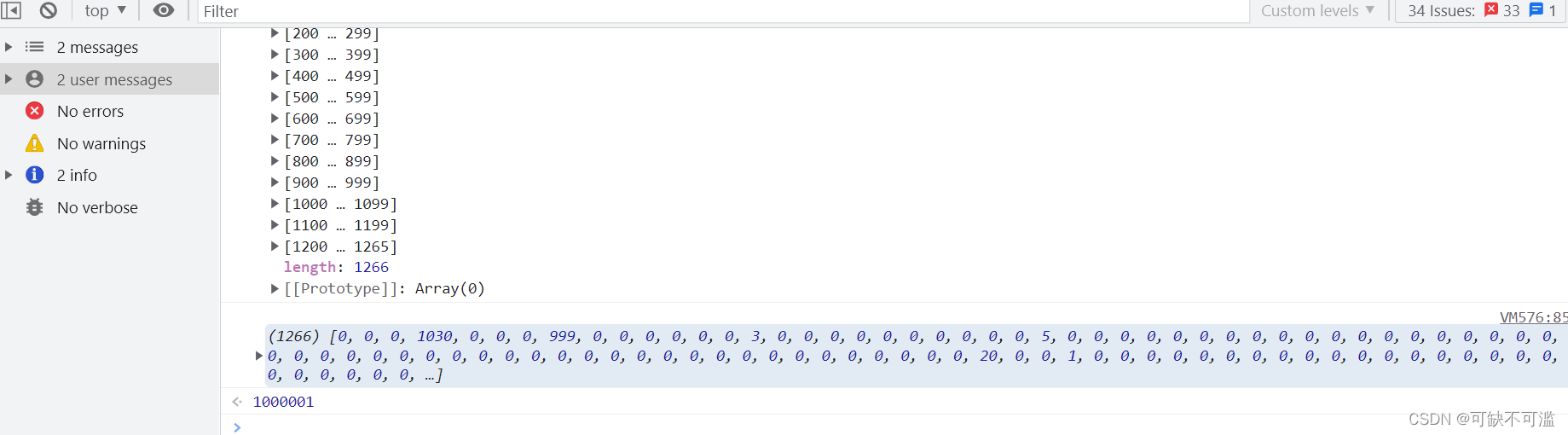
当前测试网站有人将z-index设置成了1000000
再适当优化一下,我们将所有为0的z-index去掉
function getMaxZIndex() {

	const allElement = Array.from(document.all);
	const zIndexArray = []
	allElement.forEach((item) => {

		const itemZIndex = Number(window.getComputedStyle(item, null).getPropertyValue("z-index"))
		if(itemZIndex) {

			zIndexArray.push(itemZIndex)
		}
	})
	let maxZIndex = 0
	if(zIndexArray.length) {

		 maxZIndex = Math.max(...zIndexArray)
	}
	return maxZIndex + 1
}
边栏推荐
- Generic classes and parameterized classes of SystemVerilog
- Leverage Google cloud infrastructure and landing area to build enterprise level cloud native excellent operation capability
- Ros2 --- lifecycle node summary
- Zabbix Server trapper 命令注入漏洞 (CVE-2017-2824)
- [C language] simple implementation of mine sweeping game
- 亚马逊aws数据湖工作之坑1
- 使用HBuilderX的一些常用功能
- Scheme and implementation of automatic renewal of token expiration
- 数据回放伴侣Rviz+plotjuggler
- 递归(迷宫问题、8皇后问题)
猜你喜欢
深入了解JUC并发(一)什么是JUC

Redis Key-Value数据库【初级】

递归(迷宫问题、8皇后问题)

Keepalived installation, use and quick start

ZABBIX server trap command injection vulnerability (cve-2017-2824)
在uni-app中引入uView
Memcached installation
LeetCode 78. subset

来自读者们的 I/O 观后感|有奖征集获奖名单

Unity shader learning notes (3) URP rendering pipeline shaded PBR shader template (ASE optimized version)
随机推荐
穀歌出海創業加速器報名倒計時 3 天,創業人闖關指南提前收藏!
Redis key value database [primary]
LeetCode 78. 子集
Error creating bean with name 'instanceoperatorclientimpl' defined in URL when Nacos starts
I/o multiplexing & event driven yyds dry inventory
Browser principle mind map
Common means of modeling: combination
Spark overview
LeetCode 283. 移动零
深入学习JVM底层(三):垃圾回收器与内存分配策略
Problems encountered in uni app development (continuous update)
[C language] screening method for prime numbers
VLAN experiment of switching technology
递归(迷宫问题、8皇后问题)
Arduino Wire 库使用
Cookie plugin and localforce offline storage plugin
Lambda expressions and method references
格式校验js
Brain and cognitive neuroscience matlab psychoolbox cognitive science experimental design - experimental design 4
keepalived安装使用与快速入门