当前位置:网站首页>js中map和forEach的用法
js中map和forEach的用法
2022-07-02 06:40:00 【秦時明月之安康】
前言
編碼過程中一直分不清map和forEach的區別,閑下來,弄幾個例子研究一下。
一、map
1.簡單數組
    const a = [ 5, 7, 10, ]
    const mapA = a.map((item, index, arr) => {

      console.log(item, index, arr)
      return item * 2
    })
    console.log(mapA)
輸出:
2.對象數組
    const c = [
      {

        key: 'key1',
        value: 'value1',
      },
      {

        key: 'key2',
        value: 'value2',
      },
    ]
    const mapC = c.map((item, index, arr) => {

      console.log(item, index, arr)
      let res = this.$deepCopy(item)
      res.value += index
      return res
    })
    console.log(c)
    console.log(mapC)
輸出:
所以事實上map不僅可以遍曆數組,還可以返回一個新數組。
3.修改簡單數組內容
    const a = [ 5, 7, 10, ]
    const mapA = a.map((item, index, arr) => {

      console.log(item, index, arr)
      arr[index] = item * 2
      return item * 2
    })
    console.log(a)
    console.log(mapA)
輸出:
4.修改對象數組內容
    const c = [
      {

        key: 'key1',
        value: 'value1',
      },
      {

        key: 'key2',
        value: 'value2',
      },
    ]
    const mapC = c.map((item, index, arr) => {

      console.log(item, index, arr)
      let res = item
      res.value += index
      return res
    })
    console.log(c)
    console.log(mapC)
輸出:

可見,對象數組在遍曆的過程中,修改屬性的值就可以影響到原數組
map的其他用法詳見文檔
二、forEach
1.簡單數組
    const a = [ 5, 7, 10, ]
    a.forEach((item, index, arr) => {

      arr[index] = item * 2
      console.log(item, index, arr)
    })
    console.log(a)
輸出: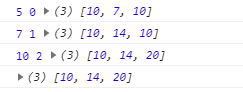
2.對象數組
    const c = [
      {

        key: 'key1',
        value: 'value1',
      },
      {

        key: 'key2',
        value: 'value2',
      },
    ]
    c.forEach((item, index, arr) => {

      console.log(item, index, arr)
      item.value += index
    })
    console.log(c)
輸出: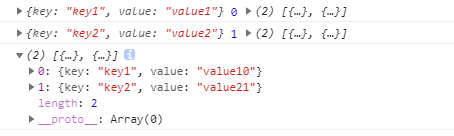
可見,對象數組在遍曆的過程中,修改屬性的值就可以影響到原數組
3.forEach() 的 continue 與 break
边栏推荐
- selenium备忘录:selenium\webdriver\remote\remote_connection.py:374: ResourceWarning: unclosed<xxxx>解决办法
- eslint配置代码自动格式化
- Sentinel rules persist to Nacos
- VSCODE 安装LATEX环境,参数配置,常见问题解决
- 利用NVIDIA GPU将Minecraft场景渲染成真实场景
- Find the highest value of the current element Z-index of the page
- [self cultivation of programmers] - Reflection on job hunting Part II
- 浏览器滚动加载更多实现
- Asynchronous data copy in CUDA
- Does the assignment of Boolean types such as tag attribute disabled selected checked not take effect?
猜你喜欢
js中map和forEach的用法
ctf三计
QQ email cannot receive the email sent by Jenkins using email extension after construction (timestamp or auth...)

Introduce two automatic code generators to help improve work efficiency

Distributed transactions: the final consistency scheme of reliable messages
Hydration failed because the initial UI does not match what was rendered on the server. One of the reasons for the problem

AWD学习

代码技巧——Controller参数注解@RequestParam
自学table au
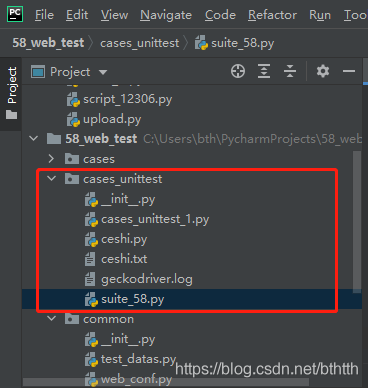
unittest.TextTestRunner不生成txt测试报告
随机推荐
The intern left a big hole when he ran away and made two online problems, which made me miserable
AWD学习
virtualenv和pipenv安装
Loops in tensorrt
Linked list (linear structure)
selenium的web自动化中常用的js-修改元素属性翻页
Linux MySQL 5.6.51 Community Generic 安装教程
由于不正常断电导致的unexpected inconsistency;RUN fsck MANUALLY问题已解决
阿里云MFA绑定Chrome浏览器
IDEA公布全新默认UI,太清爽了(内含申请链接)
CUDA user object
unittest.TextTestRunner不生成txt测试报告
Flask-Migrate 检测不到db.string() 等长度变化
FE - Eggjs 结合 Typeorm 出现连接不了数据库
代码技巧——Controller参数注解@RequestParam
Présence d'une panne de courant anormale; Problème de gestion de la fsck d'exécution résolu
Latex 编译报错 I found no \bibstyle & \bibdata & \citation command
unittest. Texttestrunner does not generate TXT test reports
JS modification element attribute flipping commonly used in selenium's Web Automation
Warp matrix functions in CUDA