当前位置:网站首页>View drawing process analysis
View drawing process analysis
2022-07-01 08:30:00 【Hatshepsut】
setContentView() What did you do
We know that onCreate() In the method setContentView() The method is to xml The file resolves to DecorView On , that DecorView When was it displayed on the screen ?

We all know activity In the life cycle of onResume() A lot of work , and onResume() As shown in the figure above . stay ActivityThread in ,handleResumeActivity() Methods not only call performActivity() Method is finally implemented on onResume() Method call , The following operations are also carried out .

and ViewManger It's an interface , The real thing is WindowMangerImpl

The real call is WindowManagerGlobal Of addView() Method

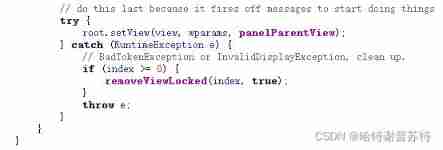
Method ViewRootImpl
mViews.add(view); //DecorView
mRoots.add(root); //ViewRootImpl
mParams.add(wparams) //WindowManager.LayoutParams
root.setView(view, wparams, panelParentView);// take view and viewRootImpl Binding
Go find ViewRootImpl Of setView() Method , The most important thing is the internal call requestLayout() Method

stay requestLayout() In the method , First of all be checkThread() Check whether the current thread is the main thread , And then execute scheduleTraversals() Method for real rendering .


scheduleTraversals() Pass through mTraversalRunable perform doTraversal() Method

Final execution to performTraversals() Method , draw view Is executed in this method .

performTraversals() The method is very long. , Did a lot of things
1. windowSizeMayChange |= measureHierarchy(host, lp, res, desiredWindowWidth, desiredWindowHeight); Notes also explain , Is to ask for the desired size , That is, the predicted quantity

Only wrap_content The situation that needs to be negotiated
a. First, through res.getValue Give an initial value to measure
b.performMeasure()
c.if ((host.getMeasuredWidthAndState()&View.MEASURED_STATE_TOO_SMALL) == 0)
If the measurement result is satisfactory , Is set to true
d. If not satisfied if Conditions , The modified baseSize,
baseSize = (baseSize+desiredWindowWidth)/2,
Re engage performMeasure()
e. If not satisfied , The window width and height are assigned to , For the third time performMeasure()

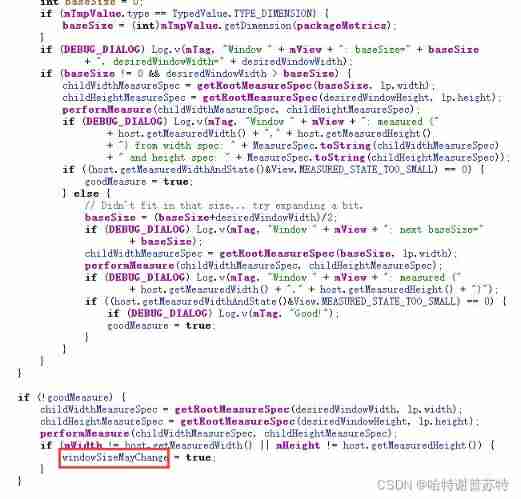
If windowSizeMayChange = true, It means that measurement is still needed
2. relayoutResult = relayoutWindow(params, viewVisibility, insetsPending);// Layout window Actually WMS In the called

3.performMeasure(childWidthMeasureSpec,childHeightMeasureSpec);// Measurement of the number of controls ( At most 4 Time performMeasure())


perform view Of itself measure() Method ,measure() Methods must call setMesureDemension() Method

4.performLayout(lp,mWidth,mHeight)

Allied , call view Of layout() Method
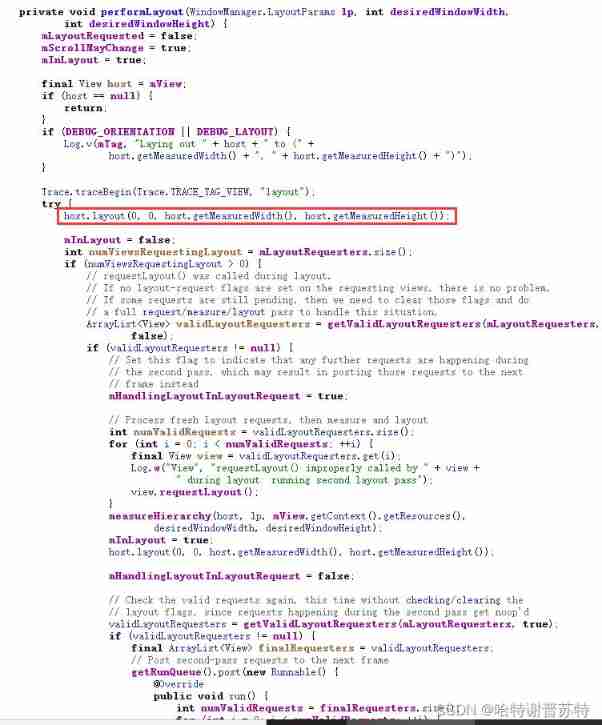
Can be done layoutChange Listening in , And learn about the changes
If it is view, You need to add your own padding, If it's a container , You need to add Margin
5.performDraw();// draw

performDraw() Method is called internally draw()

scrollToRectOrFocus(null, false) Calculate scrolling , Such as the pop-up of the keyboard ?
There are two cases of drawing : Hardware acceleration or Software acceleration

Software and hardware drawing process 、 difference ? To be added Better hardware rendering ( The software drawing will draw everything )
Whatever it is , Will be called view Of draw() Method , Well known ( background ,dispatchDraw() The process of ), Custom controls generally do not override this method

canvas There are also software and hardware

measure() Method is to measure and determine the size of the child control ,layout() In the onLayout() The method is to determine the current view Position in the parent control
stay ViewRootImpl Of setView() In the method , Other operations were also performed . The purpose is to add windows to WMS On 、
Give yourself the current view Set up parent

stay ViewRootImpl Constructor

mThread = Threag.currentThread() // Get the thread that created it
mDirty = new Rect() // Dirty areas
mAttachInfo = new View.AttachInfo() // Save some information about the current window
WindowMangerImpl determine View Which parent window does it belong to
WindowManagerGlobal Manage the entire process All window information
ViewRootImpl yes WindowManagerGlobal The actual operator of , Operate your own window
边栏推荐
- 数字转excel的字符串坐标
- Practice and Thinking on the architecture of a set of 100000 TPS im integrated message system
- MATLAB小技巧(23)矩阵分析--模拟退火
- Huawei machine test questions column subscription Guide
- P4 installation bmv2 detailed tutorial
- [force deduction 10 days SQL introduction] Day10 control flow
- Utiliser Beef pour détourner le navigateur utilisateur
- [staff] key number (key number identification position | key number marking list | a major key identification principle | F, C, G position marking ascending | F major key identification principle | B
- 【刷题】字符统计【0】
- 【华为机试真题详解】判断字符串子序列【2022 Q1 Q2 | 200分】
猜你喜欢

Koltin35, headline Android interview algorithm

Manually dig XSS vulnerabilities
![[dynamic planning] p1020 missile interception (variant of the longest increasing subsequence)](/img/3e/75a1152f9cdf63c6779fdadec702a0.jpg)
[dynamic planning] p1020 missile interception (variant of the longest increasing subsequence)

There are many problems in sewage treatment, and the automatic control system of pump station is solved in this way

华为机试真题专栏订阅指引

7-26 word length (input and output in the loop)

毕业论文中word的使用1-代码域标公式
![[getting started] extract non repeating integers](/img/88/3e96df88e980bd98ac112b18a8678c.png)
[getting started] extract non repeating integers

Differential: definition of total differential, partial derivative, gradient

基于Gazebo的无人机管道检测
随机推荐
Uni hot update
MATLAB小技巧(23)矩阵分析--模拟退火
Data analysis notes 11
【Redis】一气呵成,带你了解Redis安装与连接
2022 examination summary of quality controller civil engineering direction post skills (quality controller) and reexamination examination of quality controller civil engineering direction post skills
To prevent "activation" photos from being muddled through, databao "live detection + face recognition" makes face brushing safer
Keithley 2100 software 𞓜 Keithley2400 test software ns SourceMeter
Deep learning systematic learning
Precautions and skills in using regular expressions in golang
Leetcode t31: prochain arrangement
Programmer's regimen
EDA open source simulation tool verilator beginner 6: debugging examples
Pipeline detection of UAV Based on gazebo
Analysis of slice capacity expansion mechanism
使用threejs简单Web3D效果
Set up file server Minio for quick use
Chinese font Gan: zi2zi
Provincial election + noi Part VI skills and ideas
Learn reptiles for a month and earn 6000 a month? Tell you the truth about the reptile, netizen: I wish I had known it earlier
Anddroid text to speech TTS implementation